

Recurring revenue that runs itself.
Daily-to-yearly billing cycles, renewal pricing rules, pay-in-installments, and automatic dunning recovery — all native to StoreEngine. No separate subscriptions add-on, no third-party billing service, no extra plugin to keep up to date.
Automatic billing on every cycle you choose
Set the billing interval per product — daily, weekly, monthly, or yearly —and StoreEngine charges the customer automatically on each renewal date. Add a free or paid trial before the first charge.


Charge one price on day one, another on every renewal
Dynamic Pricing rules can target a subscription’s billing event, so a launch discount never carries forward into full-price renewals.

Billing-event targeting
Apply a pricing rule to the first payment or to renewals only.

Interval conditions
Set different prices for monthly, yearly or other billing intervals.

Stacks with other rules
Combine renewal pricing with your other Dynamic Pricing rules.

One-time setup fee
Add a one-time setup fee to the first payment.
Split any order into fixed scheduled payments
Set the instalment count and interval at the product level — ideal forhigh-ticket products, courses or B2B orders where an upfront price is a barrier.

Configure the plan
Set instalment count and interval — 3x monthly, 6x monthly, 12x weekly.

Customer chooses at checkout
Pay in full or split into instalments, shown side by side.

Payments collect automatically
Each instalment is charged on its due date — no manual follow-up.

Track progress in the account
Every payment is logged and visible to the customer.


Failed payment? An automatic retry sequence fires
Involuntary churn from failed cards is the biggest silent revenue leak in a subscription business — StoreEngine catches it automatically.

Scheduled retries
Failed renewals retry automatically on a set schedule.

Card-update emails
Sent to the customer after every retry attempt.

Suspend as last resort
Access is cut only once every retry is exhausted.

Checkout recovery
Abandoned subscription signups get a recovery nudge too.
Let customers manage their own subscription
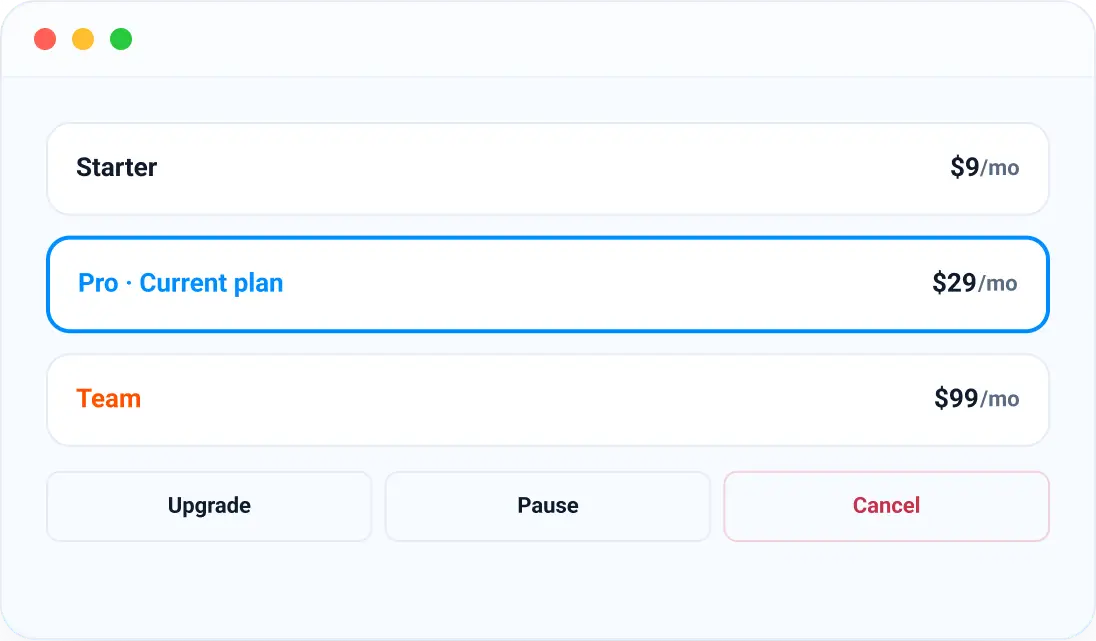
Every subscriber gets an account dashboard to upgrade, downgrade, pause, or cancel without opening a support ticket. Plan changes are prorated automatically, so nobody is over- or under-charged mid-cycle.
Launch a recurring plan in three steps
Set it up once — billing, renewals, and recovery run on their own after that.

Set pricing & cycle
Choose one-time, subscription or installment pricing, set the billing interval, and add a trial or setup fee if you need one.

Customer subscribes
Checkout charges the first payment (or starts the trial) and StoreEngine stores the billing schedule automatically.

Renewals run themselves
Automatic charges, renewal pricing, dunning retries and self-service management all happen without you touching a dashboard.
Everything else a subscription business needs
Payments, access, fulfilment and insight — all in the same plugin that runs your store.

Multi-Gateway Billing
Stripe, PayPal, Razorpay and Paddle all support recurring billing natively, with 0% transaction fees on every gateway.

Membership & Content Access
Gate pages, posts, or courses behind an active plan tier, with access revoked automatically on cancellation. See it in action on our memberships page.

Subscription Boxes
Ship physical products on a recurring schedule, with inventory checked against subscriber count before every cycle.

Subscription Analytics
A dedicated MRR dashboard tracks growth, churn, and trial-to-paid conversion in one view.

Cancellation Saver
Show a retention offer — discount, pause or downgrade — the moment a subscriber clicks cancel.

Subscriber Import
Migrate existing subscribers from another platform with original billing dates preserved, so renewals continue without a gap.
Subscription-selling questions, answered
Is recurring billing built in, or do I need a separate plugin?
Built-in. StoreEngine handles recurring billing natively as part of the Pro plan — no separate subscriptions add-on, no third-party billing service. Daily, weekly, monthly, and yearly cycles are all supported out of the box.
Can I offer a free trial?
Yes. Add a free or paid trial before the first charge. When the trial ends, it converts to a full subscription automatically.
Can customers pay in installments?
Yes. Set the installment count and interval per product, such as 3x monthly or 12x weekly. Customers choose to pay in full or split at checkout, and each payment is collected automatically on its due date.
What happens when a renewal payment fails?
StoreEngine triggers a dunning sequence: automatic retries on a schedule, with an email to the customer on each attempt that includes a card-update link. Access is suspended only after every retry is exhausted.
Can customers manage their own subscriptions?
Yes. Customers can pause, cancel, upgrade, or downgrade their plan directly from their account dashboard — no support contact needed. Plan changes are prorated automatically. Developers can also build against subscription events using the REST API and webhooks.