


Seven out of ten shoppers who add a product to their cart leave without buying. That is not a traffic problem, a pricing problem, or a product problem. It is a checkout problem — and it is the single highest-leverage conversion fix available to any ecommerce store.
Baymard Institute’s aggregate of 50 studies puts the average cart abandonment rate at 70.22%. The same research estimates that better checkout design alone can lift conversion by up to 35.26% — more than most paid campaigns, more than a full site redesign. The revenue waiting on the other side of a better checkout is already inside your store. You just need to stop losing it.
Checkout optimization is the practice of removing every friction point between “I want this” and “I bought this” — fewer steps, fewer form fields, fewer reasons to hesitate, and more paths that fit how your shoppers actually want to pay. This guide covers what that looks like on WordPress specifically, with every optimization mapped to a built-in StoreEngine feature rather than a generic recommendation that leaves you to figure out the implementation.
For how checkout optimization fits into the broader picture of revenue recovery, see StoreEngine’s ecommerce conversion rate optimization guide.
Quick Answer: What Is Checkout Optimization?
What Is Checkout Optimization and Why Does It Compound?
Checkout optimization is the deliberate removal of friction from the payment step of your store — every extra form field, every forced account creation, every additional page load, every unclear cost that appears late. The reason it compounds so powerfully is that checkout is where purchase intent is highest. A shopper who has added something to their cart has already decided to buy. Every obstacle after that point isn’t losing a casual browser; it’s losing someone who was ready to pay.
According to digitalapplied’s 2026 ecommerce checkout UX guide, one-page checkout reduces abandonment by 20% on average. Forced account creation alone causes 24% of shoppers to abandon, per Baymard’s benchmark data. Offering three or more payment methods lifts checkout conversion by 5-12%, according to Stripe’s 2024 Payment Methods report. Each of these is an independent fix that stacks with the others.
The math is compelling. If your store converts at 2% and you improve checkout to convert at 3%, you’ve grown revenue by 50% without a single additional dollar on traffic acquisition. Checkout optimization is the only growth lever where the gains come entirely from shoppers who were already there.
The Core Principle: Every Extra Step Is a Lost Sale
The standard checkout flow — browse → add to cart → view cart → enter details → select shipping → enter payment → review → confirm — has eight touch points before the sale completes. Each one is an opportunity to abandon. Mobile commerce now accounts for approximately 60% of global ecommerce transactions, according to Statista 2026, yet mobile checkout conversion runs 1.5-2× below desktop because form entry on a phone is genuinely painful. Every step and field you can remove is a direct conversion gain.
The goal of checkout optimization isn’t a beautiful checkout page. It’s the shortest, most frictionless path from intent to purchase — and on WordPress, that means having checkout options that match what each shopper’s situation actually calls for.
Checkout Optimization 1 — Skip the Cart Entirely With Instant Checkout
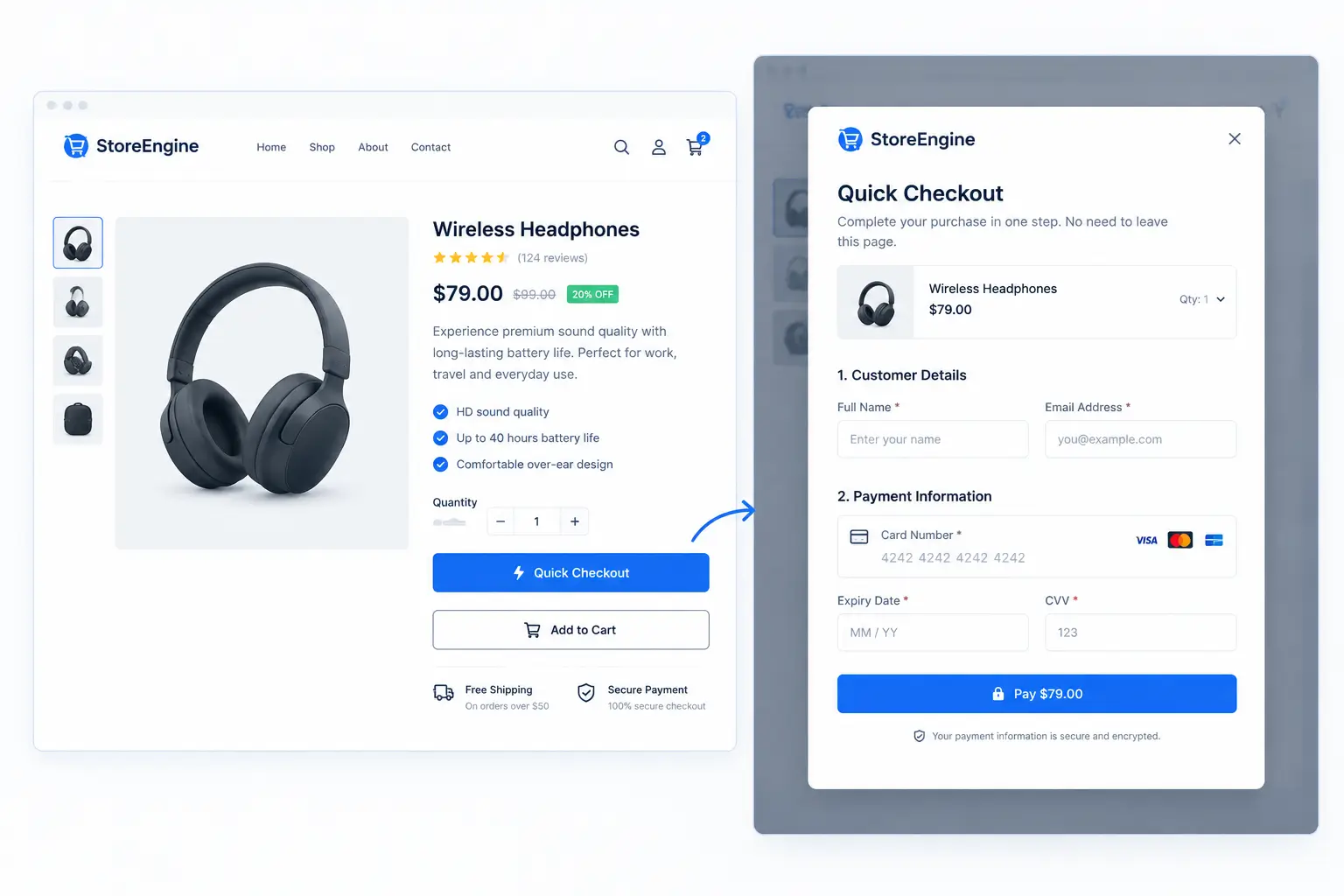
The standard add-to-cart flow routes shoppers through a cart view before reaching the checkout. That’s one extra page, one extra decision, and one extra chance to abandon. StoreEngine’s Instant Checkout eliminates this step with a Quick Checkout modal.
When a shopper clicks the Quick Checkout button on a product page or archive listing, a fully functional single-page checkout opens immediately in a modal overlay — without leaving the page they’re on. The entire purchase completes inside that modal. No cart view, no page reload, no navigation away from the product that sold them.
The modal is configurable per surface. You can show it on single product pages, on archive/shop listing pages, or both — independently, so you can optimize the experience for each context. The button label is also customizable, so “Quick Checkout,” “Buy Now,” or any other label fits your brand voice.
Checkout Optimization 2 — Embed Checkout Directly on Any Page
A modal is one pattern. An embedded inline checkout is another — and it serves a different use case with different conversion advantages.
StoreEngine’s inline checkout shortcode lets you embed a fully functional checkout form directly on any WordPress page or post. No cart, no redirect, no separate checkout page. The form renders where you put it.
Single-product inline checkout
[storeengine_instant_checkout product_id=”123″ price_id=”5″]
Drop this shortcode on a landing page for a single product and the checkout is right there — beneath the product copy, next to the product image, wherever the page calls for it. The shopper reads your sales copy, makes the decision, and completes the purchase without ever navigating away.
Multi-product checkout with optional add-ons
[storeengine_instant_checkout]
[se_checkout_item product_id=”27″ price_id=”5″]
[se_checkout_item product_id=”28″ optional=”yes” label=”Add gift wrap”]
[se_checkout_item product_id=”29″ optional=”yes” default=”yes”]
[/storeengine_instant_checkout]
Multiple products, optional add-ons, and default-checked items — all in a single embedded checkout. A customer selects which optional items to include and checks out with everything at once. This is a checkout pattern that would require a separate app or extensive custom development on most platforms; in StoreEngine it’s a shortcode.
Success URL for post-purchase redirects
A success_url parameter lets you redirect buyers to a specific thank-you page, upsell page, or account portal after purchase — rather than the default order confirmation. Combined with the Funnel Builder’s post-purchase upsell flow described in How to Build a Sales Funnel in WordPress, this turns the inline checkout into a full conversion sequence.
Checkout Optimization 3 — Embed Checkout on Any Website (Cross-Origin)
The standard inline checkout works within your WordPress site. The Embeddable Checkout addon extends it to work on any external website or domain via a secure embed SDK.
External sites load a slim JavaScript SDK from your store’s /se-embed/v1/sdk.js endpoint and authorize checkout sessions through a per-key origin allowlist. This means your checkout form can appear on:
Each embed key has its own origin allowlist — you specify exactly which domains are allowed to embed your checkout, and the SDK rejects requests from unlisted origins. A session rate limit (60 sessions per key per minute by default, adjustable) prevents abuse.
This is the checkout optimization pattern that dramatically shortens the path-to-purchase for traffic landing on content or marketing properties that aren’t your main store — because shoppers never have to navigate from a referring site to your store to complete the purchase.
Checkout Optimization 4 — Direct Checkout URLs for Campaigns
Every marketing campaign — an email, an ad, a social post — sends traffic to a product page or landing page, and then the shopper still has to navigate to checkout. A direct checkout URL collapses that journey by sending the shopper straight to a pre-filled checkout.
StoreEngine supports direct checkout URL parameters. Appending ?product_id=X&price_id=Y&qty=Z to your checkout page URL loads that product directly into checkout — the cart is cleared and the specified product is added automatically when the URL is visited.
This means a campaign email can link directly to a one-click checkout page for the featured product. A retargeting ad can route a returning visitor straight to the checkout for the item they viewed before. A limited-time offer can link to a pre-loaded checkout with the right price and quantity. No cart required, no product page browse — the moment the shopper clicks, they’re already at payment.
For teams running email campaigns, this is one of the highest-leverage optimizations available. The shopper has already re-engaged; the job is to get them to payment in as few clicks as possible.
Checkout Optimization 5 — Guest Checkout by Default
Forced account creation causes 24-26% of checkout abandonment, according to Baymard’s benchmark data across hundreds of ecommerce sites. It is, alongside unexpected costs, the most documented and most avoidable conversion killer in ecommerce.
StoreEngine’s checkout engine supports guest checkout natively. A shopper can complete a purchase with just their contact and billing details — no account required. The checkout engine handles guest orders correctly at the data layer: it creates a customer record internally for order management, but doesn’t force the shopper to set a password or create a login before they can pay.
The correct UX pattern — confirmed by Baymard’s usability research — is to offer account creation after the purchase is complete. The customer has already converted. At that point, account creation can be framed as a benefit (“save your details for next time”) rather than a gate. StoreEngine’s checkout supports this pattern natively.
Checkout Optimization 6 — Configurable Checkout Fields
The average US checkout contains 23.48 form elements, according to Baymard’s form-field analysis — nearly double the 12-14 that research identifies as optimal. Every unnecessary field is friction that compounds across every checkout session.
StoreEngine’s checkout field configuration lets you control exactly which fields appear and which are required — individually, for each field group (contact, billing, shipping). Fields you don’t need for your business or market can be disabled completely. Fields that are helpful but not essential can be enabled without being required.
For stores that only ship domestically, address fields for state or postcode may be irrelevant. For digital products, the shipping address group can be removed entirely. For stores serving markets where phone numbers aren’t needed for delivery, that field goes too. Every field you remove is a small friction reduction that applies to every checkout session your store runs.
Checkout Optimization 7 — Order Pay for Pending Orders
A shopper places an order but pays later — or a payment attempt fails and they want to retry — and there needs to be a frictionless path back to payment. StoreEngine’s Order Pay flow handles this.
A pending order generates an order-pay URL (?order_pay=1&order_id=X) that takes the shopper directly to a checkout pre-loaded with their specific order details. No re-adding items, no re-entering shipping details. They see their order, add payment, and confirm.
This flow matters for COD stores where customers later decide to pay online, for B2B stores where invoices need payment, and for any store where payment failure recovery is a conversion concern. A frictionless path back to payment recovers a sale that would otherwise require customer service intervention.
The Checkout Optimization Stack: How They Compound
Each individual optimization in this guide contributes an independent conversion lift. Their real power is in combination — because removing five separate friction points doesn’t add their effects, it multiplies them.
|
Optimization |
What it fixes |
Standalone lift |
|
Instant Checkout modal |
Multi-page cart → modal flow removes cart abandonment |
One-page reduces abandonment ~20% |
|
Guest checkout |
Forced account creation (24% of abandonment) |
Direct removal of second-largest abandonment cause |
|
Reduced form fields |
Excess form complexity (22% of abandonment) |
Each field removed reduces friction cumulatively |
|
Direct checkout URLs |
Campaign traffic loses momentum to navigation steps |
Reduces clicks-to-purchase for campaign traffic |
|
Inline/embedded checkout |
Checkout friction from page navigation |
Buyers complete purchase in context |
|
Cross-origin embed |
External traffic must navigate to your domain |
Removes domain-hop between intent and purchase |
|
Order Pay flow |
Failed/pending payments require manual recovery |
Recovers sales without customer service |
|
Multi-payment options |
Missing preferred payment method (5-12% lift per Stripe) |
Conversion lift per added payment method |
StoreEngine builds all of these into a single plugin — no separate payment page plugin, no separate guest-checkout addon, no separate embed SDK subscription. Every checkout optimization in this table is a configuration decision, not a plugin decision.
What Checkout Optimization Is Not
Two clarifications worth making explicitly.
Checkout optimization is not checkout redesign. Moving elements around a checkout page, changing colors, or adding trust badges are cosmetic changes. The data-backed conversion gains come from structural changes: fewer steps, guest checkout, field reduction, and faster paths to payment. Start with structure, not style.
Checkout optimization is also not a one-time project. A realistic 90-day improvement target from sustained optimization is +5-10 percentage points on checkout completion rate, according to Cartylabs’ 2026 Shopify benchmark data — translating to a 12-25% relative revenue lift. That comes from iterative measurement and systematic friction removal, not a single launch. The structural changes in this guide create the foundation; measurement and iteration build on it.
Setting Up Checkout Optimization on StoreEngine
Getting the core optimizations live takes less than an hour.
Guest checkout is native to StoreEngine’s checkout engine — it’s the default behavior. No configuration required.
Checkout field reduction lives in Settings → Checkout Fields. Review each field group (contact, billing, shipping), disable fields your store doesn’t need, and set optional fields to non-required. Start by removing address line 2, APT/suite, and state/region if your market doesn’t need them.
Instant Checkout modal activates from the Addons panel. Once active, a Quick Checkout button appears on product pages (single and archive surfaces, configurable independently). Test it on a product page to confirm the modal loads and the purchase flow completes correctly.
Direct checkout URLs require no configuration — the URL parameter handling is built into the core. Build campaign links in the format [your-checkout-page]?product_id=X&price_id=Y&qty=Z and use them in emails, ads, and social campaigns.
Inline checkout shortcode is available once Instant Checkout is active. Add [storeengine_instant_checkout product_id="X"] to any page or post and the checkout renders inline.
Cross-origin embed requires activating the Embeddable Checkout addon (which depends on Instant Checkout being active). Generate an embed key in the Embeddable Checkout settings, add the allowed origin domain to the key’s allowlist, and provide the SDK URL to the external site.
See storeengine.pro/features/ for the complete feature documentation.
Frequently Asked Questions
What is checkout optimization?
Checkout optimization is the process of reducing friction between a shopper’s decision to buy and the completed transaction — through fewer form fields, simpler flows, guest checkout, more payment options, and faster paths to payment. It’s the highest-ROI conversion lever in ecommerce: Baymard Institute research shows checkout design improvements can lift conversion by up to 35.26% from the same traffic, with no additional acquisition spend.
What causes most checkout abandonment?
The three most documented causes are unexpected extra costs (48% of abandonment), forced account creation (24-26%), and a complex or long checkout process (22%), according to Baymard Institute’s checkout abandonment benchmark data. All three are fixable through structural checkout changes: show costs early, offer guest checkout, and reduce form steps.
What is a good checkout conversion rate?
Most ecommerce stores see checkout completion rates of 40-55%. Top-quartile stores reach 52-58% completion, with the top decile reaching 60-75%, according to Cartylabs’ 2026 benchmark data. Mobile consistently runs 10-15 points below desktop within the same store, which is why mobile checkout optimization — fewer fields, modal flows, faster completion — is the largest single conversion opportunity.
How does guest checkout affect conversion?
Removing forced account creation directly eliminates one of the top abandonment causes. Baymard’s benchmark data shows 24-26% of shoppers abandon when forced to create an account before purchase. Offering guest checkout as the default path and inviting account creation post-purchase — after conversion — captures that lost revenue without sacrificing customer data.
What is Instant Checkout and how does it work?
StoreEngine’s Instant Checkout is a Quick Checkout modal that opens directly on the product page when clicked, presenting a complete single-page checkout form in an overlay without leaving the page. It eliminates the cart → checkout navigation step, reducing the total click path from intent to purchase. It’s configurable to show on product pages, archive/listing pages, or both, with a customizable button label.
What is a direct checkout URL?
A direct checkout URL pre-loads a specific product into checkout so a shopper lands directly at the payment step, without visiting a product page or cart. StoreEngine generates these via URL parameters: appending ?product_id=X&price_id=Y&qty=Z to your checkout page URL adds that product automatically. Used in email campaigns, retargeting ads, and social links, direct checkout URLs cut the steps-to-purchase for high-intent traffic that doesn’t need to browse.
Can I embed my checkout on an external website?
Yes. StoreEngine’s Embeddable Checkout addon provides a cross-origin embed SDK that external sites can load to render a StoreEngine checkout form on any domain. Access is controlled through per-key origin allowlists — you specify which domains are authorized to embed your checkout, and sessions from unauthorized origins are rejected. This lets you put a checkout form on any marketing property, content site, or partner page without requiring shoppers to navigate to your store.
Does StoreEngine require WooCommerce for checkout optimization?
No. StoreEngine is a standalone WordPress ecommerce plugin. Every checkout optimization in this guide — guest checkout, Instant Checkout modal, inline shortcode, cross-origin embed, direct checkout URLs, configurable fields — is built into the StoreEngine engine without WooCommerce. There’s no compatibility dependency to manage and no additional checkout plugin required.