


If you run a WordPress store in Bangladesh and ship with Steadfast, your current setup probably looks like this: an order comes in, you open the Steadfast merchant panel in another tab, copy the customer’s name and address, paste it in, book the parcel, copy the consignment ID back, and paste it somewhere in the order notes. Every single order. By hand.
The standard fix — a Steadfast plugin for WordPress — solves part of this, but every existing Steadfast-WordPress integration is built as a WooCommerce extension. It requires WooCommerce as a base layer, adds another plugin to maintain, and still requires you to manually click “book parcel” from the order list. None of them auto-push the shipment the moment payment comes in.
StoreEngine’s Courier addon connects to Steadfast’s API natively — no WooCommerce, no separate plugin, no manual booking trigger. When a customer pays, the shipment is created in the background automatically. For how the full shipping layer fits together, including shipping zones and other courier integrations, see the WordPress shipping plugin guide.
Quick Answer: How Do You Connect Steadfast to WordPress?
Why Every Existing Steadfast-WordPress Plugin Has the Same Problem
The official Steadfast WooCommerce plugin gives you the ability to book Steadfast courier parcels directly from your WooCommerce orders, with a single button click, and can also check delivery status and current balance. That’s the standard model: a button in the WooCommerce order list that you click for each order. WordPress.com
The problem with this approach isn’t the plugin itself — it’s the architecture it sits on. Adding Steadfast integration to WooCommerce means maintaining:
And the button-click model means every order still needs a human to sit down, open the order list, and dispatch it manually. At 20 orders a day that’s manageable. At 100 it’s a daily job in itself.
What these plugins also can’t do: auto-push on payment, automatic status polling, or auto-completing the order when Steadfast confirms delivery. Those require the Steadfast integration to be tightly coupled to the order engine — which is only possible when both live inside the same system. If you also ship with Pathao, the same WooCommerce-free integration architecture applies — see the Pathao WordPress integration guide.
How StoreEngine Connects to Steadfast
StoreEngine’s Courier addon is built on a provider framework — a standard interface that any courier’s API can implement. Steadfast is one of the named providers built into the framework. You configure your Steadfast API credentials once in StoreEngine’s Courier settings, and the integration is live.
Auto-push: shipments created automatically on payment
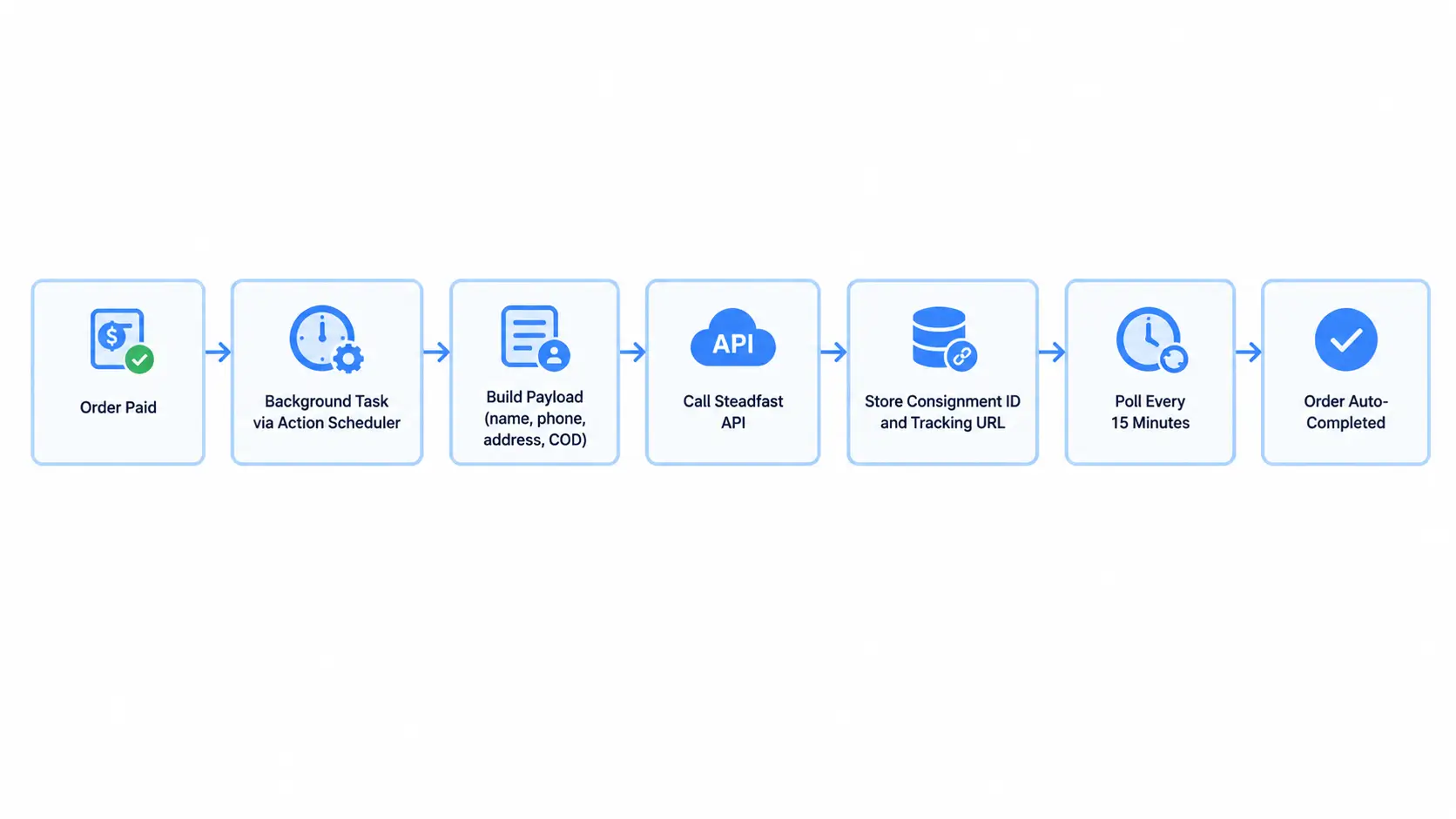
When a customer’s payment completes on a StoreEngine store, the auto-push system fires. It doesn’t run inside the payment request — that would block checkout. Instead, it queues a background task via Action Scheduler, which runs within seconds of the payment completing.
That background task builds the standard payload from the order: customer name, phone number, billing address, COD amount (if the order used a payment method you’ve flagged as COD), item description (up to the first 5 line items), and default package weight. It then calls Steadfast’s API to create the shipment and stores the response — including the consignment ID, tracking ID, and tracking URL — against the order in StoreEngine’s shipments table.
An order note is written automatically: “Shipment #[id] created via steadfast, tracking [tracking-id].” You have a permanent record without touching the order manually.
Idempotency guard: if the payment event fires twice (a common gateway behavior on retries), StoreEngine checks a per-order meta flag before calling the Steadfast API a second time. One order always produces exactly one shipment.
Status polling every 15 minutes
Steadfast doesn’t push status webhooks reliably — which means most integrations require you to manually check tracking. StoreEngine handles this with a recurring background scheduler that runs every 15 minutes, picks up to 50 in-flight shipments (those that haven’t reached a terminal status), and polls Steadfast’s API for current status.
Every status change writes an order note automatically. The full tracking history — picked up, in transit, out for delivery — is visible in the order admin without any manual action.
Normalized status states
Steadfast uses its own status terminology internally. StoreEngine normalizes every courier’s raw status into one of seven consistent internal states:
created → picked_up → in_transit → out_for_delivery → delivered → cancelled → returned
This consistent vocabulary means your order notes, admin views, and status triggers all work identically regardless of what string Steadfast’s API returns.
Automatic order completion on delivery
When polling confirms a shipment has reached delivered status, StoreEngine automatically moves the parent order to completed — provided all shipments on that order are delivered (relevant for multi-vendor orders where a customer bought from multiple sellers). This is opt-out: you can disable it in the Courier sync settings if you want manual completion review.
Similarly, when a shipment returns, StoreEngine can optionally move the order to on-hold for your review. This is off by default, opt-in.
COD Order Handling
Cash-on-delivery is the dominant payment method in Bangladesh, and Steadfast’s API accepts a cod_amount parameter when creating a shipment. StoreEngine’s auto-push system handles this automatically.
In the Courier settings, you configure which payment method IDs count as COD — typically cod or cash-on-delivery. When an order uses one of those methods, StoreEngine sets the cod_amount field in the Steadfast payload to the order total. When it’s a prepaid order, cod_amount is sent as 0. You configure it once and it applies to every auto-pushed shipment from that point forward.
Multi-Vendor Stores: One Order, Multiple Shipments
If you run a marketplace with StoreEngine’s Multi-Vendor addon, a single customer order can contain products from multiple vendors — each of whom ships from their own warehouse. StoreEngine’s auto-push handles this by grouping line items by vendor and creating a separate Steadfast shipment per vendor automatically.
Each vendor’s shipment gets its own consignment ID, its own tracking URL, and its own status polling. The customer’s order in StoreEngine shows all shipments. When every vendor’s shipment is confirmed delivered, the order auto-completes.
This is the one scenario where existing WooCommerce-based Steadfast plugins break down — they don’t have awareness of multi-vendor fulfillment, because that logic lives in a separate plugin.
Setting Up Steadfast in StoreEngine
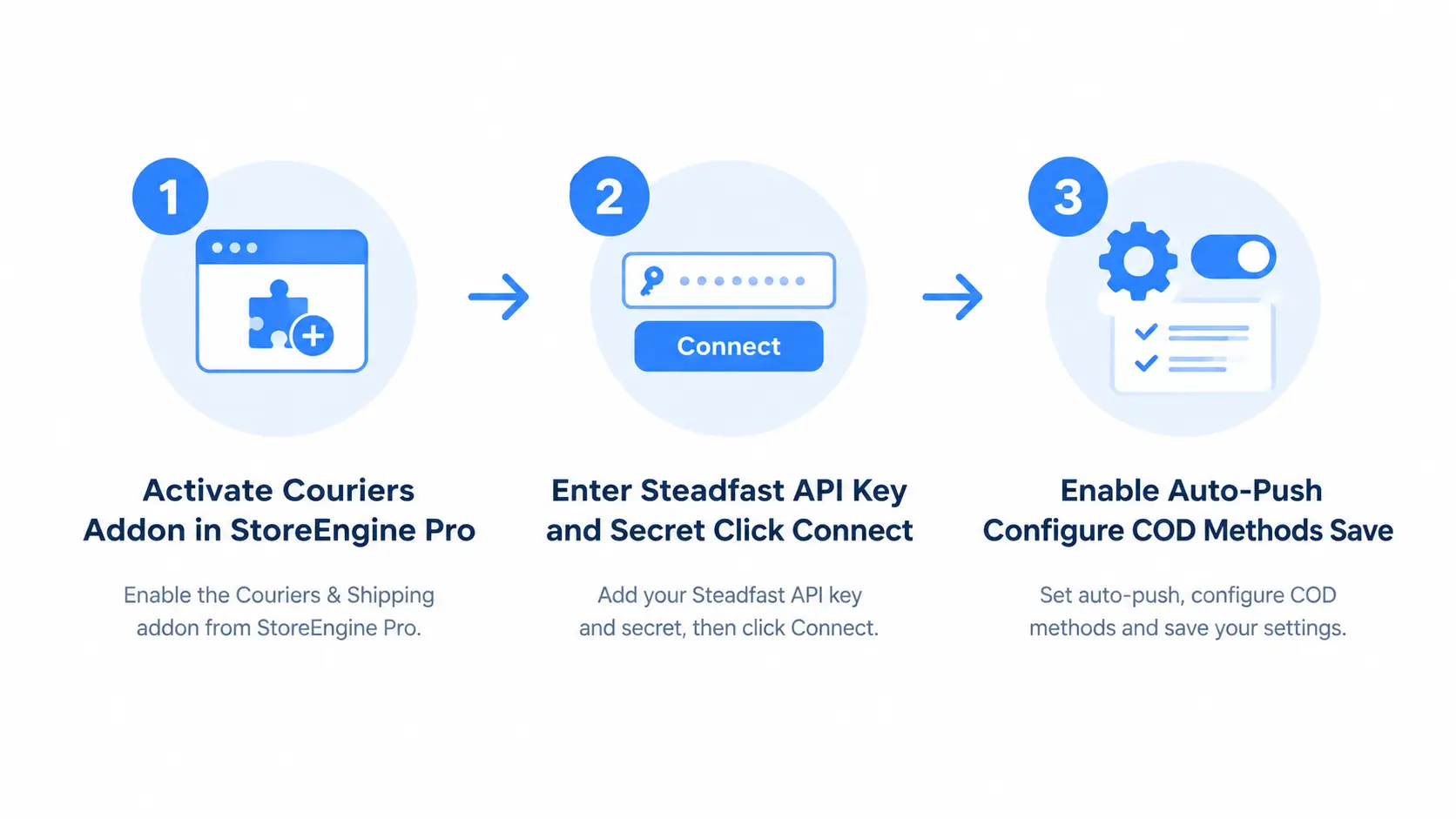
Setting up the Steadfast integration takes three steps.
Step 1 — Activate the Couriers addon in StoreEngine Pro and go to Settings → Couriers. Find the Steadfast provider card and expand it.
Step 2 — Enter your Steadfast API credentials. You’ll need the API key and secret from your Steadfast merchant account. StoreEngine provides a “Get API credentials” link that takes you directly to the Steadfast merchant panel. Enter both fields and click Connect. StoreEngine validates the credentials immediately.
Step 3 — Configure auto-push. Enable auto-push and select Steadfast as the provider. Set your default package weight (used when no product weight is specified), configure which payment methods trigger COD amount in the payload, and save.
From this point, every paid order on your store creates a Steadfast shipment automatically — in the background, without blocking checkout, and without you touching the order. For how shipping zones control which orders route through Steadfast, see the shipping zones setup guide.
Is StoreEngine the Right Steadfast Integration for Your Store?
Frequently Asked Questions
How do I integrate Steadfast with WordPress?
With StoreEngine, you activate the Couriers addon, enter your Steadfast API credentials in Courier settings, and enable auto-push. StoreEngine then creates a Steadfast shipment automatically every time an order is paid — in the background, without you clicking anything. Existing Steadfast-WordPress integrations are WooCommerce extensions that still require a manual booking click per order; StoreEngine is a standalone WordPress ecommerce plugin with Steadfast support built in.
Does StoreEngine require WooCommerce for Steadfast integration?
No. StoreEngine is a standalone WordPress ecommerce plugin. Its Steadfast integration lives inside the same system that processes your orders and checkout, with no WooCommerce dependency. This means one plugin to update, one compatibility matrix to maintain, and no risk of a WooCommerce version breaking your Steadfast connection.
How does auto-push work?
When payment completes, StoreEngine queues an asynchronous background task that builds the shipment payload from the order data and calls Steadfast’s API. The task runs via Action Scheduler, so it never blocks checkout or slows down the payment gateway callback. An idempotency guard prevents the same order from being pushed twice if the payment event fires more than once.
Does it handle COD orders correctly?
Yes. You configure which payment method IDs count as COD in the Courier settings. For orders using those methods, StoreEngine includes the order total as the cod_amount in the Steadfast payload. For prepaid orders, cod_amount is sent as 0. The configuration applies automatically to every auto-pushed shipment.
How does status tracking work without webhooks?
StoreEngine runs a background polling task every 15 minutes that checks the status of all in-flight Steadfast shipments (up to 50 per run). Each status change writes an order note automatically. This handles the reality that Steadfast’s webhook delivery isn’t fully reliable, without requiring you to manually check tracking.
What happens when Steadfast marks a shipment as delivered?
When polling confirms delivery, StoreEngine automatically moves the parent order to completed — provided all shipments on that order are delivered. For multi-vendor orders where one vendor’s parcel arrives before another’s, the order stays in processing until every shipment confirms delivered. This behavior is configurable.