


A shopper found your store. Browsed your products. They liked something enough to add it to their cart.
Then they left.
That’s not a fringe scenario — it’s what happens to roughly 70% of all ecommerce carts. Baymard Institute’s meta-analysis of 50+ studies puts the 2026 global cart abandonment rate at 70.22%. And on mobile, it’s even worse — close to 80-85% depending on the data source and industry.
The frustrating part? Most of those lost sales are recoverable. Shoppers who abandon carts aren’t random browsers — they’re high-intent buyers who hit a friction point and stopped. Fix the friction, and you recover the sale.
This guide breaks down exactly why customers abandon carts, what the data actually shows (not generic surveys from five years ago), and what you can do about it.
What Is Cart Abandonment?
Cart abandonment happens when a shopper adds items to their online shopping cart but leaves without completing the purchase. It covers everything from early browsing behavior to dropping out mid-checkout.
Two related terms worth knowing:
- Cart abandonment — exiting after adding items but before starting checkout
- Checkout abandonment — exiting during the checkout process after entering payment/shipping info
Both matter, but checkout abandonment is more alarming because those shoppers were this close to buying. We’ll break down the difference properly in a section below.
Cart Abandonment Statistics That Tell the Real Story
Before diagnosing the problem, here’s what the numbers actually look like in 2026:
- The documented online cart abandonment rate sits at 70.22%, based on a meta-analysis of 50 studies (Baymard Institute)
- Mobile devices see abandonment rates near 79.92%, compared to roughly 67-73% on desktop
- The luxury and jewelry industry has the highest cart abandonment rate at 81.68%
- The US alone loses $18 billion annually to abandoned carts
- An estimated $260 billion in lost orders is recoverable across the US and EU through better checkout design (Baymard Institute)
That last number is worth sitting with. More than a quarter trillion dollars isn’t “lost revenue” — it’s abandoned revenue that’s still within reach.
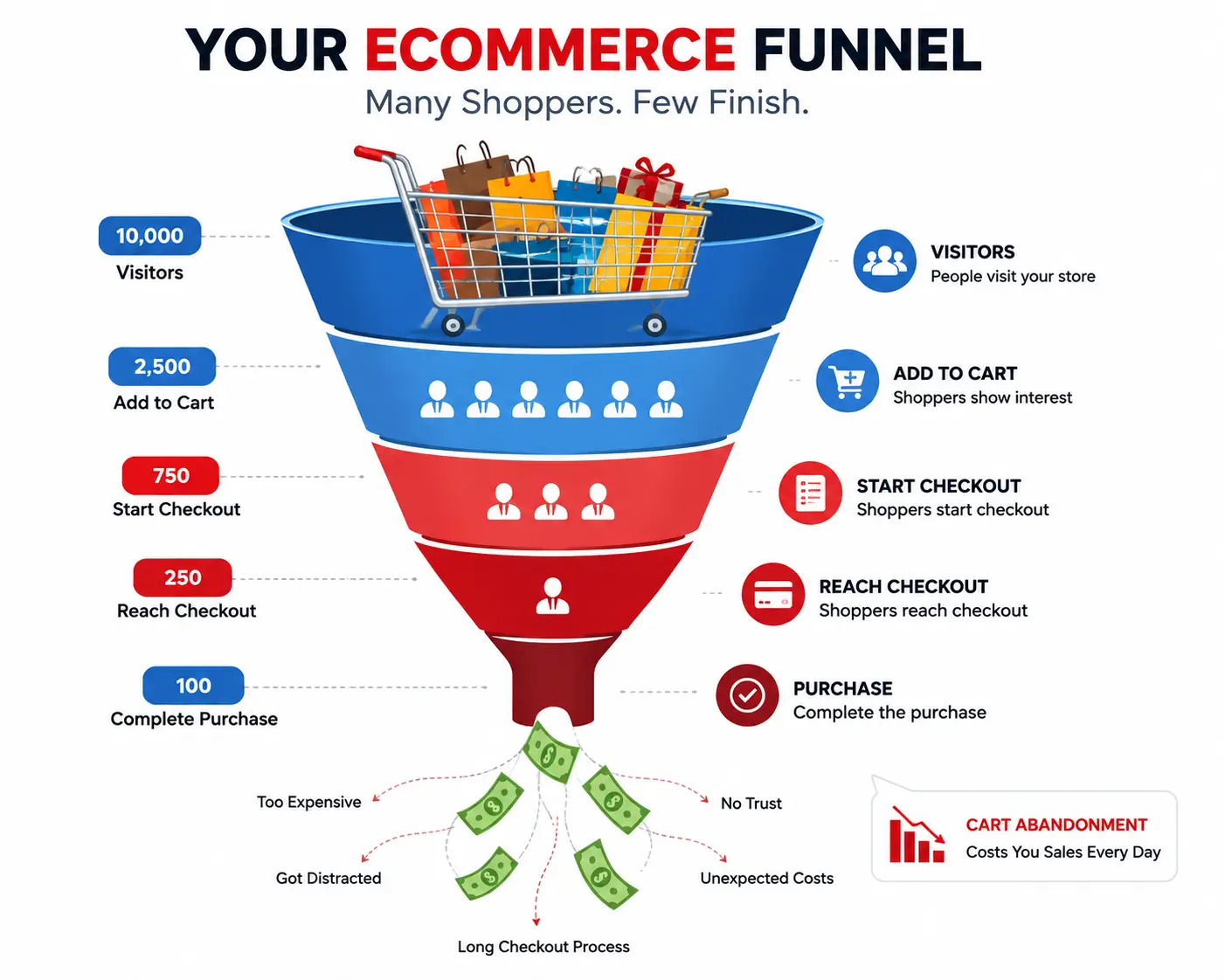
Why Do Customers Abandon Carts? The Real Reasons in 2026
Here’s where most guides go wrong. They cite Baymard’s classic survey data, present a tidy list, and move on. But the distribution of abandonment reasons has shifted — and a few causes get dramatically underplayed.
According to Baymard Institute’s own research, 42% of US online shoppers have abandoned a cart simply because they were just browsing and not ready to buy. That’s largely unavoidable. No checkout fix recovers a window shopper who wasn’t going to buy anyway.
But strip that out, and you’re left with a clear picture of fixable problems.
The Top Reasons Why Customers Abandon Carts (2026)
|
Reason |
% of Abandoners |
Fixable? |
|
Unexpected extra costs (shipping, taxes, fees) |
40-48% |
Yes |
|
Forced account creation |
15-26% |
Yes |
|
Complicated checkout process |
22% |
Yes |
|
Couldn’t see total cost upfront |
~17% |
Yes |
|
Website errors or crashes |
10-15% |
Yes |
|
Payment security concerns |
~13% |
Partially |
|
Slow delivery times |
~16% |
Partially |
|
Insufficient payment methods |
~13% |
Yes |
|
“Just browsing” |
~42% |
No |
Let’s go through the big ones properly.
Reason 1: Unexpected Costs at Checkout
Why do shoppers leave when they see the final price?
Because the price they expected and the price they got don’t match — and that gap feels like a betrayal.
Unexpected shipping costs, taxes, and fees remain the number one reason for shopping cart abandonment. Shoppers decide the total price exceeds their willingness to pay only after adding items to their cart.
Statista research confirms 39% of US shoppers abandon carts specifically because of additional costs surfacing at checkout. Some datasets put that figure closer to 48%.
The fix: Show shipping costs — or a cost estimate — before checkout. A shipping calculator on the cart page alone reduces abandonment measurably. Better yet, offer free shipping above a minimum threshold and advertise it prominently. Shoppers don’t just want free shipping; they want price transparency. Give them that at the cart stage, not the order summary screen.
Reason 2: Forced Account Creation
Why does requiring an account cost you so many sales?
Because a shopper trying to buy a pair of shoes doesn’t want to create a profile, verify an email, and set a password first. They want to check out.
Forced registration drives 26% of abandonments, according to Baymard Institute’s research. Guest checkout options eliminate this friction point entirely, allowing customers to complete purchases without commitment barriers.
This should be the easiest fix in ecommerce, and yet plenty of stores still require account creation. If you’re one of them — and you’re reading this — stop. Offer guest checkout. Invite (don’t force) account creation post-purchase.
Reason 3: A Complicated Checkout Process
How many steps is too many?
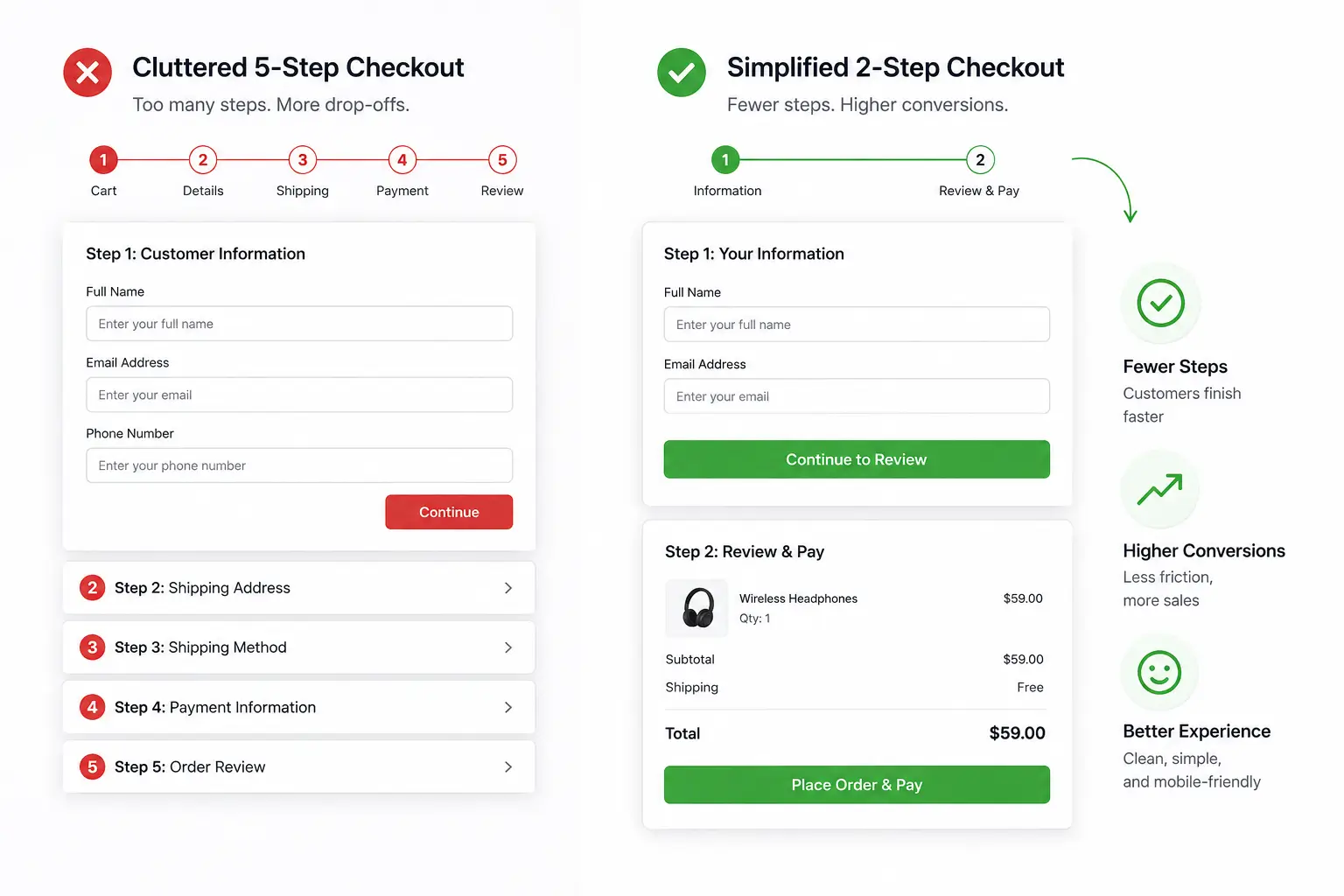
More than a shopper expects. A complicated checkout experience causes 22% of shoppers to abandon their carts. The average US checkout displayed 23.48 form elements in 2025 — nearly double the ideal of 12-14.
Every extra field is a moment for hesitation. First name and last name instead of full name. Separate city/state/zip fields that could auto-populate. Billing address fields duplicating the shipping address. Every one of these is friction — small individually, significant in aggregate.
The fix: Audit your checkout form fields ruthlessly. Eliminate anything you don’t genuinely need. Use address auto-complete. Show a progress bar so shoppers know how close they are to done.
Reason 4: Technical Problems and Slow Page Speed
How much does a slow checkout page actually cost?
More than most store owners realize. Slow page load or technical issues during checkout account for 10-15% of abandonments — and this includes page failures during checkout, not just initial load time.
A shopper who hits a payment processing error or a frozen “Place Order” button doesn’t try again. They close the tab. Mobile users are especially unforgiving here — slower connections make loading issues happen more often, which is part of why mobile abandonment rates run so much higher than desktop.
The fix: Run your checkout page through Google PageSpeed Insights. Check your mobile load time specifically. Test the full purchase flow on multiple devices monthly — a bug that surfaces only on certain browsers can quietly drain conversion rates for weeks before anyone notices.
Reason 5: Payment Security Concerns
Why do shoppers hesitate on the payment screen?
Because handing over card details to an unfamiliar store still triggers caution — especially for first-time buyers. 13% of shoppers cite insufficient payment methods as their abandonment reason, but security concerns drive an equal or larger share who don’t explicitly say so.
The fix: Display trust signals — security badges, SSL indicators, recognized payment logos (Visa, Mastercard, PayPal, Apple Pay). Add reviews and return policy information on the checkout page itself, not buried in a footer. The moment a shopper starts to second-guess whether your store is legitimate is the moment they leave.
Reason 6: Limited Payment Options
Does not accepting the right payment method lose sales?
Yes — and the gap is growing. BNPL (Buy Now Pay Later) adoption among younger shoppers has accelerated sharply. Shoppers who expected to pay with Apple Pay or Klarna and can’t will often just leave rather than type in their card number.
The fix: Add at minimum: major cards, PayPal, Apple Pay / Google Pay, and one BNPL option. The more options, the fewer objections at the payment screen.
Reason 7: Distracting or Confusing Checkout UX
Why do shoppers get confused and leave checkout pages?
Often because the checkout page is doing too much. Upsell popups, live chat overlays, navigation menus, promotional banners — every element on a checkout page that isn’t the checkout form itself is a potential exit.
The fix: Simplify aggressively. Remove navigation headers from the checkout page. Kill banner ads. Reduce visual noise to the absolute minimum. Your only goal on this page is to get the order placed.
Cart Abandonment vs. Checkout Abandonment — What’s the Difference?
These terms get used interchangeably but they’re different problems.
|
Cart Abandonment |
Checkout Abandonment |
|
|
When it happens |
Before entering checkout |
During the checkout process |
|
Shopper intent |
Lower (still browsing) |
Higher (was actively buying) |
|
Main causes |
Price research, not ready |
Unexpected costs, UX friction |
|
Recovery urgency |
Moderate |
High |
|
Best fix |
Urgency signals, cart reminders |
Checkout UX, payment options |
Checkout abandonment is the more damaging problem per-shopper because those users were committed enough to start entering their information. Prioritize fixing checkout friction before investing in recovery flows.
The Psychology Behind Cart Abandonment
What’s actually happening in a shopper’s head when they leave?
A few things worth understanding:
Price anchoring. Shoppers form a price expectation from your product page — and when checkout reveals a higher number, it doesn’t just disappoint them, it creates distrust. The gap between expected and actual price feels like a trick, even if it’s just standard shipping.
Decision fatigue. Long checkout flows aren’t just annoying — they’re cognitively exhausting. The more fields and steps, the more opportunities for doubt to creep in and kill momentum.
Window shopping is real. Baymard’s data consistently shows that a significant percentage of cart ads are more like saving for later or price-comparing across sites. These aren’t lost sales — they were never sales at the moment of cart-add.
Trust calibration. First-time buyers are especially cautious. They’re asking: “Is this store legitimate? Will this product actually arrive? What if I need to return it?” Checkout design either answers those questions or leaves them open.
Understanding this helps you target the right intervention. You can’t recover a window shopper with a checkout optimization — but you can absolutely recover a shopper who left because your shipping calculator wasn’t visible.
How to Reduce Cart Abandonment: What Actually Works
What are the highest-ROI fixes for cart abandonment?
Ranked by impact and ease of implementation:
- Show all costs before checkout. A cart page shipping estimate or prominently displayed free shipping threshold handles the #1 abandonment cause directly.
- Enable guest checkout. If you haven’t done this yet, stop reading and do it now. This is the single highest-return checkout change most stores can make.
- Cut checkout form fields. Get below 15 fields. Use auto-complete. Combine fields intelligently (full name instead of first/last).
- Add payment options. At minimum: cards, PayPal, and one mobile wallet.
- Display trust signals on checkout. SSL badge, money-back guarantee, return policy, real reviews.
- Fix mobile checkout specifically. Test it. Buttons should be tap-sized. Forms shouldn’t require pinching and scrolling. Payment autofill should work.
- Automate recovery emails. A three-email sequence starting 1 hour after abandonment recovers 15-30% of carts that are genuinely recoverable.
Benefits of Fixing Cart Abandonment
Reducing abandonment by even a few percentage points has outsized revenue impact because it compounds across everything you’re already spending on traffic.
If your store does $50,000/month in revenue and you currently sit at 75% abandonment, bringing that to 65% effectively means recovering 10% of the shoppers you were already paying to acquire. That’s not incremental — it’s structural improvement to your whole funnel.
Other benefits: better customer data (completed orders vs. ghost carts), lower effective customer acquisition cost, and stronger return on ad spend — since the same traffic produces more conversions.
Real-World Examples of Fixing Cart Abandonment
A fashion brand struggling with mobile checkout identified through session recordings that mobile users were hitting a date-of-birth field that triggered the phone’s date-picker wheel (slow, frustrating). Removing that optional field from the default checkout reduced mobile abandonment by 8% in 30 days.
A eCommerce store selling homeware saw high abandonment at the “review order” step — their shipping cost appeared for the first time there. Moving shipping estimation to the cart page dropped abandonment by 12% without changing pricing.
Neither fix required a redesign. Just better diagnosis and targeted changes.
Tools to Reduce Cart Abandonment
Most stores need three layers of tooling:
For checkout optimization: Your ecommerce platform’s native checkout settings (Shopify) handle the basics, but you need a plugin or theme that gives you control over form fields, guest checkout settings, and checkout page design.
For recovery flows: An email tool (Klaviyo, Mailchimp) or a native automation plugin handles the post-abandonment email sequence.
For analytics and diagnosis: Google Analytics 4’s funnel exploration report, plus session recording tools like Hotjar, help you see where in checkout shoppers are actually leaving.
This is where StoreEngine is worth your attention. It’s a WordPress plugin built specifically for serious eCommerce store owners — and unlike tools that focus on one slice of the problem, StoreEngine handles both the checkout infrastructure and the operational backend that keeps recovered sales profitable.
Key features relevant to reducing abandonment and running a better store:
- Streamlined, customizable checkout experience that reduces the friction causing most drop-offs
- Multi-Location Inventory — so recovery emails never promote a product you can’t fulfill
- Cost & Profit Tracking — keep visibility on margins when you run free shipping or discount promotions to win back abandoners
- POS Terminal — sync in-store and online inventory so stock counts stay accurate across channels
- Return / RMA System — structured return handling that supports the “easy returns” trust signal you need to show at checkout
- Couriers Management — centralized shipping workflows for handling the orders your recovery strategy generates
- Suppliers & Purchase Orders — keep restocking connected to demand, so high-recovery periods don’t create fulfillment gaps
You can explore the full feature set at storeengine.pro/features or check the plugin directly on WordPress.org.
Future Trends: Cart Abandonment in 2026-2027
AI-powered checkout personalization. Tools that dynamically adjust checkout flow based on the individual user’s behavior (returning vs. new, mobile vs. desktop, product category) are starting to show measurable conversion gains. By 2027, this will be mainstream for mid-market stores.
Pre-abandonment intervention. A new category of behavioral AI tools is catching hesitation signals before the shopper exits — on-page triggers that fire 10-30 seconds before likely abandonment, rather than waiting for a post-abandonment recovery email.
Biometric and one-tap payments. Face ID, fingerprint, and passkey-based checkout is reducing the friction of the payment step itself, particularly on mobile. Stores that integrate these authentication methods will see meaningful mobile conversion gains.
Stricter email deliverability. As inboxes get more filtered, recovery email sequences need better sending hygiene to reach the inbox at all — pushing stores toward integrated native solutions rather than bolted-on third-party tools.
The Bottom Line
There’s no mystery to why customers abandon carts. The data is clear, the causes are consistent, and most of them are fixable with targeted changes to your checkout experience.
The stores that win on conversion aren’t necessarily running the best ads or selling the best products. They’re the ones who’ve eliminated the friction that makes an interested buyer stop at the worst possible moment.
Start with your checkout. Audit every field, every step, every moment where a shopper might see a number they didn’t expect. Then build your recovery layer on top of that foundation.
If you’re running a WordPress store and want a platform that handles checkout optimization, inventory accuracy, and fulfillment management under one roof — StoreEngine is worth a serious look. It’s built for store owners who are done patching together tools and want the whole operation running cleanly from one dashboard.
FAQs
Why do customers abandon carts?
The most common reasons are unexpected shipping costs surfacing at checkout, being forced to create an account, an overly long or complicated checkout process, and security concerns about payment. For roughly 42% of cart-adders, they were window shopping and weren’t ready to buy at that moment — which no checkout fix can solve.
What is the biggest reason for cart abandonment?
Unexpected extra costs — shipping, taxes, or fees that weren’t visible until checkout — consistently rank as the #1 cause, cited by 40-48% of abandoners across multiple studies including Baymard Institute and Statista.
What percentage of carts are abandoned in ecommerce?
Approximately 70.22% globally in 2026, based on Baymard’s meta-analysis of 50 studies. Mobile is higher — close to 80-85% depending on industry and dataset.
How can cart abandonment be reduced?
The highest-impact fixes are: showing shipping costs before checkout, enabling guest checkout, simplifying the checkout form, adding more payment methods, and displaying trust signals on the checkout page. After those structural fixes, automated recovery email sequences recover 15-30% of the remaining abandonments.
What causes customers to leave checkout pages?
Seeing a higher total price than expected, hitting a required account creation screen, encountering too many form fields, spotting slow page loads or errors, and not seeing their preferred payment method.
How do you fix cart abandonment issues?
Start with diagnosis: check where in the checkout funnel users are dropping off (Google Analytics 4 funnel reports, session recordings). Fix the highest-drop-off step first. Most stores find that shipping cost transparency and guest checkout removal fix the majority of preventable abandonments.
Why do users not complete purchases online?
Beyond the checkout-specific friction points, shoppers also abandon due to life interruptions, price comparison across sites, or genuinely not being ready to buy. Email recovery sequences and retargeting ads are designed to catch those “I’ll come back to it” shoppers before they buy elsewhere.
What are common checkout mistakes in ecommerce?
Too many form fields, hidden shipping costs, no guest checkout option, missing security badges, poor mobile optimization, upsell popups on the checkout page, and no recovery strategy for shoppers who leave.
How to improve checkout conversion rate?
Remove friction systematically. Eliminate every non-essential form field. Offer guest checkout. Show all costs at the cart stage. Add payment options. Test on mobile specifically. Add trust signals. Then layer in recovery emails for the ones who still leave.
What are the best ways to reduce abandoned carts?
Fix the checkout first (transparency, simplicity, trust), then add a recovery email sequence, then consider SMS recovery for higher-value orders. Stores that stack all three consistently outperform those treating any single lever as the whole solution.