


You added thirty products last month. You wrote the descriptions, uploaded the images, set the prices. Three weeks later, Google has barely touched the pages. A competitor whose product is functionally identical is sitting in position four. Yours is nowhere.
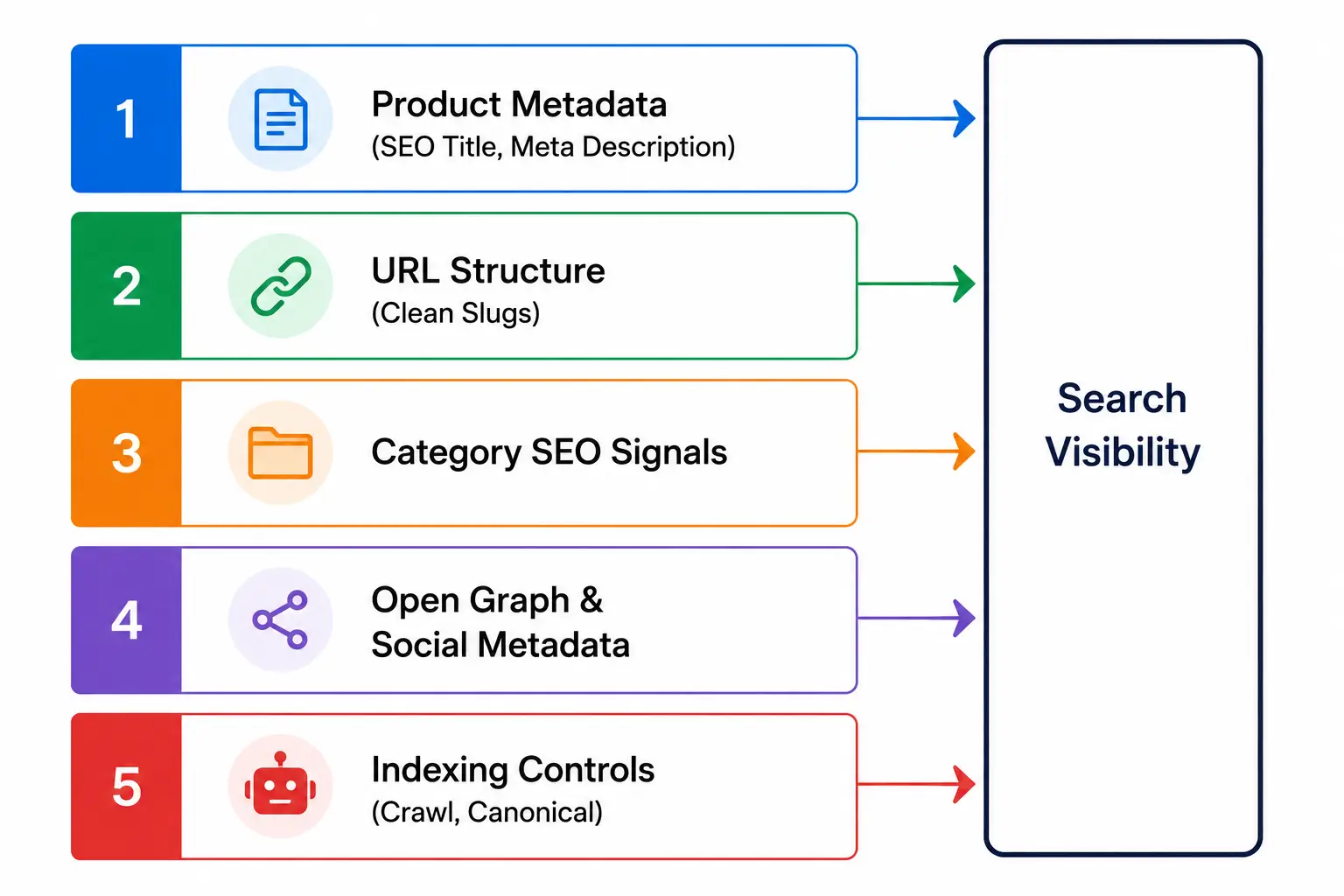
The problem usually isn’t the content. It’s that the store has no coherent SEO layer underneath it. Organic search drives 43% of all ecommerce traffic and accounts for 23.6% of online orders — but capturing that traffic requires managing at least five distinct signal layers simultaneously: product metadata, URL structure, category architecture, social preview tags, and indexing controls. Most stores handle these through a patchwork of plugins, manual edits, and settings spread across different admin screens.
By the end of this article, you’ll understand exactly what ecommerce SEO requires at each layer, why the management workflow matters as much as the optimization itself, and what a properly integrated SEO workflow looks like inside a commerce platform.
Quick Answer: What Is Ecommerce SEO?
Ecommerce SEO is the process of optimizing an online store’s product pages, category pages, URLs, metadata, and social signals so that search engines can discover, index, and rank them for relevant buyer queries — without paid advertising.
- What it is: A multi-layer optimization system covering product metadata, URL slugs, Open Graph tags, category signals, and indexing controls — applied across every page in your store
- How it works: Search engines crawl your store’s pages, read metadata and structured signals, then decide which queries each page is relevant for — your job is to make those signals clear, complete, and consistent
- Who needs it: Any store that depends on organic traffic for growth — 68% of US shoppers search Google before purchasing, searching the primary pre-purchase research channel
- What it enables: Sustained product discoverability without continuous ad spend; the average ecommerce brand ranking organically for 1,783 keywords generates roughly 9,625 organic visits per month through an integrated SEO workflow applied consistently across the catalog
- How to evaluate if you need one: If your product pages have auto-generated titles, unconfigured meta descriptions, dynamic URLs, or no Open Graph metadata, you have a search signal gap that no amount of product content will close on its own
Why Ecommerce SEO Is More Complex Than Blog SEO
A blog optimizes one page at a time, for one primary keyword, with one set of metadata. An ecommerce store might have three hundred product pages, forty category pages, and dozens of variant URLs — each of which needs its own search signal configuration. That’s not a content problem. It’s a systems problem.
The scope difference is structural. A blog post needs a title, a meta description, and a target keyword. A product page needs all of that, plus a clean URL slug, category-level signals, Open Graph metadata for social sharing, indexing rules to prevent duplicate generated content from product variants, and structured data to help search engines understand what’s being sold. Miss one layer and the page underperforms even when the content is strong.
What this actually solves is the false assumption that a single general-purpose SEO plugin is sufficient for an ecommerce environment. General SEO tools were designed for content sites. Commerce-specific SEO management has a different set of requirements — and that gap is where most stores lose organic ground before they even realize it.
The table below shows how the scope of SEO management compares between a typical content site and an ecommerce store.
|
Dimension |
Blog / Content Site |
Ecommerce Store |
|
Pages to optimize |
Tens to low hundreds |
Hundreds to thousands |
|
Metadata types needed |
Title, meta description |
Title, meta description, OG title, OG image, OG description, social sharing tags |
|
URL complexity |
Mostly static |
Variants, filters, parameters, pagination all generate new URLs |
|
Category architecture |
Tags and categories (secondary role) |
Category pages carry the primary commercial keyword volume |
|
Indexing risk |
Low — most pages should be indexed |
High — variants, filters, and paginated pages can dilute crawl budget significantly |
|
Typical plugin dependency |
1 general SEO plugin |
General SEO plugin + commerce SEO extension + social preview plugin, minimum |
What Every Product Page Needs to Signal to Google
Product pages sit at the bottom of your SEO funnel. They should rank for specific, high-intent queries — “waterproof hiking boots men size 11” or “stainless steel insulated water bottle 32oz.” Getting there requires three distinct on-page signals working correctly together.
Custom SEO Titles
The SEO title is not the same thing as the product name. The product name is what appears on your storefront — it’s written for shoppers. The SEO title is what appears in Google’s blue link — it’s written for search engines and click-through rates simultaneously.
Auto-generated SEO titles (usually just the product name pulled from the database) consistently underperform. A product named “Men’s Trail Runner” generates a title of “Men’s Trail Runner | Your Store Name.” A manually configured SEO title reads “Men’s Trail Running Shoes — Waterproof, Wide Fit | Your Store Name.” The second version includes the keyword variants a buyer actually types. Every product page needs a custom SEO title, configured separately from the display name, capped at 60 characters, and front-loaded with the target keyword.
Meta Descriptions
Meta descriptions are not a direct ranking factor — Google has confirmed this. What they control is click-through rate, which is a significant indirect driver of organic performance. A well-written meta description tells the searcher what they’ll find: the product’s primary benefit, a relevant attribute (price range, size availability, use case), and a reason to click over the result above or below.
Most platforms require a third-party plugin to expose a meta description field at the individual product level at all. Where that field doesn’t exist or isn’t configured, Google writes the snippet itself — pulling whatever text it finds first, which is often a fragment of the product description or a shipping policy notice.
SEO-Friendly URLs
Dynamic URLs — the kind that look like /products/item?id=4829&variant=blue&size=M — are a crawlability problem. Search engines can follow them, but they create duplicate indexing risk when the same product appears under multiple parameter combinations. They also waste crawl budget on URLs that carry zero keyword signal.
Clean, descriptive slugs (/products/mens-waterproof-trail-running-shoes) tell both users and search engines what the page is about before they load it. The slug should include the product category and the primary keyword phrase. This is a configuration that needs to happen at the product level — not as a site-wide redirect patch applied after the fact.
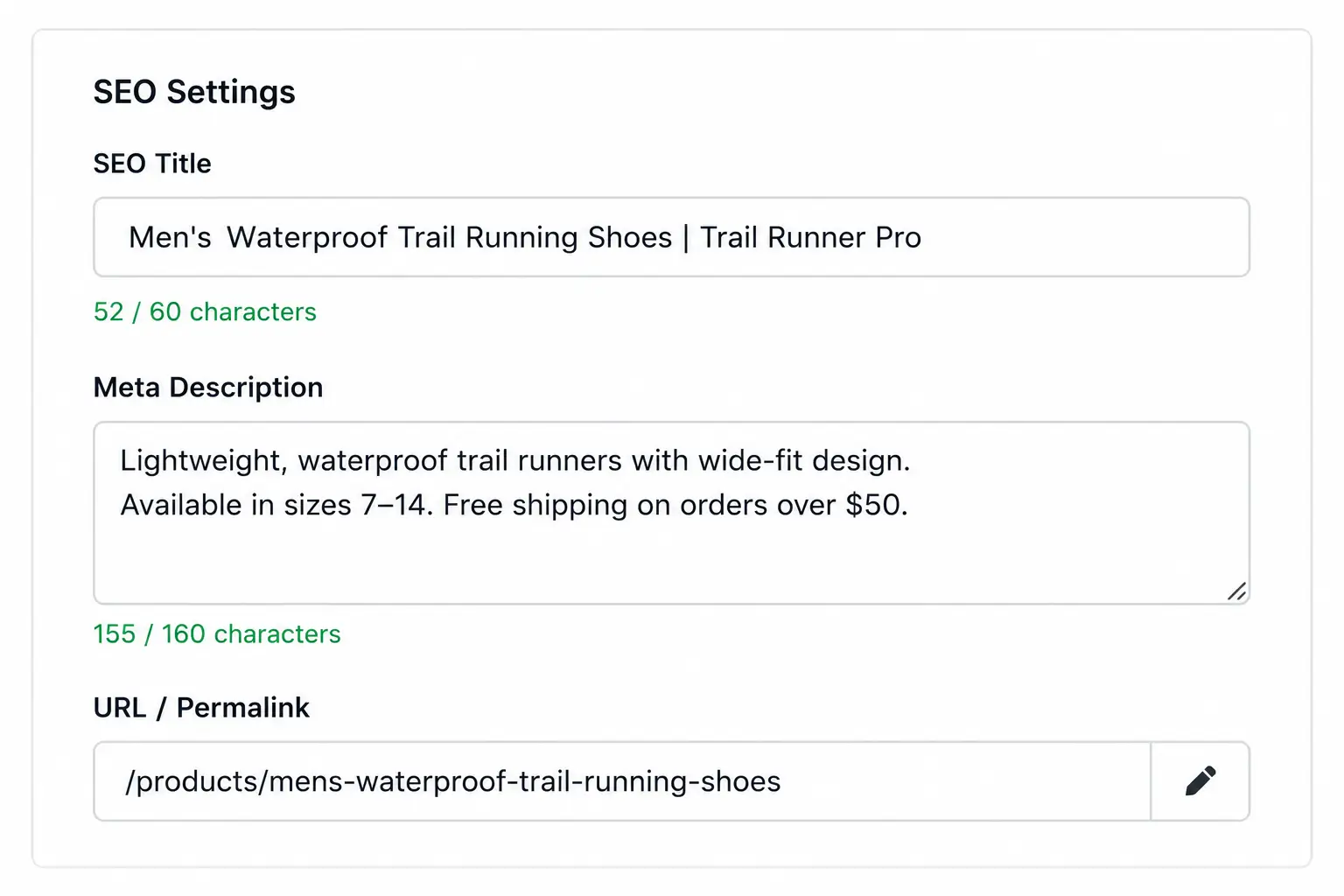
The part most setups miss is that these three fields need to be independently configurable per product — not inherited from templates or auto-generated from display fields. Templates work for defaults. Individual product pages, especially high-value ones, require manual control.
Why Category Pages Drive More Organic Revenue Than Product Pages
Category pages target broader commercial queries — “men’s trail running shoes,” “wireless headphones under $100” — and they draw significantly higher search volume than specific product pages. A shopper using those terms is comparing options, not committed to a specific model. The category page should rank for that query. The product page beneath it captures the buyer once they’ve decided.
The Keyword Volume Difference
Category pages outperform individual product pages for commercial keyword volume because they map to product-type and attribute searches rather than specific model names. The query “men’s trail running shoes” gets searched far more frequently than “Trail Runner Pro waterproof.” Most stores build strong product page SEO and weak category architecture — and end up invisible for the higher-volume queries that drive the most comparison traffic.
What Category-Level SEO Configuration Requires
Getting category SEO right means treating each category page the same way you’d treat a product page: a configured SEO title that matches the commercial keyword target, a custom meta description, a category description paragraph that includes the target keyword without burying the product grid, and internal links to subcategories and top products. Category SEO optimization is a distinct configuration from product-level SEO — it needs its own settings, not just the product-level SEO defaults inherited upward.
|
Category SEO Element |
Why It Matters |
Common Mistake |
|
SEO title |
Controls the SERP blue link for the category query |
Defaulting to the category display name alone, missing keyword modifiers |
|
Meta description |
Influences CTR for category-level commercial queries |
Leaving blank; Google pulls from the first text it finds on the page |
|
Category description |
Gives search engines keyword context for the page |
Writing purely for visual layout; the paragraph never surfaces in a crawler-readable position |
|
Internal links to products |
Passes page authority to top-priority products |
No structured linking; products ordered by date added rather than search relevance |
|
Canonical tags |
Prevents duplicate indexing when filters create new URLs |
Not configured; every filter combination is indexed as a separate page |
In practice, this matters most when a store has strong individual product SEO but weak category architecture. Organic traffic concentrates at the product level, capturing only the bottom of the funnel and missing the higher-volume mid-funnel queries that category pages are built to serve.
Open Graph Metadata: How Your Products Look When Shared
Search engines aren’t the only discovery channel for product pages. When a customer shares a product link on social media, in a messaging app, or via email, that link generates a preview card. That preview card is controlled by Open Graph metadata — a separate set of tags that has nothing to do with your SEO title or meta description.
Open Graph metadata is a set of HTML tags (og: title, og: description, og: image) that tell platforms like Facebook, LinkedIn, and WhatsApp how to render a page when it’s shared. Without these tags, the platform generates its own preview — often pulling the wrong image, a truncated page title, or no description at all. A broken preview reduces click-through from social channels, independent of how well the page ranks in Google.
The practical implication: Open Graph tags and SEO metadata need to be configured separately because they serve different surfaces with different requirements. A 60-character SEO title optimized for a Google SERP is not the same as an og: title written for a social share card. Getting both right requires two independent configuration fields per product.
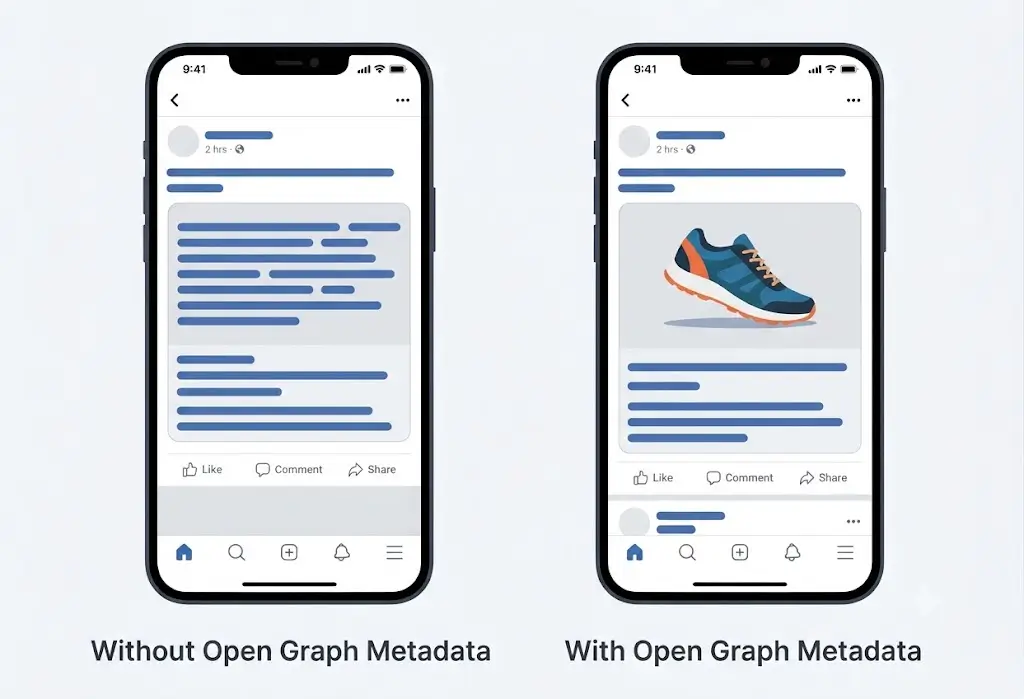
Social sharing metadata extends Open Graph further. Different platforms have different preview dimensions and character limits. Properly configured social sharing metadata ensures the product image, title, and description render correctly regardless of which platform the link lands on — Facebook, LinkedIn, WhatsApp, or iMessage.
Rich Metadata and Search Engine Indexing: Making Your Catalog Machine-Readable
Two capabilities sit underneath everything else in ecommerce SEO: how your product data is structured for machines, and which pages search engines are actually allowed to index. Both require specific configuration, and both are routinely underconfigured.
Rich Metadata and Structured Product Data
Rich metadata is structured product information that goes beyond basic title and description tags. It tells search engines specifically what kind of content a page contains — product name, price, availability, reviews — in a format machines can read without parsing unstructured text.
For ecommerce stores, this matters because Google uses it to power rich results: product cards with prices, star ratings, and availability status appearing directly in search results before a click. Pages with properly implemented structured data achieve 20–40% higher click-through rates compared to standard text listings, and rich results achieve 82% higher CTR than non-rich results. The difference shows up directly in organic traffic volume, not just rankings.
Indexing Controls and Crawl Budget
A store with three hundred products and ten variants per product can generate three thousand URLs that search engines will attempt to crawl. Most of those variant URLs contain near-duplicate content. Without proper indexing controls — canonical tags, noindex directives, and robots rules — search engines waste crawl budget on low-value pages and may dilute the authority of the pages that matter.
The indexing risks most stores leave unchecked:
- Filter-generated URLs creating hundreds of parameter-based duplicates of category pages
- Out-of-stock product pages remaining indexed with no canonical pointing to the parent category
- Paginated category pages indexed individually with thin content on pages 2 through 10
- Variant URLs (color, size) indexed as separate competing pages rather than consolidated under the canonical product URL
Search engine indexing support means the platform gives merchants control over which pages are indexed, how canonical relationships are defined, and how crawl budget is directed — without requiring a developer or a plugin to manage it.
The Problem With Bolt-On SEO Plugins for Ecommerce Stores
Most ecommerce stores manage SEO through external plugins that were originally designed for content sites. These tools expose SEO title and meta description fields at the page level — and they do that reasonably well. What they don’t do well is understand commerce-specific data structures: product variants, category hierarchies, Open Graph metadata per product, or the relationship between a product record and its indexing behavior.
The workflow cost is real. A merchant optimizing a product page in a typical plugin-dependent setup follows a fragmented path: open the product editor to write the description, switch to the SEO plugin panel to configure the title and meta description, navigate to a separate social settings screen for Open Graph tags, and check a third screen for indexing controls. The SEO metadata lives in the plugin’s database, separate from the product record. When the product is updated, the plugin’s data may or may not update with it.
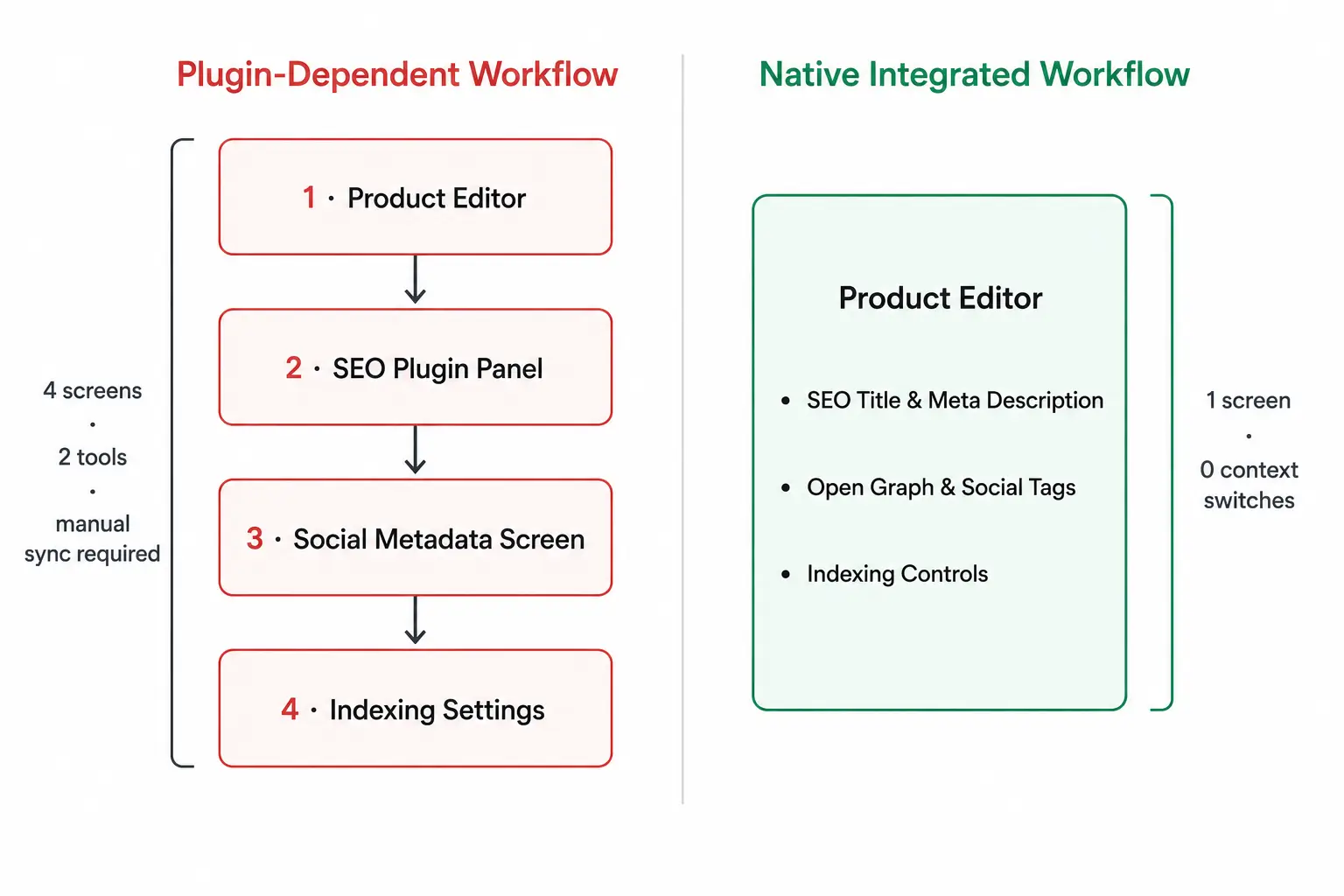
Plugin conflicts compound the risk. General SEO plugins make assumptions about site structure that don’t hold for ecommerce environments — particularly around canonical tag behavior, product variant URL handling, and category page metadata inheritance. A plugin conflict that silently overwrites canonical tags on product pages is the kind of SEO damage that doesn’t surface in rankings for weeks.
The old way treats SEO as something that happens to a page after the product is created. A properly integrated system treats SEO configuration as part of the product creation workflow itself — because the data that informs good product SEO (category, product type, primary keyword, image) is already in the product record.
|
Dimension |
Plugin-Dependent SEO |
Native Integrated SEO |
|
SEO title configuration |
Set in plugin panel, stored outside the product record |
Set inside product editor, stored with product data |
|
Meta description |
Set in plugin panel, may not inherit product updates |
Set inside product editor, part of the product record |
|
Open Graph metadata |
Separate social settings screen, often not per-product |
Per-product Open Graph fields in the product editor |
|
Category-level SEO |
Requires separate category plugin configuration |
Category SEO settings within category management |
|
Indexing controls |
Global or plugin-managed, limited per-page control |
Per-product and per-category indexing settings |
|
Maintenance overhead |
Plugin updates, version conflicts, configuration drift |
Zero — SEO configuration is part of the product record |
What a Native Ecommerce SEO Module Does Differently
StoreEngine takes a different structural approach to ecommerce SEO: instead of layering optimization functionality through external plugins, its SEO module embeds search optimization settings directly into the product management workflow. The merchant configures search visibility, social metadata, and URL structure in the same interface where they set product price, description, and inventory. No plugin to install, no separate admin screen to visit, no metadata that lives outside the product record.
That structural difference matters because StoreEngine’s SEO module integrates directly into the ecommerce system — making SEO management part of store administration rather than a separate process that runs alongside it. Here’s what that looks like across each capability.
Product SEO Management
Every product in StoreEngine has an SEO settings panel embedded in the product editor. SEO title, meta description, URL slug, and indexing preference are part of the product record — created, updated, and maintained alongside the product data itself. Product discoverability optimization happens in the same workflow as product creation, which means there is no sync problem between what the platform knows about a product and what the SEO layer communicates to Google. The metadata does not live in a plugin’s separate database.
Custom SEO Titles
StoreEngine decouples the SEO title from the product display name. A merchant sets a product name for the storefront (“Trail Runner Pro”) and a separate SEO title optimized for search (“Men’s Waterproof Trail Running Shoes — Trail Runner Pro”). The two fields serve different functions and are edited independently. Character count guidance in the editor keeps titles within effective SERP display limits without requiring the merchant to count manually.
Meta Descriptions
Each product page has a configurable meta description field inside the product editor. The merchant writes it once, targeted at the specific query the product page is meant to rank for. There is no auto-generation from product description text, and no dependency on a plugin to expose the field. The meta description is stored in the product record and updates with the product — not separately through an eCommerce plugin and an SEO plugin that may or may not stay in sync.
Businesses can also explore affordable e-commerce solutions to reduce costs while keeping essential store features in one platform.
SEO-Friendly URLs
Product URL slugs in StoreEngine are editable at the product level. The default behavior generates a clean, readable slug from the product name — no parameter strings, no numeric IDs. Merchants can customize the slug to front-load the target keyword phrase (/products/mens-waterproof-trail-running-shoes rather than /products/trail-runner-pro). URL changes trigger proper redirects automatically, so existing link equity from inbound links or indexed pages is preserved.
Open Graph Metadata
StoreEngine configures Open Graph metadata per product, not just at the site level. Each product record includes fields for og:title, og: description, and og: image. A product shared on Facebook, LinkedIn, or in a messaging thread renders a clean, branded preview with the correct product image and configured title — regardless of what the general site-level Open Graph settings say. Product-level control means every product that gets shared generates an accurate preview, not a generic site default.
Social Sharing Metadata
Social sharing metadata in StoreEngine is configured at the product level, ensuring that social previews reflect the individual product being shared rather than pulling site-wide defaults. This matters most for stores where social sharing is a real discovery channel — products shared frequently will generate measurably better click-through with per-product social metadata than with site-level defaults that weren’t written for that specific product.
Category SEO Optimization
Category pages in StoreEngine have their own SEO settings panel, separate from product-level SEO. A merchant configures a category-specific SEO title, meta description, and URL slug for each category. These settings are independent of the individual product SEO configurations within that category. The category page can target “Men’s Trail Running Shoes” as its keyword while individual product pages within it target specific model names and attributes — each layer working independently without conflict.
Search Engine Indexing Support
Indexing controls are available at both the product and category level. Merchants mark individual products or categories as noindex where appropriate — for out-of-stock products, internal pages, or thin-content pages — without touching code or plugin settings. This keeps the indexed catalog clean, and concentrates crawl budget on pages that carry real search value, directly from within the store administration workflow.
Rich Metadata Management
StoreEngine structures product data for machine readability — organizing product information including name, category, availability, and key attributes in a format that supports rich result generation. This structured approach is the foundation for product listings with price, availability, and review data appearing directly in search results. The merchant doesn’t configure schema markup separately; the product management workflow generates the structured product data as a byproduct of standard product administration.
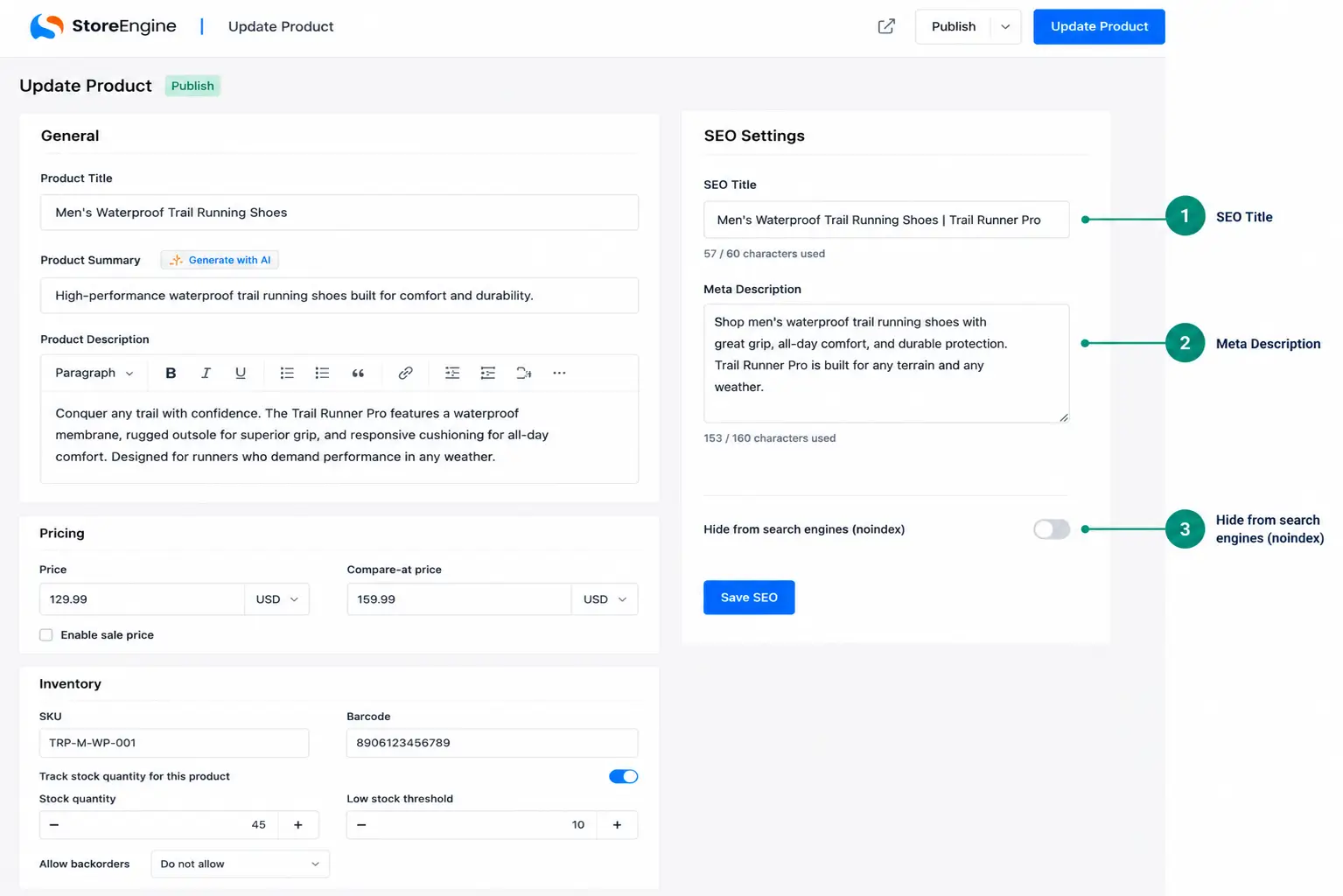
The real-world workflow: a merchant adding a new product configures the display name, description, price, and inventory — then fills in the SEO title, meta description, and URL slug in the same editor. They add the Open Graph image and title while they’re there. Indexing is on by default. The entire SEO configuration for that product takes three to five minutes inside one screen, with no plugin to switch to and no risk of metadata falling out of sync with the underlying product data.
Building an Ecommerce SEO System: What Needs to Work Together
Ecommerce SEO is not a single setting or a single plugin. It’s a system with multiple layers that need to function correctly and consistently across every product page and category page in your store. The question is not whether you’re doing SEO — most stores are doing some of it. The question is whether the five layers are working together from inside a single workflow, or operating in isolation across separate tools.
Here’s what a complete ecommerce SEO system requires — and the evaluation question for each layer:
- Product-level metadata control — Custom SEO title, meta description, and URL slug configurable per product, independent of display fields. Evaluation: Are these fields in your product editor, or in a separate plugin panel?
- Category-level SEO configuration — Separate SEO settings for category pages targeting commercial keyword clusters. Evaluation: Does your platform have a dedicated SEO configuration for category pages, or does it inherit from product-level defaults?
- Social metadata per product — Open Graph tags configured at the product level, not just the site level. Evaluation: When a customer shares a specific product link, does the preview show that product’s image and title, or generic site information?
- Indexing controls — Per-product and per-category control over what search engines crawl and index. Evaluation: Can you noindex a single out-of-stock product without touching code or plugin settings?
- Integrated workflow — All of the above accessible without leaving the product or category editor. Evaluation: How many screens do you visit to fully configure the SEO for one new product?
A platform that provides native control over all five layers eliminates the plugin dependency, the workflow fragmentation, and the metadata drift that characterizes most store SEO setups. A platform that doesn’t require stitching those layers together manually — which compounds maintenance overhead with every product update.
Is Built-In Ecommerce SEO Right for Your Store
- If you’re adding new products frequently → every product that goes live without configured SEO metadata is a missed indexing opportunity. Native SEO configuration makes product search optimization part of the standard creation workflow rather than a separate step that gets skipped under time pressure
- If social sharing is a real discovery channel for your products → product-level Open Graph metadata is the difference between a clean branded link preview and a broken placeholder image when customers share your products on social media or in messaging apps
- If you have a large catalog with product variants → native indexing controls at the product level let you manage crawl budget and prevent duplicate indexing without developer involvement or plugin configuration overhead
- If your current setup involves switching between your product editor and a plugin panel to optimize one product → that workflow fragmentation adds time to every product update and creates the conditions for metadata falling out of sync with the product record it’s meant to describe
Frequently Asked Questions
What is ecommerce SEO?
Ecommerce SEO is the process of optimizing an online store’s pages so they rank in search engine results for queries buyers use to find products. It covers product metadata, URL structure, category architecture, social preview tags, and indexing controls — not just keyword placement in product descriptions. The goal is sustained organic traffic from buyers at every stage of the purchase journey, from category-level comparison searches to specific product queries.
What’s the difference between a custom SEO title and a product name?
The product name is what appears on your storefront — it’s written for shoppers browsing your store. The SEO title is what appears in Google’s search results — it’s written to include the keyword phrase buyers search for and to earn clicks from the results page. These two fields serve different functions and should be configured independently. A product named “Trail Runner Pro” might have an SEO title of “Men’s Waterproof Trail Running Shoes — Trail Runner Pro” — the display name stays clean, and the SEO title captures the keyword.
Do I need a separate SEO plugin for my ecommerce store?
It depends on what your commerce platform exposes natively. If your platform provides built-in fields for SEO titles, meta descriptions, URL slugs, Open Graph metadata, and indexing controls within the product editor itself, a separate SEO plugin adds overhead and potential conflict without meaningful benefit. StoreEngine’s SEO module covers all of these natively inside the product management workflow, which means no additional plugin is required for commerce-specific SEO management. Platforms that don’t offer these fields natively do require a plugin to expose them.
What is Open Graph metadata and why does it matter for a product page?
Open Graph metadata is a set of HTML tags (og:title, og:description, og:image) that control how a page renders when it’s shared on social platforms or messaging apps. For product pages, this means the image, title, and description shown in a social share preview are the ones you’ve configured — not whatever the platform defaults to pulling. Without Open Graph tags, product links shared on Facebook or WhatsApp often display broken image placeholders or generic site information rather than the specific product. This directly affects click-through from social sharing, independent of search rankings.
How does category SEO differ from product page SEO?
Product pages target specific bottom-of-funnel queries like exact product names, model numbers, and specific attributes. Category pages target broader commercial queries — “men’s running shoes,” “wireless headphones under $100” — that draw higher search volume from buyers comparing options rather than committed to a specific product. Category pages need their own SEO title, meta description, and URL slug configured separately from the products within them. The two levels should be optimized independently, targeting different keyword intents.
What are SEO-friendly URLs for an ecommerce store?
SEO-friendly URLs are clean, descriptive, keyword-relevant slugs like /products/mens-waterproof-trail-running-shoes rather than dynamic parameter strings like /products/item?id=4829&color=black&size=10. Clean URLs tell search engines what the page is about before they load it, reduce duplicate content risk from parameter combinations, and are more likely to include the keyword phrase buyers actually search for. The URL slug should be configured at the product level, not applied as a site-wide template.
What does “search engine indexing support” mean for an online store?
Indexing support means the platform gives merchants control over which pages search engines crawl and index. For ecommerce stores, this matters because product variants, filter combinations, and paginated category pages can generate thousands of near-duplicate URLs that waste crawl budget and dilute the authority of pages that actually carry search value. Indexing controls let merchants mark specific products or categories as noindex — keeping the indexed catalog focused on pages worth ranking — without requiring developer involvement.
What is rich metadata management in ecommerce?
Rich metadata refers to structured product data — name, price, availability, category, review information — organized in a machine-readable format that search engines use to generate rich results in SERPs. Rich results display product attributes directly in search listings — price, availability, ratings — without requiring a click to see them. Pages with properly implemented structured data achieve significantly higher click-through rates than standard text-only listings, making rich metadata management one of the higher-leverage technical SEO configurations for any ecommerce store.