










A customer adds three items to their cart, exactly enough to trigger your “Buy 2 Get 1 Free” deal, and checks out paying full price for all three — because nothing on the page ever told them the deal existed.
That’s the real failure mode behind most ecommerce advanced coupon setups: the discount math might be perfectly correct, but nothing actively tells the customer it’s there. Advanced Coupons fixes this by pairing the discount engine itself with a layer that surfaces eligible deals automatically — in the cart, at checkout, and on the customer’s own account dashboard.
By the end of this, you’ll know exactly how the BOGO math protects your margin, how auto-apply and private codes work, and whether this is the right fix for the deals you’re already running.
Quick Answer: What Are Advanced Coupons?
- Advanced Coupons is a StoreEngine feature that extends core coupon types with BOGO deals, auto-apply codes, and a discoverability layer that surfaces eligible discounts in the cart, checkout, and customer dashboard.
- Its core mechanism pairs a BOGO engine that always discounts the cheapest eligible units with a suggestion engine that checks every promoted coupon against the live cart to decide what to show and when.
- It’s built for store owners running Buy X Get Y promotions, sitewide automatic discounts, or private VIP pricing who’ve noticed redemption doesn’t match how good the deal actually is.
- Redemption is the main thing it changes — discounts that used to need a customer to already know a code now apply themselves or get actively suggested, while private codes stay invisible to everyone they’re not meant for.
- Getting started means flipping the storeengine/advanced_coupon/enabled gate, which activates BOGO and auto-apply types that otherwise sit inactive in the free core.
What Is an Advanced Coupon? (BOGO + Auto-Apply, Defined)
An advanced coupon is a discount type that goes beyond a flat percentage or dollar amount off the cart. The two most common forms are BOGO — buy a set quantity, get free or discounted units in return — and auto-apply, where the discount fires on its own the moment a cart qualifies, no code required.
Picture a store running “Buy 2 Get 1 Free” on water bottles. With a standard coupon, a customer needs to already have a code, type it correctly, and hope it applies to the right product. With Advanced Coupons, the moment two qualifying bottles hit the cart, the engine checks eligibility, applies the reward, and shows it as a separate free line item — no code field involved.
That distinction — codes that need to be found versus discounts that find the customer — is the whole reason this feature exists. The next question is why coupons fail to get used even when they’re genuinely good deals.
The Real Problem: Customers Never See Your Best Deal
The real problem with most coupon programs isn’t the discount — it’s that most customers never see it. A code sitting in an email newsletter or a banner nobody scrolled past might as well not exist.
The data backs this up directly. 85% of consumers have abandoned an online cart specifically because they didn’t find a coupon code, according to Capital One Shopping’s 2026 research — not because the price was too high, but because they assumed a discount existed somewhere and gave up looking for it. Even when a coupon search does turn something up, it works only 10% to 30% of the time, per the same research, meaning most “use this code” moments end in something expired, restricted, or simply wrong.
BOGO deals have a second, quieter failure mode stacked on top of the discoverability gap. WebToffee’s own testing checklist for BOGO plugins flags this directly: many tools discount the wrong unit when multiple products qualify, default to the most expensive item instead of the cheapest, or stop applying correctly the moment a customer edits their cart. A store can have a perfectly reasonable BOGO deal live and still lose money — or lose the sale — because the mechanics misfire at the exact moment they’re supposed to work.
I’ve seen this pattern enough times to call it the default outcome, not the exception: a merchant builds a good deal, mentions it almost nowhere inside the actual shopping flow, then reads low redemption as a sign the deal itself was weak. It usually wasn’t. The fix has to solve two separate problems — making the discount math actually correct, and making sure eligible customers see it — which is exactly the split Advanced Coupons is built around.
How StoreEngine’s Advanced Coupons Actually Works
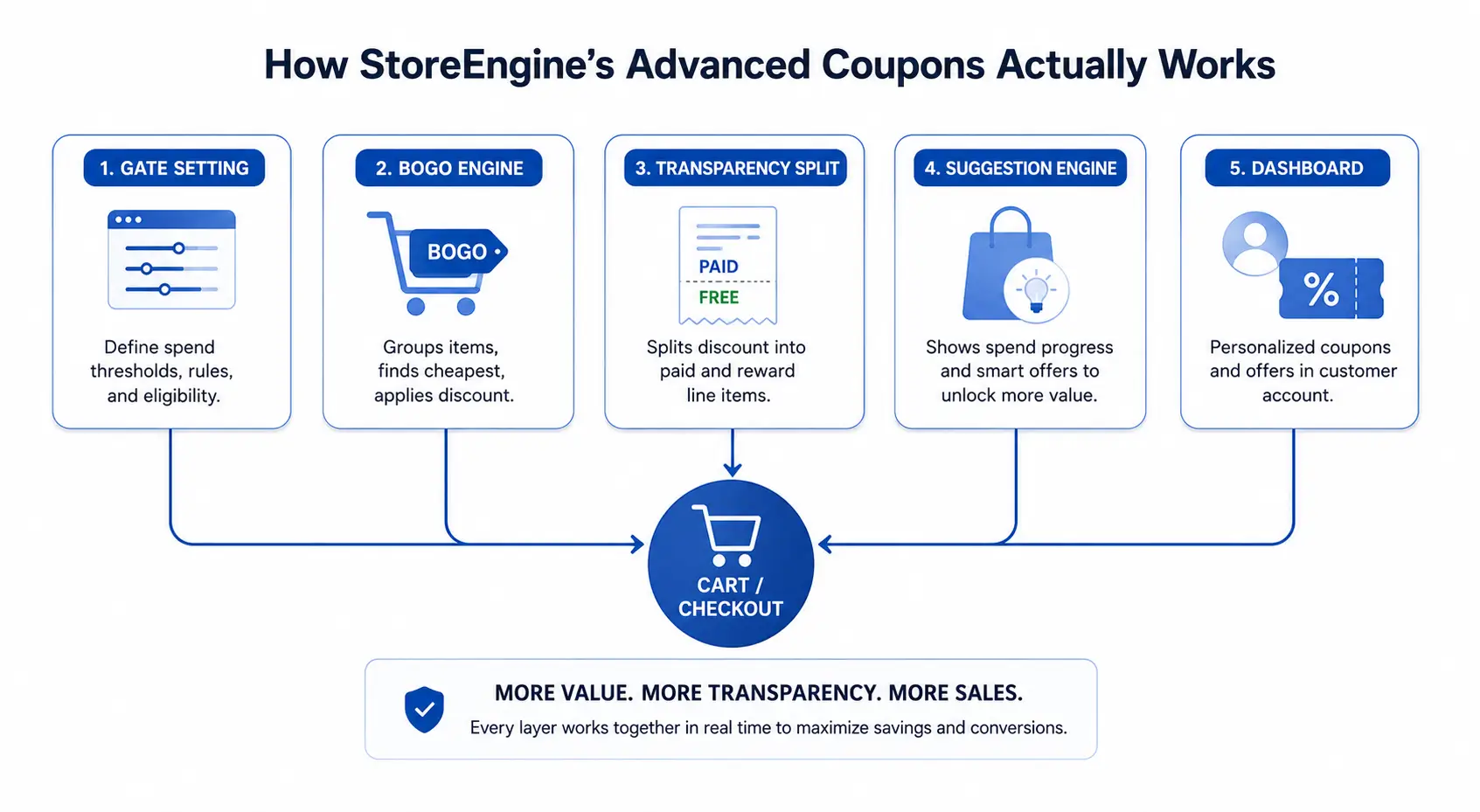
Advanced Coupons works by sitting on top of StoreEngine’s core coupon system and activating two discount types that already exist in the interface but do nothing without it. Flipping the storeengine/advanced_coupon/enabled setting is what turns BOGO and auto-apply from visible-but-inert options into discount types that actually calculate and apply.
Once active, five separate mechanisms do the work. The BOGO engine hooks directly into the discount-handling pipeline and runs the actual math. A transparency layer splits any line item that includes a free or discounted unit into two visible rows. A per-coupon “Promote in cart” toggle decides which coupons are allowed to surface to customers at all. A suggestion engine evaluates every promoted coupon against the live cart subtotal to decide what to show. And a dashboard component pulls promoted and customer-targeted coupons into the account area, using that same suggestion logic so the messaging never contradicts what’s shown in the cart.
What this actually solves is the gap between a discount existing and a discount getting used — five mechanisms, but one shared job.
Here’s a quick walkthrough. A customer with two t-shirts in their cart opens checkout. The suggestion engine has already checked every promoted coupon against that $46 subtotal — one coupon needs $50 to unlock, so it shows as “almost” with a $4 gap; another coupon is already met, so it shows with a one-click apply link. Nothing here required the customer to search for anything.
That five-piece structure is what separates a feature that calculates discounts correctly from one that also makes sure someone benefits from them. The BOGO engine specifically is worth a closer look, because the cheapest-unit logic inside it is doing more work than it looks like.
BOGO Deals That Always Protect Your Margin
BOGO deals in Advanced Coupons always protect margin by discounting the cheapest eligible units first, never the most expensive ones. That single design choice is the difference between a BOGO deal that costs what you planned and one that quietly costs more every time a customer’s cart mixes price points.
Here’s the actual math. A “Buy 2 Get 1” rule groups every eligible cart unit into blocks of three — two buy units plus one get unit. The engine takes the total eligible quantity, divides it by the group size, and rounds down to get the number of reward units: six qualifying items produce two reward units, while five qualifying items still only produce one, because the math floors instead of rounding up. Those reward units are chosen by sorting all eligible items by price, ascending, and discounting the cheapest ones first — by whatever percentage is configured, from a small 20% nudge up to a full 100% giveaway.
Say a customer has three different t-shirts in their cart at $25, $30, and $35, and the rule is Buy 2 Get 1 at 100% off. The engine sees three eligible units, floors 3÷3 to one reward unit, and discounts the $25 shirt — not the $35 one — to zero. The discount is also clamped so it can never exceed what’s left to discount on that unit, so a coupon can’t accidentally push a price negative.
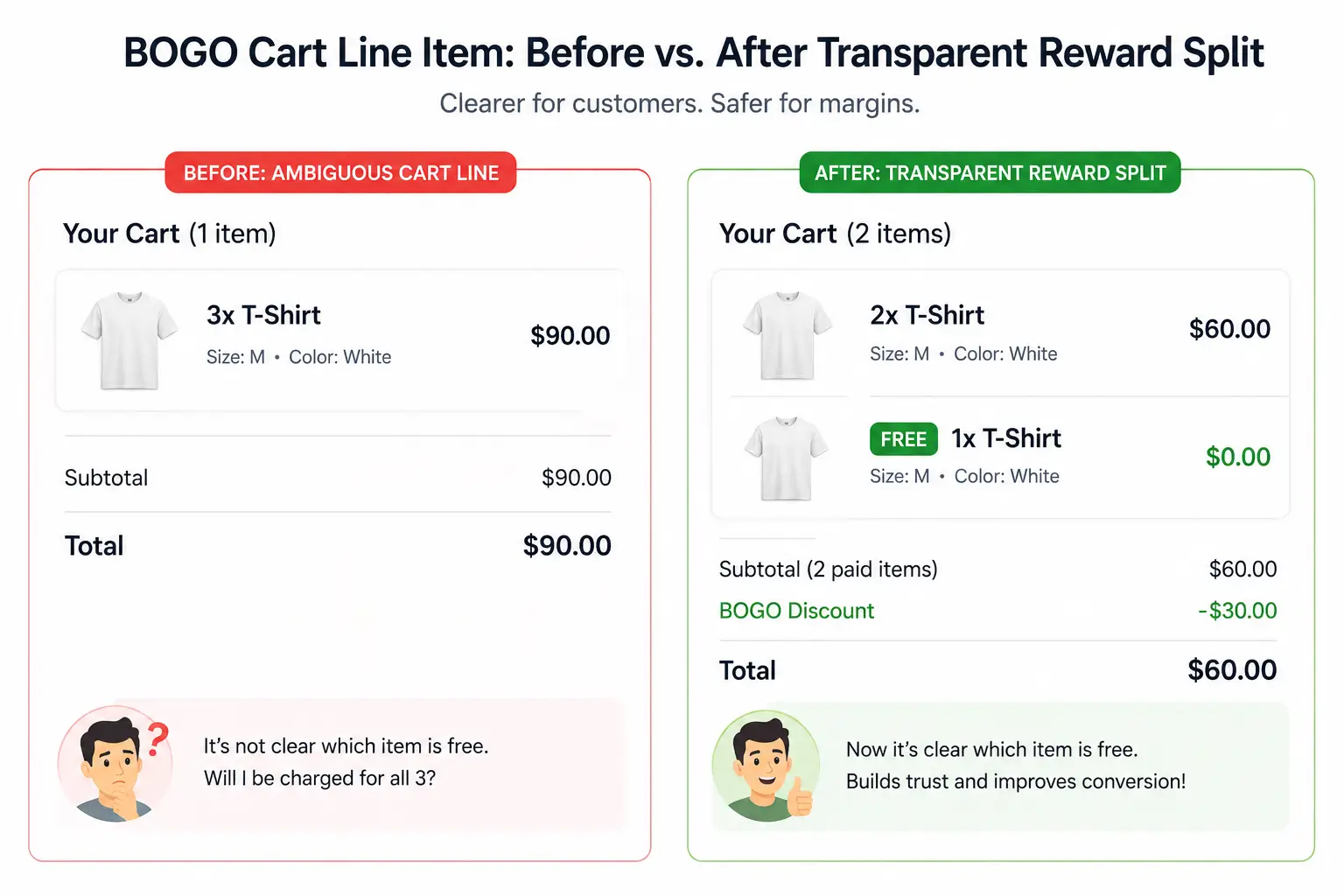
Customers see this clearly, not as a mystery total. The line containing the rewarded unit splits into two visible rows: a paid row for the full-price units and a separate reward row carrying a “FREE” badge in the cart and checkout. That’s true both in the REST data StoreEngine’s storefront reads and in the classic PHP templates, so the split shows up regardless of how the front end is built.
In practice, this matters most when a cart mixes price points — that’s exactly the moment cheapest-first protection earns its keep, and exactly the moment a plugin that picks the wrong unit costs real money. That’s also the specific failure mode WebToffee’s testing checklist warns BOGO buyers to check for before launch. Knowing the math holds up is one part of trust; the other part is removing the need for a code at all.
Auto-Apply Coupons: No Code, No Missed Deal
Auto-apply coupons work by removing the code field entirely. Once a cart meets a coupon’s conditions, the discount applies on its own, with nothing for the customer to search for, copy, or type.
This matters because of where coupon codes actually break down. Digital coupon redemption rates hover around 7% even though most shoppers say they’d use a code if they found one — the gap is mostly the friction of finding and entering it correctly, a pattern DemandSage’s coupon research confirms shows up across nearly every channel shoppers use to hunt for codes. Auto-apply removes that step entirely for any coupon marked eligible, which is why it pairs naturally with sitewide sales, loyalty perks, or any discount meant for every qualifying customer without exception.
The part most setups get wrong is treating auto-apply as a separate, looser mode instead of just another coupon with conditions. As Voucherify’s own breakdown of automatic discounts points out, an auto-applied promotion is inherently more open than a code-gated one — without guardrails, it can apply to budget you didn’t intend to spend, erode margin in low-margin categories, or stack with another discount past what either rule was designed to do alone. Advanced Coupons doesn’t pretend that risk away; auto-apply sits behind the same per-coupon settings — minimum spend, product restrictions, expiry — as every other coupon type, rather than running as a looser, separate mode.
Picture a store running a $75-spend free-shipping offer. With a standard coupon, the customer has to know the threshold exists and remember to apply a code at checkout. With auto-apply, the moment the cart crosses $75, the discount is just there, already reflected in the total. The part that actually drives the result, though, isn’t auto-apply alone — it’s pairing it with something that tells the customer they’re close before they’ve already decided to leave.
Cart & Checkout Nudges: The Spend-Progress Bar
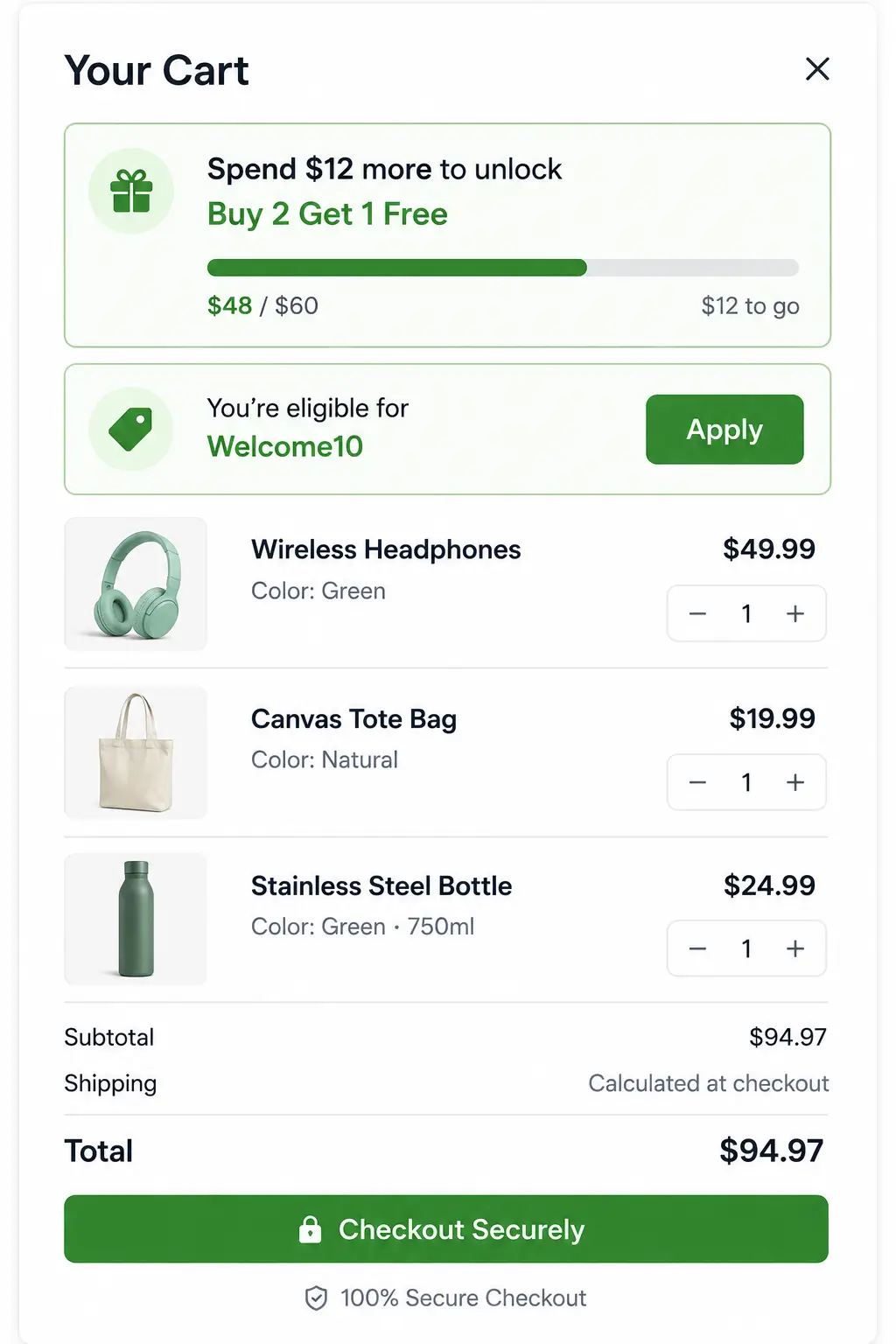
Cart and checkout nudges work by checking every promoted coupon against the current cart subtotal and showing the customer exactly how close they are to qualifying. The suggestion engine behind this sorts by smallest gap first, so the deal a customer is closest to claiming is always the one they see.
There are exactly two states a nudge can show. If the cart hasn’t met a coupon’s minimum spend, it displays an “almost” message with the specific dollar amount still needed — “Spend $12 more to unlock Buy 2 Get 1 Free” — instead of a vague “add more to save.” If the cart already qualifies, it shows an “eligible” state with a one-click apply link, so claiming the deal takes one click instead of a trip to find a code. Up to two of these nudges can show at once, each carrying the discount headline, the expiry date, and any product restrictions, so nothing about the offer stays hidden until checkout.
This only works for coupons the merchant has chosen to promote. The per-coupon “Promote in cart” toggle, with its optional description text, decides which coupons get this treatment at all — a private or targeted code stays completely invisible in this layer regardless of how generous it is. That gating matters as much as the nudge itself.
Take a cart sitting at $46 against a $50-spend coupon. Without this feature, that customer checks out $4 short of a deal they never knew existed. With it, the gap shows up in the cart itself, in plain dollar terms, while there’s still time to add one more item. That’s a direct answer to the discoverability half of the original problem — the targeting half is what private coupons solve.
Private & VIP Coupons That Never Leak
Private and VIP coupons work by restricting visibility to a specific customer, so the discount applies for them without ever surfacing in a public nudge, another shopper’s dashboard, or anyone’s cart but theirs. A coupon can be locked to a list of specific customer emails, or targeted to one customer’s account by user ID — and that targeting is what keeps it out of the promotional layer everyone else sees.
This solves a problem that’s easy to underestimate: the moment a “VIP10” code gets shared once, in a screenshot or a forwarded email, it stops being VIP. Restricting by email or user ID means the discount still works exactly the same way for the intended customer, but the suggestion engine simply never evaluates it against anyone else’s cart, so it can’t accidentally nudge a stranger toward a code meant for one person.
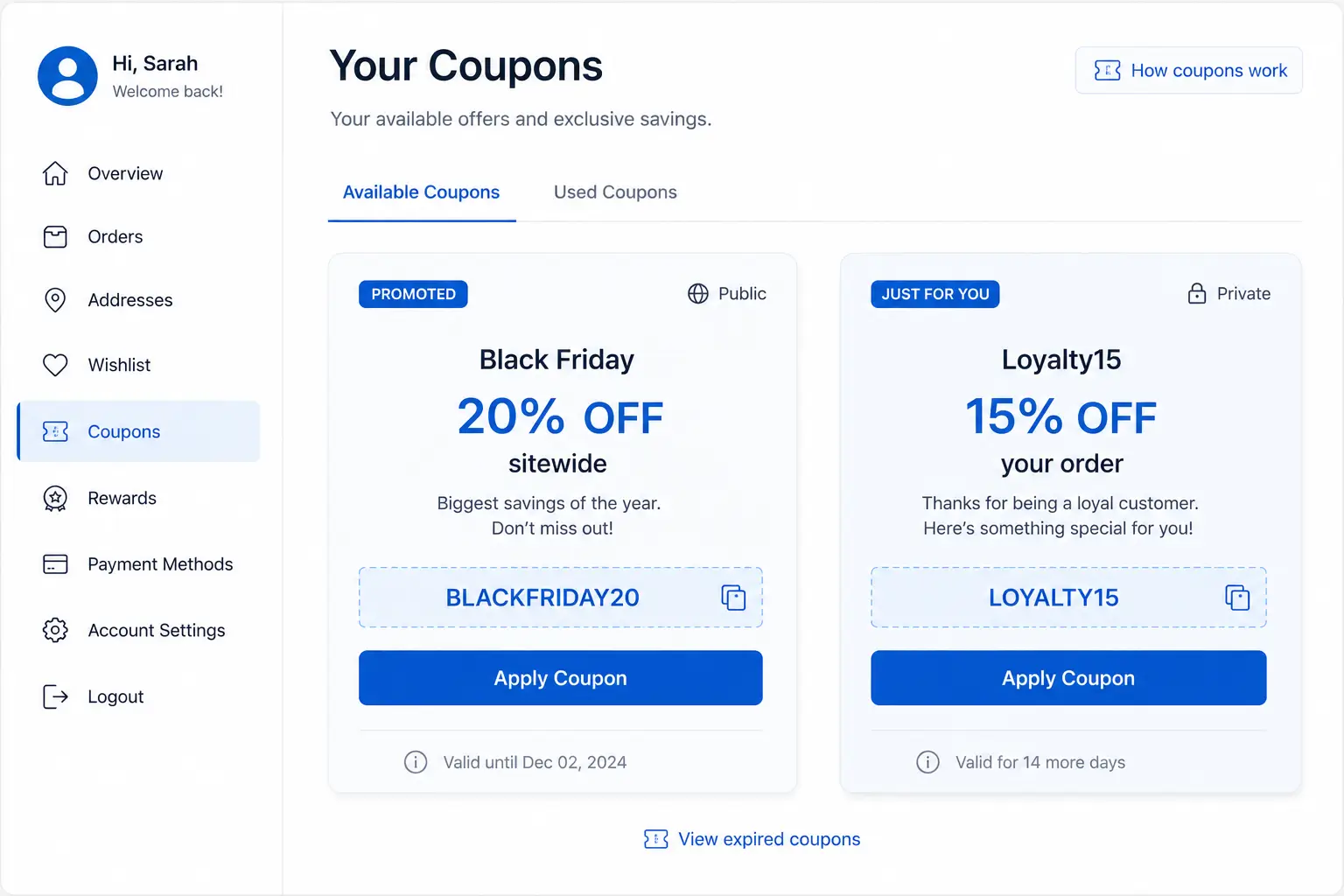
The customer dashboard panel is where this becomes visible to the right person, on purpose. A logged-in customer sees two kinds of coupons there: anything globally promoted across the store, plus anything targeted specifically to their account. Both run through the same evaluation logic as the cart nudges, so a customer never sees a different “almost” message on their dashboard than they’d see in their own cart.
Picture a wholesale customer who gets a recurring 15% code as part of an account-level deal. Instead of emailing the code every quarter and hoping it isn’t shared further than intended, that discount sits on their dashboard, evaluated against their actual cart, visible only when they’re logged into their own account. That’s the targeting gap closed — at this point, the comparison to doing this manually is worth making explicit.
The Old Way vs. Advanced Coupons
The old way of running a BOGO or VIP deal usually means choosing between three incomplete options: a manual coupon code, a dedicated BOGO plugin that only handles the math, or building the discoverability and targeting logic yourself.
|
Factor |
Manual coupon code |
Generic BOGO-only plugin |
Advanced Coupons |
|
Discoverability |
None — customer must already know the code |
None — handles discount math only |
Cart and checkout nudges, plus a dashboard panel |
|
BOGO margin safety |
N/A |
Varies by plugin; some discount the wrong unit |
Always cheapest-unit-first, clamped at zero |
|
Private/VIP targeting |
Manual tracking, easy to leak once shared |
Rare or limited |
Restricted by email or user ID, never surfaces publicly |
|
Best for |
A single, public, one-time promotion |
Stores that only need correct discount math |
Stores that need math, visibility, and targeting together |
Most of the existing tooling in this space — the kind reviewed in roundups comparing ten different BOGO plugins side by side — competes almost entirely on the middle column: whose discount math is more flexible, whose conditions engine handles more edge cases. That’s a real and useful thing to get right. It’s also only half the problem, and it’s the half most of that tooling leaves for the merchant to solve alone, usually with an email newsletter and hope.
How This Stacks Up Against Other Coupon & BOGO Plugins
Compared to dedicated coupon and BOGO tools, Advanced Coupons competes on a different axis — not just discount logic, but whether the discount gets seen and who it’s allowed to reach. Naming names matters here, because a few of these tools are genuinely good at what they do.
Advanced Coupons for WooCommerce, built by Rymera Web Co, is the most established dedicated BOGO plugin in this space, with a free tier covering basic Buy One Get One deals and a premium tier adding more complex variations like “Buy Two Get One at 50% off,” according to a recent comparison of WooCommerce BOGO plugins. It’s a mature, well-supported product — and it’s also a different product from the StoreEngine feature covered in this article, which happens to share a similar descriptive name, worth being direct about given how easy that is to confuse. The same comparison notes that Smart Coupons for WooCommerce ships a BOGO module in its free tier with recursive deals that scale with cart quantity, while Discount Rules and YayPricing both build BOGO into broader dynamic-pricing engines with drag-and-drop condition builders.
What none of them ship, based on their own documented feature sets, is a built-in suggestion layer that proactively tells an under-qualifying customer how close they are, or a dashboard view that surfaces a customer’s own private codes without a support ticket. That’s not a knock on the discount-math side of those tools — several handle conditional logic Advanced Coupons doesn’t attempt to match. It’s a different bet: that the math being correct matters less than the deal actually getting used, and that targeting needs guardrails the same way the discount itself does.
If a store’s biggest issue is genuinely the math — deeply conditional, multi-category, recursive BOGO logic — one of those dedicated tools might cover more ground. If the issue is that a fine BOGO deal sits there unredeemed, or a VIP code keeps leaking, that’s the gap this feature was built to close.
Common BOGO & Coupon Questions
A few questions come up often enough to answer directly here, before the formal FAQ.
Can a store run BOGO deals without any dedicated feature or plugin? Not reliably. Most cart platforms don’t include “buy X, get Y” logic in their core coupon system, since it requires tracking quantities across multiple line items and deciding which units get discounted. Without a dedicated engine, the usual workaround is a manually bundled product, which breaks the moment a customer wants a different combination.
How do I set up something like “buy 2, get 1 free”? In Advanced Coupons, that’s a BOGO rule with a buy quantity of 2, a get quantity of 1, and a discount percentage of 100%. The group-size math and cheapest-unit selection happen automatically — there’s no separate step to tell it which item to discount.
Is auto-apply abuse-proof? Not automatically. Auto-apply still respects every condition set on the coupon — minimum spend, product restrictions, expiry — so it’s only as safe as those conditions are configured. The risk isn’t the mechanism; it’s a coupon launched without guardrails, the same risk that exists with any automatic discount.
That covers the mechanics most people ask about before they’ve tried it. What’s left is whether any of this actually fits your store.
Is Advanced Coupons Right for Your Store?
- If you’re running BOGO deals and have ever wondered whether the discount applied to the right item → turn on Advanced Coupons for the cheapest-unit-first math and the visible paid/free row split, so you can verify it at a glance instead of trusting it blindly.
- If you’ve launched a generous coupon and redemption came back lower than the deal deserved → promote that coupon so it surfaces as a cart and checkout nudge instead of relying on customers to already know it exists.
- If you offer a recurring discount to a wholesale or VIP customer and you’re currently emailing or texting the code → restrict it by email or user ID instead, so it shows up automatically on their dashboard and nowhere else.
- If your store runs one occasional sitewide sale a year and nothing else → a single auto-apply coupon with a date range probably covers it; the BOGO engine and dashboard layer are built for stores running several promotions at once, not a once-a-year markdown.
FAQ
What is a BOGO deal, and how is it different from a regular percentage-off coupon?
A BOGO (Buy X, Get Y) deal gives a customer free or discounted units when they buy a qualifying quantity, instead of taking a flat percentage off the whole order. A percentage-off coupon reduces every eligible item by the same amount; a BOGO deal targets specific units — typically the cheapest ones — and can give them away entirely or at a partial discount.
Can my store run BOGO deals without a dedicated plugin or feature?
Not reliably. Most ecommerce platforms don’t include quantity-based “buy this, get that” logic in their core coupon system, so the common workaround is a manually bundled product, which breaks as soon as a customer wants a different combination of items. A dedicated BOGO engine handles the quantity math and unit selection automatically instead.
Is auto-apply safe, or can customers exploit it?
Auto-apply coupons are governed by the same conditions as any other coupon — minimum spend, product restrictions, and expiry dates all still apply. The risk isn’t the auto-apply mechanism itself; it’s launching a coupon without those guardrails configured, which is a risk with any automatic discount, not something unique to this feature.
How do I give one VIP customer a discount code without it leaking to everyone else?
Restrict the coupon to that customer’s specific email address, or target it to their account by user ID, rather than creating a code anyone can enter. A coupon set up this way never appears in public cart nudges or another customer’s dashboard — it only evaluates against and applies for the customer it’s restricted to.
Will customers see why a product in their cart is free or discounted?
Yes. Any line item that includes a BOGO reward splits into two visible rows — a paid row for full-price units and a separate row carrying a “FREE” badge for the discounted ones. That split shows in both the cart and checkout, so the customer can see exactly which unit the discount applied to.
Does turning on Advanced Coupons change anything for stores not using BOGO or auto-apply?
No. The BOGO and auto-apply discount types already exist in the interface, but they calculate no discount at all until the feature is switched on. Standard percentage and fixed-amount coupons continue working exactly as before, whether the feature is active or not.
Can I run more than one promoted coupon at the same time?
Yes, up to a limit. The suggestion engine shows a maximum of two promoted coupon nudges at once in the cart and checkout, sorted so the coupon with the smallest remaining gap to qualify shows first. More than two coupons can be promoted overall — only two will surface as active nudges at any given moment.