

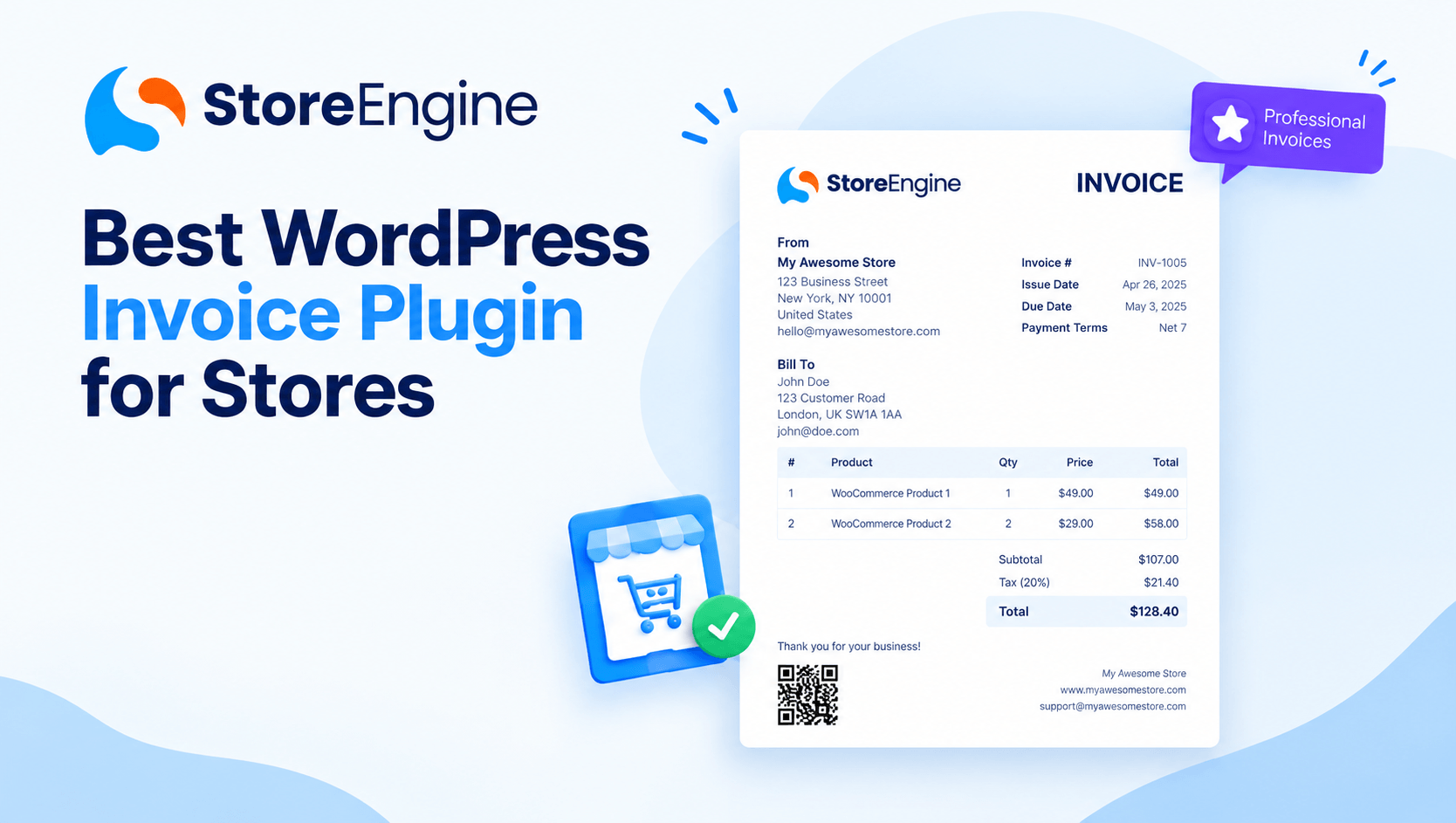

You just made a sale. Congratulations. Now comes the part nobody talks about at the “launch your online store” webinars — the invoice.
Manually creating one. Formatting it. Attaching the right VAT rate. Emailing it to a customer in Germany who expects EU-compliant billing before they leave a review.
Do that five times and it’s annoying. Do it fifty times a month and it becomes a full-time job you didn’t sign up for.
That’s exactly why choosing the right WordPress invoice plugin is one of the most important operational decisions you’ll make for your store. Not flashy. Not exciting. But the difference between a business that scales cleanly and one that drowns in billing chaos.
This guide breaks down everything — what to look for, a comparison of the top options in 2026, and why StoreEngine stands apart as the only solution that builds invoicing directly into your entire eCommerce engine.
Why Your WordPress Store Needs a Dedicated Invoice Plugin
Let’s be honest — WooCommerce’s default order confirmation emails are not invoices. They’re receipts at best.
A proper invoice plugin does far more than generate PDFs. It automates billing, keeps your records organized, handles taxes, and gives your business a polished, professional appearance.
Here’s what you actually lose without one:
- Hours every month spent manually creating and sending billing documents
- Tax compliance exposure — especially critical for VAT in the EU, GST in Australia/Canada, or sales tax in US states
- Customer trust — B2B buyers especially expect a properly numbered, dated, legally formatted invoice
- Audit readiness — no clean invoice trail means messy accounting and potential legal headaches
The right WordPress invoice solution automates PDF invoice creation for every order, keeps tax calculations accurate, and gives customers a professional billing experience without adding manual work.
What to Look for in a WordPress Invoice Plugin (2026 Checklist)
Before you install anything, run it through these filters:
|
Feature |
Why It Matters |
|
Automatic Invoice Generation |
Fires on order completion without manual action |
|
VAT / Tax Compliance |
EU VAT, GST, reverse charge — critical for international sales |
|
PDF Generation & Email Delivery |
Customers expect a downloadable, branded document |
|
Recurring Invoice Support |
Essential for subscriptions and retainer clients |
|
Multi-Currency Support |
Required for any store selling internationally |
|
Custom Branding |
Your logo, colors, and business details — not a generic template |
|
Invoice Numbering System |
Sequential numbering for accounting and legal compliance |
|
Bulk Invoice Management |
Print, export, or resend multiple invoices at once |
|
Free vs. Paid Tier |
Does the free version actually do useful work? |
When evaluating invoicing plugins, the key considerations are user-friendliness, one-time and recurring payment collection, and partial payment options — all of which affect how flexible your billing can be for clients of different sizes.
The Best WordPress Invoice Plugins in 2026 — Compared
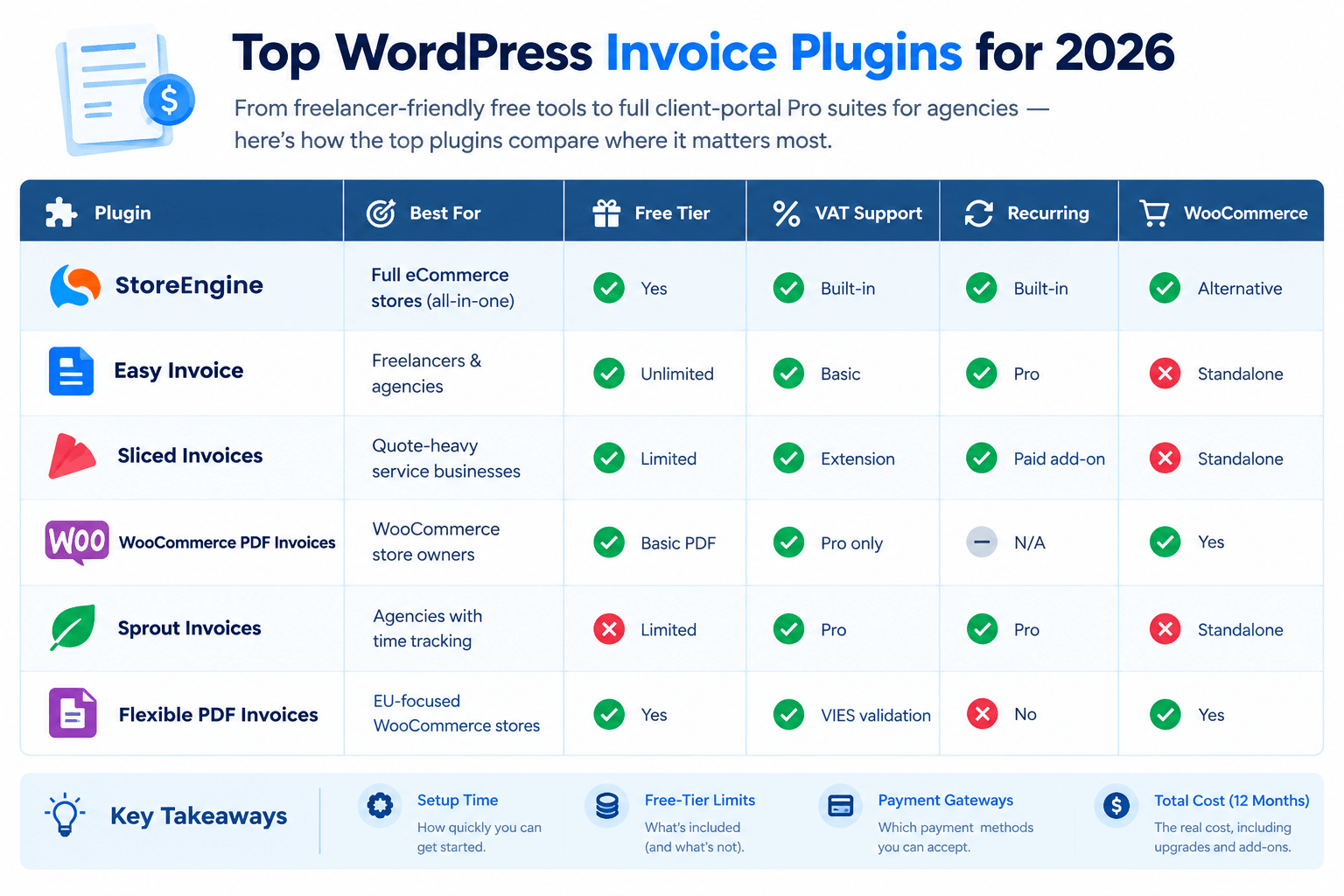
The top WordPress invoice plugins for 2026 range from freelancer-friendly free tools to full client-portal Pro suites for agencies — and the best way to evaluate them is by what actually matters: setup time, free-tier limits, payment gateways included, and total cost over 12 months.
Here’s a clear comparison:
|
Plugin |
Best For |
Free Tier |
VAT Support |
Recurring |
WooCommerce |
|
StoreEngine |
Full eCommerce stores (all-in-one) |
✅ Yes |
✅ Built-in |
✅ Built-in |
✅ Alternative |
|
Easy Invoice |
Freelancers & agencies |
✅ Unlimited |
✅ Basic |
✅ Pro |
❌ Standalone |
|
Sliced Invoices |
Quote-heavy service businesses |
✅ Limited |
✅ Extension |
✅ Paid add-on |
❌ Standalone |
|
WooCommerce PDF Invoices |
WooCommerce store owners |
✅ Basic PDF |
✅ Pro only |
N/A |
✅ Yes |
|
Sprout Invoices |
Agencies with time tracking |
❌ Limited |
✅ Pro |
✅ Pro |
❌ Standalone |
|
Flexible PDF Invoices |
EU-focused WooCommerce stores |
✅ Yes |
✅ VIES validation |
❌ |
✅ Yes |
#1 StoreEngine — The WordPress Invoice Plugin Built Into Your Store
Most invoice plugins are separate tools you bolt onto your store and hope they sync properly. StoreEngine takes a completely different approach.
StoreEngine ships automatic invoices, EU VAT and tax rules, and clean records for every order — all within a single plugin, without the bloat of stacking multiple add-ons.
Why this matters: When your invoicing system lives inside the same plugin handling your payments, subscriptions, and order management, everything is always in sync. No API mismatches. No missing order data. No duplicate entries.
What StoreEngine’s Invoicing Does
- Automatic invoice generation on every order — zero manual steps
- EU VAT rules built in — correct rates applied per customer location, automatically
- Tax-ready records for every transaction, audit-ready from day one
- Multi-currency support — sell in USD, EUR, GBP, or any currency; invoices reflect the right amounts (see StoreEngine’s international selling features)
- Subscription invoice automation — recurring orders generate recurring invoices on schedule (explore StoreEngine subscriptions)
- Clean order records synced with your full store data — payments, inventory, and billing in one place
And because StoreEngine handles physical products, digital downloads, memberships, and wholesale B2B orders — your invoicing works correctly across every product type from day one.
💡 Key Takeaway: With most plugins, you’re managing invoicing separately from your store. With StoreEngine, invoicing is just one more thing that runs automatically inside your existing workflow.
StoreEngine vs. WooCommerce for Invoicing — The Real Difference
If you’re currently running WooCommerce, you’ve probably noticed the invoicing situation requires at least one extra plugin (sometimes two or three). Here’s how the two compare on invoicing specifically:
|
Fecr |
StoreEngine |
WooCommerce + Plugin |
|
Invoice setup |
Built-in, zero configuration |
Requires separate plugin install |
|
VAT handling |
Automatic |
Varies by plugin |
|
Recurring invoices |
Native subscription integration |
Requires WooCommerce Subscriptions ($199/yr) |
|
Multi-currency invoicing |
Built-in (multi-currency) |
Requires extra extension |
|
Plugin conflicts |
None (one plugin) |
Common across multiple plugins |
|
Cost |
Single StoreEngine license |
WooCommerce + multiple paid add-ons |
Want the full cost breakdown? The StoreEngine vs WooCommerce comparison shows exactly where the savings add up.
Automatic Invoice Generation — How It Works in Practice
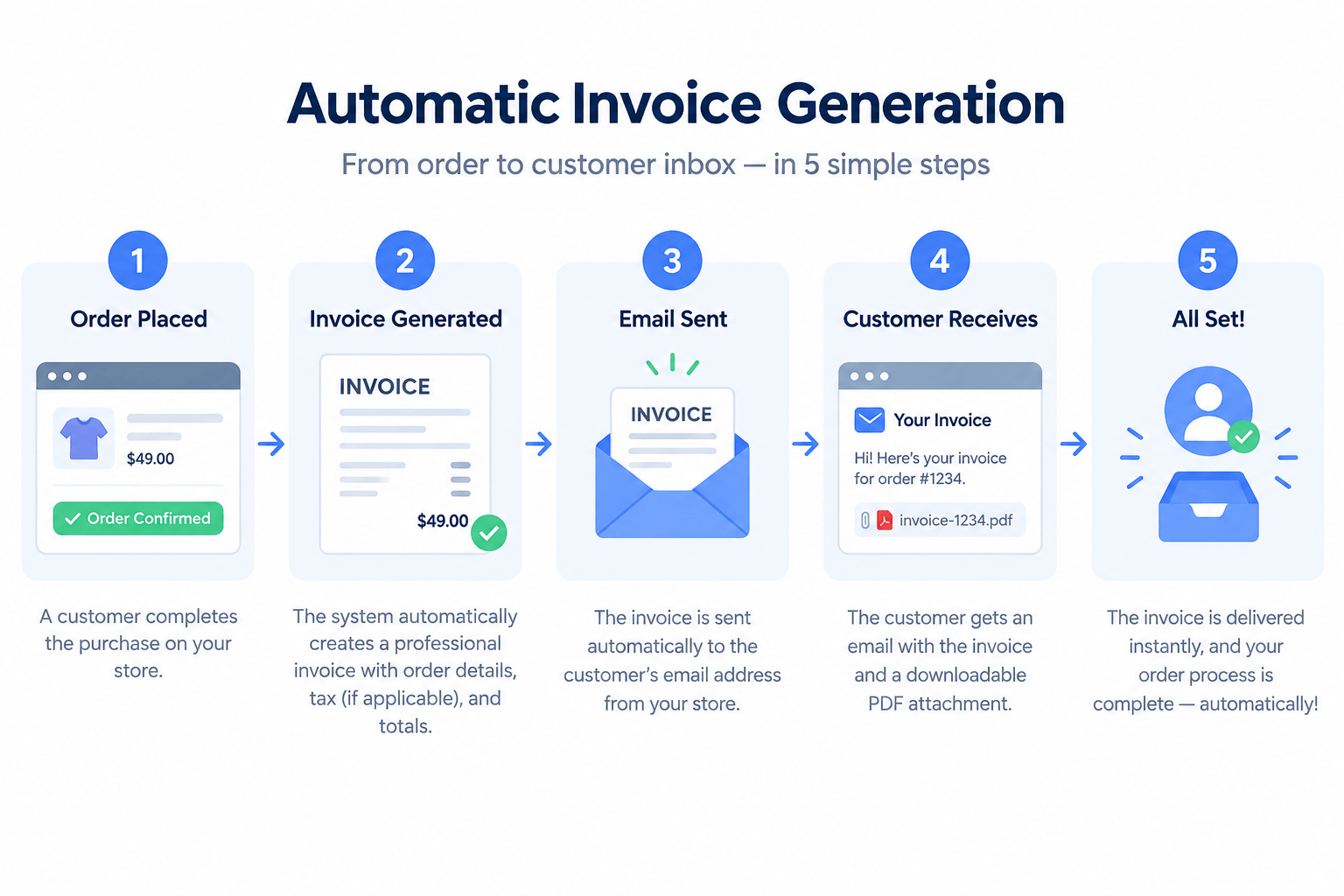
This is the part that actually saves your time. Here’s what automatic invoice generation looks like inside a well-configured WordPress store:
- Customer places an order — on any product type, at any price, in any currency
- Payment is processed — through Stripe, PayPal, Razorpay, Paddle, or any supported gateway (see all payment integrations)
- Invoice is generated automatically — numbered, dated, branded, VAT-calculated
- PDF is attached to the confirmation email — customer receives it instantly
- Record is stored in your dashboard — retrievable any time for accounting or audits
With StoreEngine, steps 2–5 happen without you touching a single button. That’s the point.
VAT-Ready Invoicing — Why This Is Non-Negotiable in 2026
If you sell to customers in the European Union, the United Kingdom, Canada, or Australia — VAT, GST, and consumption tax compliance isn’t optional. It’s the law.
Here’s what proper VAT-ready invoicing requires:
- Customer’s VAT number displayed on the invoice (for B2B transactions)
- Correct VAT rate applied per destination country
- Reverse charge notation for cross-border B2B EU sales
- Your business VAT registration number clearly displayed
- Sequential invoice numbering that cannot be altered retroactively
Getting this wrong isn’t just bad UX — it can result in tax penalties or lost VAT reclaim rights for your B2B customers.
StoreEngine’s built-in EU VAT and tax rules handle this automatically, ensuring every invoice generated meets compliance requirements regardless of where your customer is located.
For stores selling globally, pair this with StoreEngine’s cross-border eCommerce tax and currency features to cover every market correctly.
Recurring Invoice Plugin for WordPress — Subscriptions Done Right
Subscription businesses have a unique invoicing challenge: every renewal must generate a new invoice, delivered to the customer, recorded in your books — automatically, month after month.
EU sellers in particular need VAT calculation and VIES validation, which most standalone plugins only partially address — making native integrations with your billing system the cleaner solution.
StoreEngine’s subscription system handles this end-to-end. When a subscription renews:
- A new invoice is generated for that billing cycle
- The correct tax rates are applied (including any rate changes since the last renewal)
- The invoice is delivered to the customer automatically
- Your records update in real time
No cron jobs to monitor. No third-party sync issues. No missing invoices when a renewal fails and retries.
Explore how StoreEngine manages subscriptions and recurring billing with the same automated precision.
Free vs. Paid WordPress Invoice Plugin — What You Actually Get
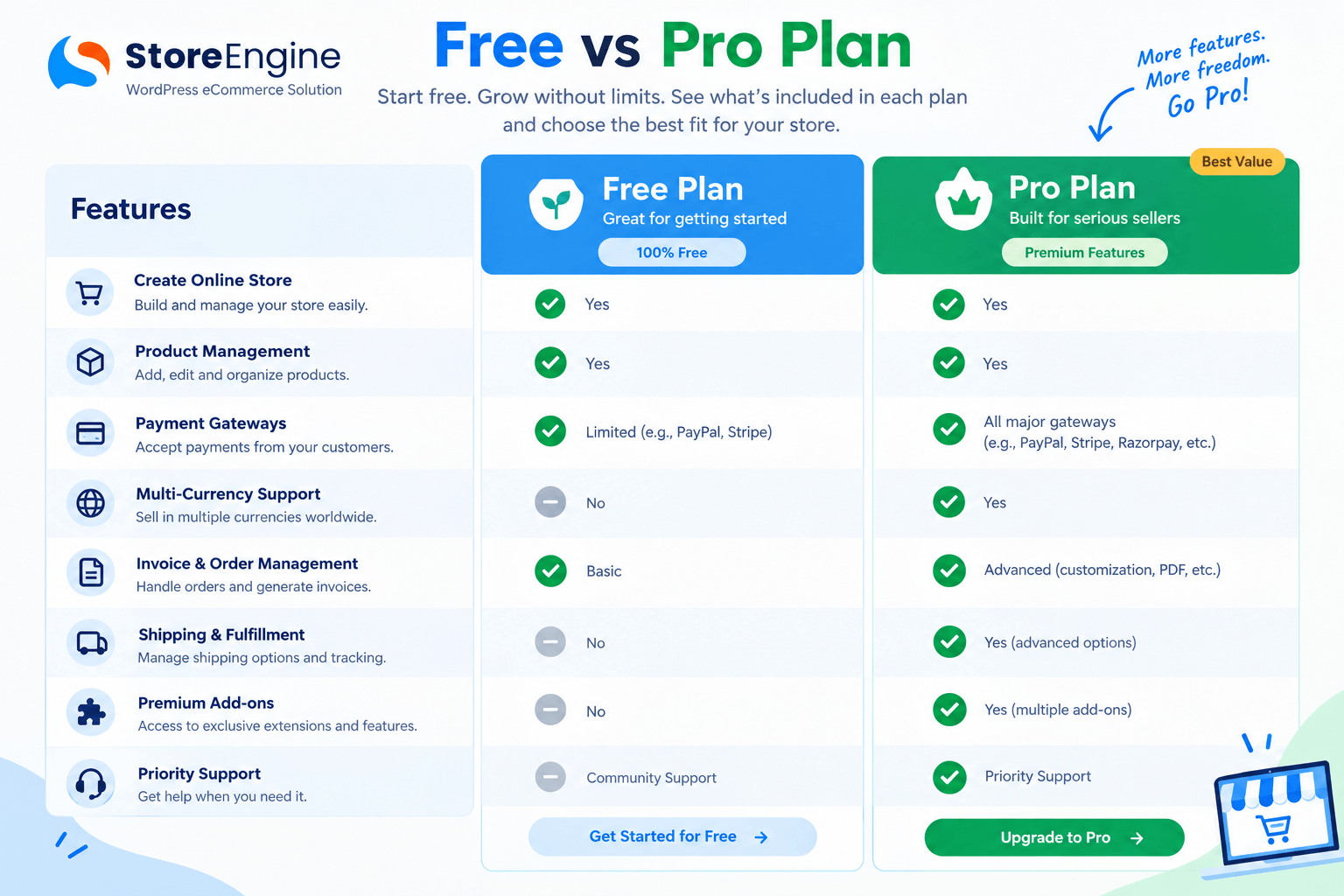
Here’s the honest picture:
Free invoice plugins are fine for:
- Stores processing fewer than 20–30 orders per month
- Businesses that don’t need VAT compliance
- Solo freelancers who only need basic PDF generation
You need a paid or all-in-one solution when:
- VAT/GST compliance is legally required for your market
- You run subscriptions with recurring invoices
- You sell in multiple currencies
- You need bulk invoice management, export, or accounting sync
- Your order volume makes manual work genuinely impossible
After helping hundreds of freelancers and agencies migrate from spreadsheets and overpriced SaaS tools, the real differentiator isn’t just the free tier — it’s whether the invoicing system actually fits how your store operates at scale.
StoreEngine’s free version on WordPress.org includes core invoicing features. The Pro version unlocks the full stack — subscriptions, multi-currency, advanced tax rules, and the complete eCommerce engine — in a single license. Compare Free vs Pro here.
WooCommerce Invoice Plugin — If You’re Already on WooCommerce
If migrating away from WooCommerce feels too big right now, there are dedicated WooCommerce invoice plugins worth considering:
WooCommerce PDF Invoices & Packing Slips — The most widely used. Automatically attaches PDF invoices to WooCommerce order emails. Clean templates. Lightweight. The Pro version adds EU VAT compliance and custom invoice numbering.
Flexible PDF Invoices for WooCommerce — Specifically built for EU compliance, with VIES VAT number validation and reverse charge support. It currently has around 6,000 active installs and a 4.4-star rating on WordPress.org.
However, if you’re already evaluating whether WooCommerce is the right fit long-term, it’s worth reading the WooCommerce vs. StoreEngine cost comparison before adding more plugins to an already complex setup.
Multi-Currency Invoice Plugin for WordPress — International Stores
Selling internationally means invoicing in the customer’s currency — or at minimum, displaying both currencies transparently.
A proper multi-currency invoice plugin for WordPress should:
- Display prices in the customer’s local currency
- Show the exchange rate and base currency (for your records)
- Apply the correct tax rate for the customer’s country
- Generate the invoice in the language the customer expects
StoreEngine handles all of this natively. The multi-currency WordPress guide walks through exactly how international pricing and invoicing works across different markets — including the UAE, EU, and Southeast Asia.
For stores selling globally, also review StoreEngine’s international selling features to ensure payment gateways, currencies, and tax rules all align.
How to Set Up Automatic Invoicing in WordPress (Step-by-Step)
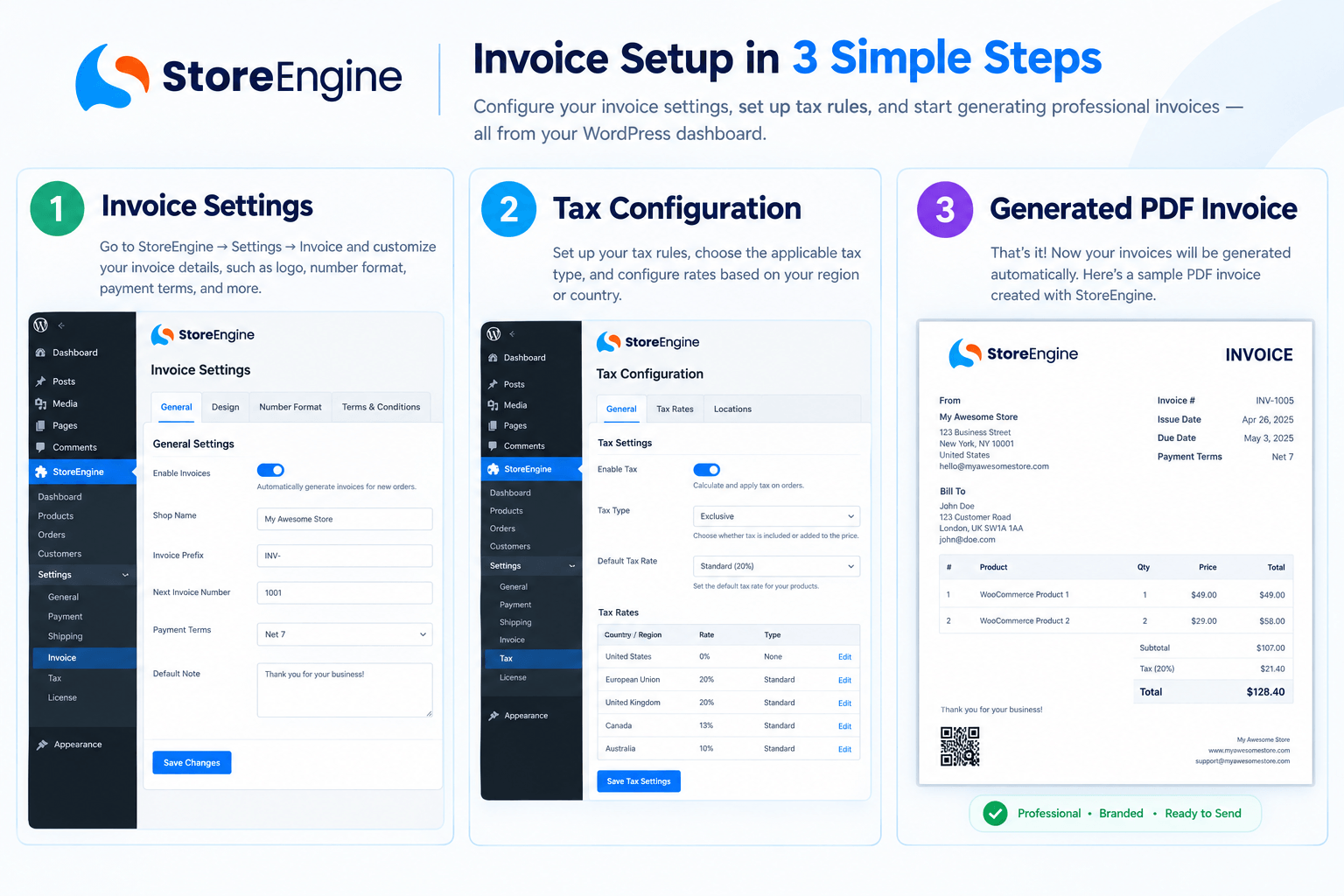
If you’re using StoreEngine, the setup is straightforward:
- Install StoreEngine from WordPress.org or via your license dashboard
- Run the guided setup — payment gateways, tax regions, and invoice settings are configured in sequence
- Set your invoice template — add your logo, business name, VAT registration number, and preferred numbering format
- Configure tax rules — select your operating country; EU VAT rules auto-populate based on customer location
- Enable automatic delivery — invoices attach to order confirmation and payment receipt emails automatically
- Test with a real order — place a test purchase and verify the PDF invoice is generated and emailed correctly
That’s it. From that point on, every order — physical, digital, subscription, or B2B — generates a compliant, branded invoice automatically.
For a detailed walkthrough, the StoreEngine documentation covers invoice configuration step-by-step.
Invoice Email Automation for WordPress
An invoice sitting in your dashboard does nothing until the customer receives it. Invoice email automation is what closes that gap.
With StoreEngine’s built-in order management and email triggers:
- Order completion → invoice generated + PDF attached to email, sent immediately
- Subscription renewal → new invoice generated + emailed on the renewal date
- Failed payment recovery → cart abandonment and payment recovery flows trigger automated follow-up with updated invoice
- Manual resend → one-click resend from the order dashboard for customer requests
This level of automation is what separates a store that handles 10 orders a week from one that handles 500 — without adding staff.
PDF Invoice Generator for WordPress — Printable & Downloadable
Every invoice your store generates should be:
- Downloadable by the customer from their order confirmation email
- Printable in standard A4 or US Letter format
- Branded with your logo and color scheme
- Legally formatted — invoice number, date, payment terms, itemized breakdown, and tax line
- Storable in your backend for easy retrieval during audits
StoreEngine generates PDFs that meet all of these requirements. Customers can download their invoice directly from the email or from their account area — reducing support requests and increasing trust.
For B2B wholesale buyers, the wholesale and B2B selling features ensure invoice formats match what procurement teams expect.
The Bottom Line
Manual invoicing is a tax on your time. And in 2026, there’s no excuse for paying it.
The right WordPress invoice plugin should do three things without you touching it: generate a professional invoice the moment an order completes, apply the correct tax rules for wherever your customer is, and deliver that invoice directly to their inbox.
Most plugins do one or two of these well. Few do all three. And almost none do it inside the same system handling your payments, products, and subscriptions — which means eventual sync errors, plugin conflicts, and billing records that don’t quite match your actual orders.
StoreEngine is built differently. Invoicing isn’t a bolt-on — it’s woven into the same engine that runs your entire store. Whether you’re selling digital products, running subscriptions, managing a multi-vendor marketplace, or processing B2B wholesale orders — every order generates a correct, compliant, branded invoice automatically.
No extra plugin. No extra cost. No extra headache.
Ready to automate your store’s invoicing? Build your store with StoreEngine →
Frequently Asked Questions
What is the best free WordPress invoice plugin?
For standalone invoicing, Easy Invoice offers a generous free tier with unlimited invoices and PDF generation. For stores that want invoicing built into their eCommerce system — including VAT compliance and multi-currency support — StoreEngine’s free version is the stronger starting point because it grows with your store without requiring additional plugins.
Can I create an invoice in WordPress without WooCommerce?
StoreEngine is a standalone WordPress eCommerce plugin that handles invoicing independently of WooCommerce. You don’t need WooCommerce to generate professional, VAT-compliant invoices for your orders.
Does WordPress have a built-in invoice generator?
No — WordPress does not include invoicing natively. You need a dedicated WordPress invoice generator plugin. StoreEngine includes this functionality as part of its full commerce stack, so you’re not adding a separate plugin for a single feature.
What is the best WordPress invoice plugin for WooCommerce?
If you’re staying on WooCommerce, WooCommerce PDF Invoices & Packing Slips is the most widely used option. For EU VAT compliance specifically, Flexible PDF Invoices for WooCommerce adds VIES validation. However, if your store is growing and you’re stacking multiple add-ons, it may be worth evaluating StoreEngine as a WooCommerce alternative.
Do I need a paid plugin for VAT-compliant invoices?
For basic EU VAT rates, some free plugins handle this adequately. For VIES validation, reverse charge notation, and multi-country compliance, you’ll generally need a paid plan or an all-in-one system like StoreEngine that includes these features as standard.
Can WordPress handle recurring invoices for subscriptions?
Yes — but only with a plugin that supports subscription billing. StoreEngine handles recurring invoices natively as part of its subscription and recurring billing system, generating a new invoice automatically on every renewal cycle.
What’s the difference between a WordPress billing plugin and an invoice plugin?
A billing plugin typically handles payment collection at checkout. An invoice plugin creates a formal billing document after payment — numbered, formatted for accounting, and compliant with tax regulations. StoreEngine handles both within the same system.