


You have 23 orders to fulfill today. Twelve go to Dhaka — that is Pathao. Eight go outside Dhaka — that is Steadfast. Three go to a corporate client who insists on their own courier. So you open three browser tabs, log in to three separate dashboards, manually copy order details into each one, and pray you do not mix up a recipient address. According to Verte Research, cited by Shipway, 91% of customers actively track their packages — often multiple times per day. When your shipping operations are fragmented across separate portals, the errors that cause delayed or misrouted packages are not hypothetical. They are what happens when the process depends on manual copy-paste under time pressure.
There is a better approach. Couriers management inside StoreEngine centralizes the entire shipping workflow — configuring providers, assigning orders, monitoring delivery status — in the same admin dashboard you already use to run your store. No separate logistics app. No external subscription. No context-switching between systems.
By the end of this article, you will understand exactly how StoreEngine’s Couriers Management feature works, how to set up multiple courier providers, and how the order-to-courier assignment process eliminates the manual handoff that slows most stores down.
Quick Answer: What Is Couriers Management?
Couriers management is a centralized system for configuring, organizing, and assigning shipping providers — so every order goes to the right courier without manual cross-referencing between separate platforms.
- What the feature is: A built-in StoreEngine module that lets you configure multiple courier providers and manage delivery operations from a single admin dashboard.
- Core mechanism: You set up each courier provider once; when an order arrives, you assign it to the right provider directly from the order screen — no external tool required.
- Who it is for: WordPress store owners selling physical products who use more than one courier or plan to as they grow.
- Main benefit: Eliminates the need to log into separate courier portals, manually copy order data, or subscribe to a third-party logistics aggregator.
- How to get started: Go to StoreEngine’s Couriers Management feature, configure your first provider in the shipping settings, and assign it to an order.
What Is Couriers Management? (And Why Most Stores Handle This Wrong)
Most stores do not have a courier management system. What they have instead is a patchwork: one courier’s website bookmarked, another accessible through a separate app, order details copied manually from the store admin into each. As NimbusPost documents in their ecommerce shipping analysis, this “operational sprawl” means teams spend hours reconciling data across different dashboards, rate cards, and invoice formats — instead of fixing actual delivery problems.
The standard workaround is a standalone logistics aggregator: a third-party SaaS platform you connect to your store, which then connects to multiple couriers on your behalf. This solves the multi-courier problem, but it adds an external dependency, a separate subscription, and an integration layer that needs maintenance whenever either your store or the aggregator updates.

StoreEngine takes a different approach. Courier management is built directly into the plugin — not connected to it, not bolted on as an integration, but inside the same admin environment where you manage products, orders, and payments. You configure your courier providers once inside StoreEngine. From that point forward, every order assignment happens in the same screen where you view the order. That distinction — native vs bolted-on — is what makes the workflow difference concrete, and the next section shows where that friction actually costs you.
The Real Cost of Managing Couriers Outside Your Store
The friction of multi-courier shipping is easy to underestimate when you are processing a handful of orders per week. It compounds very fast as volume grows.
1. The Tab-Switching Tax
Every courier portal is a separate system with separate credentials. Logging in, navigating to order entry, keying in the recipient’s name, address, phone number, and product details — doing that three times per fulfillment cycle — is not just slow. It is where copy-paste errors happen. The wrong postal code on the wrong courier’s system gets noticed only when the customer asks where their package is.
2. The Assignment Confusion
When courier assignment happens outside your store’s order system, there is no record inside the store of which order went to which provider. A teammate asks “did order #1042 go to Steadfast or Pathao?” and the answer requires searching the external courier portal. This seems minor. Across 50 orders a week with two team members, it is a consistent source of fulfillment mistakes.
3. The Status Blind Spot
Checking delivery status means opening each courier’s tracking portal separately. There is no single view of where all your in-transit orders are. As Wayfindr’s ecommerce logistics integration guide notes, customers checking your support channel about package status while you are “frantically checking three different dashboards” is exactly the scenario that erodes trust and wastes team time.
4. The Scale Problem
Each new courier you add multiplies the manual process. A third courier for regional coverage does not just add one more task — it adds one more credential to manage, one more portal to check, one more manual data-entry flow. Without a centralized system, growth in courier relationships directly increases operational overhead in a way that never becomes more efficient.
What this actually solves is not just convenience — it is the removal of error-prone manual processes from the part of the business that directly affects customer experience. Getting a package to the wrong address is harder to recover from than getting an order total wrong.
How StoreEngine’s Couriers Management Works: The Centralized Approach
StoreEngine’s Couriers Management is the admin module that lets you configure multiple shipping providers, assign orders to specific couriers, and monitor delivery workflow status — entirely from within the StoreEngine dashboard.
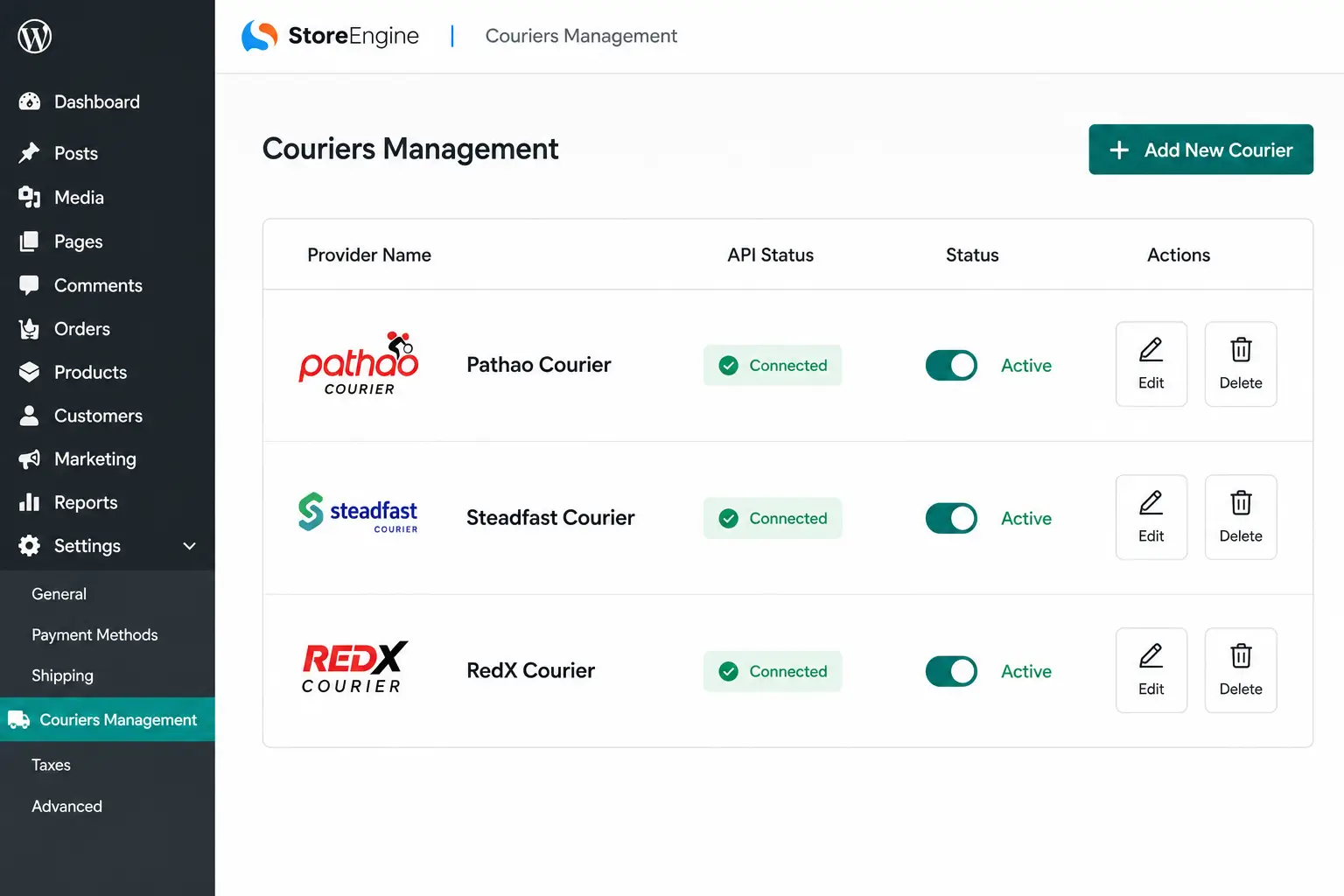
Here is how the system is structured:
The Provider Layer
This is where courier companies live as configured entities inside StoreEngine. You create a provider record for each courier — giving it a name, entering relevant credentials or identifiers, and setting its status to active. Once active, that provider becomes an option in the order assignment flow.
The provider layer solves a problem that sounds small but matters operationally: when a courier record exists inside your store system, it creates a consistent reference point. Every order assigned to “Pathao” uses the same provider configuration. There is no ambiguity about which Pathao account or which connection details.
The Order Assignment Layer
This is where individual orders connect to specific couriers. When an order is ready to be fulfilled, you select the appropriate courier provider directly from the order management screen — the same screen you use to review order details, update status, or generate an invoice. The assignment is recorded against the order, making it visible to anyone who views that order in the admin.
In practice, this matters most when multiple team members handle fulfillment. When the courier assignment lives in the order record inside StoreEngine, anyone with admin access can see which courier has been assigned without going to an external platform.
The Status and Tracking Layer
Once an order is assigned and fulfilled through a courier, the delivery workflow status is trackable within StoreEngine. You can monitor the delivery process without leaving the admin environment. For store owners who previously had to check a separate portal to answer a customer’s “where is my order?” question, this reduces the lookup from multiple steps to one.
Setting Up Multiple Courier Providers in StoreEngine
Configuring your first courier provider takes a few minutes. The second and third take less time — the process is the same each time.
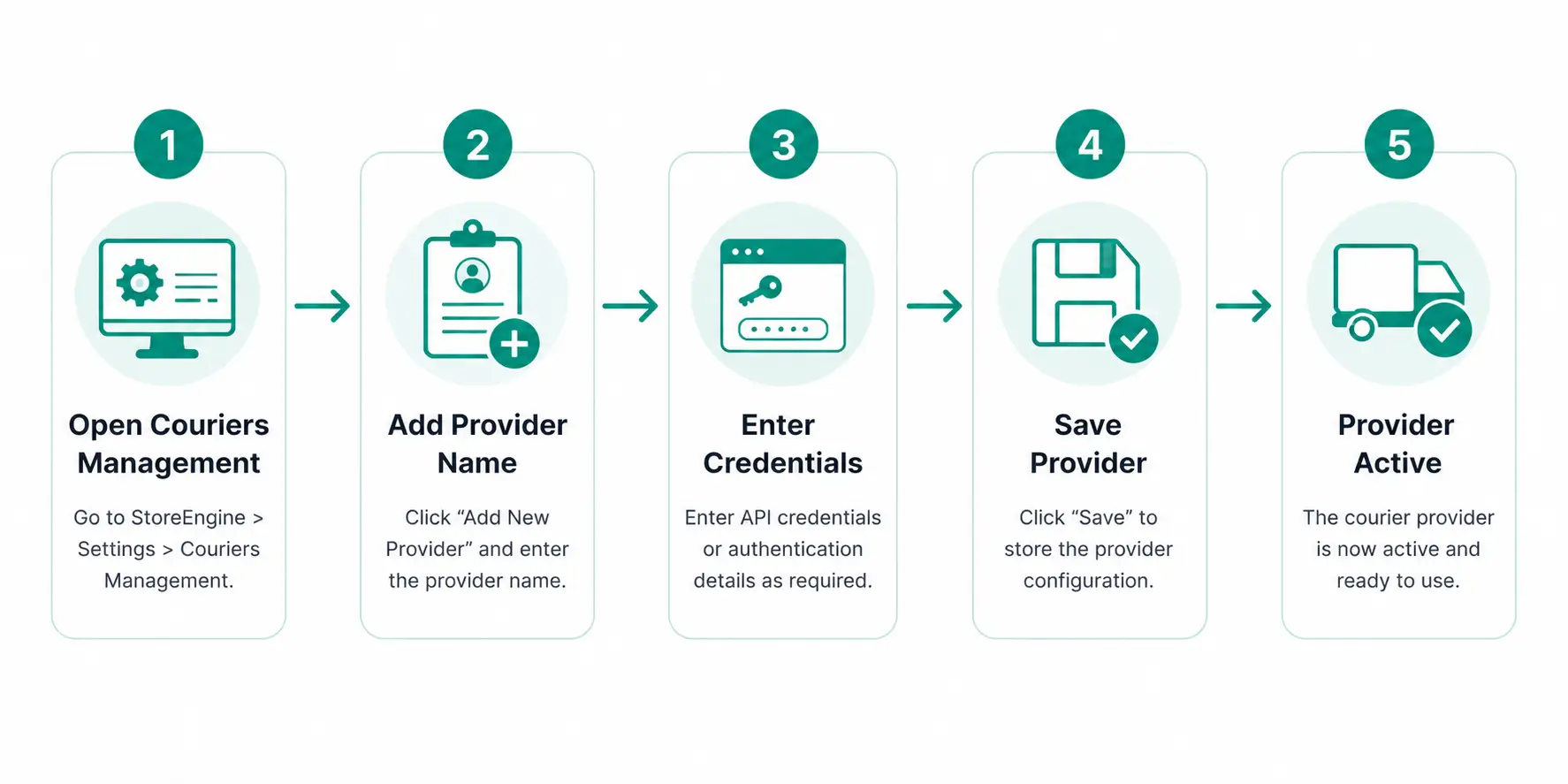
Step-by-Step Configuration
Step 1 — Open Couriers Management in StoreEngine Admin
Navigate to the Couriers Management section from within the StoreEngine dashboard. This is where all configured courier providers are listed and where you add new ones.
Step 2 — Add a New Courier Provider
Click to add a new provider. Give it a clear, recognizable name — the name you use here is what appears in the order assignment dropdown. “Pathao — Dhaka Zone” is more useful than just “Pathao” if you run multiple configurations for the same courier.
Step 3 — Enter Provider Details
Fill in the relevant configuration details: credentials, contact information, or identifiers your team will need to reference. StoreEngine stores this centrally — your team does not need to go to the courier’s own portal to find these details when processing an order.
Step 4 — Set Provider Status to Active
Activate the provider. Only active providers appear in the order assignment options. This means you can pre-configure a courier provider before you are ready to use it, or deactivate one you have temporarily stopped using, without deleting the configuration.
Step 5 — Repeat for Each Additional Courier
The process is identical for each additional provider. If you use five couriers across different delivery zones, you configure five providers. The unified shipping dashboard shows all of them in one list.
The part most workflows get wrong is treating courier setup as a one-time task when it is actually ongoing. Providers change credentials, service zones shift, and new delivery partners get added. Because all of this lives in one place inside StoreEngine, updating a provider record is a single admin action — not a search through a separate platform’s settings.
Order-to-Courier Assignment: How to Route Each Order to the Right Delivery Partner
Order-to-courier assignment is the mechanism that connects a specific order to a specific delivery partner — creating a permanent record inside the store of which courier is responsible for fulfilling that shipment.
How Assignment Works in Practice
When an order comes in and is ready to ship, go to that order in the StoreEngine admin. From the order view, select the assigned courier from the configured providers. The system records which provider was selected and makes that visible on the order record.
Here is what that looks like for a real shipping workflow:
- Order #1042 — customer in Mirpur, Dhaka → assign to Pathao
- Order #1043 — customer in Chittagong → assign to Steadfast
- Order #1044 — corporate client with dedicated courier → assign to custom provider
Each assignment takes seconds. All three assignments are visible in the order list without opening each order individually. Anyone on the team can see at a glance which courier has each order.
Courier Status Management After Assignment
Once a courier is assigned, the order’s delivery workflow status can be updated as the shipment progresses. Delivery process tracking within StoreEngine means that when a customer asks about their order, the answer is in the same place you manage the order — not behind a separate login.
The part most teams overlook: courier status management is not just useful for customers. It is useful internally. A fulfillment team that can see which orders are pending assignment, which are in transit, and which have been delivered — from a single admin screen — makes fewer errors than one working from memory or separate tracking portals.
Before and After: Manual Courier Assignment vs StoreEngine Couriers Management
|
Workflow Step |
Manual Approach (Before) |
StoreEngine Couriers Management (After) |
|
Accessing courier system |
Log into each courier’s portal separately |
Open StoreEngine admin — couriers already configured |
|
Entering order details |
Copy recipient name, address, phone manually from store to courier portal |
Assignment made from within the order screen — no re-entry |
|
Recording which courier has the order |
Not recorded in store; must check external portal |
Visible on the order record inside StoreEngine |
|
Checking delivery status |
Open each courier portal separately |
Tracked within StoreEngine’s delivery workflow |
|
Adding a new courier |
New manual process from scratch |
Configure one new provider record in Couriers Management |
|
Team visibility |
Only the person who placed the booking knows |
Everyone with admin access sees courier assignment per order |
What You Actually Get: Outcomes When Courier Management Lives in Your Store
One Dashboard Instead of Multiple Logins
The most immediate operational change is the reduction in context-switching. All shipping providers are accessible from one location. You do not log into one portal to book a shipment, then another for the next order. The booking and assignment flow runs through StoreEngine.
Industry data from multi-carrier shipping platforms consistently shows that businesses gain 15–25% cost efficiency when they gain real visibility across providers and can select the right courier per shipment. That visibility only happens consistently when the selection decision sits in the same workflow as the order — not in a separate system that adds friction to every choice.
Managing multiple couriers becomes even more critical when running a platform with multiple sellers. If you plan to scale, learn how to build a multi vendor marketplace on WordPress and streamline vendor-specific shipping options.
Every Order Has a Courier on Record
The second outcome is data quality. When order-to-courier assignment happens inside StoreEngine, the order record contains the courier assignment. Six months later, if there is a dispute about a specific shipment, the store admin shows which courier handled it. This is the kind of record that saves hours when problems surface.
Shipping Workflow Without the Switching Cost
Shipping workflow management becomes an integrated step in order processing, not a separate operational task. The order comes in, you review it, assign a courier, update the status. Everything happens in one environment. For stores processing 30, 50, or 100+ orders per week, this removes what is often the most repetitive manual work in the fulfillment cycle.
Scale Without Adding Overhead
Support for multiple delivery partners grows with your business. A store that starts with one courier can add a second for regional coverage without changing how the rest of the fulfillment process works. The Couriers Management configuration is separate from the order workflow — adding a new provider does not disrupt anything already in motion.
Courier Management for Small Business: One Provider or Multiple?
The common assumption is that courier management tools are for large operations. The reality is different — the pain of fragmented courier operations is felt earliest by small businesses, not large ones. Small operations cannot absorb the overhead of manual processes the same way.
Courier dispatch software and centralized courier management are not just enterprise tools. They are most useful precisely when a business is growing fast enough to use multiple couriers but not yet big enough to have a dedicated logistics team.
If You Currently Use One Courier
Configure that single provider in StoreEngine’s Couriers Management. The immediate benefit is not multi-courier switching — it is that the courier assignment is recorded on every order, your team has visibility, and you have a foundation to add a second provider without rebuilding the process. One provider configured inside the system is simpler to expand from than a manual process that has never been formalized.
If You Use Two or More Couriers
This is where centralized delivery operations pay off fastest. Different couriers for different zones, product types, or customer tiers — all configured in one place, all visible from one order screen. The assignment decision becomes explicit and recorded rather than implicit and remembered by whoever processed the shipment.
If You Are Scaling and Expect to Add Couriers
Scalable logistics management means the courier configuration does not become a bottleneck. When you add courier number four or five, it is one new provider record in StoreEngine — not a new manual workflow that every team member has to learn. The process for the fifth courier is identical to the process for the first.
What to Look for in Courier Management for Your WordPress Store
The old way of thinking about this is wrong. Most advice on managing multiple couriers defaults to recommending a standalone logistics platform — a separate SaaS subscription connected to your store via integration. This solves the multi-courier problem but creates a new one: two systems to maintain, two things that can break when one updates, and an ongoing monthly cost for a layer that did not need to exist.
For WordPress stores selling physical products, native courier management inside the ecommerce plugin is a cleaner architecture. Here is how to evaluate any solution against what actually matters:
|
Capability |
Why It Matters |
Standalone Logistics Tool |
StoreEngine Couriers Management |
|
Multiple courier support |
Use the right courier for each order |
Yes — but via external integration |
Yes — configured natively in admin |
|
Native in-store integration |
No sync lag, no separate login |
No — requires external platform |
Yes — same admin environment |
|
Order assignment from admin |
Recorded against the order |
No — happens in external tool |
Yes — visible on order record |
|
Delivery status tracking |
Answer customer queries without switching platforms |
Partially — status in external portal |
Within StoreEngine admin |
|
Adding new couriers |
No extra overhead as you scale |
New integration per courier |
One new provider record |
|
Cost |
Monthly overhead |
Additional subscription required |
Included in StoreEngine |
What this actually solves for a WordPress store owner is the decision of whether to build shipping operations inside the store or outside it. Building outside is the default because that is what most standalone tools assume. Building inside is what StoreEngine makes possible — and it is a meaningfully different operational reality once you have used both approaches.
Decision Framework: Is Couriers Management Right for You?
- If you sell physical products and use more than one courier → configure each provider in StoreEngine’s Couriers Management. Every order assignment becomes visible in the order record, and your team stops relying on memory or external portals to know which courier handled what.
- If you currently use a standalone logistics aggregator → StoreEngine Couriers Management covers the centralized provider management and order assignment that most stores use aggregators for. You may be able to simplify your stack by removing the external dependency.
- If you are just starting with physical product sales and only have one courier → set up that one provider anyway. The order assignment record it creates is useful from day one, and it makes expanding to a second courier a configuration task rather than a process redesign.
- If you run a multi-vendor store on StoreEngine → courier management becomes relevant at the order line level. Individual vendor orders can be routed to the appropriate courier provider, keeping fulfillment organized even when different vendors use different shipping partners.
FAQ
What is couriers management in ecommerce?
Couriers management is the centralized system that controls how shipping providers are configured, how orders are assigned to specific couriers, and how delivery status is tracked — all from one location. In an ecommerce context, it eliminates the need to manage each courier separately through that courier’s own portal or a disconnected external tool.
How do I manage multiple courier providers from one dashboard?
In StoreEngine, you configure each courier as a named provider inside the Couriers Management section. Once configured, all providers appear as options when assigning orders. You select the appropriate courier from the order screen — no separate login, no external platform. All assignments are recorded on the order.
Can I assign different orders to different couriers in StoreEngine?
Yes. Order-to-courier assignment works per order. When reviewing an order in the StoreEngine admin, you select which configured courier provider handles that specific shipment. Different orders in the same batch can go to different couriers — the assignment for each is recorded on its respective order record.
Do I need a separate courier app or plugin to manage shipping?
No. StoreEngine’s Couriers Management is built into the plugin. You do not need a third-party logistics aggregator, a separate courier management SaaS subscription, or additional integrations. Provider configuration, order assignment, and delivery workflow management all run within the StoreEngine admin environment.
What courier providers does StoreEngine support?
StoreEngine’s Couriers Integration connects to carriers including Pathao, Steadfast, and Shiprocket — pushing orders, generating shipments with tracking IDs, and syncing delivery status back automatically. Additional providers can be configured manually within the Couriers Management system. There is no locked-in list of approved couriers — you define the providers that match your delivery operations.
What is the difference between a shipping zone and a courier provider?
A shipping zone defines where you deliver and what rates apply — it is a geographic and pricing rule. A courier provider is the delivery company that physically fulfills the shipment. In StoreEngine, shipping zones handle rate presentation at checkout; courier providers in Couriers Management handle the assignment and fulfillment workflow after the order is placed. Both are separate configurations that work together.
Is StoreEngine’s Couriers Management suitable for small businesses?
Yes. The feature works whether you have one courier provider or five. For a small business using a single courier, the value is the order assignment record and the foundation for adding more providers without rebuilding the process. For a business using multiple couriers for different zones, the centralized dashboard eliminates the manual switching that becomes unsustainable as order volume grows.
How does courier status management work in StoreEngine?
After an order is assigned to a courier and dispatched, you can update and track the delivery workflow status within the StoreEngine admin. Delivery process tracking does not require opening a separate courier portal. Status updates are visible on the order record, so any team member can see the current delivery state without needing access to the courier’s own tracking system.
Can I add or remove courier providers without affecting existing orders?
Yes. Provider configuration in StoreEngine Couriers Management is independent of historical order data. Deactivating a provider removes it from new order assignment options but does not alter records of orders previously assigned to it. Adding a new provider does not affect any orders already in progress.