


Most membership pricing advice sounds like this: “Charge what you’re worth.” That’s not advice. That’s a feeling dressed up as a strategy.
The truth is, membership pricing strategy isn’t a gut call. It’s a set of specific decisions — how many tiers to offer, what to name them, what goes in each one, how to price monthly vs annual vs lifetime, and how to structure it so most buyers end up where you want them. Get these decisions right and you’ll earn more from the same number of members. Get them wrong and you’ll have 80% of your members on the cheapest tier, wondering why revenue isn’t growing.
This guide covers every part of that decision tree — tier structure, naming psychology, pricing formulas, billing periods, lifetime membership pricing, the in-house membership plan, and how to set all of it up in StoreEngine. By the end, you’ll have a complete pricing architecture, not just a number to test.
If you’re just getting started, read How to Sell Memberships on WordPress (Full 2026 Guide) first — this article picks up where that one leaves off and goes deep on the pricing layer specifically.
Quick Answer: Membership Pricing Strategy
What Is a Membership Pricing Strategy?
A membership pricing strategy is the complete system of decisions that determines how much you charge, how many tiers you offer, how billing periods are structured, and how members move between levels. It’s not just a price point — it’s the architecture that determines your conversion rate, your average revenue per member, and how easy it is for members to stay long term.
Here’s something most guides won’t say: tier design is where most membership businesses make their biggest mistakes. The instinct is to create multiple tiers quickly because it looks like a sophisticated pricing strategy. In practice, poorly designed tiers confuse prospects, create internal support complexity, and often result in the majority of members clustering in the cheapest tier regardless of what you intended.
Good tier design starts with one question: what are the genuinely different jobs that members are hiring this membership to do? Answer that first. The pricing follows.
How Many Tiers Should You Have?
The answer for almost every new membership is three. Here’s why:
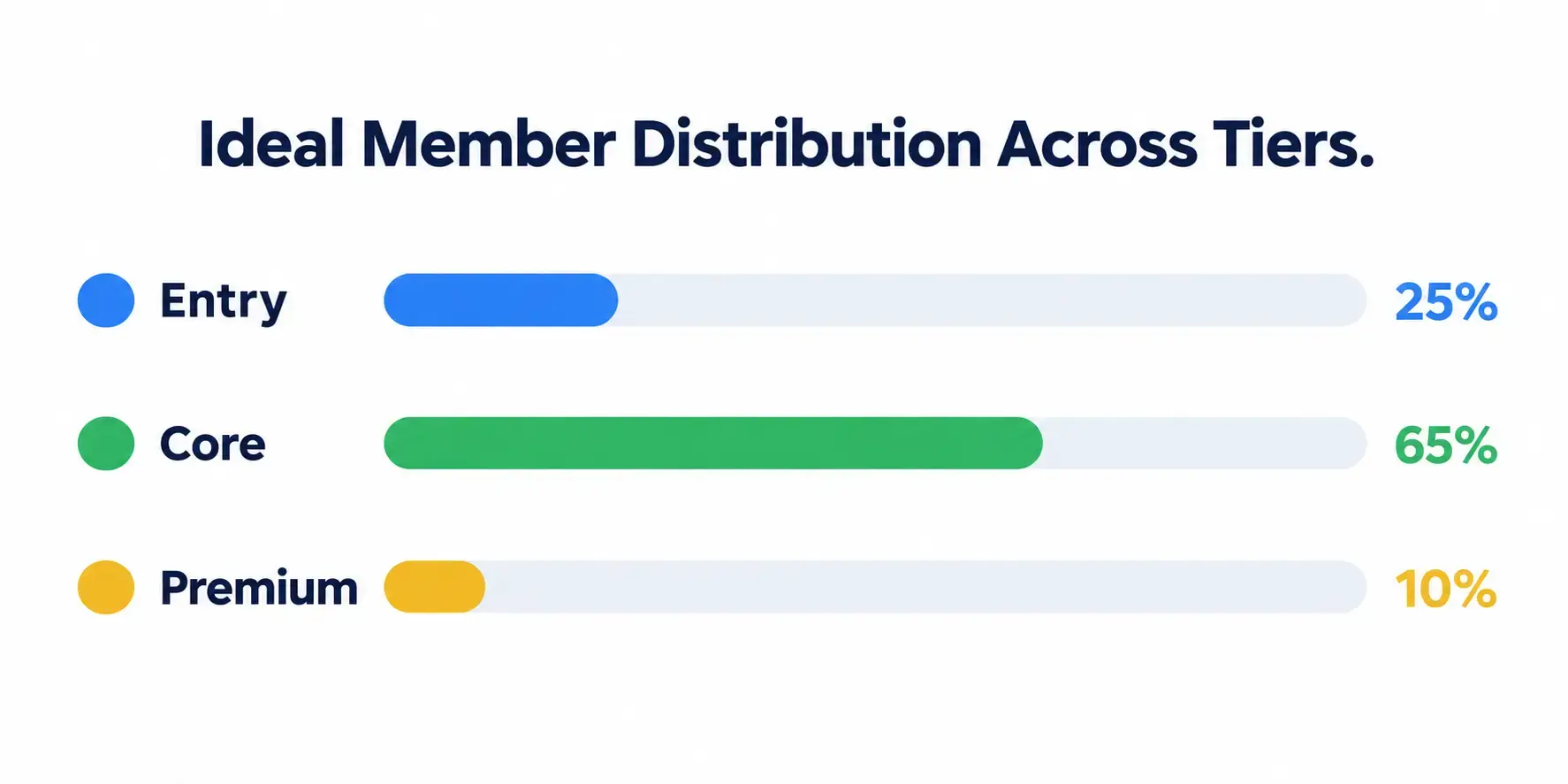
The three-tier structure looks like this:
If you launch and find 60%+ of members on the entry tier, your core tier isn’t differentiated enough. If fewer than 5% are on premium, the price gap is too large or the offer isn’t compelling. Both are fixable — but you need to know what to look for.
How to Name Your Membership Tiers
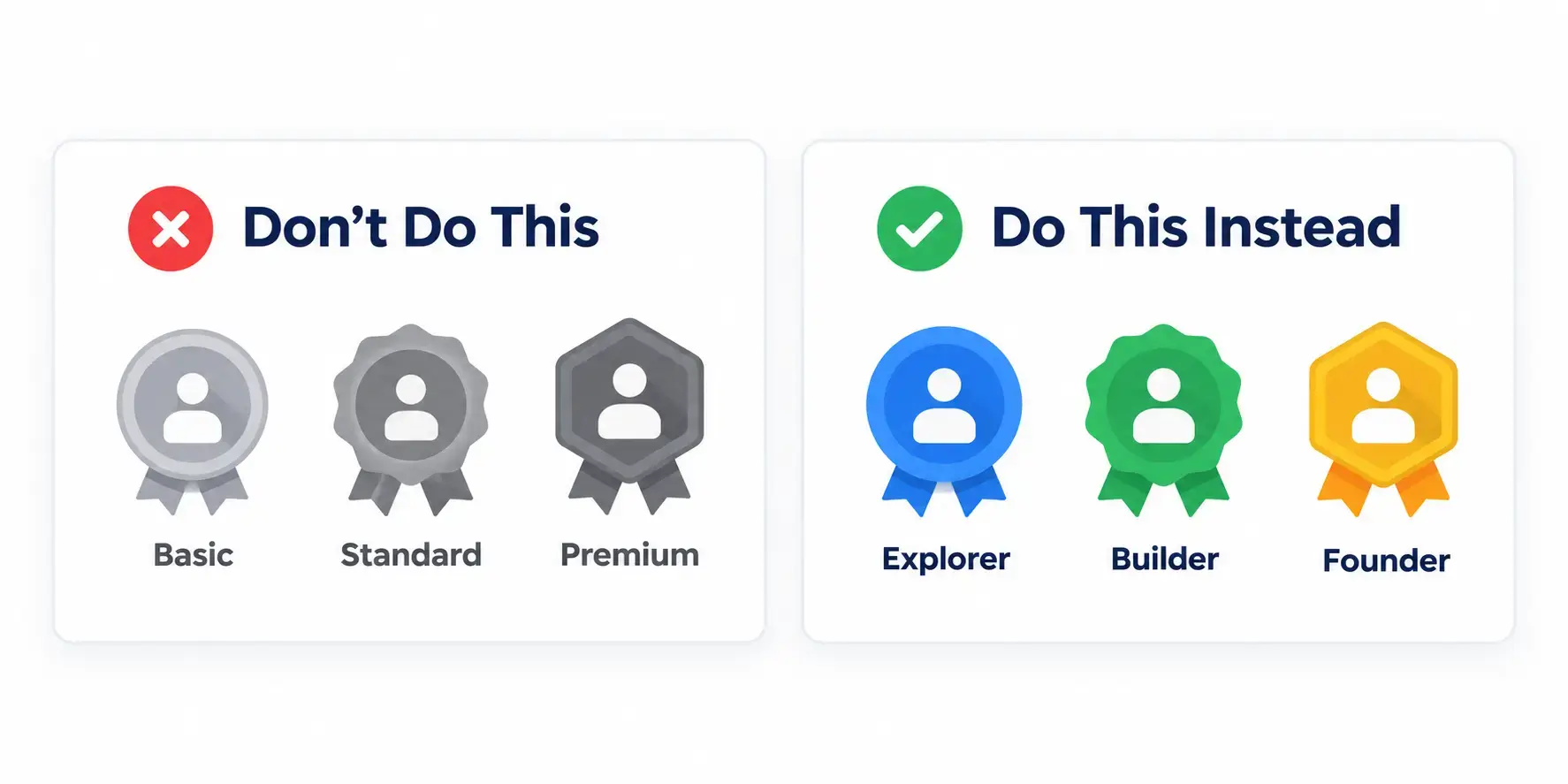
This is where most sites make a costly mistake. They name tiers “Basic / Standard / Premium” — and then wonder why conversion is flat.
Here’s the problem: if your entry-level tier is called “Basic,” it can make the first tier feel like it belongs to those beneath, which may discourage new members or make members feel like they are not valuable unless at the top. “Basic” signals limitation. Nobody wants to be basic.
Names do more than label a price point. They shape how members see themselves inside your community. A good name gives members a sense of identity — “this is where I belong, and that’s where I want to go.”
Three naming approaches that work:
1. Identity progression names
These names put members on a journey. Each tier feels like an achievement, not a purchase.
|
Niche |
Entry |
Core |
Premium |
|
Online learning |
Learner |
Practitioner |
Expert |
|
Fitness |
Starter |
Athlete |
Champion |
|
Professional development |
Associate |
Member |
Fellow |
|
Creator community |
Explorer |
Builder |
Founder |
2. Value-clarity names
These tell members exactly what they’re getting at each level. Best for content libraries and tool access.
Examples: Core / Pro / All-Access — Essential / Advanced / Complete — Insider / Inner Circle / VIP
3. Status + aspiration names
These work well for exclusive or prestige communities where belonging matters.
Examples: Member / Elite Member / Founding Member — Access / Priority / Private
The rule of thumb: tier names should help your members justify your price. If someone has to explain to a friend why they pay $99/month, “I’m a Pro member” is easier to say — and easier to feel good about — than “I’m on the Standard plan.”
What to avoid: Basic, Standard, Economy, Lite. These names actively depress perceived value. If your entry tier is your lightest offering, call it Core, Starter, or Essential. It’s the same product with a name that doesn’t apologize for itself.
Membership Pricing: The Formula That Actually Works
Here’s the most common membership pricing mistake: setting a price based on what you’d pay, or what a competitor charges, or what “feels right.” These are emotional decisions wearing rational clothing.
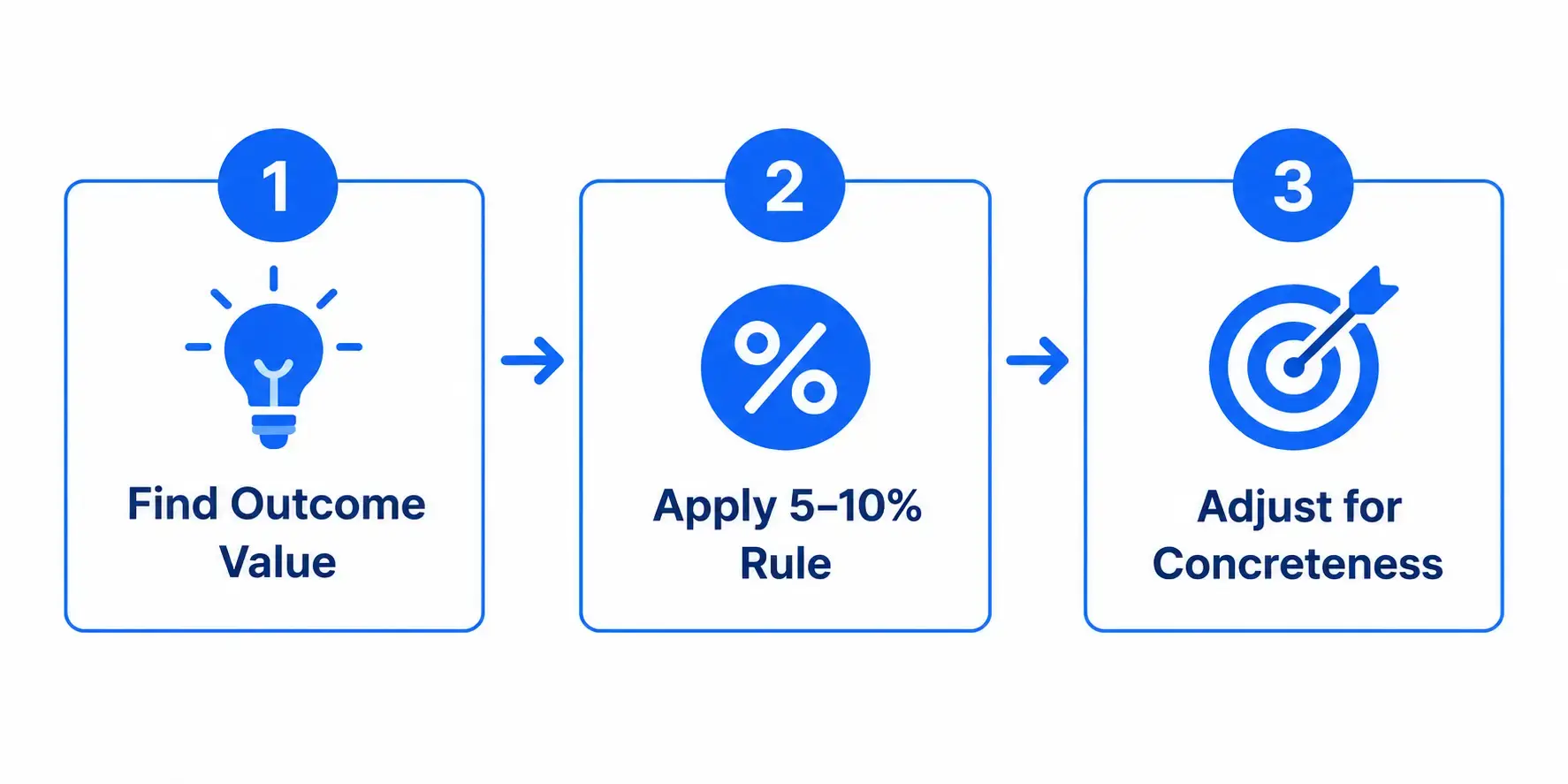
The right approach uses outcome value:
Step 1: Identify the monthly dollar value of the result you deliver.
Your membership helps freelancers land new clients. An average new client is worth $1,500/month. Your membership delivers one new client per quarter — $500/month in average value.
Step 2: Price at 5–10% of that monthly value.
5–10% of $500 = 25–50/month for the entry tier. 75–150/month for core. 200–300/month for premium.
Step 3: Adjust for how concrete and measurable the result is.
Abstract outcomes (“feel more confident”) support lower percentages. Specific, verifiable outcomes (“earn $X more, lose Y pounds, get Z certification”) support higher ones.
The anchor effect matters here. Your highest tier makes your middle tier look like the smart, balanced choice. This is one of the most powerful membership tier best practices for increasing conversions. Price your premium tier at 2–3x the core tier, not just slightly more. The contrast needs to be significant enough that the core tier feels like obvious value.
Monthly vs Annual vs Lifetime Membership Pricing
Each billing period serves a different strategic purpose. Most membership sites offer monthly by default and leave annual and lifetime as afterthoughts. That’s a missed opportunity.
For a full breakdown of how membership payment structures compare to other models, see Membership vs Subscription vs One-Time Pricing — this section focuses specifically on how to price within a membership model.
Monthly Billing
Monthly is the lowest commitment barrier. Easy to join, easy to cancel. It generates the most signups but carries the highest churn risk.
When to use monthly as your primary: new memberships where you’re still proving value, content that’s genuinely time-sensitive (weekly news, live events), or audiences who are allergic to long-term commitments.
The downside: every billing cycle is an implicit renewal decision. When the perceived value dips below the price — even for a week — cancellation becomes the path of least resistance.
Annual Billing
Annual billing is a retention strategy disguised as a discount. A member who pays $470 upfront is significantly less likely to cancel in month three than a member paying $49/month — not because the product got better, but because the psychology of sunk cost and commitment works in your favor.
Standard discount for annual: 15–20% off the monthly equivalent. If monthly is $49, annual should land at 470–499 (not $588, which is full price and gives the member no reason to commit). Show the savings prominently: “Save $119/year” outperforms “Pay less per month” as a framing.
The 2025 Membership Marketing Benchmarking Report puts the sector median renewal rate at 84%. Annual billing members consistently sit at the top of that range. Monthly members cluster at the bottom. The gap is almost entirely explained by the billing structure, not the product quality.
Lifetime Membership Pricing — The Right Formula
Lifetime pricing is where most membership sites either leave money on the table or price themselves into a loss. The mistake is using “2–3x annual” as the formula. That number has no relationship to your actual member value.
The right formula uses Member Lifetime Value (LTV):
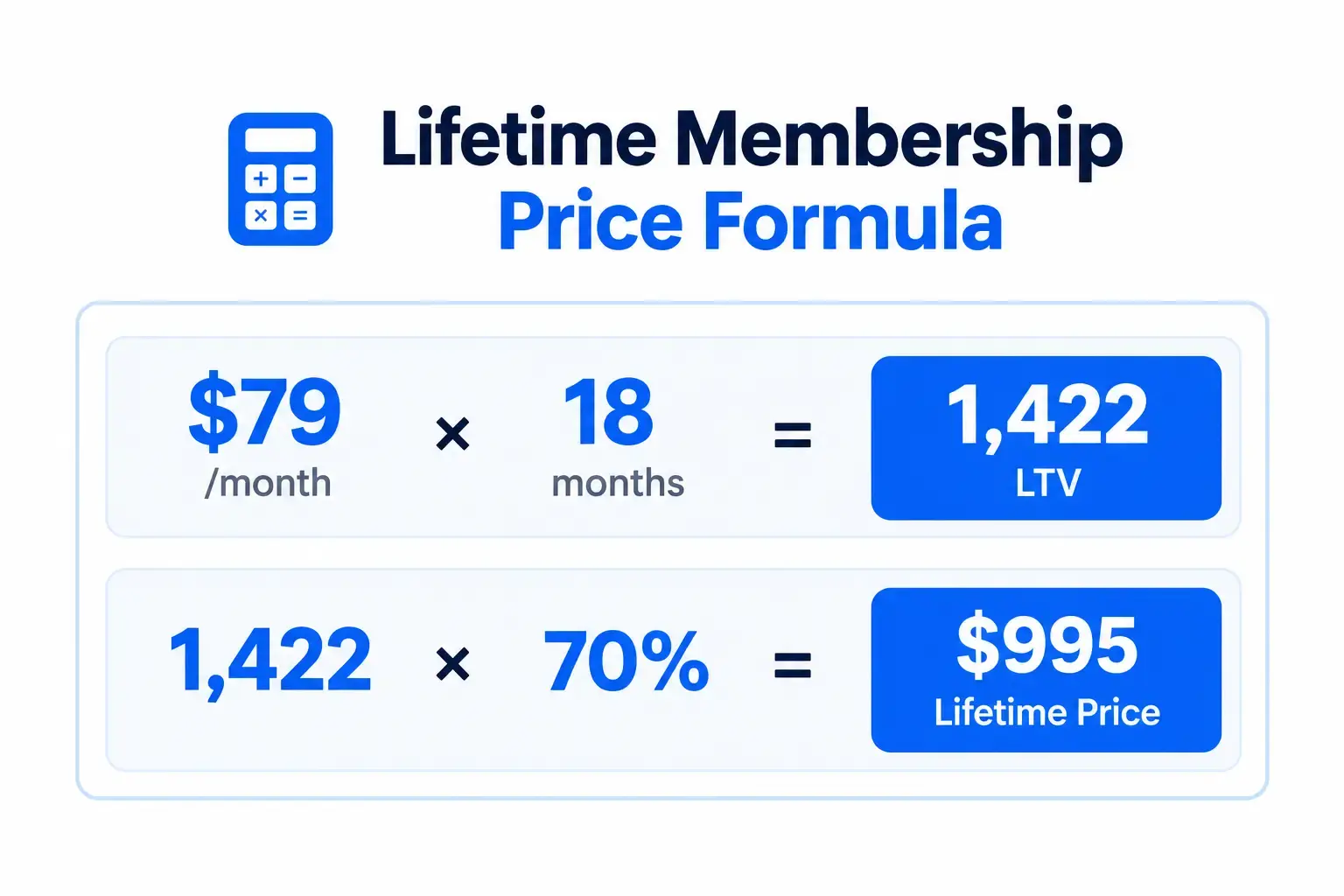
LTV = Average Monthly Price × Average Member Tenure (months)
Then: Lifetime Price = LTV × 60–80%
Example:
Why 60–80% of LTV? The member saves money versus staying monthly long-term. You get cash upfront and eliminate churn risk on that member. Both sides win.
Price below 60% of LTV and you’re subsidising your most loyal long-term members. Price above 80% and the lifetime offer stops feeling like a deal. The basic LTV formula is ARPU ÷ churn rate — straightforward to calculate once you have a few months of billing data.
When to offer lifetime pricing:
When not to: active live communities where the value depends on current members being present, or anything where the content will become dated quickly.
What Is an In-House Membership Plan?
An in-house membership plan is a membership tier that doesn’t appear on your public pricing page. It’s offered privately — directly to specific customers, partners, employees, or groups — at custom pricing or with custom access rules.
Common uses:
In StoreEngine, you handle in-house plans by creating a private Access Group — one that’s not listed on the public pricing page shortcode. The admin adds the specific users or generates a private purchase link and shares it directly. Membership activates on purchase exactly as a public tier would, but it’s invisible to general visitors.
This is useful for B2B deals where the pricing is custom per account. You’re not creating a new product — you’re controlling who can see and access it.
The Membership Funnel: How Your Tier Structure Drives Upgrades
A membership funnel is the path a member takes from their first awareness of your program through joining, upgrading, and staying long-term. Your tier structure is the funnel architecture — and most sites build it without thinking about upgrades at all.
For a broader look at how this fits into your overall store sales process, see How to Build a Sales Funnel on WordPress (No External Tools) — that guide covers the full funnel from awareness to checkout, while this section focuses specifically on how membership tiers function as an upgrade path.
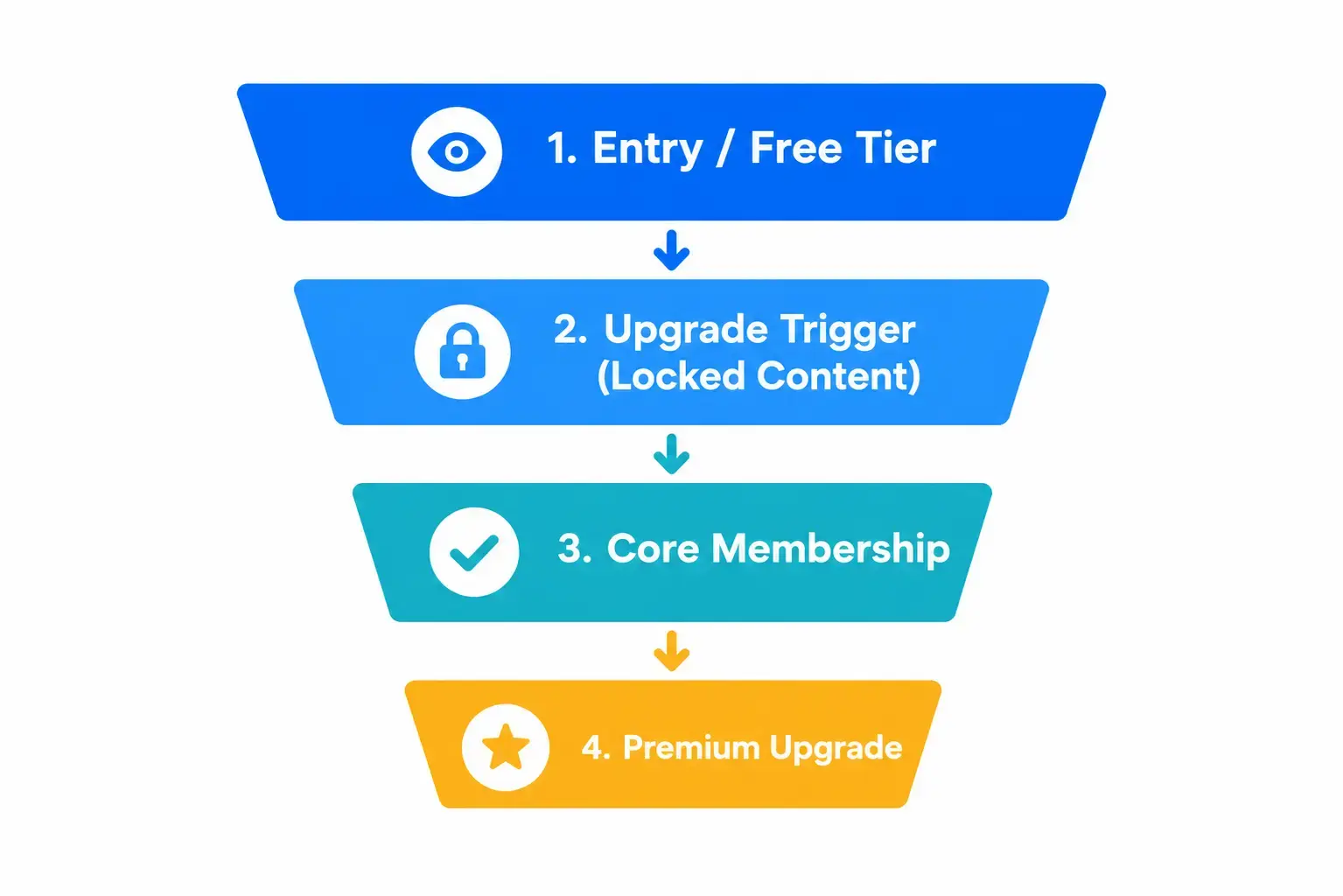
Here’s what a working membership funnel looks like:
Step 1: Free or entry tier — Member discovers your content. Sees enough to understand the value. Can see what Core members get but can’t access it.
Step 2: Organic upgrade trigger — Member hits a piece of Core-only content and sees your restriction message. Not “Members only” — a specific, named message: “This is Pro content. Upgrade to Pro for $79/month to access this.”
Step 3: Core membership — Member gets full access. Participates in community. Sees what Premium members get during live calls or in restricted posts.
Step 4: Premium upgrade — The small segment of members who want direct access, reviews, or priority support self-select up.
The key to making this work: tiered pricing provides a built-in mechanism for retention by offering pathways to additional value. Members feel like their membership evolves with them rather than becoming stagnant. Without a clear upgrade path, members either stay on the cheapest tier forever or cancel when the entry tier stops feeling sufficient.
In StoreEngine, each tier is a separate Access Group. Higher tiers get added to multiple groups — a Pro member is in both the Core group and the Pro group, so they inherit all Core content automatically. The upgrade is additive, not a swap. This makes tier design in the admin clean and member experience seamless.
To understand how content restriction works at the technical level — how to gate posts, categories, and pages by tier — see How to Restrict Content & Gate Premium Access.
Setting Up Membership Tiers in StoreEngine
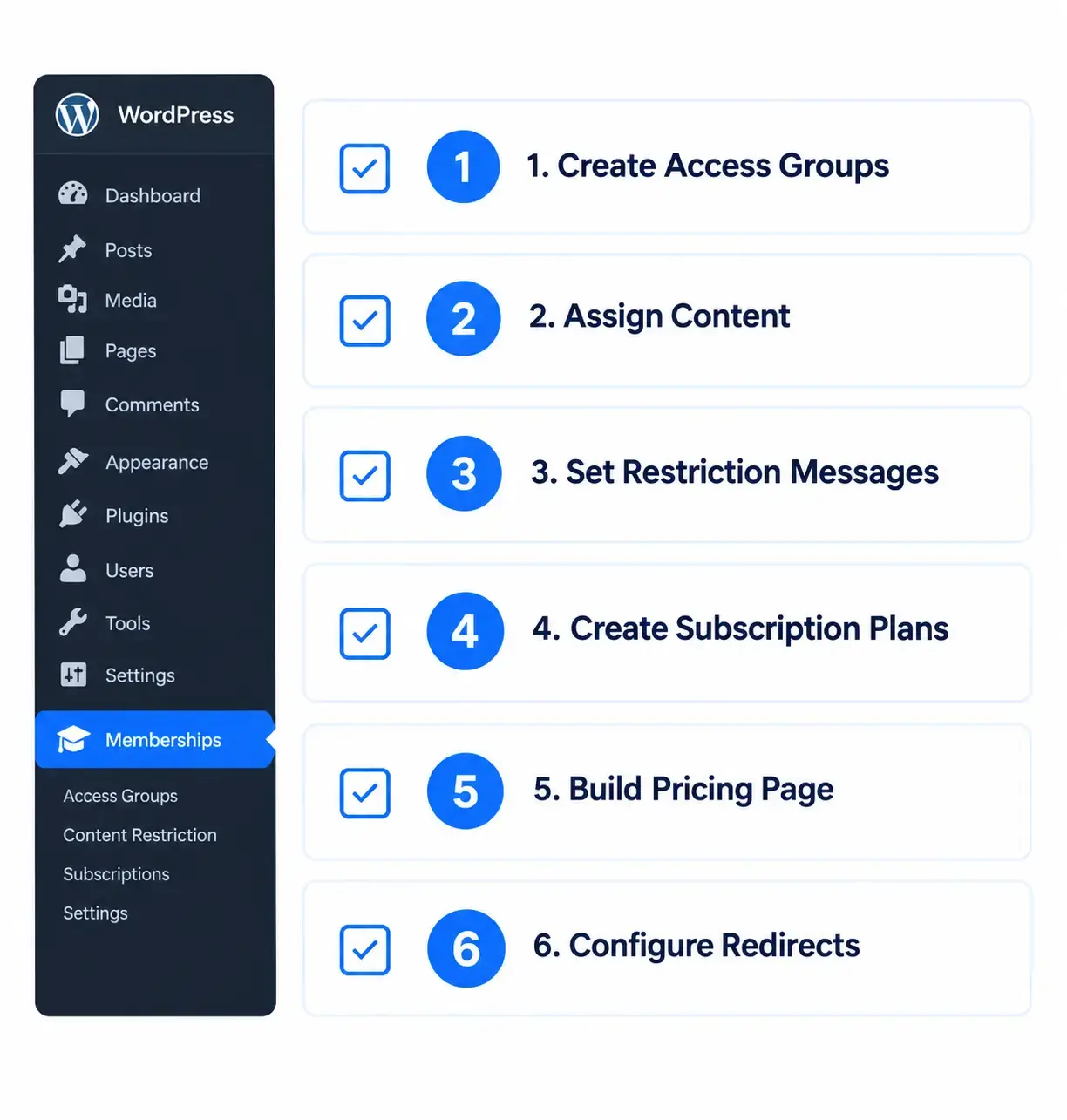
Here’s the exact setup sequence for a three-tier membership in StoreEngine:
1. Create your Access Groups.
Go to StoreEngine → Membership → Access Groups → Add New. Create one group per tier: Core Members, Pro Members. Set expiration to 30 days for monthly subscribers — the Subscription addon extends automatically on renewal.
2. Assign content to each group.
For individual posts: use the Access Group sidebar panel in the post editor. For categories: assign the category — every post inside inherits the restriction. Use Granular Exclusions to override any post within a protected category (useful for freemium teaser content).
3. Set restriction behaviour and messages.
Go to each Access Group’s settings. Set redirect (send to pricing page) or inline message. Write a specific upgrade message for lower-tier members hitting higher-tier content: “This is Pro content — upgrade for $79/month.” Include a direct link to your pricing page.
4. Create Subscription plans linked to each group.
Go to StoreEngine → Subscriptions → Plans. Create one plan per paid tier. Set billing interval (monthly, annual) and link to the corresponding Access Group. On successful renewal, access extends automatically. On cancellation, access expires at the end of the current billing period.
5. Set up the Membership Pricing Page.
Go to StoreEngine → Membership → Pricing Page. Configure your tier cards — names, prices, feature lists. Copy the shortcode and paste it into a WordPress page. This is your public-facing pricing page. The in-house Access Group you created privately doesn’t appear here.
6. Configure after-purchase redirects.
Different tiers should redirect to different welcome pages. A Core member’s welcome page is different from a Pro member’s. StoreEngine → Membership → Settings → After Purchase Redirect. Set a URL per Access Group.
Not sure which plugin to use for membership management on WordPress? Best WordPress Membership Plugin (Free & Paid) compares the top options across features, pricing, and ease of setup — useful if you’re evaluating StoreEngine against alternatives.
Decision Framework: Which Pricing Structure Is Right for You?
Once your pricing is set, your next focus is conversion — getting visitors to actually sign up. eCommerce Conversion Rate Optimization: Complete Guide covers the full CRO playbook including checkout optimization, trust signals, and page-level improvements that apply directly to membership signup pages.
Frequently Asked Questions
What is a membership pricing strategy?
A membership pricing strategy is the complete system of decisions that determines how much to charge, how many tiers to offer, how billing periods are structured, and how members move between levels. It’s not just a price — it’s the architecture behind your conversion rate, average revenue per member, and long-term retention.
How many membership tiers should I have?
Three is the proven sweet spot for most membership sites. One entry tier to lower the commitment barrier, one core tier as your primary offer, and one premium tier to anchor price perception. Fewer than three leaves money on the table. More than four overwhelms most buyers and results in too many members clustering in the cheapest option.
What are customer-focused membership level names?
Customer-focused membership level names describe what the member becomes or achieves — not what they get. “Practitioner” outperforms “Advanced.” “Founder” outperforms “VIP.” Names like Learner / Practitioner / Expert, Starter / Athlete / Champion, or Core / Pro / All-Access work because they signal identity and progression, not just feature quantity. Avoid “Basic” — it actively signals limitation.
How do I calculate lifetime membership cost?
Use your Member Lifetime Value (LTV): multiply your average monthly price by your average member tenure in months. Then price the lifetime option at 60–80% of that LTV. If your average member stays 18 months at $79/month (LTV = $1,422), your lifetime price should be $850–$1,100. Don’t use “2–3x annual” as the formula — it underprices for long-tenure members and creates losses.
Should I offer monthly or annual membership payment?
Offer both, but present annual first and more prominently. Monthly lowers the sign-up barrier. Annual dramatically improves retention and cash flow. Standard annual discount is 15–20% off the monthly total — show the dollar savings clearly (“Save $119/year”), not just a vague “get 2 months free.”
What is a membership funnel?
A membership funnel is the path a member takes from discovery through joining, upgrading, and long-term retention. In a well-designed membership tier structure, the funnel is built into the tiers themselves — free or entry members see what higher tiers include, hit a restriction message with a clear upgrade CTA, and self-select up. The upgrade isn’t sold. It’s discovered.
What is an in-house membership plan?
An in-house membership plan is a private membership tier not visible on the public pricing page. It’s used for corporate team access, partner arrangements, sponsored memberships, or internal staff accounts. In StoreEngine, you create a private Access Group and share a direct purchase link rather than listing it on the public pricing page shortcode.
How do I set up membership tiers in StoreEngine?
Create one Access Group per tier in StoreEngine → Membership → Access Groups. Assign content at the page, post, or category level. Create linked Subscription plans in StoreEngine → Subscriptions → Plans with the billing interval and Access Group connection. Higher tiers are added to multiple Access Groups so they inherit all lower-tier content automatically. Configure restriction messages and after-purchase redirects per tier.