


Every ecommerce guide eventually tells you to “set up your email flows.” Then it points you at Klaviyo, Mailchimp, or Omnisend, and assumes you’ll connect one of those to your store as a separate service. For most stores on Shopify or BigCommerce, that’s the only path available.
On WordPress with StoreEngine, it’s not the only path — and for the emails that move the most revenue, it isn’t even the right one. Email marketing for ecommerce runs on two tracks: the transactional emails that fire automatically on store events (order confirmations, shipping updates, payment failures, subscription renewals), and the marketing sequences built to recover and grow revenue (abandoned cart recovery, welcome flows). StoreEngine has both built in. The transactional layer is the Email addon. The cart recovery layer is the Abandoned Cart addon. Neither requires an external ESP subscription or a separate integration to maintain.
This guide covers how each layer works, what it actually automates, and how the whole system connects — because the part most email guides skip is the one that earns the most: the automated flows that run on your existing data, without you touching them, after you set them up once.
Quick Answer: What Is Email Marketing for Ecommerce?
Why Email Is Still the Highest-ROI Channel in Ecommerce
Every year, a new channel gets declared the future of ecommerce marketing. Email has outlasted all of them. The global email marketing market is worth $13.72 billion in 2026, growing at 10.82% annually. The ROI data explains why: email returns $36 for every $1 spent globally, and US ecommerce brands see $72 return per dollar — the highest ROI of any digital marketing channel.
The more important number is the automation gap. Automated email flows make up just 2% of total email sends but drive 30% of email revenue. They earn roughly $1.58 per recipient; manually sent campaigns earn $0.06. That 28× gap isn’t because automated emails are better written — it’s because they’re sent at the right moment, triggered by the right behavior, to a specific person with specific intent.
What this means practically is that the highest-ROI email investment for most ecommerce stores isn’t a better newsletter. It’s the abandoned cart sequence you haven’t turned on yet, and the subscription renewal flow you’re not sending. These don’t require a perfect email program — they just require the right triggers firing at the right time.
The Two Email Tracks Every Ecommerce Store Needs
Before diving into StoreEngine’s specific features, it helps to map the landscape clearly.
Transactional emails fire automatically when something happens in the store: an order is placed, a payment fails, a subscription renews, a shipment is created. They’re not marketing — customers expect them. But they’re often your highest-open-rate emails (order confirmations regularly exceed 60% opens), which makes them prime real estate for brand building and trust signals. Every transactional email that goes out looking generic or broken is a missed opportunity.
Marketing automation flows fire based on behavioral triggers: a customer abandons a cart, a subscription trial is ending, an affiliate earns their first commission. These are where most of the email revenue lives — because they’re sent to a person who has already demonstrated intent, at the moment that intent is still active.
Most WordPress stores handle transactional emails through generic WordPress mail (wp_mail) with no customization, and ignore marketing automation entirely. StoreEngine builds both into the store engine so they’re not afterthoughts.
Transactional Emails: 15+ Templates, Every Store Event Covered
StoreEngine‘s Email addon replaces the default WordPress order notification emails with a fully customizable transactional email system. Every template has a configurable subject line, heading, and content block — editable through a block editor interface that works like the standard WordPress post editor.
Order lifecycle emails
The order email layer covers every event a customer or admin needs to know about:
Order confirmation sends to both the customer and the admin when an order is placed. Customer and admin get separate templates with separate subject lines and content — because the merchant needs different information (order totals, customer details) than the customer does (a friendly receipt). Both are enabled by default. Subject lines include {order_id} by default, which prevents Gmail and Outlook from threading multiple order notifications into the same conversation in the admin’s inbox.
Order status change fires whenever an order’s status changes, with {order_old_status} and {order_new_status} both available in the template. A customer who was waiting on a processing order gets notified automatically when it moves to shipped — no manual email from support required.
Item shipped fires when a shipment is created for the order, with shipping-specific variables: {shipment_tracking_number}, {shipment_tracking_url}, {shipment_tracking_link}, {shipment_courier}, and {shipped_item_name}. A customer with a tracking link in their email is a customer who doesn’t need to contact support asking where their order is.
Delivered fires when a shipment reaches delivered status (via the Couriers addon’s background polling). Same tracking variables available, plus {shipment_status}.
Order note sends to the customer when an admin adds a note to their order — useful for custom orders, supply delays, or anything requiring personal communication without leaving the admin.
Payment failed, Refund, Cancelled each fire on their respective events. Payment failed is particularly important for subscription stores — it’s the customer’s signal to update their payment method before their subscription lapses.
New user notification optionally sends a customer their account credentials when an account is auto-created from their order — with a security note in the default template to change the password immediately, and a direct sign-in URL.
Invoice email
Account emails
Registration welcome fires when a new customer creates an account, with variables for their name, login URL, and store details. Password reset fires when requested, with a secure {reset_url} that links directly to the reset form.
Subscription Lifecycle Emails: Four Automated Flows for Recurring Revenue
Subscription businesses live or die by their email lifecycle coverage. A subscription renewal that processes silently — no email, no receipt, no acknowledgment — creates chargeback risk and support tickets. A renewal failure that goes unnoticed becomes churn. StoreEngine’s subscription emails cover the four moments that matter.
Subscription renewed
Fires when a subscription renewal payment completes. Variables include {order_id}, {order_items}, {order_totals}, and {order_created_date} — the customer gets a proper renewal receipt, not silence. This is the email most subscription stores forget to configure, and it’s the one that prevents “I didn’t know I was being charged” chargebacks.
Renewal payment failed
Fires when a recurring payment fails to process. The default subject is “Action needed: your subscription renewal payment failed (order #{order_id})” — clear and action-oriented. Template variables include {retry_button} and {retry_url}, which link the customer directly to the payment retry page. A failed renewal with a retry button in the email recovers far more subscriptions than a generic “your payment failed” notice with no path forward.
Trial ending soon
Fires when a subscription trial is approaching its end date, giving customers advance notice before they’re charged. The exact timing is configurable. This is the email that reduces trial-to-paid churn — customers who don’t see it coming are far more likely to dispute the charge than customers who expected it.
Subscription cancelled
Fires when a subscription is cancelled, confirming the cancellation to the customer. Stores the order details and items in the template so the customer has a clear record of what was cancelled.
Abandoned Cart Recovery: Three Emails, One Configurable System
Abandoned cart emails are the highest-revenue-per-recipient automation in ecommerce. Abandoned cart emails achieve a 50.5% average open rate and recover 3-5% of lost sales, with top performers recovering up to 14%. A three-email sequence generates 6.5× more revenue than a single reminder. The first email in a sequence captures 45-55% of total flow revenue, so sending it quickly matters most.
StoreEngine’s Abandoned Cart addon (Pro) runs a three-email sequence with fully configurable timing and an optional recovery discount — and every part is customizable without touching code.
How the scheduling works
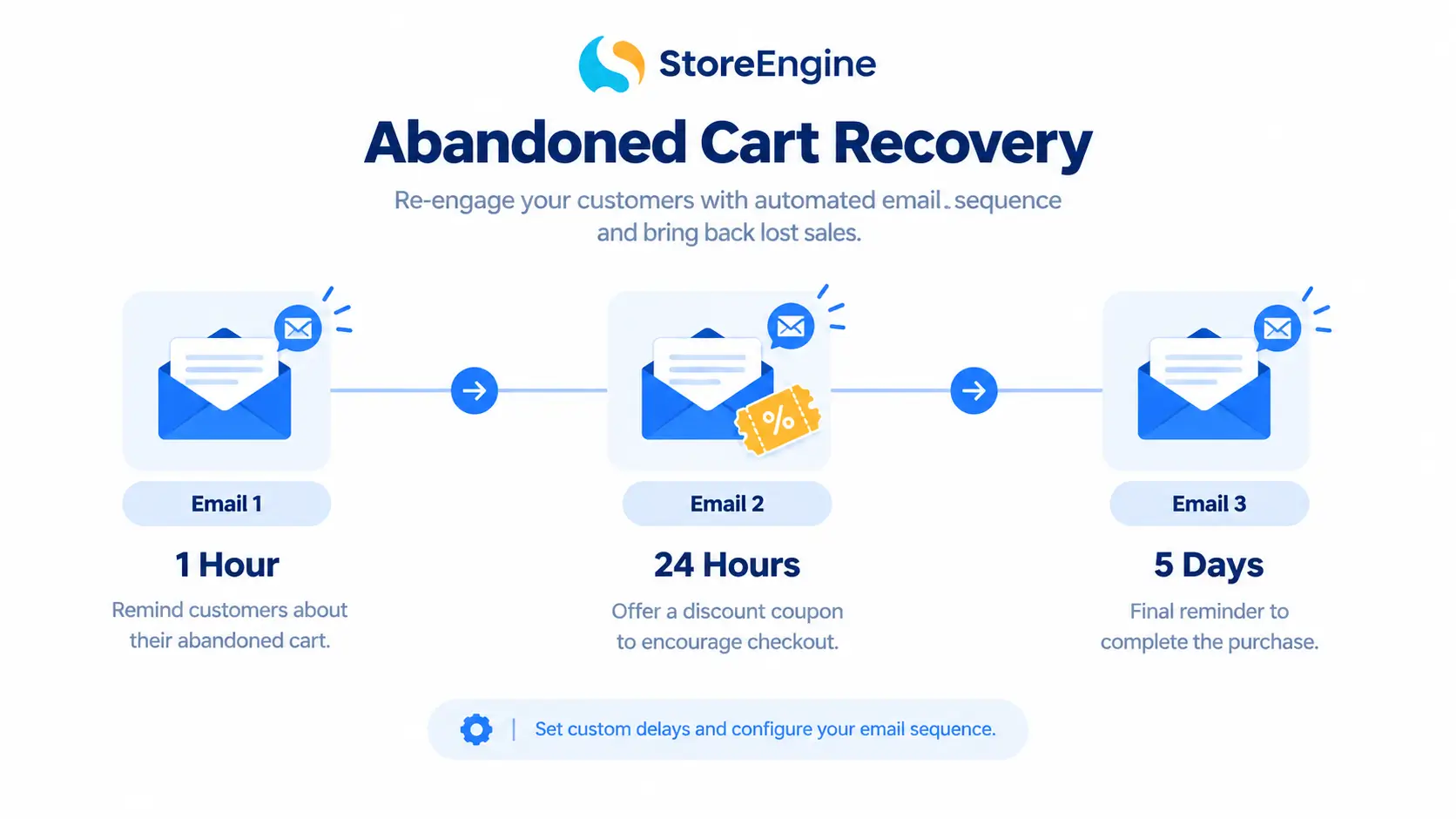
Every 10 minutes, a background scheduler runs and checks for carts that have been inactive longer than your configured cut-off time (default 30 minutes). When a cart crosses that threshold and hasn’t already had emails scheduled, StoreEngine marks it abandoned and queues three timed recovery emails via Action Scheduler.
The default timing is:
All three delays are independently configurable from 14 preset options ranging from 30 minutes to 7 days. The system enforces chronological order: first < second < third. You can disable individual emails in the sequence — some stores prefer a two-email sequence; others want all three.
Recovery discount: how to use it without training customers to abandon
The optional recovery discount lets you include a coupon in the recovery sequence — percentage or fixed amount, configurable value, with an expiry date so urgency is real. The key configuration choice is which email gets the discount. Most stores attach it to the second or third email — not the first. Here’s why: if your first email always carries a discount, you’re training customers who would have completed the purchase anyway to wait for the coupon. Attaching it to the second or third email means you’ve already tried to recover the sale without giving away margin first, and you’re deploying the discount only when it’s actually doing incremental work.
The discount variables in the template ({abandoned_cart_discount}, {abandoned_cart_discount_amount}, {abandoned_cart_discount_code}, {abandoned_cart_discount_expired_in}) give you full control over how and where the coupon appears in the email content.
Cart restore token
Every recovery email carries a cart restore link that returns the customer directly to a pre-filled checkout — the same items, the same quantities, ready to complete. No re-adding items, no navigating the store. One click and they’re at payment.
The token is specific to the cart record, not reusable across sessions. If the customer completes the purchase through a different path (organic return, direct navigation), the cart status updates and the remaining scheduled emails are not sent.
Idempotency and safety
Once a cart’s recovery emails are scheduled, the scheduling engine will not re-queue them even if the cart’s status is updated or the scheduler runs again. This prevents a common problem in cart recovery systems: a cart that flips between active and abandoned states flooding Action Scheduler with duplicate email jobs. Each cart gets one set of recovery emails scheduled, once, based on its first abandonment.
Affiliate Program Emails: Automated Communication for Your Partner Network
If you’re running StoreEngine’s Affiliate Program, every milestone in an affiliate’s journey triggers an automated email. These are the emails that make an affiliate program feel professional rather than ad hoc, and they require zero manual sends once configured.
Six affiliate email events fire automatically:
{referral_code} so they can start promoting immediately{commission_amount} and {order_id}{payout_amount}, {payout_method}, and {payout_transaction_id}Every affiliate email is as customizable as every order email — subject line, heading, content, and template variables. An affiliate who gets a commission notification with their exact amount and the order it came from feels like part of a real program. One who gets silence doesn’t promote again.
Email Logger and Resend: The Audit Trail You Need
StoreEngine‘s Email Logger captures every email the system sends — not just a count, but a full record: email type, recipient, subject line, timestamp, and delivery status (queued, sent, or failed).
This matters for two reasons. The first is debugging: when a customer says they never received their order confirmation, you can check the log to see whether the email was sent and what it contained. The second is resend: any logged email can be resent from the log interface — the failed or historical row stays in the audit trail, and the resend creates a fresh log entry. Password reset emails are intentionally excluded from resend (resending an old reset token would be a security vulnerability) — everything else is resendable.
For stores that need to demonstrate to regulators or customers that a specific email was sent — invoice emails for EU VAT, subscription renewal receipts for chargeback disputes — the audit log is the evidence.
What StoreEngine’s Email System Handles vs. What an ESP Does Better
StoreEngine’s built-in email system is optimized for the automated, behavioral, store-triggered emails that drive the most ecommerce revenue. For everything it handles natively, you don’t need to pay for an external integration. But being honest about the boundaries matters.
|
Email type |
StoreEngine native |
External ESP better suited |
|
Order confirmation |
✓ Built in |
— |
|
Abandoned cart (3-email sequence + discount) |
✓ Built in |
— |
|
Subscription renewal / failed / trial |
✓ Built in |
— |
|
Affiliate program emails |
✓ Built in |
— |
|
Shipping and delivery notifications |
✓ Built in |
— |
|
Invoice delivery |
✓ Built in |
— |
|
Email audit log and resend |
✓ Built in |
— |
|
Newsletter broadcasts to full subscriber list |
— |
Klaviyo, Mailchimp, ConvertKit |
|
Advanced segmentation by purchase history |
— |
Klaviyo, Drip |
|
Browse abandonment flows |
— |
Klaviyo, Omnisend |
|
Predictive send-time optimization |
— |
Klaviyo, Mailchimp |
|
A/B subject-line testing |
— |
Most ESPs |
For many WordPress stores — particularly those just launching or those focused on transactional and behavioral automation — StoreEngine’s native email layer covers everything that generates meaningful revenue. When you’re ready to add newsletter campaigns, predictive analytics, or multi-channel automation, an ESP can connect to StoreEngine’s order data via webhooks for the additional layer.
Setting Up Email Marketing on StoreEngine
Step 1 — Configure global email settings. In StoreEngine → Settings → Email, set your from name, from email address (match your domain’s DKIM/SPF for deliverability), and the footer text that appears in every email. Upload a header image to brand every outgoing email consistently.
Step 2 — Review and customize transactional templates. Work through each email template — order confirmation, status change, shipped, delivered, refund, payment failed. Update the content, tweak subject lines, and verify that every template includes the variables your customers actually need. The default templates are functional; making them feel like your brand takes 30-60 minutes.
Step 3 — Enable abandoned cart recovery. Activate the Abandoned Cart addon in StoreEngine Pro. Set your cut-off time, configure the three email delays, decide which email carries the recovery discount and what the discount is, and verify the cart restore link appears in the template. Run a test: add items to cart, leave, wait for the cut-off time, and confirm the first recovery email arrives.
Step 4 — Enable subscription emails (if applicable). If you sell subscriptions, confirm all four subscription emails are enabled and that the renewal failed email’s retry button links correctly to the payment update page.
Step 5 — Enable affiliate emails (if applicable). If your affiliate program is live, confirm the six affiliate email templates are enabled and personalized. An affiliate who receives their approval email with their referral code immediately is ready to promote; one who doesn’t may assume their application got lost.
Frequently Asked Questions
What is ecommerce email marketing?
Ecommerce email marketing is the use of automated and campaign-based email sequences to drive revenue across the customer lifecycle — from order confirmations that build purchase trust, through abandoned cart recovery emails that recapture lost sales, to subscription lifecycle and loyalty emails that increase repeat purchases. It runs on two tracks: transactional emails triggered by store events, and behavioral automations triggered by customer actions.
What is the ROI of email marketing for ecommerce?
Email marketing returns $36–$72 for every $1 spent, according to Omnisend’s 2026 data — the highest ROI of any digital marketing channel. Automated email flows generate 30× more revenue per recipient than manually sent campaigns, which is why setting up behavioral automations (abandoned cart, subscription lifecycle) is consistently more valuable than optimizing newsletter frequency.
What is the best email for ecommerce?
By revenue per recipient, abandoned cart emails lead all other email types — averaging $3.65 RPR with top performers reaching $28.89. Welcome emails are second at $2.65 RPR. Both dramatically outperform broadcast campaigns ($0.06–$0.11 RPR). The implication: if you have limited time to invest in email, setting up your abandoned cart sequence and a proper welcome flow generates more revenue per hour of setup than any other email initiative.
How does StoreEngine’s abandoned cart email work?
StoreEngine’s Abandoned Cart addon monitors active carts every 10 minutes. When a cart has been inactive for longer than your configured cut-off time (default 30 minutes) and the customer has provided an email address, StoreEngine marks the cart abandoned and schedules up to three recovery emails via Action Scheduler. Each email has a configurable delay (first: 1 hour, second: 24 hours, third: 5 days by default). A cart restore link in each email takes the customer directly back to a pre-filled checkout. A recovery discount — percentage or fixed, with a configurable expiry — can be included in any or all of the three emails.
Does StoreEngine send subscription renewal emails automatically?
Yes. The subscription lifecycle emails include: a renewal receipt when payment succeeds (with order details), a renewal failure notification with a direct retry link, a trial ending soon notice before trial expiry, and a cancellation confirmation. All four are independently enabled and fully customizable. The renewal failure email is the most important — it includes a {retry_button} variable that links the customer directly to payment update, which is the primary mechanism for recovering failed renewals before they lapse.
What email does an affiliate receive when their commission is approved?
When a commission is approved in StoreEngine’s Affiliate Program, an automated email fires to the affiliate with their name, the specific commission amount, and the associated order ID. Separately, payout completion triggers a payout confirmation email with the amount, payment method, and transaction ID. Both are customizable templates. These emails make an affiliate program feel professional and keep partners informed without requiring manual communication.
Do I need Klaviyo or Mailchimp if I use StoreEngine?
Not for the flows covered in this guide. StoreEngine handles transactional emails, abandoned cart recovery (3-sequence), subscription lifecycle emails, and affiliate program emails natively. For newsletter broadcasts, advanced behavioral segmentation, browse abandonment tracking, or predictive analytics, a dedicated ESP like Klaviyo connects to StoreEngine’s order data via webhooks and provides those additional capabilities.