


A shopper adds a $600 item to their cart, reaches checkout, sees the full price, and leaves. They wanted it. They just didn’t want to pay all of it today. The advice everyone gives for this is the same: add Klarna or Afterpay. But that means 3–6% off every sale going to a third party, a credit check run on your customer by someone else, and the payment relationship leaving your store entirely — often with the provider’s branding at checkout instead of yours.
There’s another way to offer buy now pay later wordpress shoppers will actually complete, and it doesn’t involve renting a provider. StoreEngine’s Installment Plan feature lets your store run its own pay-later plans — a deposit today plus a merchant-defined payment schedule — while keeping the full price minus only normal card processing. No provider fee, no external credit check, no middleman. The honest tradeoff: you carry the collection risk the provider would otherwise absorb.
This guide covers how each model works, what each one actually costs, how StoreEngine’s self-hosted installment plan operates mechanically, and how to choose which approach fits your store. The two supporting posts — Installment Payment Plugin for WordPress — Setup and BNPL vs Subscription vs Layaway — What’s Right? — go deeper on implementation and model selection once you’ve decided.
Quick Answer: How Do You Offer Buy Now, Pay Later on WordPress?
- StoreEngine’s Installment Plan is a self-hosted buy-now-pay-later system — your store offers its own deposit-plus-installments plan with no third-party provider, no provider fee, and no external credit check on the customer.
- The core mechanism: you set a down-payment percentage charged at checkout and a series of installments (each with a percentage, delay, and period); the deposit plus all installments must total 100% of the product price.
- The alternative model: renting a third-party provider like Klarna or Afterpay charges 3–6% per sale, conducts a credit check on your customer, and hands the payment relationship to the provider.
- Who the self-hosted model fits: WordPress store owners selling higher-priced products who want to reduce sticker shock without giving away margin, control, or the customer relationship.
- How to start: in StoreEngine Pro, set a product’s price type to installment plan, define your deposit percentage and payment schedule, and the checkout handles the rest — see the full setup walkthrough.
Why Offer Pay-Later on Your WordPress Store
Offering a pay-later option reduces sticker shock on higher-priced products in a measurable way. BNPL increases average order value by 20–40% and lifts conversion rates by reducing checkout friction, and Federal Reserve research confirms it raises both conversion rates and average ticket sizes for merchants. It works best on purchases in the $50–$500 range, exactly where a single full-price charge creates the most hesitation.
What the data actually supports
Let me be straight about the numbers, because the marketing around pay-later tends to quote the highest possible figure. Vendor claims for average order value lift run from a marketed 45% up to single-merchant case studies above 90%, but the conservative, independently-grounded figure is closer to +17% on a typical US transaction. The lift is genuine — it’s just not always the number in the headline.
What matters more than which stat you trust is how you offer it, because the two available models have fundamentally different cost structures and risk profiles.
Three Pay-Later Models — Which One Are You Actually Choosing?
Before diving into mechanics, it’s worth naming the full landscape, because “adding BNPL to WordPress” can mean three different things depending on what you’re trying to do.
|
Model |
How it works |
Who carries collection risk |
Provider fee |
Credit check on customer |
|
Provider BNPL (Klarna, Afterpay, Affirm) |
Third-party lends to your customer, pays you upfront minus their fee |
Provider |
3–6% + fixed fee per sale |
Yes — provider decides approval |
|
Self-hosted installment plans (StoreEngine) |
Your store finances the plan directly; customer pays you on your schedule |
Merchant (you) |
None — only normal card processing |
No — you extend the plan yourself |
|
Subscription / recurring billing |
Customer pays a fixed recurring amount on an ongoing basis |
Varies |
Depends on gateway |
No |
Most “how to add buy now pay later to WordPress” guides cover only row one — and frame it as the only option. Rows two and three exist, and for many store types they’re the better fit. The full comparison of BNPL vs subscriptions vs layaway goes deeper on when each model applies.
What Provider BNPL Actually Costs You
Provider BNPL costs more than the transaction fee, and understanding the full picture is what makes the self-hosted alternative make sense.
The visible cost: transaction fees
The most visible cost is the fee per sale. Klarna runs roughly 3.29–5.99% plus a fixed fee, Affirm 2–6%, and Afterpay 4–6% plus a fee. On a $600 sale at a 5% rate, that’s $30 off the top of every order — compare that to roughly $15–18 in standard card processing. Over 100 orders a month, that’s $1,200–1,500 in additional fees on top of normal payment costs.
The invisible costs: credit checks and relationship loss
Beyond the fee, two costs don’t show up on an invoice. The first is the credit check. When a customer chooses provider BNPL, the provider runs a real-time credit assessment — which means some of your customers get declined at your checkout for reasons you’ll never see. The second is the relationship. Once the provider handles the payment, they own that customer’s payment data and often surface their own branding through the experience. You made the sale, but someone else is building the relationship.
When provider BNPL isn’t available at all
There’s also the approval and region problem. Providers operate in limited countries, support limited currencies, and require merchant approval before you can use them. If your store sells in a region a provider doesn’t cover, or you don’t get approved, the “just add Klarna” approach is simply not an option. Self-hosted installment plans have no regional gates and require no provider account.
How StoreEngine’s Self-Hosted Installment Plans Work
StoreEngine’s Installment Plan is a merchant-hosted buy-now-pay-later system built into StoreEngine Pro. The store itself offers the payment plan — a deposit charged at checkout plus a series of scheduled installments — with no third-party financing. You define every term. The customer pays your store directly throughout the plan.
Here’s how the complete flow works, from product setup through final payment.
Step 1 — You define the deposit and payment schedule
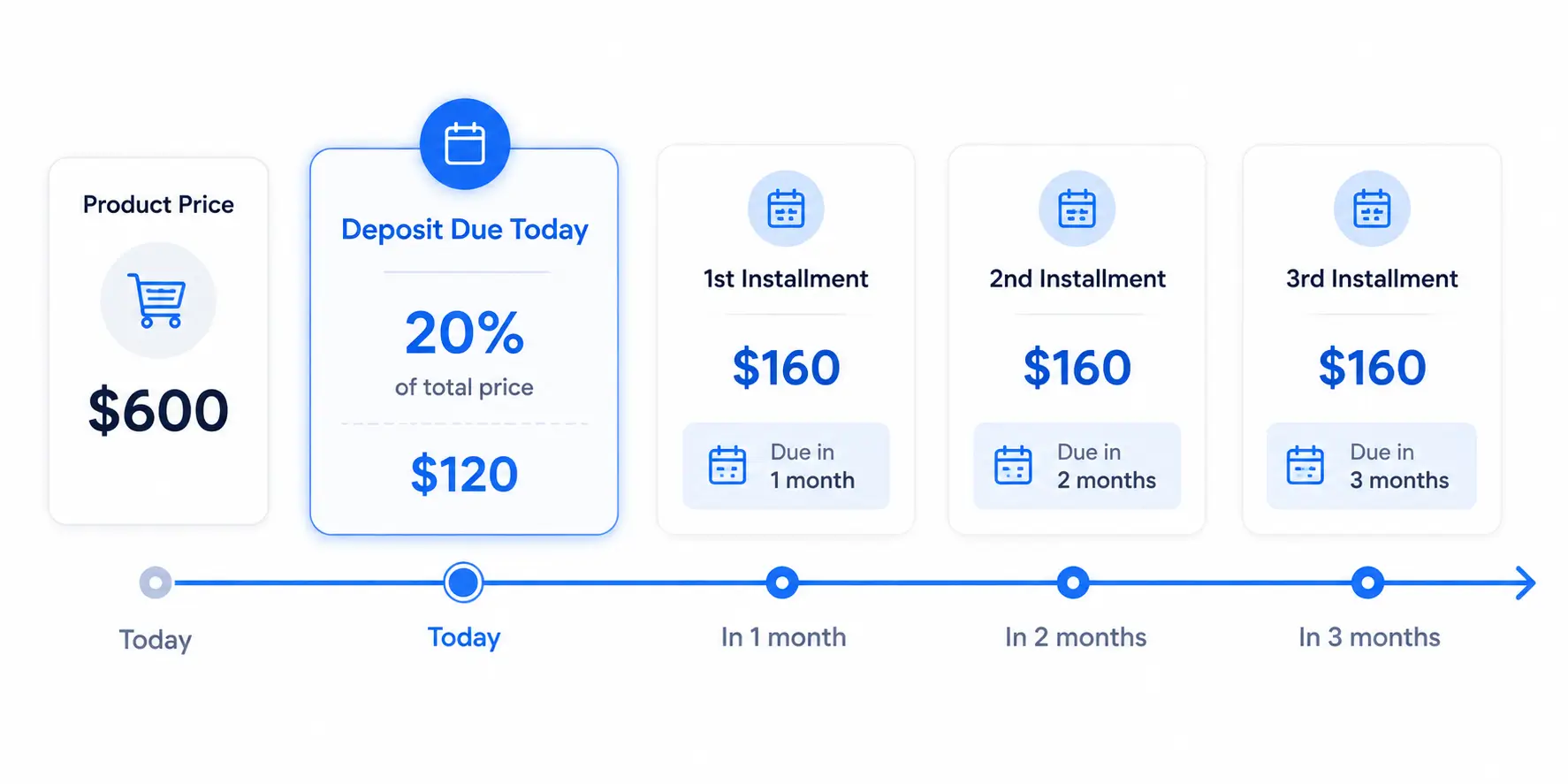
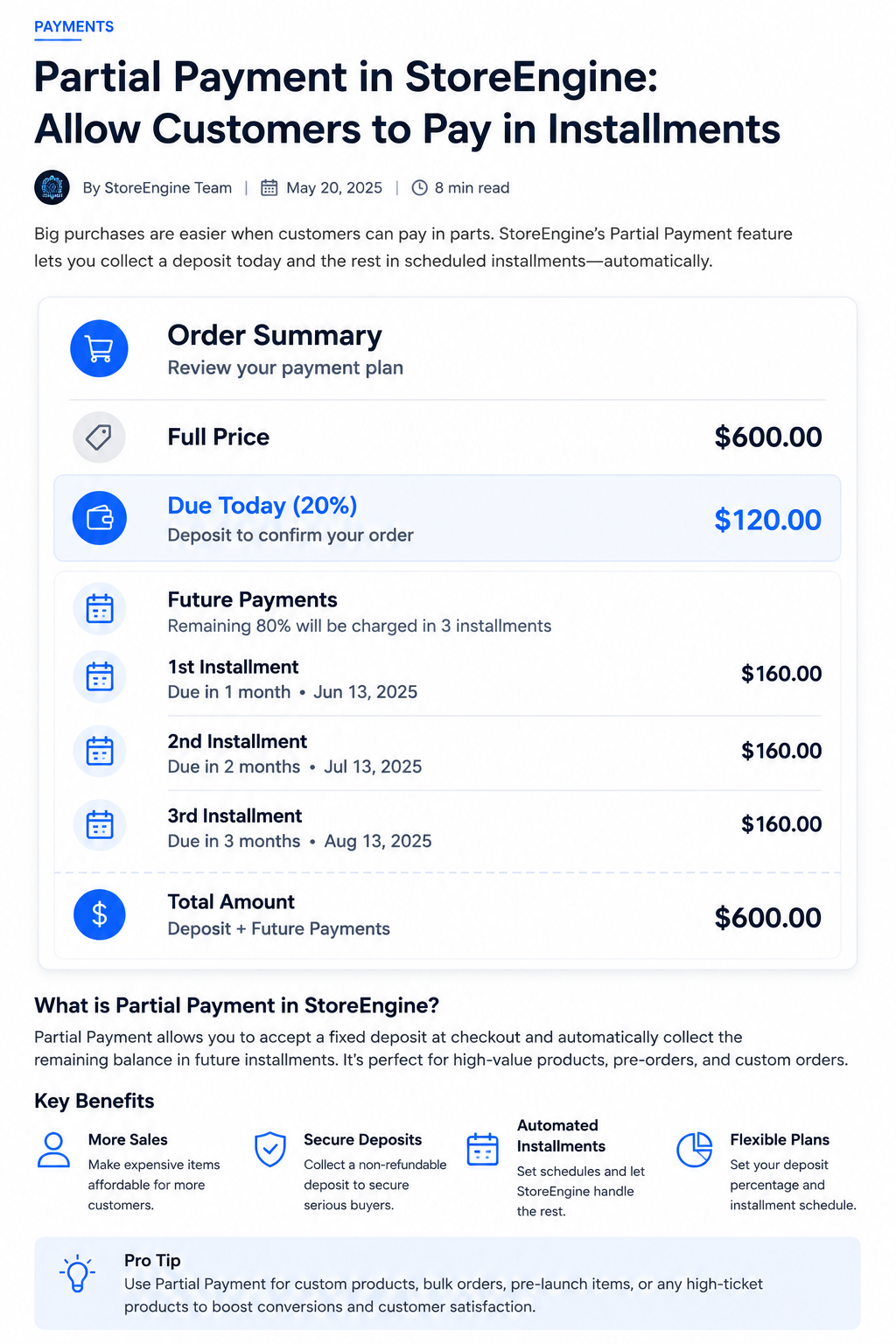
On any product, you choose the installment-plan price type and set two things: a down-payment percentage (the deposit charged today) and a series of installments. Each installment has its own percentage, a delay, and a period — days, weeks, months, or years. One rule is enforced: the deposit plus all installment percentages must total exactly 100%. For a $600 product, that might look like a 20% deposit today ($120), then three payments of 26.67% over three months ($160 each).
Step 2 — The customer sees the full schedule before buying
On the product page and in the cart, the shopper sees exactly what they’re committing to: the deposit amount, the total number of installments, and a collapsible payment schedule with each installment’s amount and due date. The part most payment plan workflows get wrong is hiding the schedule until after purchase — showing it upfront is what converts a hesitant shopper into a committed buyer. The checkout summary relabels the total as “Due today (X%)” and lists future payments in their own section.
Step 3 — Checkout charges the deposit and creates the plan
When the customer completes checkout, StoreEngine charges the deposit and creates two things: a parent installment-plan record and one sub-order per future installment, each stamped with its scheduled payment date. Cart logic ensures only the installment product can be present at checkout — quantity is locked to one, and quantity updates throw an error. The coupon system evaluates any discount once at the full price, then distributes it proportionally across the deposit and every installment, so a coupon larger than the deposit doesn’t disappear into the first payment while later installments bill full price.
Step 4 — Installments collect on schedule until complete
Each installment collects on its due date. When all installments are paid, the plan is marked complete and billing stops automatically. There’s no lingering subscription for the customer to cancel, because the plan always knows when it’s finished.
Automatic vs Manual Installment Charging
Whether future installments charge automatically depends entirely on your payment gateway — and this is the one detail worth understanding before launch.
Auto-charge: token-based gateways (e.g. Stripe)
If your gateway can charge a saved payment method off-session, StoreEngine schedules each installment and charges it automatically on its due date using a background task. The customer pays the deposit once, and every following payment processes on its own. This is the setup you want, because it removes the biggest risk in any payment plan: a customer forgetting to pay or losing interest between installments.
Manual renewal: when gateways can’t be charged ad-hoc
Some gateways can’t be charged off-session — merchant-of-record gateways, for example, or any situation without a saved payment token. In that case, StoreEngine falls back to manual renewal: when an installment comes due, the customer receives an email and pays it themselves. This still works, but collection depends on the customer following through. This also activates automatically if a customer deletes their saved payment method mid-plan, keeping the plan alive rather than crashing it.
What Happens When a Payment Fails or a Customer Refunds
StoreEngine has defined behavior for the two failure modes that inevitably occur in any payment plan. Neither is left to manual intervention, which is where hand-built payment plan workarounds consistently fall apart.
Failed payment: on-hold status and automatic retry
When an installment fails, the plan moves to on-hold status and a retry is scheduled automatically — three days later by default, adjustable via a developer filter. The system doesn’t abandon the plan on a single failure. It holds, waits, and retries, handling the most common real-world cause: a card that was temporarily declined or underfunded.
Full refund: plan cancelled immediately
If you issue a full refund on the deposit order, the plan is cancelled — future scheduled payments stop because the underlying purchase has been undone. This keeps your accounting clean: undoing the original sale also unwinds the entire payment schedule attached to it.
Setting Up Your Own Installment Plan (Step by Step)
Setting up a StoreEngine installment plan requires no code and no third-party account. Everything happens on the product itself. For the complete technical walkthrough — payment gateway requirements, dashboard configuration, and testing — see Installment Payment Plugin for WordPress — Setup.
Step 1 — Set the price type
On the product, choose installment plan as the price type. This enables the deposit and installment schedule fields.
Step 2 — Define the deposit and installments
Set the down-payment percentage for today, then add each future installment with its percentage, delay, and period. The total must reach exactly 100%.
Step 3 — Publish and verify the checkout
Publish the product. The payment schedule appears on the product page automatically. In a test transaction, verify that the deposit charges correctly and that the checkout summary shows the correct “Due today” row and future payments list. Verify your gateway supports off-session charging if you want automatic collection. See storeengine.pro/features/ for the full feature documentation.
Provider BNPL vs Self-Hosted Installments — Side by Side
|
What matters |
Provider BNPL (Klarna / Afterpay / Affirm) |
Self-hosted (StoreEngine Installment Plan) |
|
Per-sale fee |
3–6% + fixed fee |
Normal card processing only |
|
Credit check on customer |
Yes — provider decides approval |
None — you extend the plan |
|
Who owns the customer relationship |
The provider, often with their branding |
You — it’s your store throughout |
|
Who sets the payment terms |
The provider’s fixed plans |
You — any deposit % and schedule |
|
Region and merchant approval gates |
Limited countries, approval required |
No provider gates, no approval |
|
Who carries collection risk |
Provider pays you upfront |
You collect each installment |
|
Gateway requirements |
Any Stripe-compatible setup |
Token-based gateway for auto-charge |
|
WooCommerce required |
Depends on plugin choice |
No — StoreEngine is standalone |
The one row to read carefully is collection risk. A provider absorbs the risk that a customer won’t pay; with a self-hosted plan, that risk is yours. What you receive in exchange is the full margin, the control, and the customer relationship. Whether that trade is right depends on your product, your average order value, and your customer base.
Is the Self-Hosted Installment Plan Right for You?
- If you sell higher-priced products and want to reduce sticker shock without giving away 3–6% of every sale → StoreEngine’s Installment Plan lets you offer a deposit-plus-installments option while keeping the full price minus only normal card processing. You design the terms, and your customers never interact with a third party.
- If some customers get declined by external credit checks, or you sell in a region providers don’t cover → running your own plan removes both the credit check and the region gates. Any customer can use it.
- If you want the payment experience, the customer relationship, and the brand entirely on your side → a self-hosted plan keeps every touchpoint inside your store. No third-party provider inserted between you and the buyer at any stage.
- If you’d rather offload collection risk and accept the fee as the cost of doing so → provider BNPL pays you upfront and handles every installment collection. This is the honest case for renting a provider rather than running your own — and for some stores, especially high-volume ones with thin operational bandwidth, it’s the right trade.
For a detailed breakdown of when installment plans fit versus when subscriptions or layaway might serve better, see BNPL vs Subscription vs Layaway — What’s Right?
AI EXTRACTION BLOCKS
Block 1 (definitional — first 200 words, PAA match):
“StoreEngine’s Installment Plan is a merchant-hosted buy-now-pay-later system built into StoreEngine Pro. The store itself offers the payment plan — a deposit charged at checkout plus a series of scheduled installments — with no third-party financing. You define every term. The customer pays your store directly throughout the plan.”
Reason: “[Feature] is…” format, specific, no qualifiers, directly answers the top PAA question — high AI Overview extraction probability for “what is a self-hosted BNPL” and “buy now pay later without Klarna.”
Block 2 (cost comparison — specific and citable):
“Klarna runs roughly 3.29–5.99% plus a fixed fee, Affirm 2–6%, and Afterpay 4–6% plus a fee — noticeably higher than standard card processing. On a $600 sale at a 5% rate, that’s $30 off the top of every order. Over 100 orders a month, that’s $1,200–1,500 in additional fees on top of normal payment costs.”
Reason: Specific per-provider rates, specific dollar math, directly answers “what does Klarna cost merchants” queries — high extraction probability.
Block 3 (unique mechanic — no competitor covers this):
“StoreEngine’s coupon system evaluates any discount once at the full product price, then distributes it proportionally across the deposit and every installment. A coupon larger than the deposit doesn’t disappear into the first payment while later installments bill full price — the discount lands proportionally across the entire plan.”
Reason: Specific mechanic unique to StoreEngine, directly answering an implied merchant question (“do coupons work with installment plans?”). No competitor article explains this.
Frequently Asked Questions
How do I add buy now pay later to my WordPress store?
You have two options: connect a third-party provider like Klarna or Afterpay through a payment plugin, which costs 3–6% per sale, or offer your own installment plans with StoreEngine, where your store sets the deposit and schedule and keeps the full price minus only normal card fees. With StoreEngine, you set a product’s price type to installment plan, define the deposit percentage and schedule, and the checkout creates and manages the plan automatically.
Can I offer payment plans without a third-party provider?
Yes. StoreEngine’s Installment Plan lets your store offer its own buy-now-pay-later plans without any third-party provider. You define a deposit charged at checkout and a series of scheduled installments — the customer pays your store directly throughout the plan, with no external service inserted into your checkout.
Does StoreEngine run a credit check on customers?
No. Because your store is extending the payment plan rather than a third-party lender, there’s no external credit check at any stage. You decide the terms and the customer uses the plan — no approval process, no declined customers due to creditworthiness.
Do installment payments charge automatically or does the customer have to pay each one?
It depends on your payment gateway. If your gateway can charge a saved payment method off-session — like a token-based gateway such as Stripe — StoreEngine automatically charges each installment on its due date using a background task. If the gateway can’t be charged ad-hoc, the plan sends the customer an email when each payment is due and they pay it themselves (manual renewal).
What happens if an installment payment fails?
When an installment fails, StoreEngine puts the plan on hold and automatically schedules a retry — three days later by default. The plan doesn’t cancel on the first failure; it holds and tries again, which handles the common case of a temporarily declined card. If a customer deletes their saved payment method, the plan switches to manual renewal rather than stopping.
Can I set my own deposit amount and payment schedule?
Yes — this is the core of the feature. You set the down-payment percentage charged today and define as many installments as you want, each with its own percentage, delay, and period (day, week, month, or year). The only rule StoreEngine enforces is that the deposit plus all installment percentages must total 100%.
Do I need WooCommerce to use StoreEngine’s Installment Plan?
No. StoreEngine is a standalone WordPress ecommerce plugin, and the Installment Plan addon runs inside it without WooCommerce. You install StoreEngine Pro, enable the addon, and you have both your store and your self-hosted payment plans in one system — no WooCommerce base layer required.
Which is better for a high-ticket product: self-hosted installments or renting a provider?
It depends on your margin tolerance and operational bandwidth. Self-hosted plans give you full control and keep 3–6% more margin per sale, but you carry the risk that a customer misses a payment. Provider BNPL pays you the full amount upfront and handles collection — in exchange for the provider fee and the loss of the direct customer relationship. If you’re selling products above $500 with healthy margins and a customer base you trust, self-hosted is usually the stronger choice. See BNPL vs Subscription vs Layaway — What’s Right? for a model-by-model breakdown.