


An order is placed. A clock starts. Everything between “payment confirmed” and “package delivered” is fulfillment — and in 2026, it’s where online stores win or lose on both cost and customer loyalty.
Over 90% of online shoppers will abandon a purchase if they encounter unexpected shipping costs. 73% of global shoppers won’t complete an online purchase if they don’t trust the delivery provider. And on the margin side, FedEx and UPS implemented 5.9% average rate increases in 2026, while Amazon FBA fees rose alongside a 3.5% fuel and logistics surcharge. Every dollar of unmanaged fulfillment cost is a direct hit to profitability.
Ecommerce fulfillment is the end-to-end process of managing inventory, receiving stock from suppliers, picking and packing orders, dispatching shipments to couriers, tracking delivery, and handling returns. Most fulfillment guides present this as a choice between building an in-house warehouse operation and outsourcing to a third-party logistics provider. For WordPress stores, there’s a third path: a store engine where every fulfillment layer — inventory management, supplier procurement, order dispatch, shipment tracking, cost and profit accounting, and returns — runs inside one system, without a 3PL platform and without WooCommerce.
This guide covers the complete ecommerce fulfillment process, how each layer connects to the next, and how StoreEngine manages the entire chain natively. Supporting guides go deeper where you need them: WordPress Shipping Plugin: Built-In Zones, Couriers & Returns for the shipping and returns layer, and StoreEngine’s ecommerce conversion rate optimization guide for how fulfillment speed and cost transparency affect checkout conversion.
Quick Answer: What Is Ecommerce Fulfillment?
What Ecommerce Fulfillment Actually Involves in 2026
Fulfillment used to be simple: receive a box, ship a box. In 2026, customer expectations have raised the bar on every dimension.
Customers want fast delivery, accurate tracking, and simple returns — and they treat poor fulfillment as a brand failure, not just a logistics issue. The DTC target is 99.5% order accuracy and 95%+ same-day shipment for orders placed before your cutoff time. These aren’t enterprise benchmarks — they’re the expectations that fast-growing mid-market stores are being measured against.
The five layers of a complete fulfillment operation, and why each one matters:
Inventory management — knowing what you have, where it is, and when you’re about to run out. A stockout costs you the sale and potentially the customer. Excess inventory ties up capital in dead stock. Both are expensive in different ways.
Procurement and supplier management — getting stock in the door reliably, at the right cost, from suppliers you can measure and manage. This is the layer most ecommerce guides skip, and it’s the one that determines whether your inventory data is accurate at all.
Order dispatch and shipment creation — turning a paid order into a physical shipment in the fastest, most consistent way possible. Manual booking is the single largest scale constraint in early-stage fulfillment operations.
Tracking and status sync — giving customers real-time visibility into their delivery and auto-completing orders when delivery is confirmed. Proactive tracking communication is the single most effective way to reduce “where is my order” support volume.
Returns management — handling the reverse logistics loop: customer requests, approvals, restocking, and refunds — in a way that retains the customer rather than losing them over a friction-filled return process.
StoreEngine covers all five natively.
Layer 1 — Inventory Management: Knowing What You Have
Inventory is the foundation every other fulfillment layer builds on. If your inventory data is wrong, your orders will ship late, contain errors, or fail to ship at all. Maintaining accurate inventory across all sales channels through an inventory management system is essential to avoid overselling and stockouts.
StoreEngine’s Inventory addon manages stock at the product and variation level, tracking stock quantity, low-stock threshold, stock status (in stock, out of stock, on backorder), and backorder settings per SKU. Every stock change — a sale, a return, a manual adjustment, a supplier receipt — is recorded as a named movement in the stock movements table, giving you a timestamped audit trail of every quantity change.
Multi-location inventory with Inventory Pro
For stores with more than one location — a primary warehouse, a retail location, a secondary fulfillment center — the Inventory Pro addon extends the base system to track stock per location. Each location maintains its own stock level per variation, and the movements table records which location was affected by every adjustment.
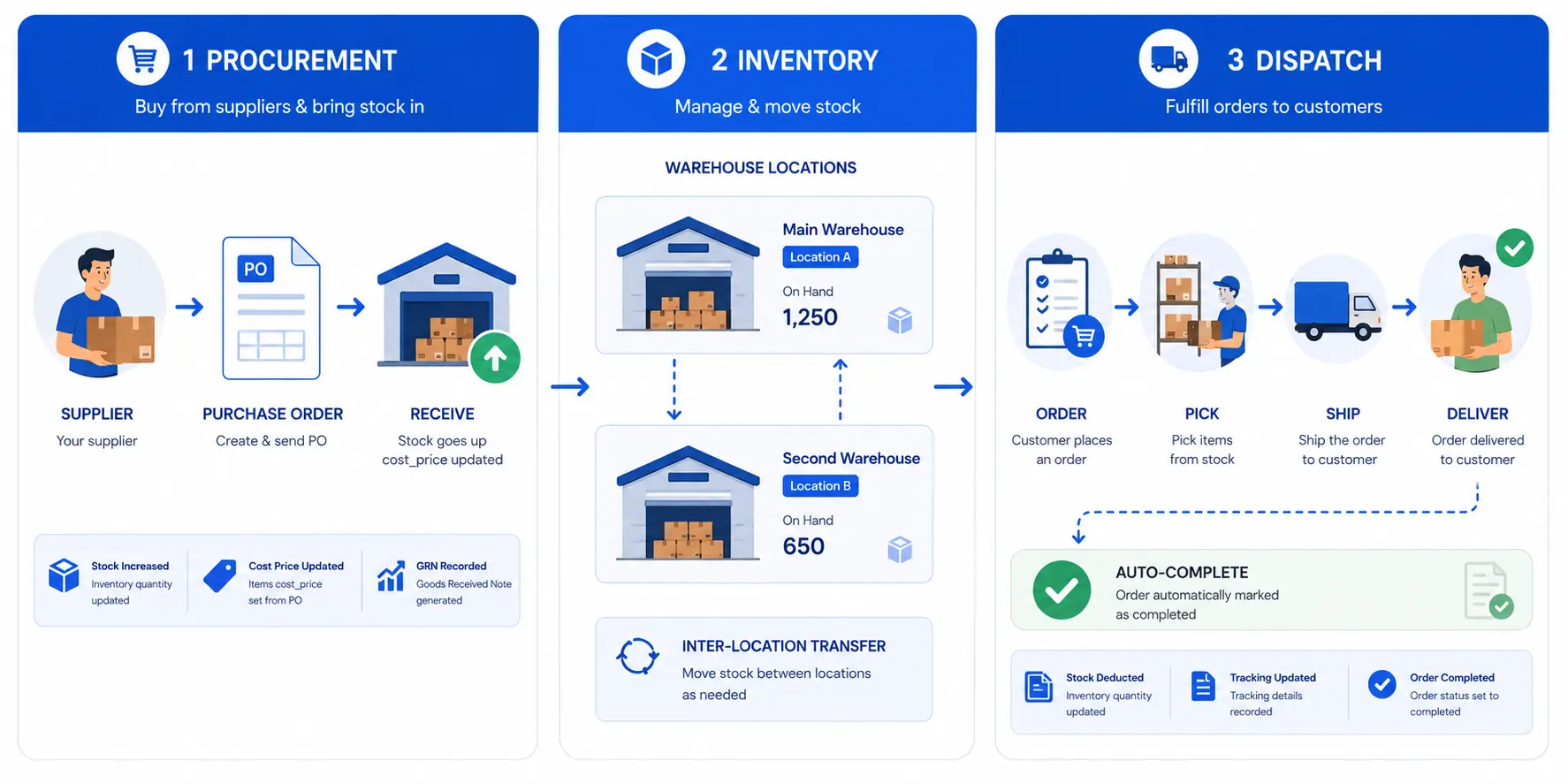
Stock transfers between locations are handled as paired movements: a transfer_out at the source and a transfer_in at the destination, created atomically in a single database transaction with a shared transfer UUID. You can’t end up in a state where the transfer deducted from one location without crediting the other. The admin can query movement history by product, variation, location, date range, and movement type — sale, return, purchase/received, adjustment, transfer_in, transfer_out — giving full visibility into how stock moved across your network.
Back-in-stock customer notifications
When a variation drops to out-of-stock status, Inventory Pro renders a customer notification subscription form directly on the product page. Customers enter their email to be notified when the item is back. When stock status flips from out-of-stock to in-stock, a batched dispatcher emails all confirmed subscribers automatically. Two emails fire: a subscription confirmation when they sign up, and the back-in-stock notification when it triggers. Both are configurable templates.
This converts an out-of-stock loss into a warm lead recovery — customers who subscribed have explicitly expressed purchase intent, making them higher-converting than cold traffic.
SKU and barcode management
Inventory Pro includes barcode SVG generation for products and variations. Printable labels for warehouse shelving, packing confirmation, and retail scanning — without a separate barcode management tool. Every variation can carry its own SKU for identifying items during picking and receiving.
Layer 2 — Procurement: Supplier Management and Purchase Orders
Most ecommerce fulfillment guides treat inventory as a starting point and skip how it gets there. Procurement is where inventory accuracy begins — and where cost data enters the system.
StoreEngine’s Suppliers addon (Pro) manages the full procurement cycle: supplier contacts, purchase orders, receiving, and cost accounting — closing the loop between “I need to reorder” and “the goods are received and counted.”
Purchase order lifecycle
Purchase orders move through a defined status sequence: draft → sent → partial → received → cancelled. A draft PO is editable; a sent PO has been dispatched to the supplier (with an optional email via the PO Mailer and Supplier Portal). When stock arrives, you receive it in the system — per line, with the quantities actually received. The receive() operation does three things simultaneously:
received movement with reason='po:{po_number}'Moving-average cost accounting means your product cost data reflects the blended cost of all units currently on hand, not just the most recent purchase price — which is the correct cost basis for margin calculation.
Automatic reorder point monitoring
The AutoReorder system runs a daily Action Scheduler sweep that checks every tracked variation’s available stock (stock_quantity minus reserved_quantity) against its configured reorder_point. When stock has fallen at or below the reorder point, it creates a draft purchase order for that variation’s preferred supplier.
The process is idempotent — if there’s already an open auto-generated draft PO for a supplier, new low-stock lines are appended to it rather than creating a duplicate. Drafts are never auto-submitted; an admin always reviews and presses Submit before the PO goes to the supplier. This gives you the automation of automatic detection without the risk of unchecked automatic ordering.
Supplier performance analytics
Every supplier in the system accumulates performance data across their purchase orders: on-time delivery rate (received_at ≤ expected_at), fill rate (total units received / total units ordered), and average lead time. The monthly trend function provides a 12-month view of on-time performance over time. These metrics exist so you can compare suppliers objectively — not just by unit cost, but by their reliability at actually delivering the right quantity on time.
Supplier portal
Suppliers have access to a web portal (secured via a per-supplier token) where they can view and acknowledge purchase orders sent to them. This reduces the friction of PO communication for suppliers who don’t want to manage email threads.
Layer 3 — Order Dispatch: From Paid Order to Shipment
Order dispatch is where fulfillment speed is won or lost. The single biggest bottleneck in early-stage fulfillment is the manual booking step — opening a courier portal, entering the address, booking the shipment, copying the consignment ID back. At 30 orders a day that’s tolerable. At 300 it’s a full-time job.
StoreEngine’s Courier addon eliminates this step with auto-push.
Auto-push: shipments created automatically on payment
When a customer’s payment completes, auto-push queues an asynchronous background task via Action Scheduler. The task builds the shipment payload from the order — customer name, phone, billing address, package weight, item description, and COD amount if the payment method is configured as COD — and calls the courier provider’s API to create the shipment. The task runs asynchronously (never blocking the payment gateway callback), with a 30-second timeout per provider call. An idempotency guard prevents the same order from being pushed twice if the payment event fires more than once.
POS orders are automatically skipped. A cashier handing goods across a counter in person doesn’t need a shipping label created. The system detects the POS source and bypasses courier dispatch without any configuration.
Multi-vendor orders split automatically. For marketplace stores, an order containing products from multiple vendors creates one shipment per vendor — each dispatched to the correct warehouse with its own API call, its own consignment ID, and its own tracking. No custom logic required.
Seven normalized statuses
Different couriers return different status strings. StoreEngine normalizes every provider’s raw status into one of seven internal states: created → picked_up → in_transit → out_for_delivery → delivered → cancelled → returned. This consistent vocabulary means your admin views, order notes, and automation triggers (auto-complete on delivered, auto-hold on returned) work identically regardless of which courier is handling the shipment.
The extensible provider framework
The Courier addon is built on a standard provider interface — create_shipment(), check_status(), cancel() — that any courier can implement and register via a WordPress filter. Named integrations include Pathao and Steadfast (Bangladesh) and Shiprocket (India), with the Generic HTTP connector available for any provider with an HTTP API. For deeper coverage of each integration, see Steadfast Courier for WordPress and Pathao Courier for WordPress.
Background status polling every 15 minutes
Regional couriers don’t always deliver reliable webhook status updates. StoreEngine runs a recurring 15-minute background task that polls up to 50 in-flight shipments per run and writes an order note for every status change. Auto-completion fires when all shipments on an order reach delivered. You and your customer always know where the package is — without manual portal checks.
Layer 4 — Dropshipping: When the Supplier Ships Directly
When a product is fulfilled directly by a supplier — shipped from their warehouse to your customer, never touching yours — the fulfillment flow changes. StoreEngine’s Dropshipping addon (Pro) handles this as a native order routing layer, not a separate app or marketplace plugin.
Route planning: one route per supplier
On payment, the route planner groups the order’s line items by each variation’s preferred supplier. Each supplier group becomes one “route” — a fulfillment unit tracked independently through its own status lifecycle. A custom filter (storeengine/dropshipping/resolve_supplier) allows developers to implement backup supplier logic or custom routing rules.
Dispatch policy: auto or manual queue
Each supplier’s route can be dispatched automatically (creating a purchase order and emailing the supplier via the Supplier Portal, or calling the supplier’s connector API directly) or held in a manual dispatch queue for human review before dispatch. The policy is configurable per supplier.
Supplier catalog connectors: AliExpress, CJ, Spocket, custom
For suppliers with product catalog APIs, the Connector layer imports external supplier products directly into the StoreEngine catalog. Scheduled price and stock sync runs in batches, updating cost_price and sale_price (cost × margin multiplier) and stock levels from the supplier’s live data. This keeps your catalog accurate without manual price monitoring. Connectors are built for AliExpress, CJ Dropshipping, and Spocket, with a custom API connector available for any HTTP-based supplier API.
Fulfillment aggregator: route statuses → order status
As supplier routes progress (dispatched → shipped → delivered), the FulfillmentAggregator rolls the composite status back onto the parent order. When all routes reach delivered, the order auto-completes. Order notes record each route’s status transition.
Layer 5 — Cost and Profit Tracking: Knowing What Fulfillment Actually Costs
Running a fulfillment operation without knowing your per-order margin is common. It shouldn’t be. The difference between a profitable store and an unprofitable one often lives in untracked fulfillment costs.
StoreEngine’s Cost & Profit addon (Pro) snapshots the cost_price of every line item onto the order at sale time — so your profit calculations are stable even if your supplier costs change later. Two additional fields are added at the order level: shipping_cost (what you paid the courier) and packaging_cost (materials cost). Together, these give you the full COGS picture per order.
Profit columns appear on the order list, gated behind a custom view_storeengine_profit capability — meaning only staff with explicit permission see margin data. The cost_price on each line is populated from the product’s cost_price field, which is kept current by the Suppliers addon’s PO receive flow (last-cost or moving-average strategy). Procurement and margin tracking are connected: receiving a PO updates cost_price, and the next sale records that updated cost as the COGS baseline.
Layer 6 — Returns and RMA: The Reverse Logistics Loop
Returns are an unavoidable cost of ecommerce. Repeat buyers spend 67% more per order, but poor returns experiences erode both the relationship and the margin. A structured returns system converts a potential churn event into a brand trust moment.
StoreEngine’s Returns addon (Pro) manages the complete RMA lifecycle:
Requested — the customer initiates a return through their account dashboard, selecting items and providing per-line return reasons. An RMA number is generated and the request enters the review queue.
Approved — the admin reviews and approves. An approval email fires automatically, including the return shipping address.
Received — when returned items arrive, the admin marks them received. StoreEngine automatically restocks the returned items at the receiving location — writing a return movement to the inventory log — keeping stock counts accurate without manual adjustment.
Refunded — the admin processes the refund and a confirmation email fires.
Five emails automate communication through each stage: request received, approved, customer shipped, warehouse received, and refunded. An admin-facing shortcode renders the customer-facing return request portal.
The connection between returns and inventory is native: a received return increases stock, logs the movement, and the record is queryable by location, product, and date — the same movement log that tracks purchases and sales. Returns are not a separate system; they’re part of the same inventory ledger.
The Connected Fulfillment Loop: How Every Layer Talks to the Next
The reason a native fulfillment system outperforms a stack of integrated tools isn’t any single feature — it’s the connections between them. Each layer in StoreEngine feeds the next:
Procurement → Inventory: receiving a PO increments stock at the destination location, logs a received movement, and updates cost_price (last-cost or moving-average). The procurement event creates the inventory event automatically.
Inventory → Order dispatch: auto-push reads the order’s billing address, weight, and COD status from the same system that manages the stock those items came from. No separate OMS or export required.
Order dispatch → Cost tracking: cost_price is snapshotted from the product at sale time, and shipping_cost is recorded on the order — so every dispatched order has its COGS, shipping cost, and packaging cost all in one record.
Tracking → Order completion: when background polling confirms all shipments delivered, the order auto-completes. When a shipment returns, the order goes on hold. Status transitions drive order management automatically.
Returns → Inventory: receiving a return restocks the item at the correct location and logs the movement. The inventory level reflects the returned unit immediately, available for the next order.
|
Fulfillment layer |
Standalone tools needed |
StoreEngine |
|
Inventory management |
Inventory plugin or WMS |
Inventory addon — built in |
|
Multi-location stock |
Warehouse management system |
Inventory Pro — one addon |
|
Supplier procurement + POs |
ERP or procurement tool |
Suppliers addon — built in |
|
Auto-reorder points |
Separate demand planning tool |
AutoReorder — built in, daily sweep |
|
Supplier performance tracking |
Separate analytics |
Built into Suppliers addon |
|
Shipment dispatch |
Courier plugin per carrier |
Couriers addon — extensible framework |
|
Background status tracking |
Manual or webhook integration |
Built in — 15-min polling |
|
Dropshipping routing |
Separate dropshipping app |
Dropshipping addon — native routing |
|
Cost and margin per order |
Accounting tool or spreadsheet |
Cost & Profit addon — built in |
|
Returns and RMA |
Returns plugin or manual process |
Returns addon — full lifecycle |
|
All layers connected |
Multiple integrations to maintain |
One engine, one data model |
Ecommerce Fulfillment Models: Which One Fits Your Store
StoreEngine supports three fulfillment models, and stores can run them simultaneously on different products.
Self-fulfilled: your warehouse, your stock, your couriers. The Inventory, Suppliers, Couriers, and Cost & Profit addons cover this end to end — procurement to dispatch to tracking to returns, all in WordPress.
Dropshipping: suppliers ship directly to your customers. The Dropshipping addon handles route planning, supplier dispatch policy, catalog sync, and fulfillment status aggregation natively — as part of the order flow, not a separate integration.
Hybrid: some products self-fulfilled, others dropshipped. StoreEngine routes each order line by the variation’s preferred_supplier_id. Products without a supplier are self-fulfilled from your own stock. Products with a supplier route to the Dropshipping dispatch flow automatically. No manual split required.
Is StoreEngine the Right Fulfillment Platform for Your WordPress Store?
Frequently Asked Questions
What is ecommerce fulfillment?
Ecommerce fulfillment is the complete operational process of storing inventory, receiving stock from suppliers, picking and packing orders, dispatching shipments to couriers, tracking delivery status, and processing returns. It covers every step between a customer placing an order and receiving their package. The global ecommerce fulfillment services market is worth $141 billion in 2025, growing at 14.1% annually, reflecting how central fulfillment infrastructure has become to ecommerce profitability.
What is the difference between in-house fulfillment and a 3PL?
In-house fulfillment means managing your own inventory, warehouse, and shipping operations. A third-party logistics provider (3PL) manages fulfillment on your behalf, providing warehouse space, staff, and carrier relationships. The tradeoff is control versus capital: in-house gives you full control over the customer experience but requires infrastructure investment; a 3PL requires lower upfront capital but hands control of your inventory and packing to an external party. StoreEngine enables in-house fulfillment with software-level automation — auto-push dispatch, background tracking, supplier purchase orders — that reduces the manual overhead traditionally associated with in-house operations.
How does auto-push shipment creation work?
When a customer’s payment completes, StoreEngine queues a background task via Action Scheduler that builds the shipment payload from the order data and calls the courier provider’s API to create the shipment. The task runs asynchronously — never blocking the payment gateway callback — with an idempotency guard that prevents the same order from being dispatched twice. POS orders are automatically skipped (cashier already handed the goods over). Multi-vendor orders split into one shipment per vendor automatically.
What is a purchase order reorder point?
A reorder point is the stock level at which a new purchase order should be created to replenish a product before it stockouts. StoreEngine’s AutoReorder runs a daily sweep comparing each tracked variation’s available stock (stock minus reserved quantity) against its configured reorder point. When stock has reached or fallen below the reorder point, a draft purchase order is created for that variation’s preferred supplier — appended to an existing draft if one already exists for that supplier. Drafts are never auto-submitted; an admin always reviews before the PO is sent.
How does StoreEngine calculate product cost on orders?
The Cost & Profit addon snapshots the product’s cost_price onto each order line at the moment of sale, creating a stable cost record that doesn’t change if the supplier price changes later. Shipping cost and packaging cost are tracked as additional order-level fields. The cost_price itself is kept current by the Suppliers addon: receiving a purchase order updates cost_price using either last-cost (cost_price = latest unit_cost) or moving-average (new cost_price = blended average of all units on hand at their respective purchase costs).
How does returns management connect to inventory?
When a return is marked as received in StoreEngine’s Returns addon, the system automatically restocks the returned items at the receiving location — adjusting the stock quantity and writing a return movement to the inventory movement log. The returned items are immediately available for the next order without any manual stock adjustment. The movement is queryable by product, location, and date — part of the same inventory audit trail as purchase receipts and sales.
Does StoreEngine require WooCommerce for fulfillment features?
No. StoreEngine is a standalone WordPress ecommerce plugin. All fulfillment features — Inventory, Inventory Pro, Suppliers and Purchase Orders, Dropshipping, Couriers and shipment tracking, Cost & Profit, and Returns/RMA — are built into StoreEngine without WooCommerce. The order data, inventory data, procurement data, and shipment data all live in one system, with one admin interface and one update cycle to manage.