

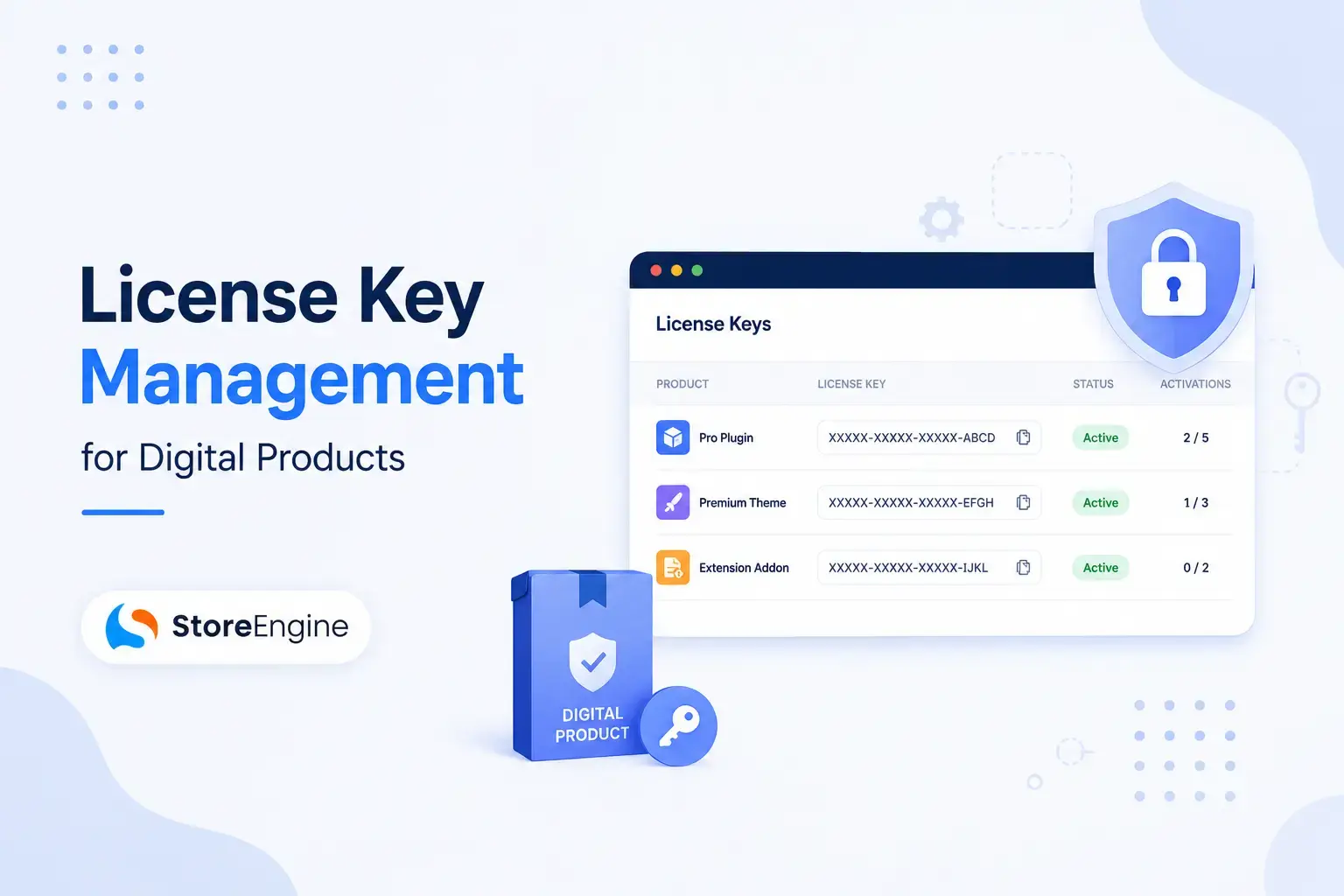

You spent months building your WordPress plugin. It’s polished, it works, customers love it. And then someone screenshots the license key and shares it in a Discord server. Just like that, your revenue walks out the door.
License key management isn’t a “nice to have” feature anymore. In 2026, it’s the difference between a sustainable digital product business and a leaky bucket that fills as fast as it drains.
This guide covers everything — what license key management in WordPress actually means, how the system works under the hood, what features actually matter, and which tool is built to handle it all without stacking five plugins.
What Is License Key Management in WordPress?
A license key is a unique alphanumeric code — think SE-XXXX-XXXX-XXXX-XXXX — that ties a software purchase to a customer, a domain, or a number of activations. It’s your product’s gatekeeper.
License key management is the complete system around that key: generating it, delivering it post-purchase, validating it remotely, limiting activations, handling renewals, and revoking access when necessary.
In WordPress specifically, license management isn’t just about locking down code. It’s about controlling access to:
- Software updates (only paying customers get the latest version)
- Premium support (verify who’s a real customer before opening a ticket)
- Premium features (certain functionality unlocked only with an active license)
- Domain-limited deployments (enforce per-site, per-user, or per-device limits)
💡 The core principle: You’re not selling software. You’re selling access to the service that makes the software valuable. License keys enforce that distinction.
Why License Key Management Can’t Be an Afterthought in 2026
The numbers are blunt.
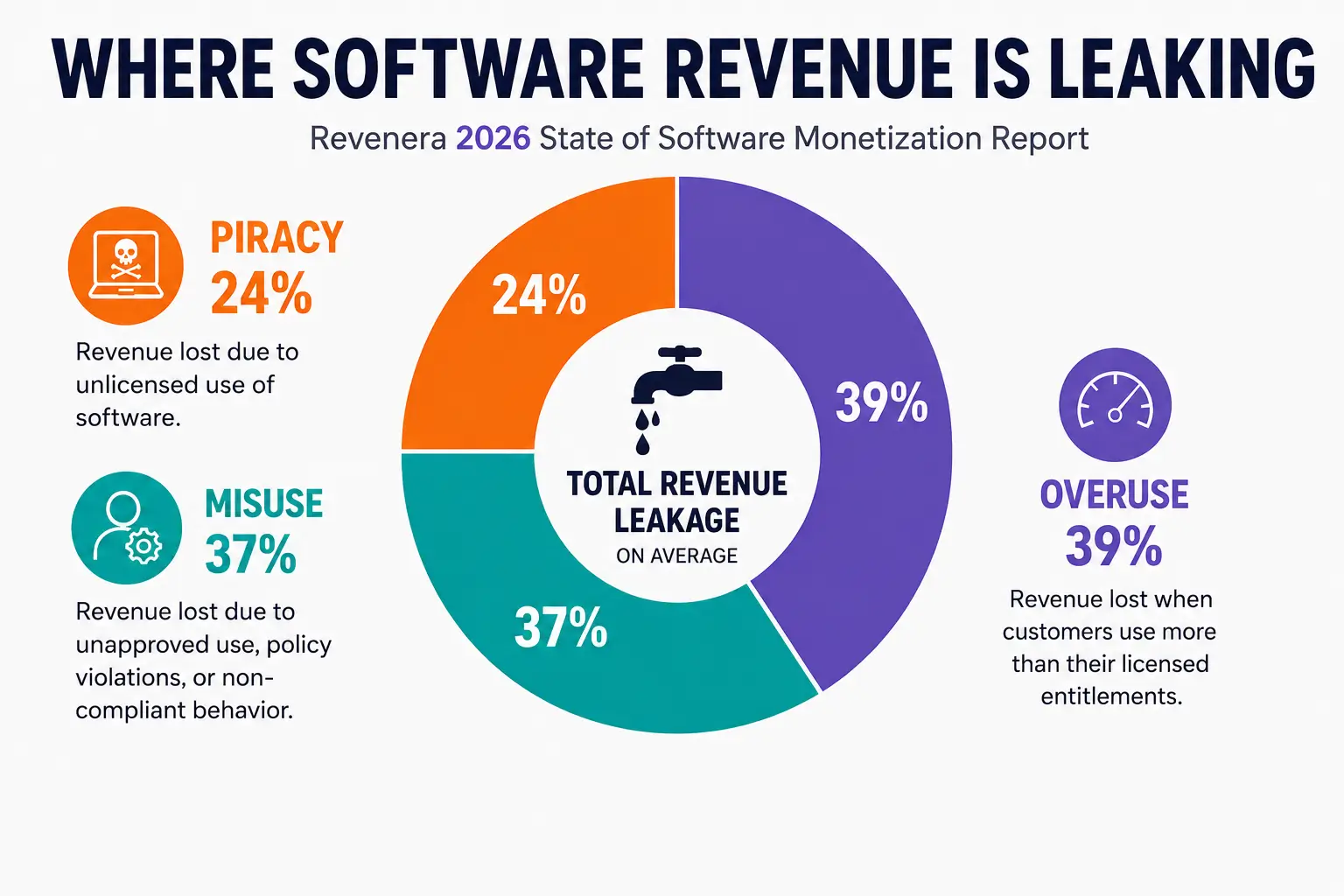
Software revenue leakage costs the industry $46.3 billion annually due to inadequate license management and digital rights protection. 73% of software companies report significant revenue loss from unauthorized usage, while 58% struggle with license compliance across their product portfolio.
For WordPress plugin and theme sellers, the threat isn’t always organized piracy. It’s the customer who:
- Shares their license key with a friend
- Uses a “nulled” version downloaded from a sketchy repo
- Activates the same license across 10 sites when they paid for one
And it compounds fast. If you’re selling at $99/year and even 20% of your user base isn’t paying — that’s a real hole in your revenue model.
31% of software companies report piracy as a major cause of revenue leakage, while 25% cite misuse and 23% overuse as equally significant problems.
A proper license key system doesn’t just protect your revenue. It creates the infrastructure for a sustainable software business.
How WordPress License Key Management Works
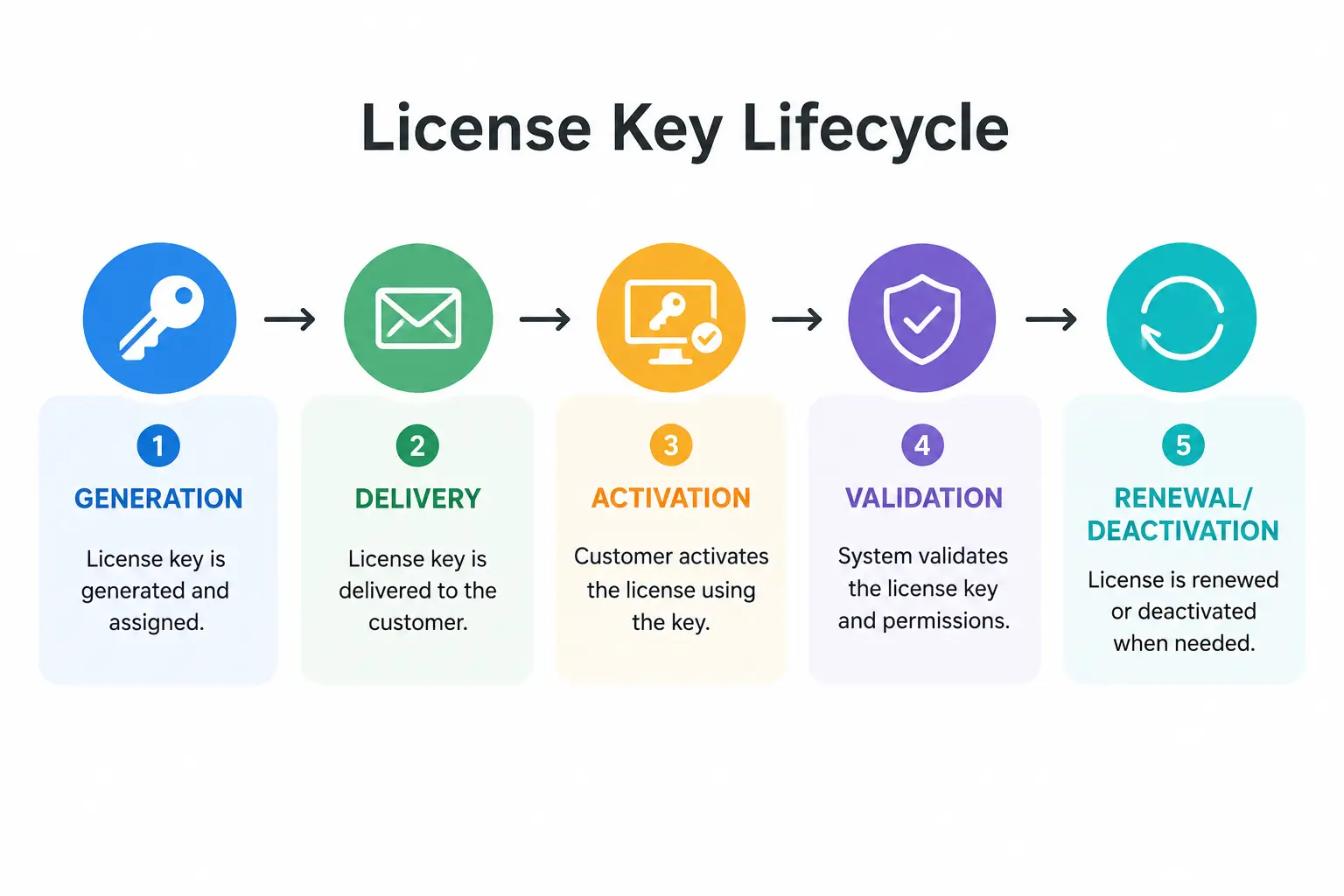
Understanding the mechanics helps you configure it right. Here’s what happens behind the scenes:
Step 1: Key Generation
When a customer completes a purchase, your system generates a unique license key. This can happen:
- Automatically — the plugin generates it on order completion
- From a pre-loaded pool — you import keys in bulk, and they’re assigned sequentially
- Via a generator with custom rules — define the format, length, character set, and expiry
Step 2: Key Delivery
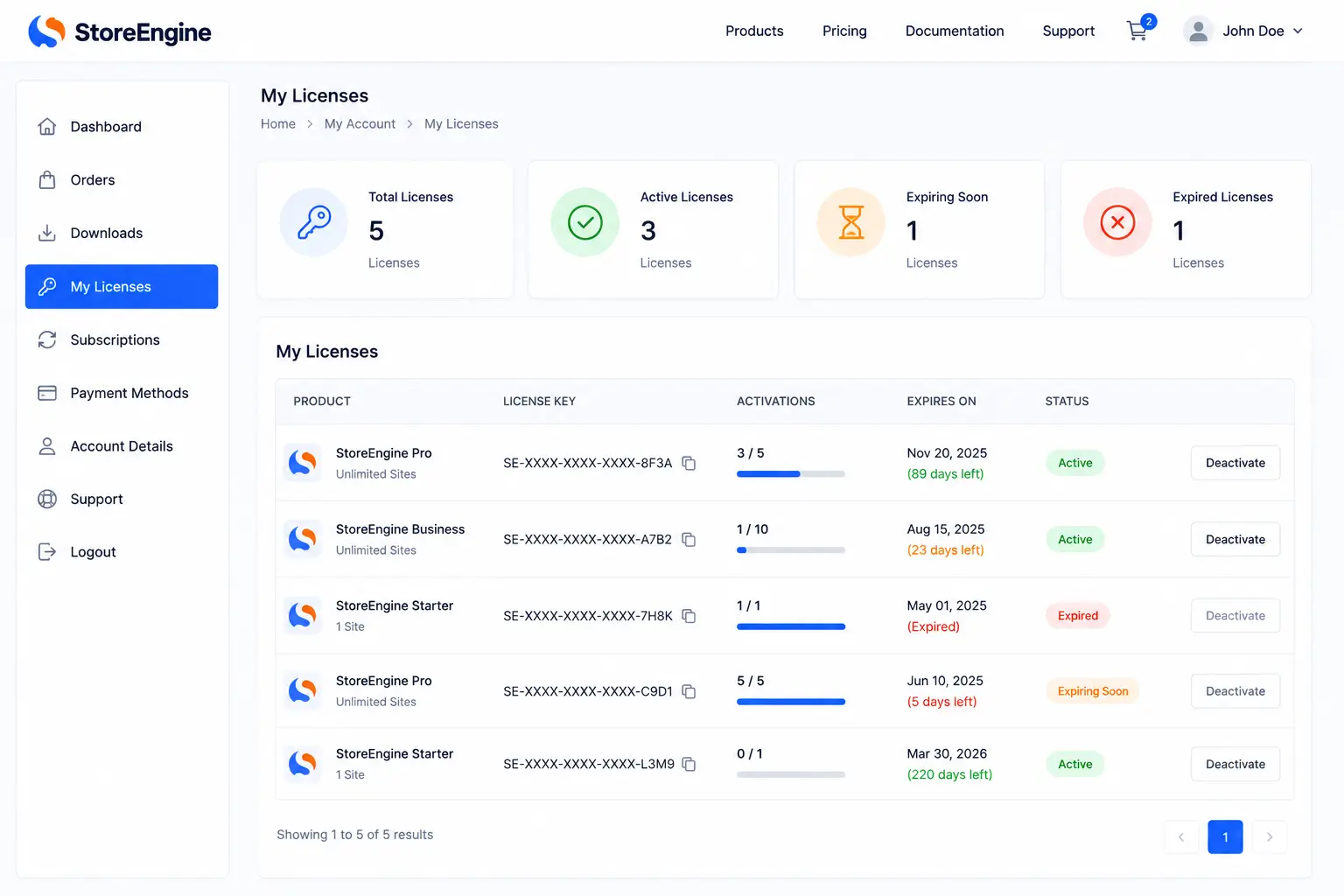
The license key is sent to the customer immediately after purchase — typically via order confirmation email and the “My Account” page. Speed matters here. A customer who has to wait 24 hours for their license key is already frustrated.
Step 3: Activation
The customer enters the key in your product (plugin, theme, app). Your product pings your license server via a REST API call, which validates:
- Is this key real?
- Is this key still active (not expired or revoked)?
- Has the activation limit been reached?
If all checks pass — access granted. Updates flow. Premium features unlock.
Step 4: Ongoing Management
This is where most DIY setups fall apart. A proper system handles:
- Deactivation — customer moves to a new domain, needs to release the old activation
- Renewal reminders — automated emails before expiry
- Expiration enforcement — license stops validating after the renewal date
- Revocation — manual or automated key invalidation for refunds or violations
Core Features Every License Key System Needs
Not all license key plugins are built equal. Before you commit to one, verify these essentials are covered:
|
Feature |
Why It Matters |
|
Automated key generation |
No manual copy-paste after every order |
|
Instant email delivery |
Customer gets key the moment payment clears |
|
REST API for remote validation |
Your product validates in real-time from the customer’s site |
|
Activation limits |
Enforce per-site or per-user restrictions |
|
License expiration control |
Tie licenses to subscription renewals |
|
Bulk import/export |
Manage thousands of keys without a PhD in databases |
|
Deactivation support |
Let customers manage their own activations without opening tickets |
|
Renewal notifications |
Automated reminders before keys expire |
|
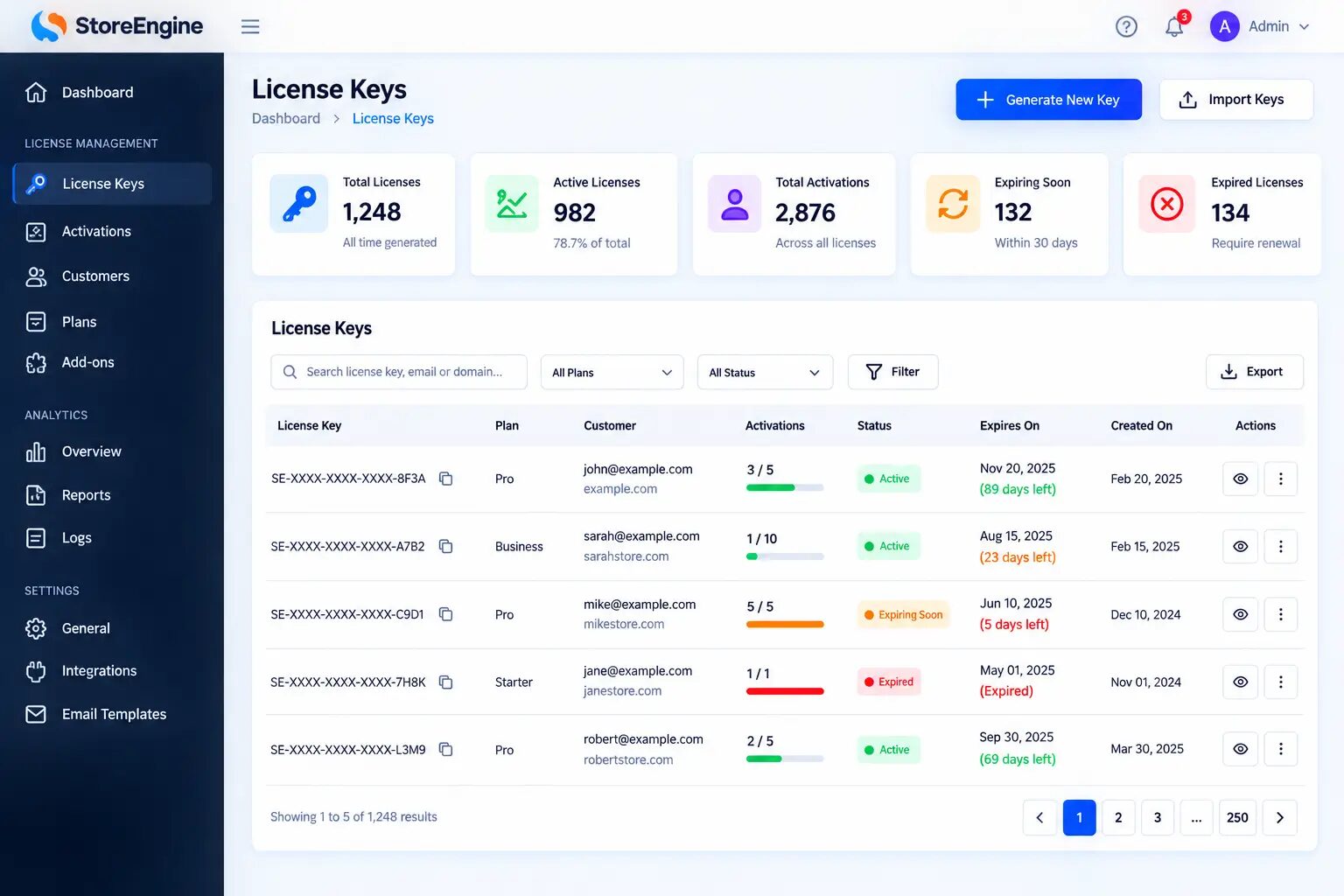
License status dashboard |
See active, expired, deactivated keys at a glance |
|
Encrypted key storage |
Keys in plain text are a security risk |
💡 Key insight: If you’re managing more than 50 licenses and you’re doing it manually — spreadsheet, copy-paste, email draft — you’re already spending more on admin time than the tool costs. Automate this.
StoreEngine: The All-in-One WordPress License Key Solution
Most WordPress plugin developers hit the same wall. They want license management, but they don’t want to install a WooCommerce dependency just to bolt on a license manager plugin, then add a subscription plugin for renewals, then configure a third plugin for automatic updates. That’s three plugins to do what should be one job.
StoreEngine is built differently.
Developers and SaaS owners who sell downloadable products or apps rely on StoreEngine’s license key system to automate license creation, activation, and renewals. It helps manage digital rights, track usage, and deliver updates — without depending on third-party tools.
What StoreEngine’s License System Does
StoreEngine handles the complete digital product licensing stack in a single, lightweight plugin:
Automated License Creation The moment an order completes, StoreEngine generates a unique license key and ties it to the customer’s account. Zero manual intervention.
Instant Secure Delivery The key appears in the order confirmation email and the customer’s account dashboard immediately. No waiting, no support tickets asking “Where’s my license?”
Remote Activation & Validation StoreEngine includes an isolated per-client REST API for license and insights management. Your plugin or theme pings the API; StoreEngine validates the key in real time.
Automatic Updates Delivery This is where StoreEngine goes beyond typical license managers. It also delivers secure and seamless automatic updates to premium plugins and themes directly within WordPress. Paying customers get the update notification in their WordPress dashboard, just like free plugins — but gated by their active license.
Usage Tracking & Analytics Track and monitor license usage with detailed activation and deactivation logs, ensuring better compliance visibility. Plus actionable insights showing how your products are used in real-world environments.
Built-in Cross-Sell & Upsell Because StoreEngine is a complete eCommerce platform — not just a license manager bolted onto WooCommerce — it includes native upsell and cross-sell tools. License management sits inside a full revenue system.
StoreEngine License System vs. Standalone License Plugins
|
Capability |
StoreEngine |
Standalone License Plugin + WooCommerce |
|
License key generation |
✅ Built-in |
✅ Via add-on |
|
Automated delivery |
✅ Built-in |
✅ Via WooCommerce |
|
REST API validation |
✅ Isolated per-client API |
✅ Shared API |
|
Automatic plugin/theme updates |
✅ Built-in |
⚙️ Separate add-on required |
|
Usage analytics |
✅ Built-in |
❌ Usually not included |
|
Subscription/renewal management |
✅ Built-in |
⚙️ Separate plugin required |
|
Affiliate system |
✅ Built-in |
❌ Separate plugin required |
|
Membership management |
✅ Built-in |
❌ Separate plugin required |
|
Plugin install count |
1 |
3–5 minimum |
|
WooCommerce dependency |
❌ Not required |
✅ Required |
StoreEngine Pricing:
- Free version available on WordPress.org (core features)
- Pro plans unlock digital licenses, subscriptions, memberships, affiliate management, and priority support
🔗 Explore StoreEngine → storeengine.pro
Types of License Key Models — Which One Fits Your Product?
Not every digital product needs the same licensing structure. Here’s how the main models break down:
1. Single-Site License
One license key, one domain. The most common model for WordPress plugins and themes. Clean, simple, easy to enforce.
Best for: Individual site owners buying a single-purpose plugin.
2. Multi-Site License
One key, multiple activations (e.g., up to 3 or 5 sites). Typically priced as a tier above single-site.
Best for: Freelancers, small agencies managing a handful of client sites.
3. Unlimited / Agency License
Activate on any number of sites. Usually your highest-priced tier. Often comes with additional perks like priority support or white-labeling.
Best for: Agencies building on behalf of clients, power users with large portfolios.
4. Time-Limited License (Annual / Monthly)
License expires after a set period. Renewal required to continue receiving updates and support. The most common model for software products in 2026.
Best for: Products that release regular updates, security patches, or evolving features. Predictable recurring revenue for you; ongoing value for the customer.
5. Lifetime License
Pay once, use forever. Growing in popularity as a conversion tool, particularly effective against subscription fatigue.
Best for: Conversion-sensitive audiences, early supporters, limited promotional pricing.
License Tier Pricing Example
|
Tier |
Sites |
Annual Price |
Lifetime Option |
|
Personal |
1 site |
$49/year |
$149 |
|
Business |
5 sites |
$99/year |
$299 |
|
Agency |
Unlimited |
$199/year |
$599 |
💡 Pro tip: Always offer a lifetime tier, but price it at minimum 3× the annual price. It converts hesitant buyers and gives you upfront capital — just make sure your product delivers enough long-term value to justify it.
Setting Up License Key Management in WordPress: Step by Step
Whether you’re using StoreEngine or evaluating your options, here’s the practical setup process.
Step 1: Define Your Licensing Model
Before touching a plugin, decide:
- How many activation sites per license?
- Will licenses expire, and on what schedule?
- Will you deliver automatic updates through the license system?
- Do you need a REST API for external validation?
Step 2: Install and Configure Your License Management Plugin
For StoreEngine:
- Install from WordPress.org or upload the Pro zip file
- Navigate to StoreEngine → Pro → Settings
- Open the License Settings tab
- Configure your license format, activation limits, and expiry rules
Step 3: Create Your Product with License Settings
When adding a digital product:
- Enable license generation for that product
- Set the activation limit (1 site, 5 sites, unlimited)
- Set expiry (annual, monthly, lifetime, never)
- Connect to the generator rule that controls key format
Step 4: Configure Delivery
Set up the email template that includes the license key. Test it with a real order. Ensure:
- The key is visible in the email body (not buried)
- The My Account page shows the key, activation count, and expiry date
- Customers can deactivate sites themselves without contacting support
Step 5: Integrate Remote Validation in Your Product
This is the technical step that makes the system real. Using the provided SDK or REST API endpoints, add license validation to your plugin or theme. The check runs on product load and confirms:
- Key is valid and active
- Activation limit not exceeded
- License hasn’t expired
If validation fails, features degrade gracefully — or the product prompts for a valid key.
Step 6: Test Everything
- Purchase a test license
- Activate on a staging site
- Verify activation shows in your dashboard
- Trigger expiry manually and confirm access changes
- Test the deactivation flow from the customer side
License Key Security: What You Can’t Ignore
A license key system is only as strong as its security layer. Here’s what proper implementation looks like:
Encrypted Storage
All license key data should be encrypted in the database. Keys stored in plain text are a security breach waiting to happen — if your database is ever compromised, every license key is exposed.
Signed API Requests
License validation API calls should use API keys with scoped permissions, not open endpoints. The StoreEngine SDK uses an isolated per-client REST API — meaning your API traffic is separated from other merchants.
Signed Download URLs
If your product includes file downloads, use signed, expiring URLs instead of static download links. A signed URL includes a cryptographic signature and an expiration timestamp — the same URL stops working after a set window, commonly 15 minutes to 24 hours.
Activation Logging
Log every activation and deactivation event with: timestamp, domain/IP, user agent, and key used. This audit trail is your evidence in disputes and your early warning system for abuse patterns.
Revocation Capability
You need to be able to kill a license key instantly — for refunds, disputes, or abuse. This should take two clicks in your admin panel, not a database query.
License Key Management: Key Metrics to Track
Running a licensing business blind is like driving without a dashboard. These are the numbers that matter:
|
Metric |
What It Tells You |
|
Active licenses |
Total paying, currently active users |
|
License renewal rate |
Health of your recurring revenue model |
|
Activation-to-purchase ratio |
Are customers actually using what they bought? |
|
Multi-activation usage |
How many licenses are hitting their activation limits? |
|
Expired (not renewed) licenses |
Churn indicator — who left and why |
|
Deactivation frequency |
Are customers moving between sites, or abandoning? |
|
API validation failures |
Possible abuse, nulled versions in circulation |
💡 Revenue recovery move: Run a quarterly report of expired licenses. Reach out with a renewal discount — even a 20% off email to lapsed customers consistently outperforms cold acquisition for plugin businesses.
License Renewal System: Automating Your Recurring Revenue
The license expiry date isn’t just a technical parameter. It’s your recurring revenue trigger.
A solid renewal system does five things automatically:
- Sends a reminder email 30 days before expiry
- Sends a second reminder 7 days before expiry
- Sends a final notice on the expiry day with a direct renewal link
- Automatically renews if the customer has an active recurring subscription attached
- Downgrades access gracefully if renewal doesn’t happen — stops updates and support, but doesn’t break the installed software.
The “graceful downgrade” is important. Abruptly disabling a customer’s live site because their license lapsed is how you get angry refund requests and one-star reviews. Instead: stop delivering updates, display a renewal prompt in the admin panel, and let the product keep working on the version they last downloaded.
StoreEngine‘s built-in subscription and renewal management handles this entire flow — including trial periods, upgrade/downgrade options, and a dunning system for failed payments — all without third-party add-ons.
Frequently Asked Questions
What is license key management in WordPress?
License key management in WordPress is the system for generating unique keys for digital products (plugins, themes, software), delivering them to customers after purchase, validating them remotely via API, enforcing activation limits, managing expiry, and handling renewals — all automated through a licensing plugin.
Do I need WooCommerce to manage license keys in WordPress?
Not necessarily. Standalone solutions like StoreEngine handle eCommerce and license management in a single plugin without requiring WooCommerce as a dependency. WooCommerce-based options like Digital License Manager or License Manager for WooCommerce work well too but require WooCommerce to be active.
How does license key validation work remotely?
When a customer activates your plugin or theme, your product sends an API request to your license server. The server checks: Is the key valid? Is it expired? Has the activation limit been reached? If all checks pass, it returns a success response and the product unlocks premium features. This API call typically happens on each admin page load or once per day.
What is an activation limit and how do I set it?
An activation limit defines how many sites or devices a single license key can be used on simultaneously. You set this per product or per license tier (e.g., “Personal: 1 site, Business: 5 sites, Agency: unlimited”). When the limit is reached, new activation attempts are rejected until the customer deactivates an existing site.
How do I prevent license key sharing?
Full prevention is impossible — but you make sharing costly. Enforce activation limits (sharing one key across 10 sites fails at activation 2 or 3). Log activations with domain and IP data to spot abuse patterns. Use signed API requests so keys can’t be easily scraped. Offer a low-cost tier that makes sharing feel unnecessary.
Can license keys be tied to subscriptions for automatic renewal?
Yes. In StoreEngine, license expiry is synced with subscription billing. When a customer’s annual subscription renews, their license is automatically extended. If payment fails, the license is flagged for renewal. This is how sustainable software businesses operate — no manual license extensions, no awkward support interactions.
What happens when a license expires?
The product should stop receiving updates and premium support. The software itself should continue working on the last downloaded version (don’t break live sites). The customer sees a renewal prompt in the WordPress admin. If they renew, the license is reactivated and updates resume automatically.
Is WordPress license management suitable for SaaS products?
Yes, with the right API integration. StoreEngine’s isolated per-client REST API supports license validation for any application — not just WordPress plugins. Developers building SaaS tools can use the same licensing infrastructure, validating keys from external apps against the central license server.
The Digital Product Licensing Market in 2026
Digital product licensing isn’t a niche — it’s the infrastructure of the creator economy.
- The global enterprise software market is valued at $913 billion, with license management a core operational need
- On average, organizations waste $259 per desktop on unused software due to poor license tracking
- Compliance Intelligence data has supported customer compliance programs generating more than $4.5 billion in new license revenue since 2010.
For independent WordPress plugin developers, the opportunity runs parallel. The more cleanly you enforce licensing, the more revenue you capture from your existing user base — before spending a dollar on new customer acquisition.
Conclusion: License Management Is Your Revenue Infrastructure
Here’s the honest framing: license key management is not a technical checkbox. It’s the infrastructure your entire recurring revenue model runs on.
Get it wrong — manual delivery, no activation limits, no renewal system — and you’re leaving money with every customer who shares a key, every agency using your “personal” license across 40 client sites, every churned customer who simply forgot to renew because no one reminded them.
Get it right — automated generation, instant delivery, remote validation, renewal automation — and your software business runs while you sleep.
In 2026, the WordPress ecosystem has no shortage of license management tools. But most require you to assemble the puzzle yourself: WooCommerce, a license plugin, a subscription plugin, an update delivery plugin, an analytics tool.
StoreEngine is the one-plugin answer to all of it.
License key generation, delivery, remote validation via isolated REST API, automatic update delivery, usage analytics, subscription renewals, affiliate management — built into a single lightweight eCommerce plugin that doesn’t require WooCommerce to function.
Whether you’re launching your first WordPress plugin or scaling a catalog of premium themes, your licensing infrastructure deserves the same care as your product itself.
🚀 Start selling and managing licenses properly → storeengine.pro