


Most product pages lose sales before the buyer even reads the description.
A slow image load, a price buried in fine print, or a vague “premium quality” headline — and the visitor is gone. According to Baymard Institute, 51% of eCommerce sites have mediocre or worse product page UX, across 343 leading US and European stores. These aren’t small shops. These are established retailers leaving money on the table every day.
The fix isn’t a full redesign. It’s fixing specific things in a specific order. Product pages are one piece of a larger conversion system — alongside checkout flow, trust building, and traffic quality — covered in depth in the complete guide to eCommerce conversion rate optimization. This article focuses specifically on what happens on the product page: 12 practices that directly affect conversion, with the data behind each one, common mistakes, and a checklist you can use today.
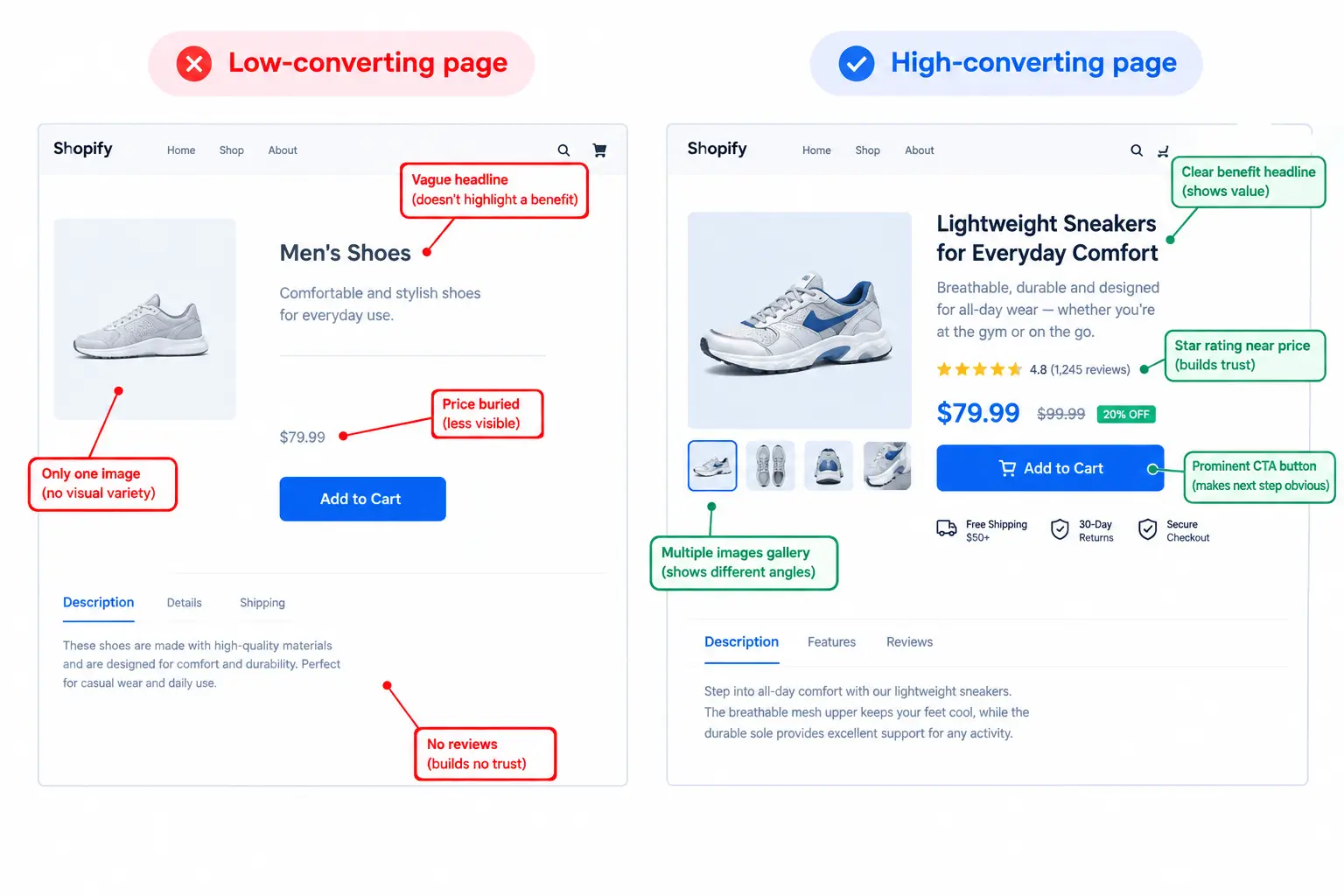
Quick Answer: What are the product page best practices that increase sales?
What Makes a Product Page Convert?
A product page that converts does one thing: it removes every reason a buyer has to hesitate. That sounds simple, but in practice it means handling several things at once — visual trust, information clarity, price transparency, social proof, and page speed — all at the same time.
The pages that fail aren’t missing all of these. They’re usually missing two or three critical ones. A buyer who sees great photos but can’t find the return policy hesitates. A buyer who loves the product but sees no reviews hesitates. A buyer who finds everything they need but the page loads slowly on mobile leaves.
This guide works through each element in the order it affects most buyers: what they see first, what they check before committing, and what closes the sale.
1. Lead with a Benefit-Focused Product Title
The title is the first thing a buyer reads, and on Google it’s the first thing they see before clicking. Most product titles describe what the product is. The ones that convert describe what it does for the buyer.
Weak: Stainless Steel Water Bottle 32oz
Strong: 32oz Insulated Bottle — Stays Cold 24 Hours, Leak-Proof Lid
The strong version answers the implicit question every buyer has: “Why does this matter to me?”
A few things to get right:
One mistake I see constantly: stacking multiple benefits into the title and making it unreadable. Pick the one benefit that matters most to your specific buyer. The description handles the rest.
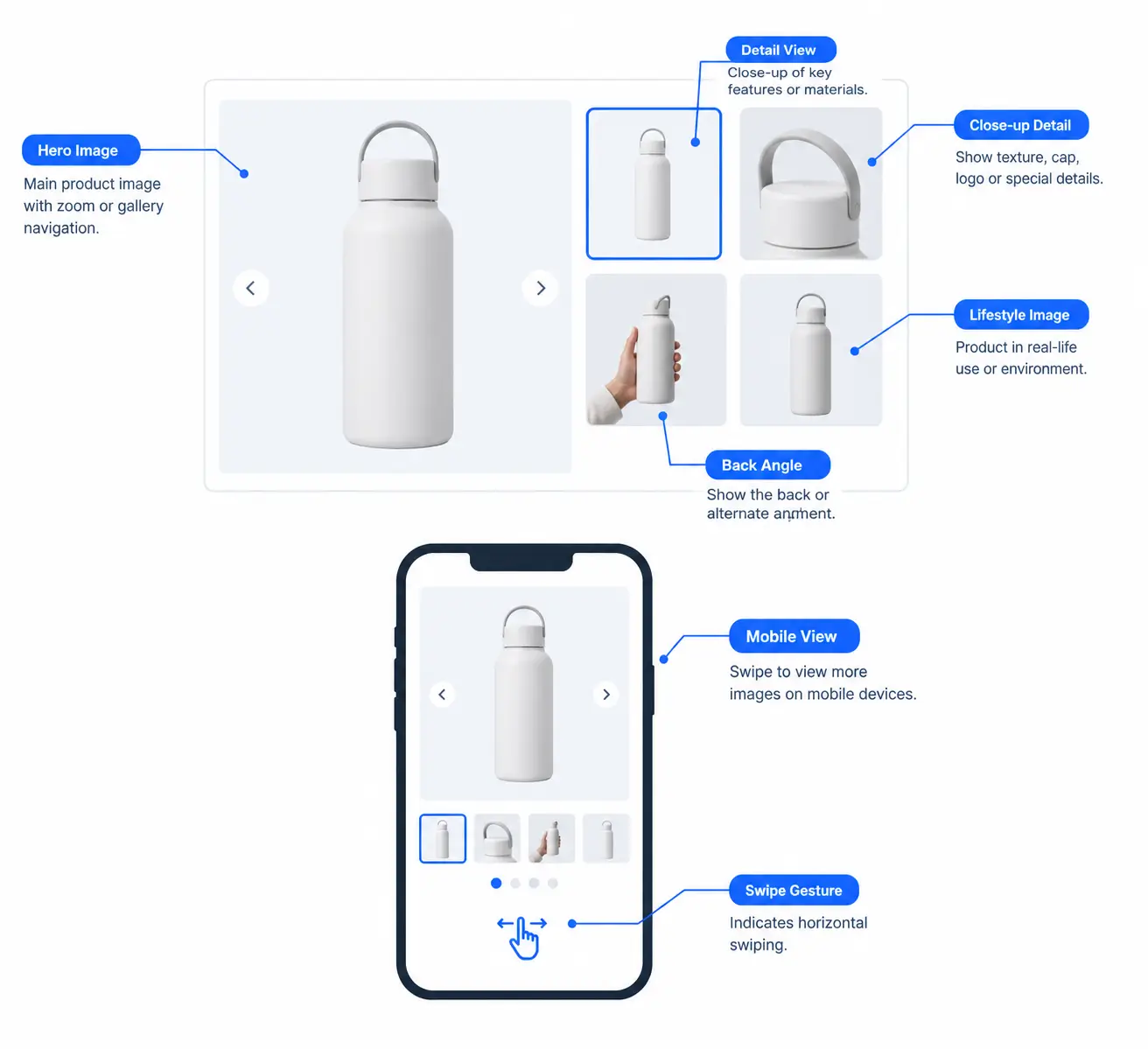
2. Use High-Quality Images from Multiple Angles
When a buyer can’t touch or try the product, images carry the full weight of the sensory experience. According to eMarketer, 83% of US shoppers consider product images the most influential factor in their purchase decisions. Yet 40% of eCommerce stores still don’t support pinch-to-zoom on mobile images (Baymard Institute).
Every product page needs at least:
|
Image type |
What it shows |
Why it matters |
|
Hero shot |
Full product, clean neutral background |
First impression — sets quality expectations |
|
Detail shots |
Texture, stitching, connectors, finish |
Replaces the “feel” of touching it in a store |
|
Scale reference |
Product next to common object or in hand |
Eliminates size confusion, reduces returns |
|
In-use lifestyle |
Product in its natural environment |
Helps buyers imagine owning it |
|
Multiple angles |
Front, back, side, interior |
Answers “what does the back look like?” before they ask |
Beyond static images, 77% of shoppers prefer seeing customer photos over professional shots (SmartInsights). Adding a photo review section to your product page serves double duty — it provides social proof and fills the lifestyle image gap for products where professional shoots are expensive.
Page load speed matters here too. A page that loads in 1 second converts at roughly 3x the rate of one that loads in 5 seconds (Portent). Use WebP format, lazy loading, and size images to the largest display size they’ll actually appear at — not larger.
3. Write Descriptions That Sell, Not Spec Sheets
The most common description mistake: writing it from the brand’s perspective instead of the buyer’s. “Premium-grade aluminium alloy construction with advanced nano-coating” tells the buyer nothing they can act on.
Buyers have one question when they read a description: “Does this solve my specific problem?”
The description structure that works:
87% of customers say product content is the most important factor in their purchase decision (AX Semantics, 2024), and 87% say they are unlikely to repurchase if the original description was inaccurate (Baymard Institute). The description does two jobs: it converts the first sale and it prevents the return.
One rule on length: match it to the price and complexity. A $12 case needs 60 words. A $600 espresso machine needs 400. The rule isn’t “write more” — it’s “answer every question the buyer has, and nothing more.”
The teams that get this right write their first draft from the customer support inbox. The questions that come in most often are the objections the description failed to answer. Fix those and you fix the description.
4. Make the Price Impossible to Miss
If a buyer has to hunt for the price, they leave. This sounds obvious. Half the product pages I review still bury it.
The price should be visible above the fold, next to the product name, in a font size that reads clearly without zooming. If you have a sale price, show both the original and the discounted price. The visual contrast of a strikethrough reinforces the deal far more than a percentage badge.
What to show near the price:
What always tanks conversion: hiding shipping costs until checkout. That surprise is the single biggest driver of cart abandonment — buyers feel deceived, not surprised. State your shipping cost or free shipping threshold on the product page, near the price. “Free shipping on orders over $50” placed near the add-to-cart button is one of the highest-ROI additions to any product page.
If buyers are adding to cart but not completing the purchase, the issue is usually at checkout, not the product page itself. The complete guide to optimizing checkout and reducing drop-off covers that step in detail.
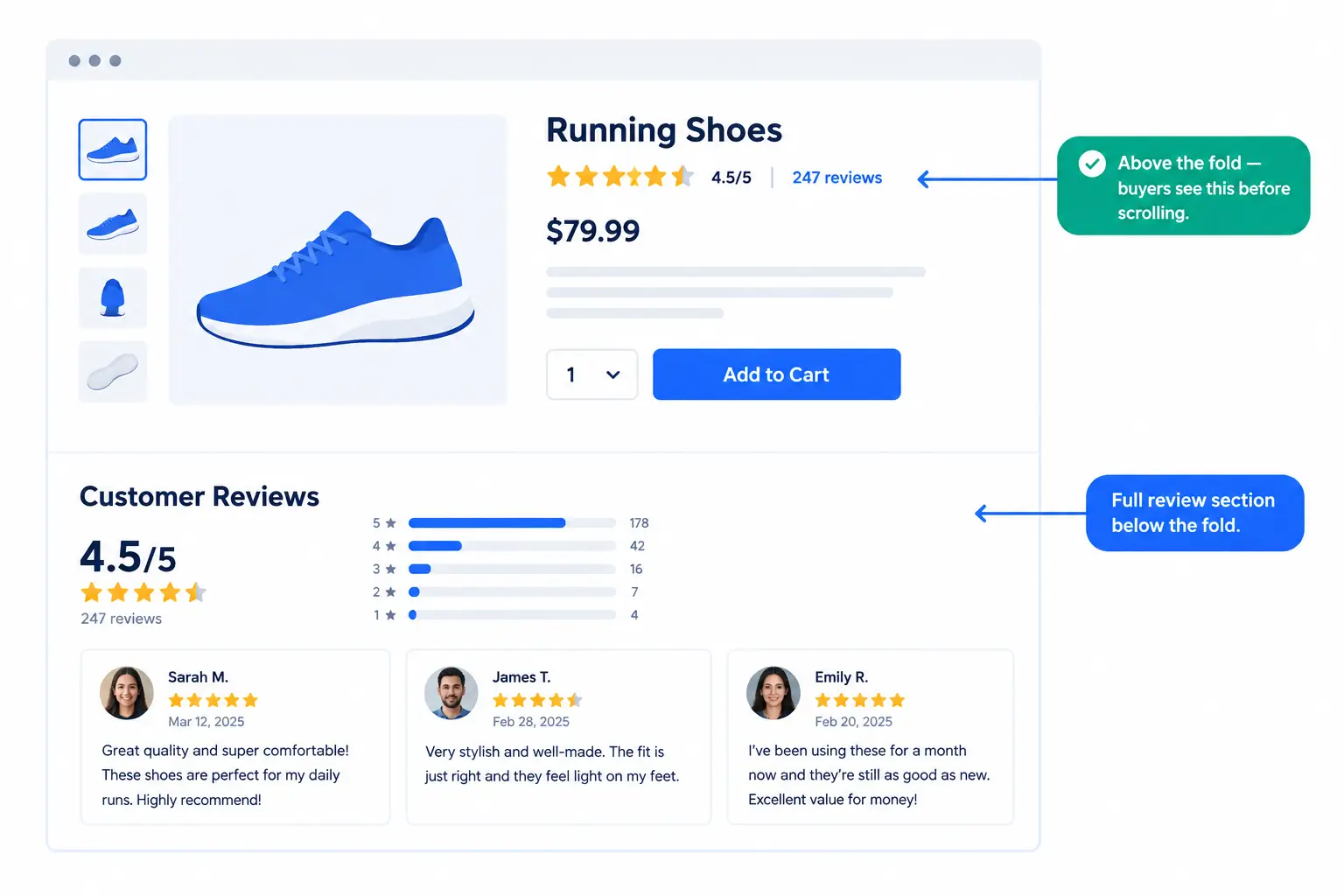
5. Add Reviews Right Where Buyers Look for Them
Placement matters as much as whether you have reviews. Reviews buried at the bottom of the page are nearly invisible. 96% of consumers check reviews before a first purchase (Clutch, 2026). The review summary needs to be near the price, above the fold, where buyers are already weighing the decision.
What to show on the product page:
The mistake I see most often here: collecting reviews but not displaying them prominently. Reviews collected in a system and buried at the bottom of a long page don’t lift conversion. Reviews displayed above the fold do.
StoreEngine has a built-in product review system that lets customers submit star ratings and written feedback directly on your product pages. Reviews appear automatically and roll into the rating summary — no separate plugin needed for WordPress stores built on StoreEngine.
One more thing: respond to reviews publicly, especially negative ones. A professional, helpful response to a 2-star review signals to every future buyer that your customer service is real. It’s one of the most underused trust signals in eCommerce.
6. Use Real Urgency — Not Fake Countdown Timers
Scarcity and urgency are legitimate conversion drivers. But fake urgency — the “Sale ends in 2:37:44” countdown that resets every day — is one of the fastest ways to lose a returning visitor’s trust. Savvy buyers have seen it a thousand times.
Use urgency that is true:
The research backs this up: CXL Institute’s urgency tests showed a 17.1% revenue lift from real urgency messaging. But that lift only holds when the message is credible. 73% of high-procrastination buyers delay purchases without a genuine reason to act (Centre De Recherche DMSP) — and a fake countdown gives them a reason not to trust you instead.
The version of this that almost always works: accurate stock counts. “3 left” when you actually have 3 left creates urgency without any deception. Buyers can see that inventory exists and moves. It’s real, and it works.
When buyers leave without purchasing despite genuine urgency signals, that’s where abandoned cart recovery picks up — capturing revenue from visitors who hesitated at the last step.
7. Show Inventory Status and Offer Back-in-Stock Alerts
Displaying inventory status — in stock, low stock, out of stock — sets accurate expectations and reduces post-purchase frustration. But the bigger opportunity is what happens when something runs out.
An out-of-stock product page with a back-in-stock email capture form is one of the highest-ROI additions to any store. The people who sign up have already decided they want the product. They’re not browsing — they’re buyers waiting to purchase. Back-in-stock email conversion rates typically run 20 to 30%, far above any standard marketing email.
What to show for inventory:
|
Stock status |
What to display |
|
In stock (adequate) |
“In Stock” or nothing — availability assumed |
|
Low stock |
“Only 8 left” (use when genuinely below ~10 units) |
|
Out of stock |
Clear status + email capture form for restock alert |
|
Pre-order |
Ship date + deposit option if available |
StoreEngine tracks inventory in real time and can replace the add-to-cart button automatically with a back-in-stock notification form when stock hits zero. Customers subscribe, and the system emails them the moment you restock — without manual follow-up. For stores building out a broader email program around these notifications, the email marketing for eCommerce guide covers how to sequence and automate those campaigns.
The platforms that don’t offer this leave revenue sitting there. Someone who visits an out-of-stock page and leaves is a lost sale. Someone who leaves their email is a future sale with a 20 to 30% close rate.
8. Optimize the Add-to-Cart Button
Everything on the product page exists to get the buyer to click this button. It needs to be the most visually obvious thing on the page — not competing with the wishlist button, not the same grey as the background, not buried below a wall of text.
What makes a button convert:
On mobile, a sticky add-to-cart button that follows the user while they scroll through the description is one of the higher-impact improvements for long product pages. Buyers who scroll all the way through the description and have to scroll back up to buy — some of them don’t.
The worst version of this I see regularly: a grey or muted button color that doesn’t communicate “click this.” The button color should be the highest-contrast element on the page. If your brand colors are all muted, use a contrasting accent just for the primary CTA.
9. Add Trust Signals Near the Decision Point
Even after a buyer decides they want a product, something in the back of their mind asks: “Can I trust this store?”
Trust signals answer that question before it becomes hesitation. 70% of shoppers actively look for trust signals like guarantees and security badges before completing a purchase (Eklipse Creative).
The trust signals that move buyers:
|
Signal |
Where to place it |
|
Secure payment icons (Visa, MC, SSL) |
Near or below add-to-cart button |
|
Money-back guarantee |
Near price or CTA |
|
Free shipping / free returns |
Near price or CTA |
|
Real contact info (email, phone, chat) |
Visible in header or product area |
|
Return policy summary |
1-2 sentences near CTA, full policy linked |
The placement rule: trust signals work at friction points. The highest friction point on a product page is the moment before clicking “Add to Cart.” That’s where the buyer most needs reassurance, and that’s where trust signals do the most work.
A simple row of three icons with short labels — “Secure Checkout · Free Returns · Fast Shipping” — placed directly below the buy button consistently lifts conversion in A/B tests, particularly for first-time visitors who don’t yet know your brand.
There’s a full breakdown of which trust signals move the needle for different store types, and how to display them without cluttering your layout, in the dedicated guide to trust signals and social proof for online stores.
10. Upsell and Cross-Sell at the Right Moment
Product recommendations done right account for up to 35% of total eCommerce revenue — a figure Amazon has consistently reported for its recommendation engine. The math works because you’re reaching buyers who have already committed to a purchase.
The three types and when to use each:
|
Type |
Timing |
Example |
|
Cross-sell (“Goes well with”) |
Product page, below main content |
Camera → memory card, bag, cleaning kit |
|
Upsell (“Customers also considered”) |
Product page or cart |
32oz bottle → 64oz bundle |
|
Order bump |
Checkout page, one-click add |
Course → workbook PDF for $9 |
The rule for recommendations that work: three highly relevant suggestions outperform twelve loosely related ones. Irrelevant recommendations train buyers to ignore the section. Relevance is what converts.
Order bumps specifically deserve attention. An order bump is a one-click add-on offer shown at checkout — the buyer adds it with a single checkbox without re-entering payment details. The complete guide to order bumps, upsells, and cross-sells covers implementation, pricing strategy, and what offers convert best by product type. Research cited there shows average order value lifts of 10 to 30% from well-placed bumps. A $30 bump accepted by 25% of buyers on 100 orders adds $750 to that month’s revenue — with zero additional traffic.
StoreEngine’s order bump feature lets you configure a relevant add-on at checkout. One click for the buyer, no page redirect, no re-entry of payment details. For WordPress stores using StoreEngine, this is one of the fastest ways to lift revenue per transaction.
11. Optimize for Mobile — Specifically
Mobile commerce now accounts for more than 60% of global eCommerce traffic (Statista, 2024), but mobile conversion rates are still 1.5 to 3x lower than desktop for most stores. That gap is almost entirely a UX problem, not a buyer intent problem. People shopping on phones are ready to buy — the experience fails them.
The mobile-specific checklist:
The most reliable way to find mobile UX problems: open your own product page on your phone and go through the actual purchase flow. Don’t use browser dev tools in desktop. Use the actual device. Notice where you have to pinch. Notice where buttons are too small. Those are your fixes.
For WordPress stores, page speed on mobile is largely a theme and image optimization problem. A well-configured caching plugin plus WebP images handles most of it without touching code.
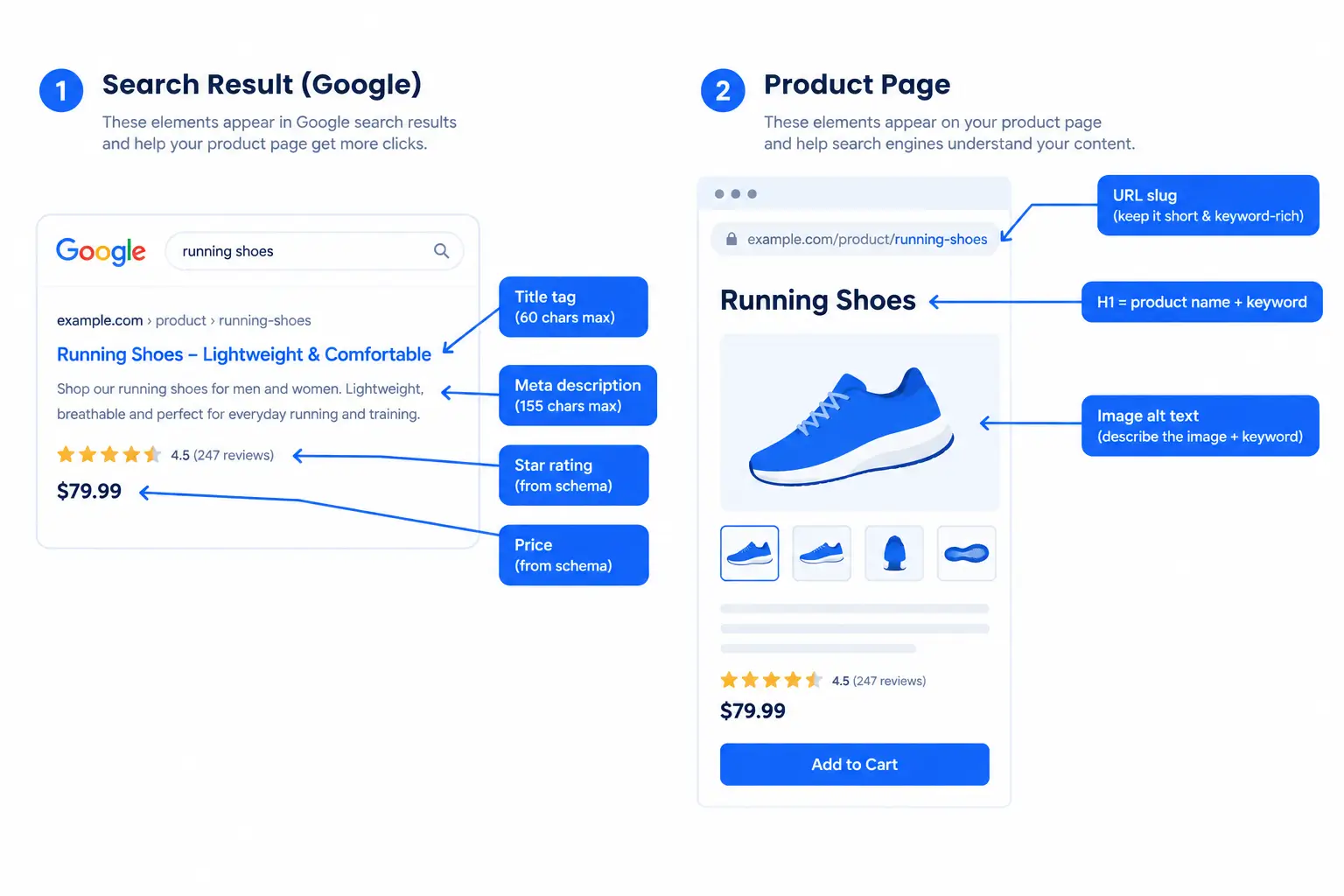
12. Optimize for Search — Bring Buyers to the Page
The best product page in the world doesn’t convert visitors it doesn’t have. Product page SEO targets buyers at the bottom of the funnel — people who know what they want and are searching with purchase intent.
Keywords like “buy [product],” “[product] for [use case],” and “[brand] [product] review” signal buyer intent. These are the searches where someone is already deciding, not just exploring.
Product page SEO elements that matter:
|
Element |
Rule |
|
Title tag |
Primary keyword + key differentiator, under 60 characters |
|
Meta description |
Specific value prop + call to action, under 155 characters |
|
H1 |
Matches the product name, includes primary keyword |
|
URL slug |
Short, keyword-focused: |
|
Image alt text |
Descriptive, keyword-relevant, written naturally (not stuffed) |
|
Product schema |
Enables rich results — star ratings, price, availability in Google results |
Product schema is the most underused SEO tool on product pages. It tells Google to display your rating, price, and stock status directly in search results, which can double your click-through rate from identical search positions. If you’re on WordPress, a well-configured SEO plugin handles schema generation automatically.
StoreEngine’s built-in SEO addon generates Product schema automatically and integrates with Rank Math, Yoast SEO, AIOSEO, and SEOPress. Your star ratings and pricing can appear in Google results without any manual schema coding. Combined with StoreEngine’s SEO-friendly URL structure, this covers the core technical requirements without a separate plugin. For a full breakdown of eCommerce SEO beyond individual product pages, the eCommerce SEO for WordPress guide covers category pages, site architecture, and keyword strategy.
One maintenance point: product pages that go out of stock and get redirected or 404’d lose their SEO equity. Keep the URL live with a back-in-stock form. If a product is discontinued permanently, redirect to the closest successor or category page.
Product Page Best Practices Checklist
|
Element |
Must have |
Nice to have |
|
Product title |
Benefit-focused, includes keyword |
Under 65 characters |
|
Images |
3+ angles, zoom-capable, WebP format |
Video, 360-degree view, customer photos |
|
Description |
Benefit-led, addresses top 3 objections |
Organized with expandable tabs |
|
Price |
Visible above fold, shipping cost clear |
Sale price with strikethrough, installment option |
|
Reviews |
Star rating near price, recent reviews visible |
Photo reviews, verified buyer badge, response to negative reviews |
|
Urgency |
Real low-stock count, shipping cutoff |
Restock date for out-of-stock items |
|
Back-in-stock |
Email capture when out of stock |
SMS notification option |
|
CTA button |
High contrast, clear text, trust line below |
Sticky on scroll for mobile |
|
Trust signals |
Secure payment icons, return policy |
Guarantee badge, contact info visible |
|
Recommendations |
3 relevant cross-sells |
Order bump at checkout, upsell in cart |
|
Mobile |
Fast load, large tap targets, no mobile pop-ups |
Sticky mobile CTA button |
|
SEO |
Keyword in title, meta, H1; Product schema |
Optimized slug, image alt text complete |
Which Fix Should You Prioritize First?
Not every improvement delivers the same return. The right starting point depends on where your page is actually losing buyers.
Run one change at a time where possible. A/B testing shows you which change moved the needle instead of guessing. Testing two things simultaneously means you can’t learn which one worked.
FAQ
What is the most important element on a product page?
If you can only fix one thing, fix the primary product image. 83% of US shoppers say product visuals are the most influential factor in their purchase decision (eMarketer). A clear, high-resolution image from multiple angles removes more hesitation than any other single element. Reviews and price clarity are close behind.
How many images does a product page need?
A minimum of 3 for simple products — hero, detail closeup, and in-use or scale reference. For apparel, accessories, or products with complex surfaces, aim for 5 to 8: hero, multiple angles, in-use lifestyle, and a scale reference. Even a 15-second product video typically outperforms static images alone.
Does the length of a product description affect conversion?
Yes, but the relationship isn’t “longer = better.” The description needs to be long enough to answer every question a buyer has before purchasing. A $12 item with 3 obvious use cases needs 60 words. A $500 item with complex configuration options needs 400+. The question to ask: what would a buyer call customer support to ask before buying? Answer those questions in the description.
How should I show reviews to get the most conversion lift?
Display the star rating summary near the price, above the fold — not at the bottom of the page. Show the total review count. Feature 2 to 3 recent reviews in the main product area. A 2026 Clutch report found that 96% of consumers check reviews before a first purchase; they’re looking before they read the description, so the rating summary needs to be where they look first.
What’s an order bump and when should I use one?
An order bump is a one-click add-on offer shown at checkout — the buyer adds it with a single checkbox without re-entering payment details. It works best when it’s directly relevant to what they’re already buying (a case for a phone, a workbook for a course, an extended warranty for an appliance). The order bumps, upsells, and cross-sells guide cites typical AOV lifts of 10 to 30% when the offer is relevant and priced at 20 to 30% of the main product cost.
How do I handle out-of-stock products without losing the SEO ranking?
Keep the URL live. Replace the add-to-cart button with a back-in-stock email capture form. This preserves the page’s search ranking and turns visitors into future buyers — back-in-stock email subscribers convert at 20 to 30% when the product returns. If a product is permanently discontinued, redirect to the closest successor product or category page, not to your homepage.
What is Product schema markup and does it help?
Product schema is structured data added to your product page HTML that tells Google how to interpret your content. With it, Google can show your star rating, price, and stock status directly in search results before someone clicks your link. That additional information in the result can significantly lift click-through rate from the same search position. For WordPress stores, an SEO plugin that supports Product schema (Rank Math, Yoast SEO, or StoreEngine’s built-in SEO addon) handles this without manual coding.
Does page speed really affect product page conversion?
Yes. Portent’s research found conversion rates drop 0.3% for each additional second of load time, and a page loading in 1 second converts at roughly 3x the rate of a page loading in 5 seconds. On mobile this effect is stronger. The fixes that matter most: optimize images to WebP format, use a caching plugin, and minimize third-party scripts that block rendering. For most WordPress stores, those three steps get load time under 3 seconds.
StoreEngine is a WordPress eCommerce plugin with built-in product reviews, back-in-stock notifications, order bumps, upsell recommendations, and an SEO addon with automatic Product schema markup. Everything in this checklist is available in a single plugin — see all features at storeengine.pro/features/.