


To sell online courses on WordPress, install StoreEngine and Academy LMS, build your course in the LMS, then create a StoreEngine product and link it to that course through the Integration panel. When a student pays, StoreEngine enrolls them automatically. This gives you payments, orders, and course delivery in one WordPress dashboard — no third-party checkout required.
💡 Quick Takeaway:
Online courses are the highest-margin product a creator can sell. Recent data shows 67% of monetizing creators now sell digital products like courses, with profit margins of 70–90% — dramatically higher than ad or sponsorship income. The global eLearning market reached roughly $325 billion in 2025.
Why sell online courses in 2026?
Knowledge is one of the few products you can build once and sell infinitely. That is why the numbers behind online education keep climbing. The global eLearning market reached approximately $325 billion in 2025 and is projected to hit $370–400 billion by the end of 2026. The creator economy — courses, coaching, and digital products — sits around $250 billion.
For individual creators, the economics are hard to beat. More than half of six-figure creators cite online courses as their primary revenue source, and course profit margins of 70–90% far outpace advertising or brand deals. Meanwhile, 90% of companies now offer some form of online training, so demand comes from both consumers and enterprises.
The catch on WordPress has always been the plumbing. An LMS handles lessons and student progress, but it does not process payments or manage orders well. Historically, that meant bolting on a separate eCommerce plugin and wiring the two together. StoreEngine and Academy LMS remove that friction — the LMS delivers the learning, StoreEngine handles the selling, and the two talk to each other natively.
How StoreEngine and Academy LMS work together
Think of it as a clean division of labor. Academy LMS is where you build and deliver the course: lessons, curriculum, quizzes, and learner progress tracking. StoreEngine is your store: it handles pricing, checkout, payment gateways, orders, and refunds. The Integration panel inside a StoreEngine product is the bridge that connects a paid product to a specific course.
The result is automatic enrollment. When a customer completes checkout and the order is marked complete, the student is instantly granted access to the linked course — no manual work on your end. Everything is managed from one WordPress admin, so you are never juggling separate systems for sales and delivery.
What you need before you start
Make sure these prerequisites are in place before selling a course:
- WordPress installed and configured
- StoreEngine plugin installed and activated
- Academy LMS (or a supported LMS) installed and activated
- At least one course created and published in the LMS
- Payment methods configured in StoreEngine
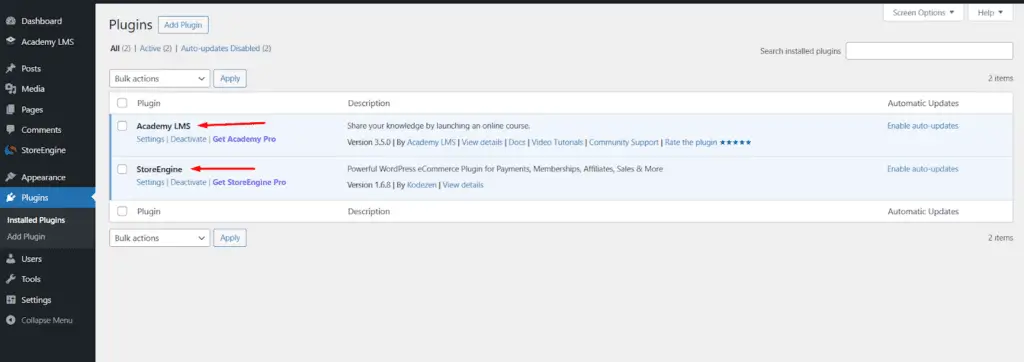
Figure 1: Both StoreEngine and Academy LMS installed and active in the WordPress Plugins list.
If you have not built your course yet, do that first. In Academy LMS, go to Courses → Add New Course, enter your title, description, lessons, and curriculum, then publish. Once published, the course becomes available to link inside StoreEngine.
How do you create and link a course product?
Selling a course means creating a StoreEngine product, setting its price, and connecting it to your published Academy LMS course. Here is the exact flow.
Step 1: Create the product and set a price
Go to StoreEngine → Products and click Add New Product. Enter the product name and details, then set your price in the pricing section. This is the price students will pay to unlock the course.
Step 2: Link the course in the Integration panel
Scroll down to the Integration section of the product editor. From the Integration dropdown, select Academy LMS. Then choose your course from the Course Access field, confirm the amount in Select a Price, and click Add Integration.
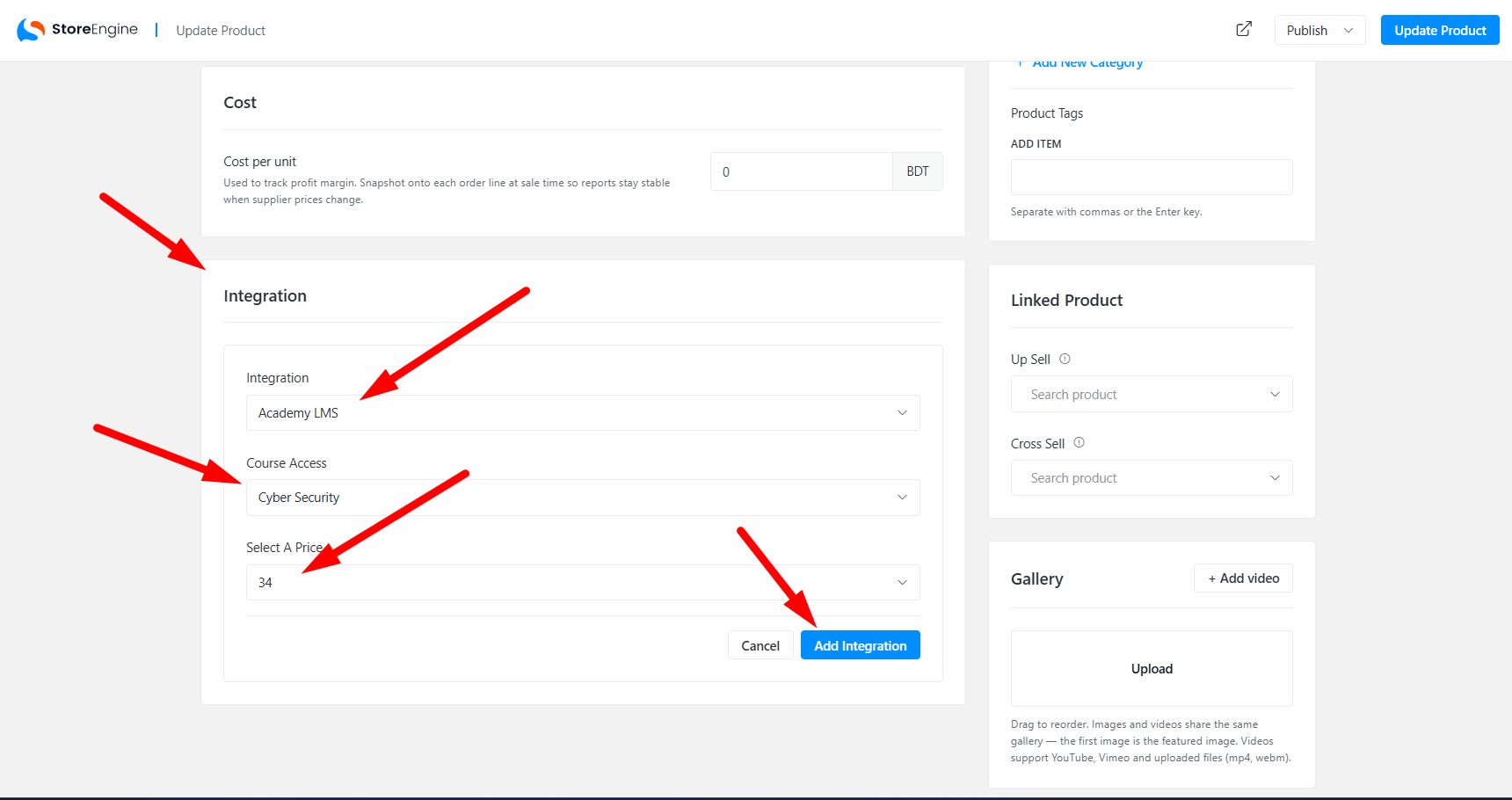
Figure 2: In the Integration panel, select Academy LMS, choose the course under Course Access, pick the price, and click Add Integration.
Finally, click Publish (or Update Product). Your product is now officially linked to the course. A few rules to keep in mind: the Academy LMS plugin must stay active, the course must be published, one product links to one course, and access is granted only after successful payment.
What does the checkout and enrollment flow look like?
Once your course product is live, customers buy it like any other product. The flow is fully automated for most payment methods:
- A visitor lands on the course product page and proceeds to checkout.
- They complete payment through your chosen gateway.
- The order status updates to Completed.
- The student is automatically enrolled in the linked course.
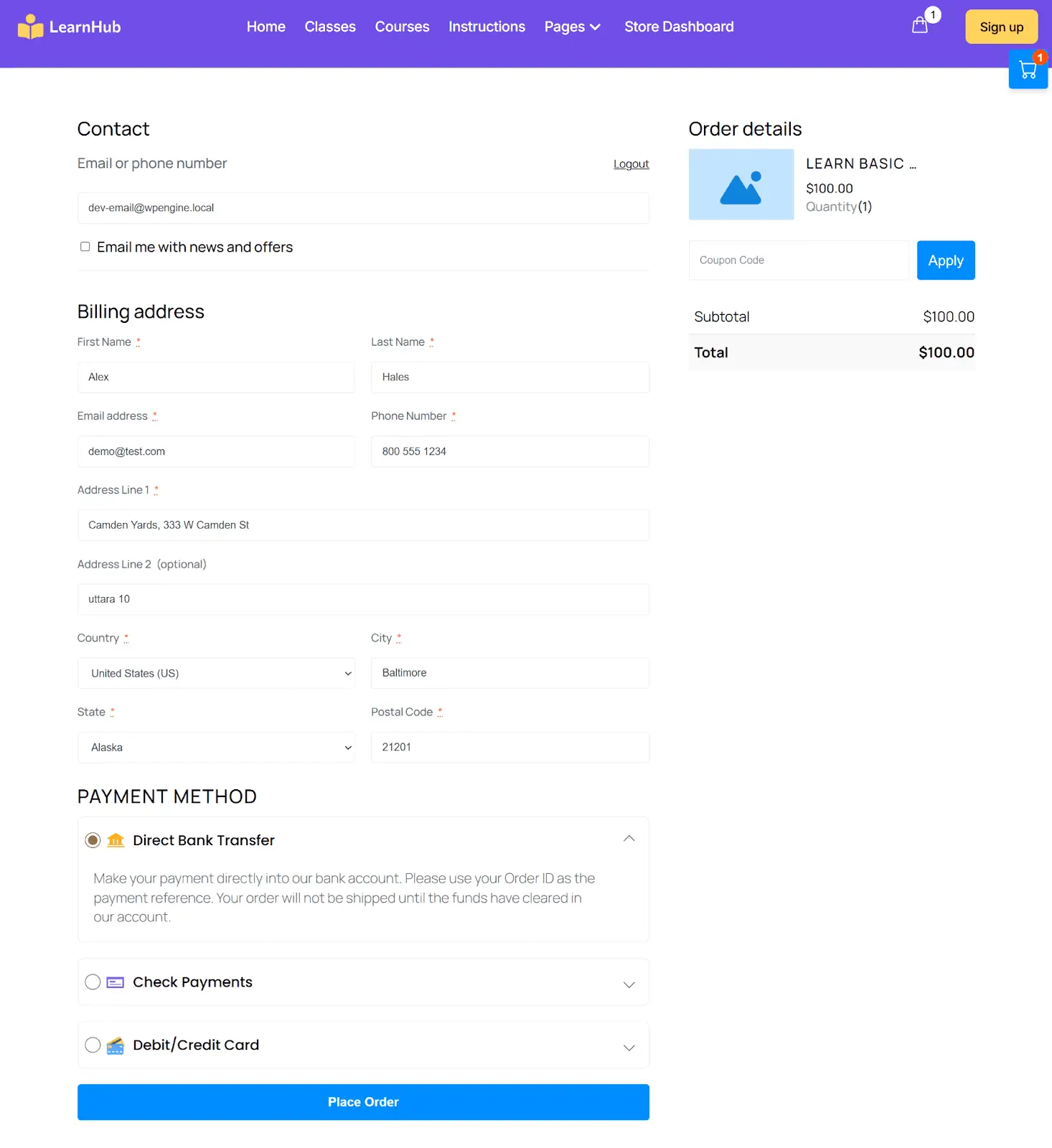
Figure 3: The StoreEngine checkout page a student sees — billing details, order summary, coupon field, and payment methods.
No manual enrollment is required. The one exception is offline payment methods like bank transfers and checks, where you confirm payment before access is granted — since the funds clear outside the automated gateway flow.
How do you manage course orders?
Every course purchase is tracked from the StoreEngine Orders page, giving you full visibility over your e-learning revenue. Go to StoreEngine → Orders to view each order’s product, customer, amount, payment info, and status. From here you can monitor Processing and Completed orders, spot unpaid bank-transfer orders that need confirmation, and process refunds when required.
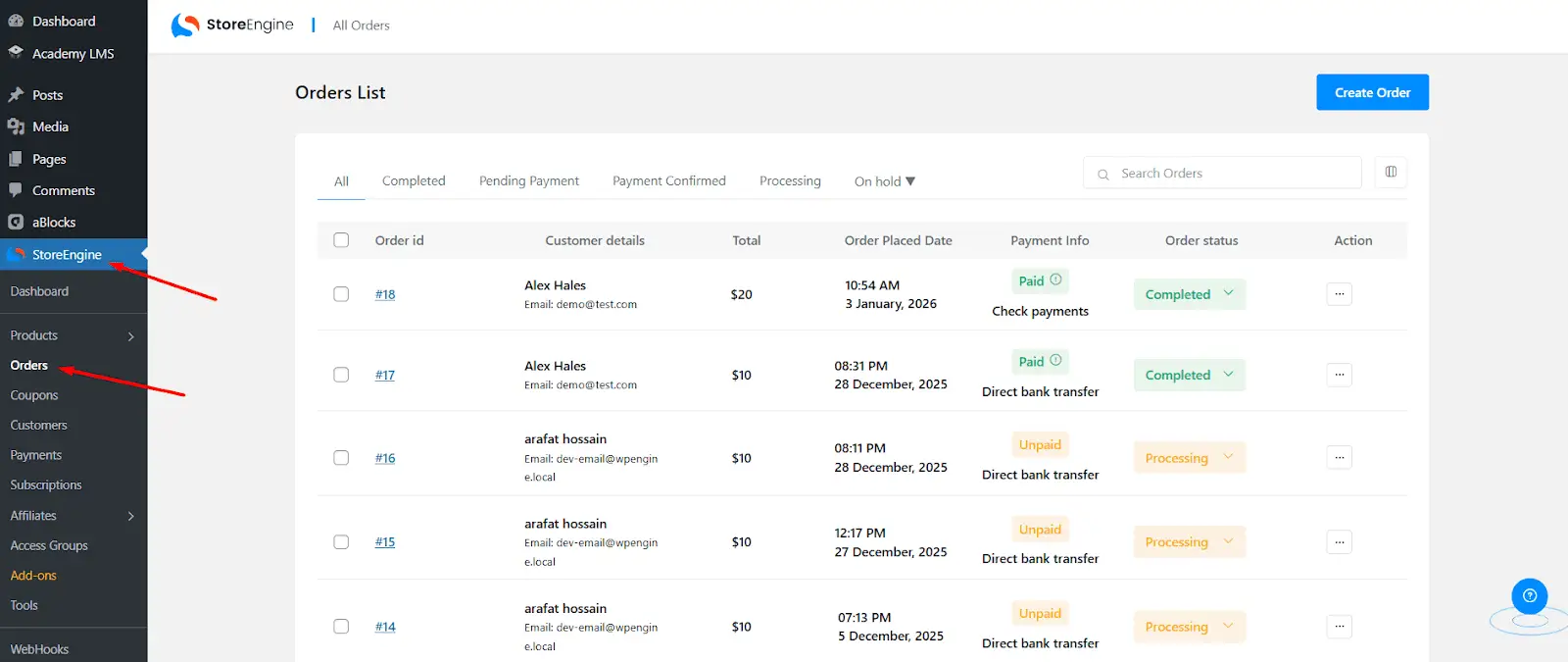
Figure 4: The StoreEngine Orders list — filter by status, see payment info, and manage course transactions in one place.
Because orders, payments, and enrollment all live in StoreEngine, you get a single source of truth for your course business instead of reconciling data across separate tools.
Tips for selling more courses
1. Price with anchoring and tiers
Course pricing varies wildly — Kajabi creators average around $37,000 annually while Udemy instructors average far less, largely due to pricing power. Owning your platform lets you charge premium prices. Use a compare-at price to anchor value, and consider tiered access (basic vs. cohort/community) rather than a single flat price.
2. Add community to lift completion
Completion rates for standalone courses hover around 10–15%, but jump dramatically when courses include active community elements. Higher completion means better reviews, more referrals, and lower refund rates — all of which compound your revenue over time.
3. Use coupons and order bumps
StoreEngine includes coupons, order bumps, and upsells natively. Offer a launch discount to build early momentum, then bump complementary courses or resources at checkout to raise average order value without extra ad spend.
4. Sell to businesses, not just individuals
With 90% of companies offering online training and corporate eLearning growing faster than the consumer market, packaging team or bulk licenses can open a higher-value B2B revenue stream alongside individual sales.
StoreEngine + Academy LMS vs. Plugin-Stack Alternatives
The traditional WordPress approach stitches an LMS to a separate eCommerce plugin. Here’s how the native StoreEngine + Academy LMS pairing compares.
|
Capability |
StoreEngine + Academy LMS |
LMS + WooCommerce + Bridge Plugin |
|
Automatic enrollment |
✓ Native |
✓ Requires bridge plugin |
|
Payments & checkout |
✓ Built-in |
✓ Separate plugin |
|
Orders in one dashboard |
✓ Yes |
✗ Split systems |
|
Coupons, bumps, upsells |
✓ Included |
Often paid add-ons |
|
Number of plugins to sync |
Two |
Three or more |
|
Setup complexity |
Low |
High |
The core advantage: StoreEngine and Academy LMS are built by the same team to work together — so there’s no fragile third-party bridge to maintain between your store and your courses.
Frequently asked questions
Do I need WooCommerce to sell courses on WordPress?
No. StoreEngine is a complete, self-hosted eCommerce solution with its own checkout, payments, and orders. Paired with Academy LMS, it handles the entire course-selling flow natively — you do not need WooCommerce or a separate bridge plugin to connect sales to enrollment.
Are students enrolled automatically after they pay?
Yes, for standard online payments. Once the order status reaches Completed, StoreEngine automatically enrolls the student in the linked Academy LMS course with no manual steps. The exception is offline methods like bank transfers and checks, where you confirm the payment first before access is granted.
Can one product sell access to multiple courses?
Each StoreEngine product links to one Academy LMS course through the Integration panel. To sell access to several courses together, you would typically create a bundle course in the LMS or use a membership access group, then link the product to that.
Where do I track course sales and process refunds?
All course purchases appear on the StoreEngine Orders page, where you can view the product, customer, amount, payment status, and order status. From there, you monitor Processing and Completed orders, confirm offline payments, and process refunds when needed — all in one dashboard.
Selling online courses on WordPress no longer means duct-taping an LMS to a checkout plugin. With StoreEngine and Academy LMS, you build the course once, link it to a product, and let automatic enrollment and unified order management do the rest. Set up your first course product, test the checkout in an incognito window, and start selling into one of the fastest-growing markets in digital commerce.