


Multivendor Ecommerce Platforms Compared helps you evaluate the best marketplace solutions based on pricing, features, scalability, and long-term costs. It costs you months — rebuilding, migrating, reconciling vendor payments manually because the payment split feature you assumed was included is actually behind a $499/year add-on.
Most comparison articles list 10 platforms and tell you each one is “great for growing businesses.” They skip two things that actually matter: what the platform will cost you by month 12, and whether the architecture fits the way you’re running your marketplace. A Shopify store owner adding vendor functionality has completely different needs from someone building a fresh WordPress marketplace. And a freelancer testing a marketplace idea needs something different from a business onboarding 200 vendors.
Read this article, and you’ll know exactly which platform matches your situation — with a framework for evaluating the decision yourself, honest pricing breakdowns, and a clear call-out for who should not use each option.
Quick Answer: Best Multivendor Ecommerce Platforms
- Best for WordPress without WooCommerce: StoreEngine — native multi-vendor add-on, flat annual cost, no WooCommerce dependency
- Best for WooCommerce users: Dokan — starts at $149/year, deep WooCommerce integration, 40+ modules
- Best all-in-one hosted: Shopify + marketplace app — easy setup, but app costs stack fast on top of $29–$299/month base plans
- Best self-hosted with built-in marketplace: CS-Cart Multi-Vendor — $55–$275/month, no extra marketplace plugin needed
- Best for fast no-code MVP: Sharetribe — fastest to launch, limited product catalog depth
- Best for enterprise B2B: Mirakl or VirtoCommerce — enterprise pricing, built for large vendor networks
Why Choosing a Multivendor Platform Is Harder Than It Looks
The digital marketplace market reached $580.31 billion in 2024 and is projected to surpass $1 trillion by 2030 (CAGR of 10.6%). That growth has produced a crowded software landscape where every platform claims to do everything.
The real differences between platforms are structural. Some were built specifically for marketplaces. Others are standard ecommerce platforms extended through third-party apps. Others are WordPress plugins that add marketplace functionality to an existing WooCommerce store. Each architecture comes with different trade-offs around cost, maintenance, vendor control, and long-term scalability.
Before comparing specific platforms, you need one clear thing: a framework for evaluating them against your specific situation. Most people skip this step and end up choosing the most-reviewed tool rather than the right tool.
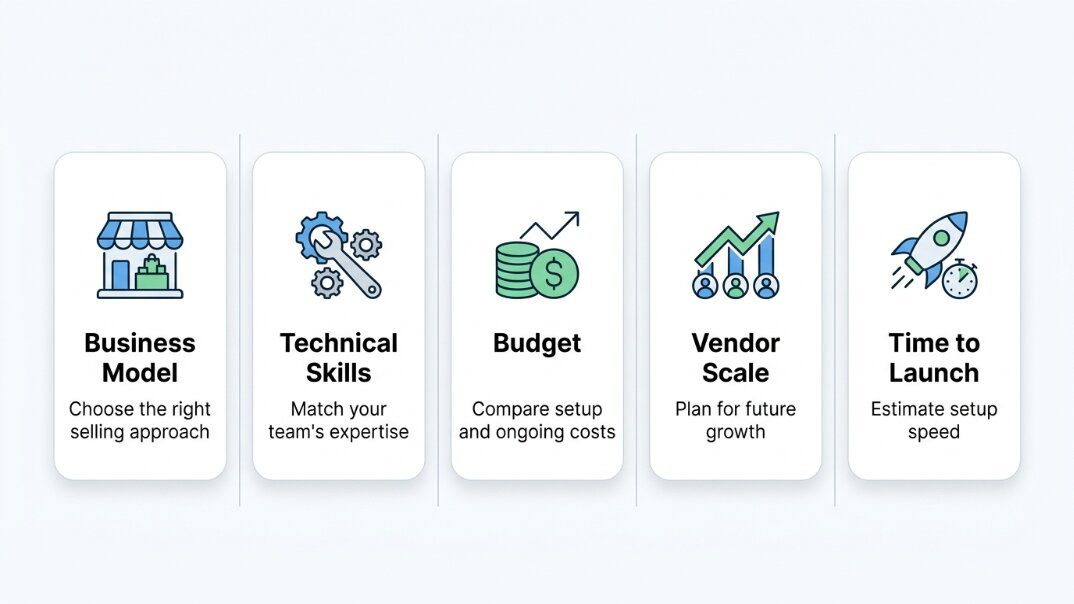
The Platform Fit Test: 5 Questions Before You Choose
This is the framework I use before any platform recommendation. Five questions. Your answers narrow the field to two or three real options.
Question 1 — What’s your business model?
Are you building a product marketplace (physical or digital goods), a service marketplace, a course/digital download marketplace, or a hybrid? Your answer determines whether you need WooCommerce-grade product variation support, a booking system, LMS integration, or something else entirely.
Question 2 — What’s your technical situation?
Do you have a developer, or are you doing this yourself? WordPress plugins give maximum flexibility but require active maintenance. Hosted SaaS platforms reduce technical overhead but give you less control. If you can’t manage WordPress hosting, plugin updates, and PHP compatibility, don’t choose a plugin-based solution.
Question 3 — What’s your budget — first year, honestly?
“Starts at $29/month” is not your budget. Add hosting, the marketplace app or plugin, any paid modules you’ll actually need, and payment processing fees. We’ll do this calculation for the major options below.
Question 4 — How many vendors are you starting with vs. scaling to?
A 10-vendor niche marketplace and a 500-vendor general marketplace need different vendor management infrastructure. Onboarding workflow, product approval queue depth, and payout management complexity all change with vendor count.
Question 5 — How fast do you need to go live?
A fast MVP needs a hosted solution where setup is measured in days, not weeks. A purpose-built self-hosted marketplace needs more time but gives you more control long-term.
The Platforms: What Each One Actually Does Well
1. StoreEngine — Best WordPress Marketplace Without WooCommerce
Every article about WordPress multivendor marketplaces assumes you start with WooCommerce and then add Dokan or WCFM on top. That assumption is worth questioning.
WooCommerce is a dependency, not a feature. Adding Dokan on top means maintaining three separate plugin stacks: WooCommerce, the marketplace plugin, and any additional modules. A WooCommerce update can break Dokan. A Dokan update can break your custom theme. You’re not just choosing a marketplace tool — you’re choosing a maintenance relationship between plugins you don’t control.
StoreEngine is a standalone WordPress ecommerce plugin. It does not require WooCommerce. The Multi-Vendor add-on is built directly into the StoreEngine architecture, which means vendor management, commission calculation, and payout management all run within a single plugin codebase.
What StoreEngine Multi-Vendor actually includes:
- Vendor registration via [storeengine_vendor_signup] shortcode, with pending/approved/suspended status workflow
- Admin approval gate — vendors cannot self-publish products; new listings go into a review queue
- Per-vendor store pages at /vendor/store-slug/ with pagination and theme override support
- Commission system: global rate (percent or flat) + per-vendor override; automatic commission reversal on refunds (negative row insertion — not manual subtraction)
- Withdrawal management: vendor requests payout → admin approves → paid (terminal, irreversible audit trail)
- Payment methods: PayPal and bank transfer (account holder, account number, SWIFT, IBAN, routing number)
- Vendor isolation: vendors can only see and edit their own products — attempting to access another vendor’s product returns 403
- 9 webhook events: vendor_registered, vendor_approved, vendor_suspended, commission_computed, commission_reversed, withdrawal_requested, withdrawal_status_changed, payout_recorded, vendor_products_assigned
- Vendor badges: Verified, Top Rated, New + custom types with custom colors
- Shop filter: sidebar dropdown by vendor on product archive pages
What it doesn’t have (yet): Mobile app, marketplace ratings aggregation per-vendor, integrated shipping carrier API for multi-vendor orders. Digital products and LMS course sales work natively through StoreEngine’s core and Academy LMS integration.
Pricing: Flat annual Pro plan fee — no per-vendor charges, no transaction fees beyond standard payment gateway rates. Cost stays flat whether you have 10 vendors or 500.
Best for: WordPress-first businesses, course and digital product marketplaces, and anyone who wants marketplace functionality without WooCommerce as a dependency.
Not for: Businesses that need native mobile vendor apps, or teams already deeply committed to the WooCommerce ecosystem.
2. WooCommerce + Dokan — Best for Teams Already in the WooCommerce Ecosystem
Dokan is the most-used WordPress multivendor plugin. If you’re already running WooCommerce and your team understands the ecosystem, Dokan is the lowest-friction path to vendor functionality.
What Dokan adds to WooCommerce: vendor storefronts, a frontend vendor dashboard, commission management, vendor-level shipping, payout requests, and 40+ premium modules for specific features (Stripe Connect, subscriptions, vendor analytics, etc.).
The trade-off is maintenance complexity. You’re running three plugin stacks at minimum — WooCommerce, Dokan, and your theme — all requiring synchronized updates to avoid conflicts. The mistake I see most often: people launch on the free Dokan tier, discover they need Stripe Connect for split payouts, and then realize that’s a Business plan feature at $499/year.
Pricing (2025):
|
Plan |
Price |
Key inclusions |
|
Free |
$0 |
Basic vendor dashboard, manual payouts |
|
Starter |
$149/year |
Product management, order management |
|
Professional |
$249/year |
Coupons, reports, single site |
|
Business |
$499/year |
Stripe Connect, subscriptions, multi-site |
|
Enterprise |
$999/year |
White label, priority support |
Real Year 1 cost for a serious marketplace: WooCommerce hosting (~$20–$40/month on managed WordPress) + Dokan Business ($499/year) + WooCommerce Subscriptions if needed ($199/year) = roughly $1,100–$1,600/year before payment processing.
Best for: Teams already using WooCommerce who want to add vendor functionality without changing platforms. Agencies building WordPress marketplace projects.
Not for: Anyone starting fresh who doesn’t have a specific reason to be in the WooCommerce ecosystem. The maintenance overhead is real, and it doesn’t get easier as your vendor count grows.
3. Shopify + Marketplace App — Best for Shopify Merchants Testing the Model
Shopify doesn’t have native multivendor functionality. You add it through a third-party app — most commonly Webkul’s Multi-Vendor Marketplace, Shipturtle, or similar. This approach works best if you already have a Shopify store and want to test whether a vendor model works for your business before committing to a platform change.
The real cost problem: Shopify’s base plans (Basic $29/month, Grow $79/month, Advanced $299/month) don’t include marketplace functionality. You add an app that costs an additional $30–$100+/month depending on which one and which plan tier. And unlike WooCommerce, Shopify charges transaction fees (0.5%–2% depending on your plan) unless you use Shopify Payments.
Real Year 1 cost for a Shopify marketplace: Shopify Grow ($79/month = $948/year) + marketplace app ($49/month = $588/year) + transaction fees = $1,500–$2,200+/year depending on transaction volume.
Best for: Shopify merchants who already have an audience and product catalog and want to add vendor functionality without rebuilding the store.
Not for: Starting from scratch specifically to build a marketplace. The math doesn’t favor Shopify when the goal is the marketplace, not the Shopify ecosystem.
4. CS-Cart Multi-Vendor — Best Self-Hosted Option With Native Marketplace
CS-Cart is the only self-hosted platform on this list where multivendor functionality is built into the core — not added via a plugin. That means vendor dashboards, commission management, vendor subscription plans, and split payouts are native, not layered.
CS-Cart is strong for businesses that need full control over hosting and code: a niche marketplace that needs specific custom workflows, a regional marketplace that needs compliance features, or a team with a developer who wants to own the platform completely.
Pricing (cs-cart.com/compare):
|
Plan |
Monthly (annual billing) |
Key inclusions |
|
Standard |
$55/month |
Unlimited vendors, basic marketplace |
|
Plus |
$110/month |
Advanced vendor tools, promotions |
|
Ultimate |
$275/month |
Full feature set, mobile apps |
|
Lifetime license |
From $3,299 |
One-time payment, lifetime access |
No transaction fees. 14-day free trial available.
Best for: Teams that want self-hosted control with native marketplace functionality, without needing a separate marketplace plugin. Good for niche B2B marketplaces.
Not for: Non-technical founders. CS-Cart requires hosting setup, server management, and ongoing maintenance.
5. Sharetribe — Best for Fast No-Code Marketplace MVP
Sharetribe is genuinely the fastest path to a working marketplace. No code required. You configure it in a day, connect Stripe, and launch. This makes it ideal for validating whether your marketplace idea has real supply-and-demand fit before you invest in a more complex architecture.
The limitation: Sharetribe is built for service marketplaces, rental marketplaces, and peer-to-peer product marketplaces. It is not strong for large product catalogs, complex inventory management, or digital download delivery. If your marketplace is product-heavy with variations, SKUs, and detailed inventory tracking, Sharetribe will feel limiting fast.
Pricing: Starts at $39/month (Build plan). Scales based on features needed. Custom plans for headless/API builds.
Best for: Marketplace MVPs. Founders who need to validate supply and demand before committing to infrastructure. Service and rental marketplace models.
Not for: Product-heavy marketplaces, complex inventory needs, or businesses that need the same platform for their initial launch and their 500-vendor scale.
6. Mirakl / Enterprise Platforms — Best for Large B2B Programs
Mirakl, VirtoCommerce, and Marketplacer belong in a separate category. These are not tools you choose if you’re building your first marketplace. They’re tools you graduate to when you’re managing hundreds of vendors, integrating with an existing ERP, running a B2B dropship program, or operating a marketplace that processes millions of transactions per year.
Pricing is enterprise custom. Implementation costs alone can exceed $50,000. They’re included here for completeness — and to be clear that most readers of this article should not be evaluating them.
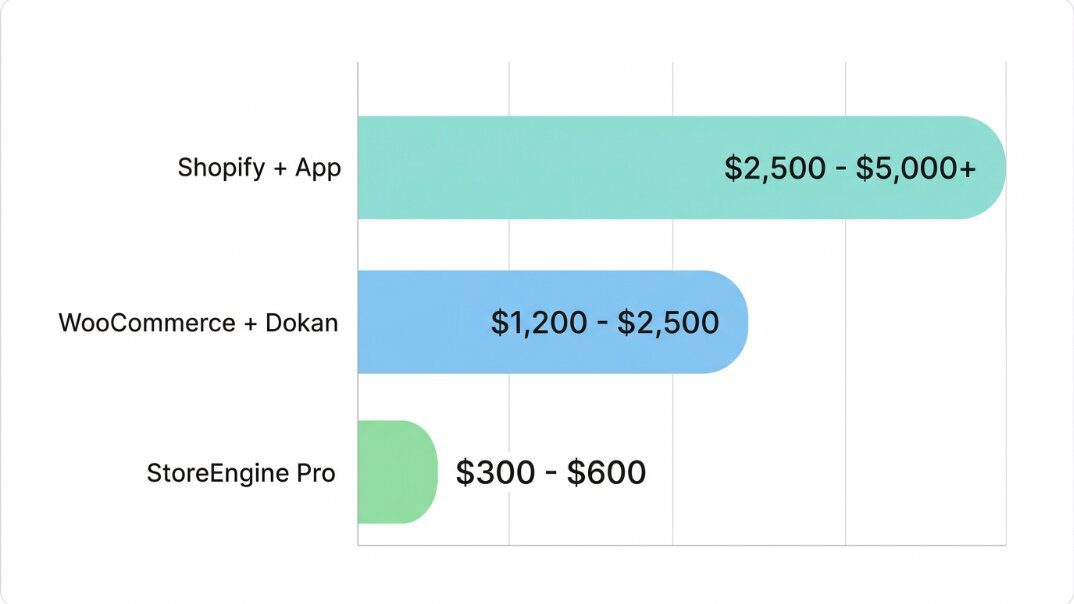
Honest Total Cost of Ownership: Year 1
This is the calculation most articles skip. Here’s what each major option actually costs in Year 1 for a mid-scale marketplace (20–50 vendors, 500 products).
|
Platform |
Hosting/Platform Fee |
Marketplace Feature Cost |
Transaction Fees |
Est. Year 1 Total |
|
Shopify Grow + Webkul app |
$948/year |
~$588/year (app) |
0.5–2% per sale |
$1,536+ |
|
WooCommerce + Dokan Business |
$360–$480/year (managed WP) |
$499/year (Dokan) |
Standard gateway fees |
$860–$980 |
|
CS-Cart Standard |
$660/year |
Included (native) |
None from platform |
$660 |
|
StoreEngine Pro |
Hosting (~$300/year) + Pro plan |
Included in Pro |
Standard gateway fees |
Lower flat cost |
|
Sharetribe Build |
$468/year |
Included |
Stripe fees |
$468+ |
The key insight: platforms that include marketplace functionality natively (CS-Cart, StoreEngine) have lower Year 1 TCO than platforms that require a separate marketplace plugin or app on top.
Quick Feature Comparison
|
Feature |
StoreEngine |
Dokan (Business) |
Shopify + App |
CS-Cart |
Sharetribe |
|
WooCommerce required |
❌ No |
✅ Yes |
N/A |
❌ No |
❌ No |
|
Vendor frontend dashboard |
✅ |
✅ |
✅ (via app) |
✅ |
✅ |
|
Per-vendor commission override |
✅ |
✅ |
Depends on app |
✅ |
❌ |
|
Auto commission reversal on refund |
✅ (built-in) |
❌ Manual |
❌ Manual |
✅ |
N/A |
|
Withdrawal state machine |
✅ |
✅ |
Limited |
✅ |
❌ |
|
Vendor webhook events |
✅ (9 events) |
✅ |
Limited |
✅ |
✅ |
|
Public vendor store pages |
✅ |
✅ |
✅ |
✅ |
✅ |
|
Platform fee scales with vendors |
❌ Flat |
❌ Flat |
❌ Flat |
❌ Flat |
❌ Flat |
|
Product catalog depth |
Deep |
Deep |
Deep |
Deep |
Limited |
|
Mobile vendor app |
❌ |
✅ (paid plans) |
Via app |
✅ |
❌ |
Decision Framework: Which Platform Is Right for You?
- You’re building a WordPress marketplace and don’t want to depend on WooCommerce → StoreEngine Multi-Vendor. Flat annual cost, native vendor isolation, automatic commission reversal on refunds, no WooCommerce dependency. Scale from 10 vendors to 500 without your cost changing.
- You already run WooCommerce and want to add vendor functionality now → Dokan Starter ($149/year) to test the model. If you need Stripe Connect for split payouts, budget for the Business tier ($499/year) from day one — don’t underestimate the module upgrade cost.
- You have an existing Shopify store and want to test a vendor model without rebuilding → add Webkul or Shipturtle. Expect to pay $1,500+/year total. If the vendor model works and you want to scale, revisit the platform decision at 20 vendors.
- You want self-hosted control with marketplace built in (no plugins needed) → CS-Cart Standard ($55/month). Better TCO than Dokan for teams that want native marketplace functionality without the WooCommerce maintenance overhead.
- You’re validating a marketplace idea before committing to infrastructure → Sharetribe ($39/month). Launch in a day. Test supply and demand. Don’t use it beyond MVP if your marketplace is product-heavy.
To understand what goes into building a multivendor marketplace step by step, read How to Build a Multivendor Marketplace on WordPress. For deep coverage of commission management and vendor payout systems, see How Multivendor Commission and Vendor Management Works.
Frequently Asked Questions
What is the best multivendor ecommerce platform?
There’s no single best platform — the right choice depends on your technical setup, budget, and business model. For WordPress without WooCommerce dependency, StoreEngine is the strongest option. For WooCommerce users, Dokan is the most mature choice. For self-hosted native marketplace functionality, CS-Cart. For fast no-code MVPs, Sharetribe.
Which multivendor platform is cheapest in Year 1?
Sharetribe is cheapest for a basic MVP at $468/year. For a production-ready WordPress marketplace, StoreEngine’s flat Pro plan plus standard WordPress hosting gives you a lower TCO than WooCommerce + Dokan Business ($499/year plugin cost alone, before hosting). CS-Cart at $55/month is competitive for self-hosted options with native marketplace features included.
Do I need WooCommerce for a WordPress multivendor marketplace?
No. WooCommerce is required for Dokan and WCFM, but not for StoreEngine. StoreEngine is a standalone WordPress ecommerce plugin with a native Multi-Vendor addon. This means one plugin to maintain, one support channel, and no WooCommerce version compatibility issues to manage.
What is the best multivendor plugin for WordPress?
Dokan is the most widely used WooCommerce-based multivendor plugin. StoreEngine is the strongest option if you want to avoid WooCommerce entirely. The right choice depends on whether you’re already using WooCommerce or starting fresh.
What features should I look for in a multivendor ecommerce platform?
Five non-negotiables: a vendor frontend dashboard (vendors should never need admin access), per-vendor commission override, automatic commission reversal on refunds, a clear payout/withdrawal workflow, and vendor product isolation (vendors should only be able to edit their own products). Missing any of these will create manual admin work at scale.
Is Shopify good for a multivendor marketplace?
Shopify can support a multivendor marketplace through third-party apps like Webkul or Shipturtle. It works best if you’re already on Shopify and want to add vendor functionality without changing platforms. The trade-off is total cost — Shopify base plan plus a marketplace app runs $1,500+/year, higher than WordPress-based alternatives at equivalent feature sets.
What is the difference between Dokan and WCFM Marketplace?
Both run on WooCommerce. Dokan has more polished documentation, a larger active user base, and stronger support. WCFM Marketplace has a more complex feature set and deeper configuration options, but a steeper learning curve. For most WordPress marketplace builders, Dokan is the better starting point. For teams with technical WordPress experience who need deep customization, WCFM may offer more flexibility.
Can I build a multivendor marketplace without coding?
Yes. Sharetribe requires zero code and can be launched in a day. StoreEngine and Dokan on WordPress require basic WordPress knowledge (installing plugins, configuring settings) but no custom coding for standard setups. CS-Cart has a setup wizard for initial configuration. Coding becomes necessary for custom workflows, API integrations, and enterprise-level customization on any platform.