

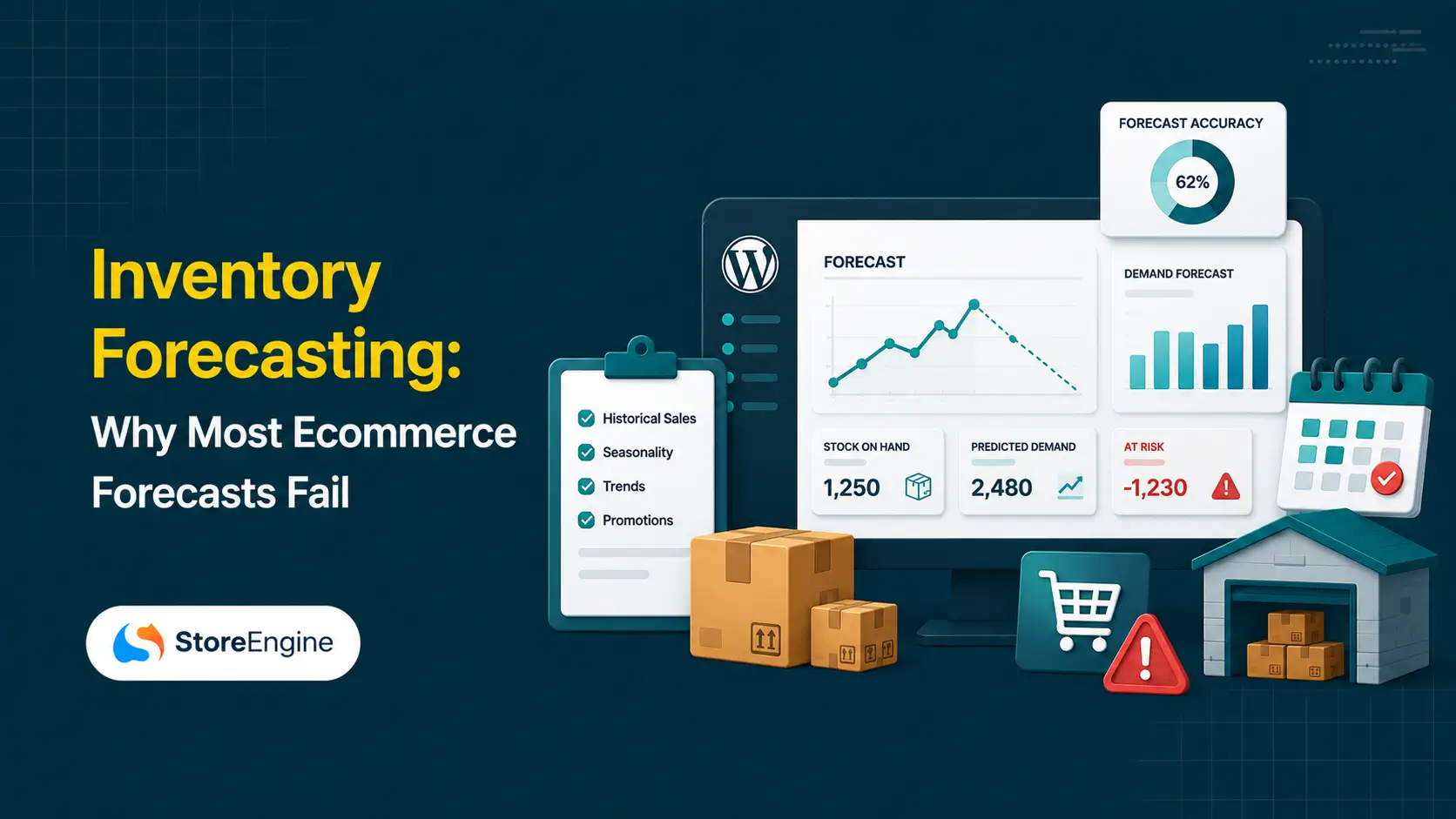

A store owner opens a spreadsheet, pulls twelve months of sales, averages it, adds a buffer, and places an order. Six weeks later they are out of stock on their best seller and sitting on 400 units of something that stopped selling in March. The formula was fine. The data underneath it was not.
Inventory forecasting is usually taught as a math problem: learn the formulas, apply them to your sales history, order accordingly. That framing skips the part that actually determines whether a forecast works, which is whether the numbers feeding it reflect what really happened in your store. Stockouts leave no record in sales data. Returns quietly inflate demand. Supplier lead times get treated as fixed when they vary by weeks. Stock sitting in a second location looks like stock you can sell today.
This guide covers what inventory forecasting is, the data foundation it depends on, the three formulas that carry most of the weight, and how the whole loop runs automatically once the underlying records are trustworthy. For the wider operational picture this sits inside, see the complete guide to ecommerce fulfillment.
Quick Answer: What Is Inventory Forecasting?
What Is Inventory Forecasting?
Inventory forecasting is the practice of estimating how much stock a business will need over a future period, using historical demand, supplier lead times, seasonality, and current stock position. It translates a demand prediction into a specific reordering decision: which SKU, how many units, from which supplier, and by what date.
It is worth separating two terms that get used interchangeably. Demand forecasting predicts what customers will buy. Inventory forecasting takes that prediction and turns it into stocking decisions, factoring in how long replenishment takes, how much variability you need to absorb, and what you already hold. One is a sales question. The other is an operations question.
The cost of getting it wrong is well documented. IHL Group estimates global retail inventory distortion, the combined cost of stockouts and overstocks, at more than $1.7 trillion a year, with roughly two thirds of that traced to lost sales from stockouts and one third to the carrying cost of excess inventory. Both failures usually come from the same root cause, which is a planning process working from incomplete information.
Why Most Ecommerce Forecasts Are Wrong Before the Math Starts
Most forecasting guides open with formulas. That order is backwards. A formula applied to bad inputs produces a confident, precise, wrong answer, and the precision makes it harder to notice the error.
Here is the evidence that this is a widespread problem rather than an occasional one. Companies using simple 30-day forecasting models achieve roughly 57 percent accuracy, which means close to half of inventory decisions are effectively guesses. On the supply side, 60 percent of manufacturers report that inaccurate demand forecasts drive more than 15 percent excess inventory every year, according to McKinsey research.
Three data problems cause most of it.
Your sales history is not your demand history
The part most setups miss is that a stockout leaves no trace in your sales data. If you sold 40 units in a month because you only had 40 units, your records show demand of 40. Real demand might have been 70. Forecast from that number and you will under-order again, then again, locking the SKU into a permanent stockout cycle that looks like steady, modest sales.
The same distortion runs the other way with returns. A unit sold and returned appears as demand that never existed. On categories with high return rates, forecasting from gross sales rather than net movement overstates what you need.
Lead time gets treated as a constant when it varies
In practice, the number that breaks forecasts most often is lead time. Store owners plug in whatever the supplier promised at onboarding, usually a round figure like 14 days, and never revisit it. Actual lead times drift with season, supplier capacity, customs, and freight availability.
A supplier who delivers in 14 days on average but ranges from 10 to 28 days requires nearly double the safety stock of a supplier who reliably delivers in 18. Average lead time alone tells you almost nothing useful. Variability is what you buffer against, and you cannot measure variability you never recorded.
Multi-location stock breaks single-number forecasting
The moment inventory sits in more than one place, a single total becomes misleading. A business with 500 products across four warehouses already manages 2,000 product-location combinations before variations are counted. Knowing you hold 1,000 units means little if 900 are in the wrong location for where demand is.
This is measurable in outcomes: retailers with cross-location visibility reduce customer-facing stockouts by up to 50 percent, not by holding more stock, but by knowing where the stock they already have actually is.
The Data Your Forecast Actually Needs
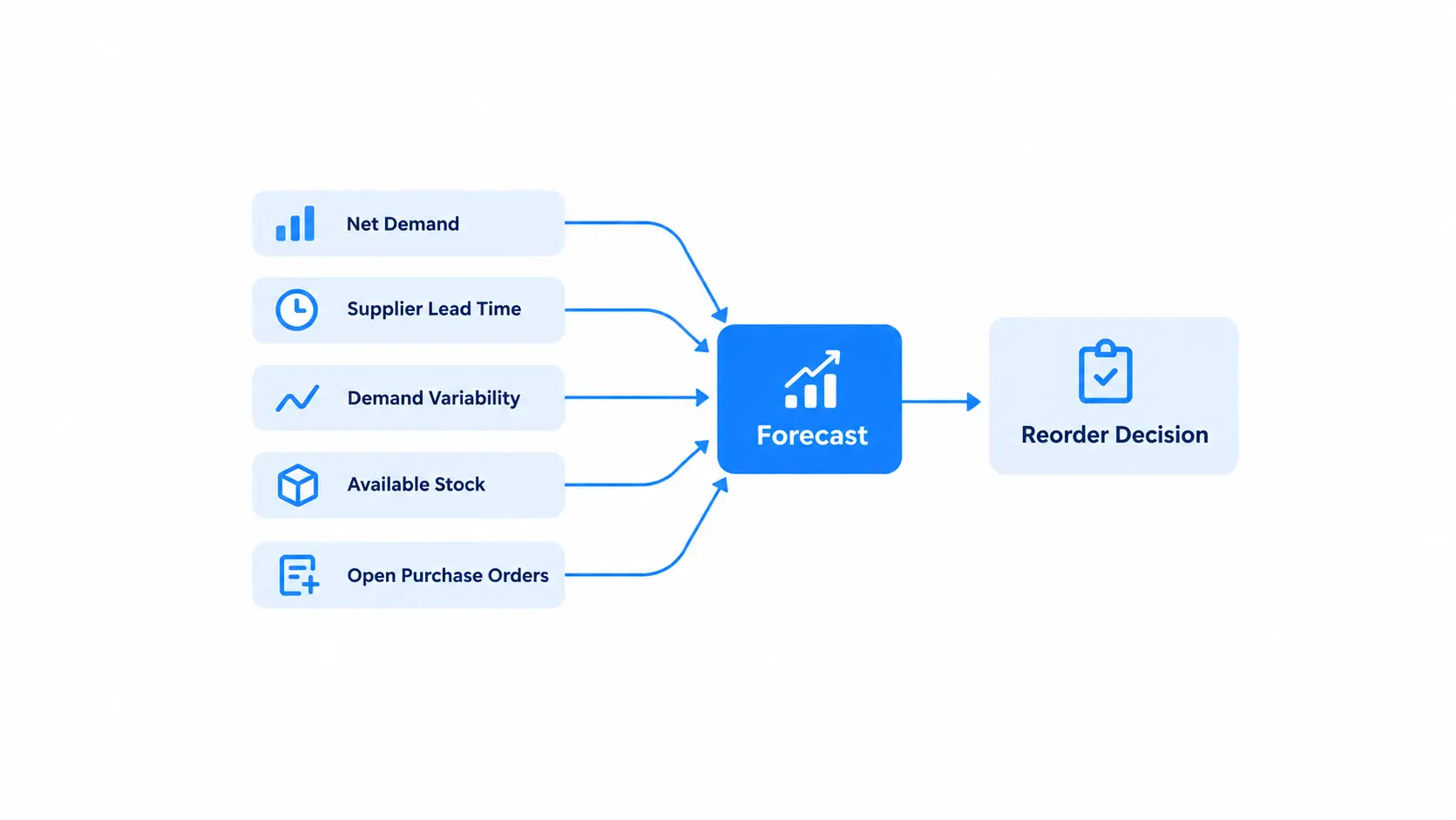
Before any formula, five data points need to exist and be trustworthy for every SKU you plan to forecast.
If any of these are missing, the forecast is estimating on top of an estimate. Fix the data before reaching for a better model. The businesses that struggle most with forecasting are usually still reconciling a spreadsheet against a storefront by hand, and no amount of statistical sophistication compensates for records that do not match reality.
The Three Calculations That Do Most of the Work
Once the data is clean, three formulas cover the majority of practical replenishment decisions. None requires machine learning.
Lead time demand
Lead time demand is how many units you expect to sell while waiting for a replenishment order to arrive.
Lead time demand = average daily sales × average lead time in days
A product selling 8 units a day with an 18 day lead time has a lead time demand of 144 units. If you reorder when you have 100 units left, you run out five days before the shipment lands.
Safety stock
Safety stock is the buffer that absorbs the difference between your average case and your bad case. A practical version for stores without a statistics team:
Safety stock = (maximum daily sales × maximum lead time) − (average daily sales × average lead time)
Using the same product, if peak sales reach 14 units a day and the worst observed lead time was 28 days, safety stock works out to (14 × 28) − (8 × 18), which is 392 − 144, or 248 units.
That number often surprises people, and the common reaction is to override it downward. The honest tradeoff is that safety stock is insurance you pay for in carrying cost, and carrying costs run 20 to 30 percent of inventory value per year. The right answer is not automatically more buffer. It is either accepting the cost, or reducing the variability that made the buffer necessary by fixing supplier reliability.
Reorder point
The reorder point is the stock level that triggers a new order.
Reorder point = lead time demand + safety stock
For our example: 144 + 248 = 392 units. When available stock hits 392, it is time to order.
The mistake I see most often is treating a reorder point as a one-time setup. Sales velocity changes, suppliers change, seasons change. A reorder point calculated in January and untouched in October is a number that describes a store that no longer exists. Automating the calculation matters more than getting it perfect once: automated reorder triggers eliminate the human error factor behind roughly 23 percent of stockouts.
How This Runs Inside a WordPress Store
Everything above assumes you have movement-level records, per-location stock, measured lead times, and a mechanism that watches stock levels continuously. On most small and mid-sized ecommerce stacks, that assumption fails, which is why forecasting gets outsourced to a spreadsheet.
StoreEngine implements this loop natively inside WordPress, without a separate ERP or warehouse management system. It is worth walking through how each forecasting input maps to something the system already records, because the data problem is the hard part and it is the part that gets solved by the store engine itself rather than by a forecasting tool bolted on top.
The movement ledger is your demand dataset
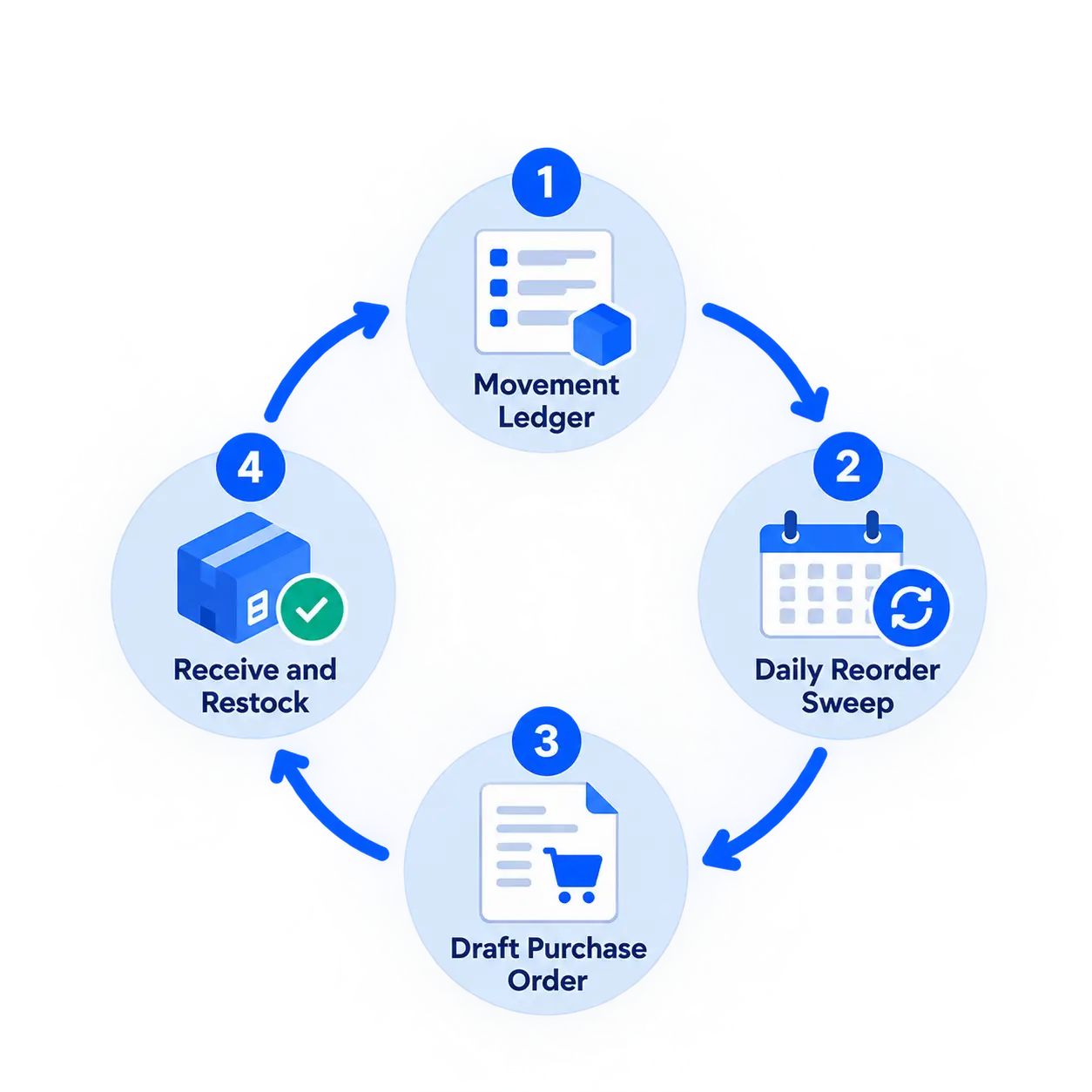
Every stock change in StoreEngine is written to a movement record: sales, returns, manual adjustments, purchase order receipts, and transfers between locations. Each entry carries the product and variation, the location affected, the movement type, the quantity before and after, a reason code, and a timestamp.
What this actually gives you is net demand rather than gross sales. A sale and its later return both appear as separate typed movements, so you can compute what customers actually kept. Movement history is queryable by product, variation, location, movement type, and date range, which is the exact shape of query a demand calculation needs.
Reorder points live on the variation
Each product variation carries its own reorder point and low stock threshold, alongside its stock quantity and stock status. Reorder points are set per variation rather than per product, which matters because a size medium and a size XXL of the same shirt almost never share a demand curve.
A daily sweep watches every SKU
StoreEngine runs a scheduled task once a day that compares every tracked variation’s available stock against its reorder point. Available stock is calculated as stock quantity minus reserved quantity, so units already committed to open orders are not counted as sellable.
When a variation has fallen to or below its reorder point, the system creates a draft purchase order for that variation’s preferred supplier. The sweep is idempotent, meaning if an open auto-generated draft already exists for that supplier, new low-stock lines are appended to it rather than spawning duplicates.
Drafts are never submitted automatically. A person reviews and presses submit. That design choice is deliberate: automatic detection is reliable, and automatic ordering is how stores end up with a warehouse full of something a spike in fraud orders made look popular.
Supplier performance turns lead time into a measured number
Every purchase order records an expected date and a received date. From those, StoreEngine computes on-time delivery percentage and fill rate per supplier, meaning units actually received against units ordered, plus a twelve-month trend.
This is the input that fixes the second data problem described earlier. Instead of buffering against a lead time a supplier claimed at onboarding, you buffer against what they have actually delivered, and you can see whether their reliability is improving or degrading. When a supplier’s on-time rate slips, the correct response is often to renegotiate or dual-source rather than to quietly raise safety stock and absorb the carrying cost.
Receiving a purchase order closes the loop
When a purchase order is received, three things happen in one action: stock increases at the destination location, a movement is logged with the purchase order number as its reason code, and the product’s cost price is updated using either last cost or a moving average across units on hand.
That last part matters for forecasting economics. Cost price feeds margin calculations at sale time, so the true cost of carrying and selling each unit stays accurate as supplier prices move.
Capturing the demand you never got to sell
Back-in-stock notifications are usually framed as a recovery feature. They are also the only clean way to measure demand during a stockout.
When a variation goes out of stock, a subscription form appears on the product page, and customers who want it leave their email. That subscriber count is a direct signal of demand your sales data could not record, because the sale never happened. A SKU that accumulates 60 back-in-stock subscribers over a two week stockout is telling you your reorder point was set too low, in a way no amount of sales-history analysis would reveal. Those subscribers also convert well on restock, which connects this to broader customer retention work.
Spreadsheet Forecasting vs an Automated Reorder Loop
Both approaches use the same formulas. They differ in where the numbers come from and how often they update.
|
What matters |
Spreadsheet forecasting |
Automated reorder loop |
|
Demand data source |
Exported sales report, gross figures |
Movement ledger with typed entries, net of returns |
|
Update frequency |
Whenever someone remembers |
Daily sweep across every tracked variation |
|
Lead time input |
Supplier’s quoted figure |
Measured from actual order and receipt dates |
|
Multi-location stock |
Single total, or separate tabs |
Per-location stock with per-location movements |
|
Reserved stock |
Usually ignored |
Subtracted from available before comparison |
|
Stockout demand |
Invisible |
Captured as back-in-stock subscribers |
|
Reorder trigger |
Manual review |
Draft purchase order created automatically |
|
Best for |
Under 50 SKUs, single location, stable suppliers |
Growing catalogs, multiple locations, variable lead times |
The honest read is that spreadsheets work fine at small scale. A store with 30 SKUs, one location, and one reliable supplier does not need automation. The threshold where it breaks is usually somewhere around the point of adding a second location or a second supplier, because that is when the number of combinations to track exceeds what anyone will actually maintain by hand every week.
A Replenishment Cycle, End to End
Here is how the pieces connect in practice for a single SKU over one cycle.
A store sells a mid-priced accessory averaging 8 units a day. Its supplier has delivered six past purchase orders with an average lead time of 18 days and a worst case of 28. Peak daily sales during last year’s holiday period reached 14 units.
Safety stock computes to 248 units. Lead time demand is 144. The reorder point is set at 392 on that variation.
Through the season, every sale writes a movement record. Two returns come back and are received, each writing a return movement that puts the units back into available stock at the correct location. The daily sweep runs each morning, comparing available stock to 392.
On day 34, available stock drops to 388. The sweep creates a draft purchase order for the preferred supplier, adding this variation as a line. The buyer reviews it the next morning, adjusts the quantity for an upcoming promotion, and submits it. The supplier’s portal reflects the order.
Nineteen days later the shipment arrives. Receiving it increases stock at the destination location, logs a received movement referencing the purchase order number, and refreshes the product’s cost price using the new unit cost. The supplier’s on-time percentage updates to reflect a 19 day delivery against an 18 day expectation.
Next cycle, the lead time average and its variability both shift slightly, and the reorder point calculation reflects reality a little more closely than it did before. That compounding accuracy is the actual point of the system. For how this connects to the shipping and returns side of the same operation, see the WordPress shipping and courier guide.
Is Automated Inventory Forecasting Right for Your Store?
Frequently Asked Questions
What is inventory forecasting?
Inventory forecasting is the practice of predicting how much stock a business will need over a future period, based on historical demand, supplier lead times, seasonality, and current stock position. It converts a demand prediction into a specific reorder decision covering which SKU, how many units, and by when. Demand forecasting predicts what customers will buy; inventory forecasting turns that into a stocking plan.
How do you calculate a reorder point?
Reorder point equals lead time demand plus safety stock. Lead time demand is average daily sales multiplied by average lead time in days. Safety stock is maximum daily sales times maximum lead time, minus average daily sales times average lead time. For a product selling 8 units daily with an 18 day average lead time, 14 units peak daily sales, and a 28 day worst-case lead time, the reorder point works out to 392 units.
Why do inventory forecasts fail?
Most forecasts fail on data quality rather than method. Sales history understates real demand because stockouts are invisible in it, returns inflate demand unless movements are typed, supplier lead times are treated as fixed when they vary, and multi-location stock is reduced to a single misleading total. Companies using basic 30-day models achieve about 57 percent accuracy, which reflects input problems more than formula problems.
How much inventory data do I need before forecasting is useful?
Three to six months of clean movement history is enough to compute meaningful averages for steady sellers, and a full year is needed before seasonal patterns are reliable. What matters more than duration is whether the records are typed and complete, meaning sales, returns, adjustments, and receipts are all logged separately rather than netted into a single stock number.
What is safety stock and how much should I hold?
Safety stock is the buffer that covers the gap between average and worst-case conditions in both demand and lead time. Calculate it from measured variability rather than instinct, since carrying costs run 20 to 30 percent of inventory value annually and excess buffer is a real expense. When the calculation returns an uncomfortably large number, the productive response is usually to reduce supplier lead time variability rather than to override the figure downward.
Can inventory forecasting be automated on WordPress?
Yes. StoreEngine records every stock change as a typed movement with location and timestamp, stores a reorder point per product variation, and runs a daily scheduled sweep comparing available stock against those reorder points. When a variation falls below its threshold, the system generates a draft purchase order for the preferred supplier, which a person reviews before submitting. Supplier on-time rates and fill rates are calculated from actual purchase order history, so lead time inputs stay measured rather than assumed.
How do I account for demand during a stockout?
Sales data cannot record demand that had no stock to meet it, so you need a separate capture mechanism. Back-in-stock notification signups are the most direct one available to ecommerce stores: subscriber counts during an out-of-stock window give you a floor on the demand you missed. Feeding that number back into the reorder point calculation corrects the downward spiral where each stockout suppresses the sales history that sets the next reorder point.