


Almost every store owner asks the same question before starting: how long until I can start selling? The honest answer is “it depends”, but it depends on a few things you can see in advance. A template-based store with ready content can launch in days. A custom store with several integrations can take half a year.
This guide gives you realistic timeline ranges by store type and platform, a stage-by-stage breakdown, and a sample 8-week plan you can adapt. It also covers what slows launches down and how to avoid it, using StoreEngine, a WordPress e-commerce plugin, as the main example of a faster setup.
Read the numbers as planning ranges. They come from published agency guides, not from StoreEngine tests, so use them to plan and then adjust for your own scope.
How Long Does It Take to Build an E-commerce Website?
Building an e-commerce website can take anywhere from a few weeks to several months, depending on the store’s complexity, platform, design requirements, and team experience. A simple store may take 1–4 weeks, a medium-complexity store may take 1–3 months, and a complex enterprise store may require 3–6 months.
|
E-commerce Website Type |
Estimated Timeline |
Typical Requirements |
|
Basic online store |
1–4 weeks |
Ready-made theme, small product catalog, basic checkout |
|
Medium-complexity store |
1–3 months |
Custom design, user accounts, inventory tracking, mobile optimization |
|
Complex enterprise e-commerce store |
3–6 months |
Advanced functionality, third-party integrations, custom development |
These are indicative planning estimates, not guaranteed delivery dates or universal industry averages. Actual timelines depend on the project scope, platform, product catalog, content readiness, team experience, and integration requirements. For additional context, see Spark Interact’s e-commerce development timeline guide.
The key takeaway: You don’t need months of custom development to launch every online store. Start with the features your business actually needs, then expand as your requirements grow.
E-commerce Website Development Timeline by Store Type
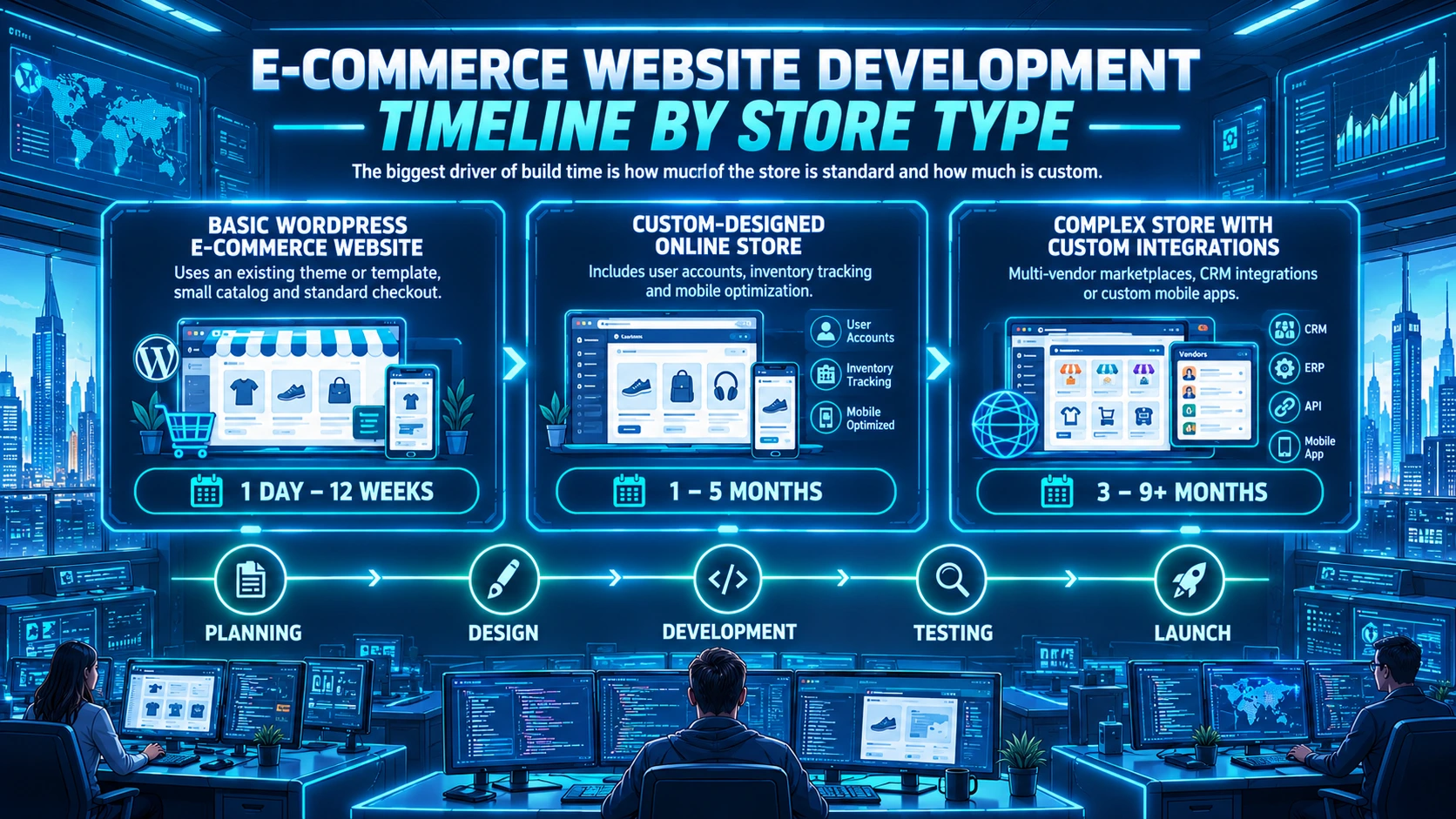
The biggest driver of build time is how much of the store is standard and how much is custom.
Basic WordPress E-commerce Website
A basic store uses an existing theme or template, a small catalog and standard checkout. One agency guide puts a basic build with a proven theme and light customization at roughly 6 to 12 weeks from planning to launch. The hands-on setup itself is much shorter: another guide estimates one day to two weeks for building a small store on a website builder or e-commerce platform, once research and design decisions are done.
The difference between these estimates comes partly from what each timeline includes. The shorter estimate covers the hands-on store-building stage after research and design decisions are complete, while the longer estimate covers a broader project involving planning and light customization. Decision-making, content readiness, and approval time can also affect the overall timeline.
Custom-designed Online Store
A custom design with user accounts, inventory tracking and mobile optimization takes longer. One guide estimates one to three months for this level. Another estimates three to five months when the project also includes stronger UX planning, more category organization and standard third-party integrations.
Design approval is a common slowdown here. Projects stall when branding, merchandising and leadership review the design at different times.
Complex Store With Custom Integrations
Stores with multi-vendor marketplaces, CRM integrations or custom mobile apps take three to six months in one guide. Another reports five to nine months or more for projects with platform migration, subscriptions, B2B features, advanced search and heavy QA, and a third gives three to six months for enterprise implementations with deep ERP integration.
How Long Does It Take on Each Platform?
Your choice of e-commerce platform affects how quickly you can launch. Hosted platforms and WordPress solutions with ready-made themes can reduce the amount of custom development required. However, the overall timeline depends on your store’s functionality, design requirements, product catalog, integrations, and testing needs.
The following estimates come from published development guides. They represent different project scopes and should be treated as general planning estimates, not directly comparable timelines.
|
Platform or Project Type |
Estimated Timeline |
|
Basic Shopify store with a pre-built theme |
3–7 days |
|
Basic WooCommerce store |
1–4 weeks |
|
Medium-complexity e-commerce store |
1–3 months |
|
Custom e-commerce development |
1–6 months |
|
Complex enterprise e-commerce store |
3–6 months |
|
Enterprise commerce platform migration with a clearly defined scope |
3–9 months |
These are indicative planning estimates, not guaranteed delivery dates. Actual timelines vary depending on project scope, content readiness, design revisions, team experience, integrations, data migration, and testing requirements. The enterprise migration estimate refers to a focused platform migration and should not be interpreted as a standard timeline for every ERP integration.
For reference, see Spark Interact’s e-commerce development timeline guide and Shopify’s enterprise transformation guide.
WordPress With an All-in-One Plugin (StoreEngine)
StoreEngine does not publish a guaranteed website launch timeline, so this article does not assign one. Its features include ready-made store templates, a visual storefront builder powered by aBlocks, and payment gateway integrations. StoreEngine also offers a free, one-click WooCommerce migration tool for importing products, orders, and customers.
These features can reduce the need to build core selling functionality from scratch, although the overall launch time still depends on your store’s requirements.
Explore the StoreEngine features page and integration options for more details.
WooCommerce With Add-ons
WooCommerce timelines vary because the final store depends on which extensions you add. The sources above range from one to four weeks for a simple store to three to six months when the build is customized.
Shopify
Shopify is the fastest route in most guides because of its templates and app ecosystem. One agency notes that a basic store is possible in one to two days with minimal customization, but a store that converts visitors takes more planning and testing.
Custom Development
Custom builds give full control but take the longest. They are worth the extra time only when you need unique features or complex integrations.
What Are the Main Stages of Building an E-commerce Website?
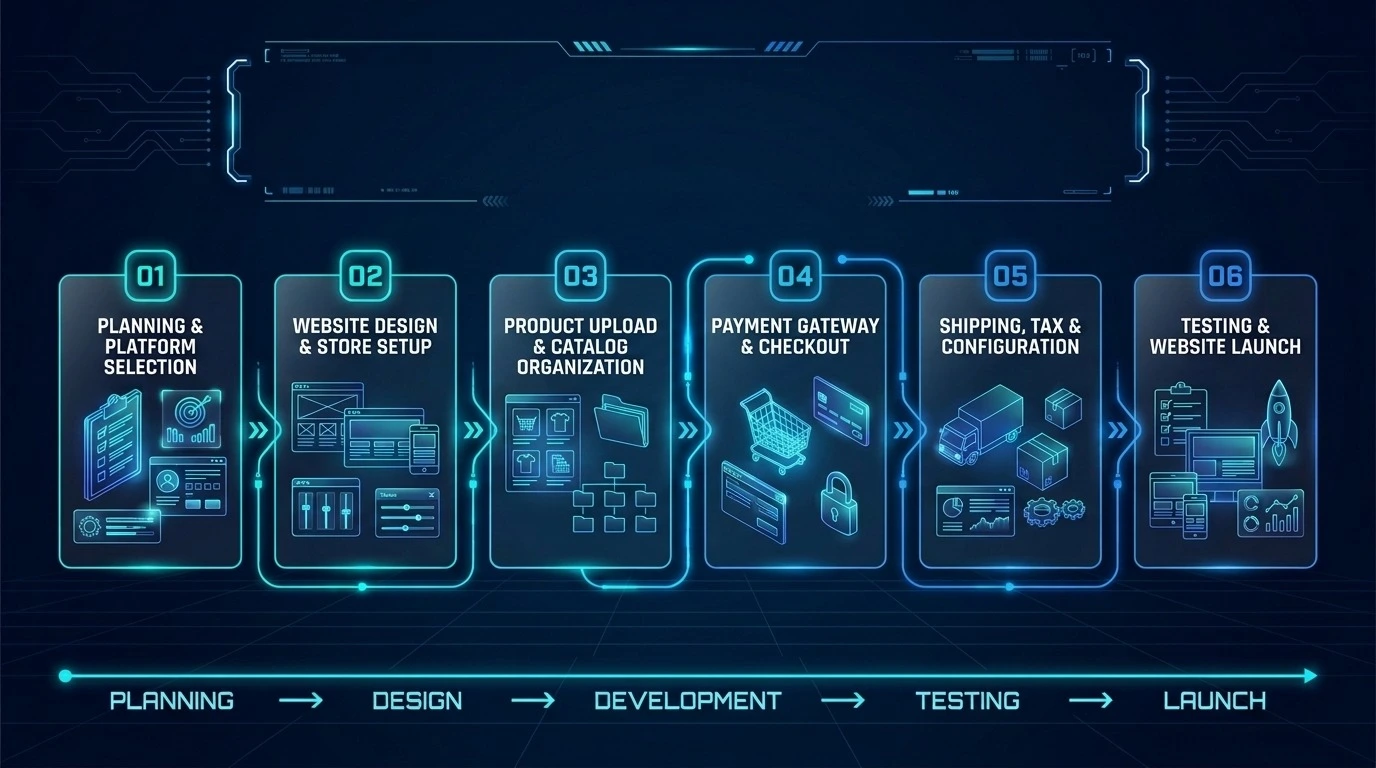
Building an e-commerce website involves six main stages, from planning and platform selection to testing and launch. The time required for each stage depends on the store’s complexity, product catalog, design requirements, and integrations. Planning ahead and choosing the right tools can help reduce delays.
1. Planning and Choosing an E-commerce Platform
Start by defining your budget, target audience, product range, and business goals. Compare e-commerce platforms based on ease of use, customization, payment options, and scalability. Preparing your product information and branding assets early can also help prevent delays during development.
StoreEngine provides an initial setup wizard that guides you through store details, product types, essential pages, and theme selection. This simplifies initial configuration, although the overall launch timeline depends on your store’s requirements.
2. Website Design and Store Setup
Choose a theme that fits your brand and customize the layout, colors, navigation, and product pages. Ready-made templates can reduce design work, while custom layouts and advanced functionality may require more time.
StoreEngine helps you configure essential store pages through its setup wizard. Its checkout form also has a dedicated aBlocks integration, allowing you to adjust the checkout layout visually in the Gutenberg editor. You can explore additional website templates through Template Kits.
3. Product Upload and Catalog Organization
Prepare product images, descriptions, prices, stock information, and variations before uploading your catalog. Organize products into relevant categories to make browsing easier for customers.
For stores with larger catalogs or existing data, StoreEngine offers CSV import and export functionality for products, customers, and orders. The CSV Import/Export add-on must be activated before using these tools. See the StoreEngine import/export documentation.
4. Payment Gateway and Checkout Integration
Configure your payment methods, connect the necessary accounts, and test the checkout process. The time required depends on the payment provider, account verification, and the payment methods your business needs.
StoreEngine supports integrations with Stripe, PayPal, Razorpay, and Paddle. Other payment methods and additional gateways may also be available depending on the integration and configuration. Review the StoreEngine integrations page to confirm which options suit your store.
5. Shipping, Tax, and Store Configuration
If you sell physical products, configure shipping zones, delivery rates, and available shipping methods. Review your tax settings and invoicing requirements based on your business location and applicable regulations.
StoreEngine provides documentation for shipping zone setup and tax management. Configure these settings carefully and test them before accepting live orders.
6. Testing and Website Launch
Before launching, test the complete shopping experience. Place test orders, check payment processing, verify order notifications, review shipping and tax calculations, and inspect the website on mobile and desktop devices.
Resolve any issues before making the store publicly available. After launch, monitor orders and customer feedback so you can identify problems and improve the shopping experience.
For a useful pre-launch checklist, see Shopify’s guide to preparing your store for launch.
Sample 8-Week Timeline for a Small to Medium Store
An eight-week schedule can serve as a practical planning example for a small to medium-sized e-commerce store. This illustrative timeline assumes a template-based design, a catalog of a few dozen products, and timely decisions from one primary decision-maker. The actual schedule may be shorter or longer depending on content readiness, customization, integrations, and testing requirements.
|
Week |
Main Task |
Expected Deliverable |
|
Week 1 |
Define the project scope, product range, budget, and platform |
Approved project scope and platform selection |
|
Week 2 |
Prepare product photos, descriptions, branding assets, and store policies |
Content ready for upload |
|
Week 3 |
Install and configure the platform, select a theme, and establish the store layout |
Initial store structure with branding and navigation |
|
Week 4 |
Upload products and organize categories |
Product catalog prepared for testing |
|
Week 5 |
Configure payment methods, shipping zones, and tax settings |
Core checkout and order flow configured |
|
Week 6 |
Customize checkout, configure email notifications, and connect required integrations |
Key store functions configured and ready for testing |
|
Week 7 |
Test orders, payment processing, mobile layouts, notifications, and refund workflows |
Critical issues identified and resolved |
|
Week 8 |
Launch the store, monitor orders, and address early issues |
Publicly available store and post-launch action list |
Payment configuration, third-party integrations, and final testing can cause delays, particularly when external account verification or technical troubleshooting is required. Consider keeping an additional one- to two-week buffer for unexpected issues.
Note: This is an illustrative project plan, not a guaranteed delivery schedule. A store with prepared content and minimal customization may launch sooner, while a project with custom development or complex integrations may take longer.
How Does Your E-commerce Business Model Affect the Timeline?
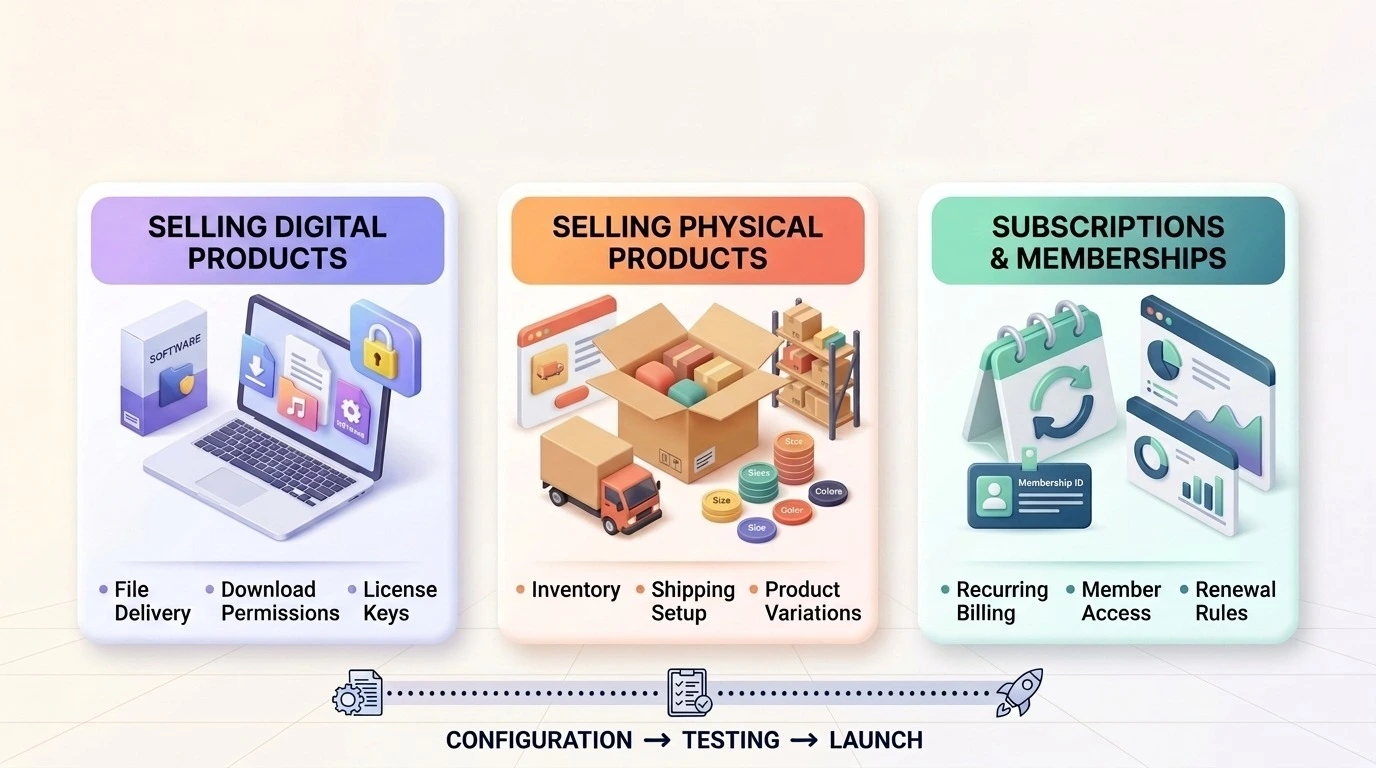
The type of products you sell affects how much time you need to prepare your e-commerce website. Physical products require shipping and inventory configuration, digital products need secure delivery, and recurring business models require billing and renewal settings. Understanding these requirements early can help you plan your launch more effectively.
Selling Digital Products
Digital product stores do not need physical shipping, but you still need to configure file delivery, download permissions, and customer access. If you sell software or WordPress plugins, license key generation and validation may also be necessary.
StoreEngine supports secure digital file delivery through time-limited download links, download limits, and automatic license key generation. These features can simplify digital product fulfillment, although you should confirm which plan or add-on is required before choosing your setup.
Explore StoreEngine’s digital downloads features and compare the available options on the StoreEngine Free vs. Pro page.
Selling Physical Products
Physical product stores require additional configuration for shipping zones, delivery rates, product variations, and stock management. Products with multiple sizes, colors, or other variations also need accurate pricing, SKU, and inventory details.
StoreEngine supports variable products, per-variation stock control, shipping zones, and shipping methods. Preparing your product catalog and shipping rules before development can help reduce delays during setup and testing.
Explore StoreEngine’s physical product features to learn more.
Setting Up Subscriptions and Memberships
Subscription and membership stores need additional planning for billing intervals, renewal rules, customer access, and failed-payment handling. You should also test recurring payments and confirm that customers retain or lose access according to your policies.
StoreEngine supports recurring billing, configurable billing cycles, trial periods, and automatic renewal recovery. Its membership features let you restrict content based on membership levels and offer recurring or one-time pricing.
These features can simplify the technical setup, but you still need to decide your pricing, access rules, and renewal policies before launch. Check the StoreEngine subscriptions page and memberships page for details about available features and plan requirements.
How to Launch Your WordPress Store Faster With StoreEngine
Launching an online store involves several steps, from configuring store settings and adding products to customizing the shopping experience and testing checkout. StoreEngine provides tools that can simplify parts of this process, helping you reduce repetitive setup work. However, the time required to launch depends on your store’s requirements and how prepared your content is.
For step-by-step instructions, explore the StoreEngine documentation.
Start With a Ready-Made Store Template
Starting with a ready-made template can reduce the amount of design work required to build your store. Instead of designing every page from scratch, choose a layout that fits your business and customize its colors, content, and branding.
StoreEngine features ready-made templates and a visual storefront builder powered by aBlocks. Explore the StoreEngine features page to learn more about its design tools and template options.
Use Built-In Features to Reduce Plugin Overhead
Installing multiple plugins can increase configuration and compatibility work. StoreEngine brings several e-commerce capabilities together, including payment integrations, subscriptions, affiliate management, invoicing, order bumps, and cart abandonment recovery.
Using a single platform for the features your store needs may reduce the number of separate plugins you have to configure and test. However, some capabilities require specific add-ons or a Pro plan, so check the StoreEngine Free vs. Pro comparison before planning your setup.
Design Pages Visually With aBlocks
Customizing storefront and checkout layouts can take time, especially when every change requires code edits. StoreEngine’s aBlocks integration lets you arrange and style supported store elements visually in the Gutenberg editor.
This can make layout adjustments easier for store owners who prefer a visual editing workflow. Explore the StoreEngine features page for more details.
Launch a Minimum Viable Store First
You do not need every possible feature before accepting your first order. Start with the essentials: a well-organized product catalog, a working cart and checkout, suitable payment methods, and clear shipping or digital delivery settings.
Once your store is live and you understand what customers need, you can introduce additional features such as subscriptions, sales funnels, or affiliate programs where appropriate. A smaller initial scope can make testing and launch preparation more manageable.
Plan Your WooCommerce Migration Carefully
If you are moving from WooCommerce, StoreEngine provides a migration add-on designed to transfer supported store data. Before migrating, review the StoreEngine Migration Add-on documentation, confirm which data types your current version supports, and back up your existing store.
Run the migration on a staging site first, then check product information, orders, coupons, customer records, and checkout behavior as applicable before switching your live store.
What Should You Prepare Before Building Your Online Store?
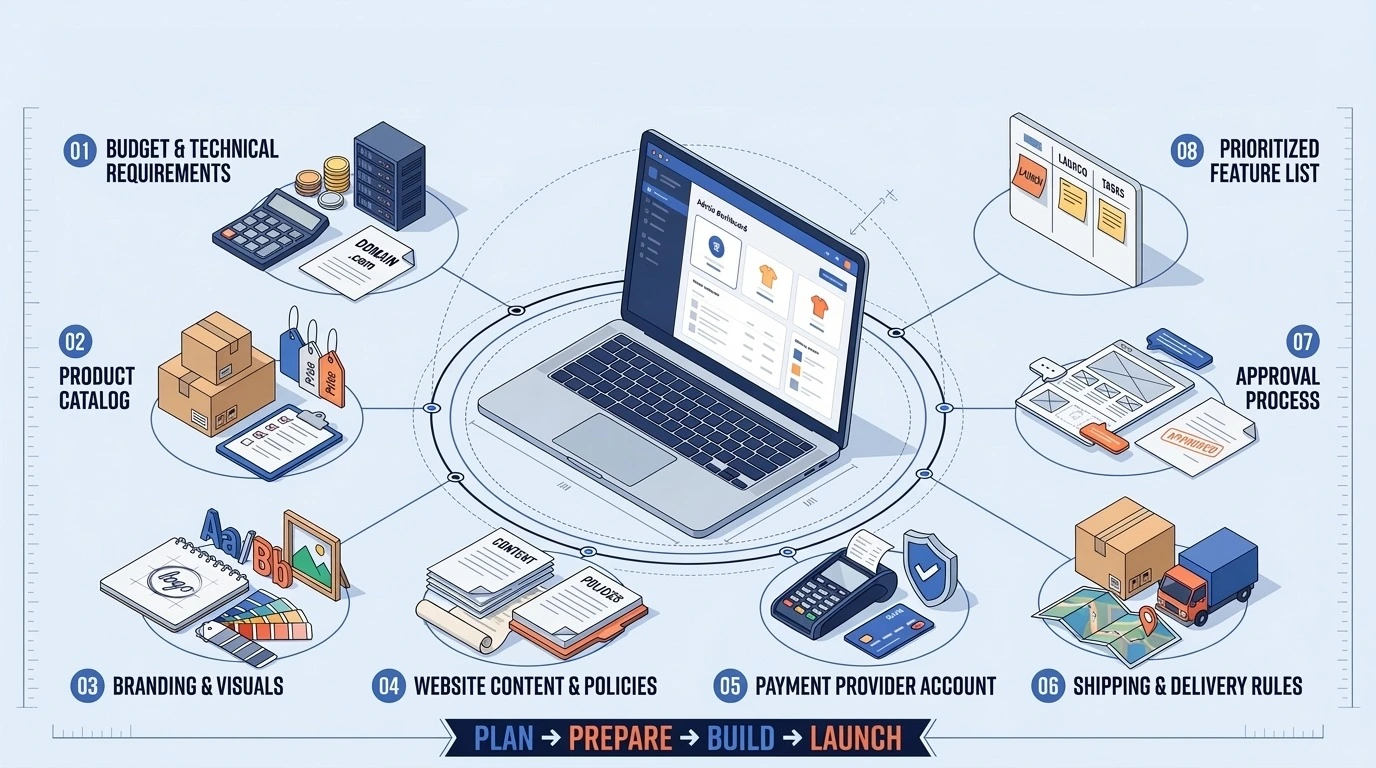
Preparing the essential information and resources before development begins can help you avoid delays and make the launch process smoother. Use this checklist to organize your requirements before building your e-commerce website.
Preparing these items before development starts gives you a clearer project scope and helps your team focus on building, testing, and launching the store.
Bottom Line
The time it takes to build an e-commerce website depends on your platform, design, product catalog, and integrations. A template-based store may launch faster, while custom development and complex integrations can take considerably longer.
To avoid delays, define your requirements, prepare product content, and choose your platform before development begins. Use the eight-week timeline as a planning guide and test checkout, payments, and order notifications before launch.
If you choose WordPress, StoreEngine’s setup wizard, ready-made templates, and built-in features can simplify store setup. Explore the pricing plans or get started with the free version on WordPress.org.
Frequently Asked Questions
Can I build an e-commerce website in one week?
Yes, for a very simple store with ready content. One guide says a basic Shopify store with a template can launch in 3 to 7 days if product content, payment and shipping setup are ready. A custom or larger store will not fit in a week.
How long does it take to build a WordPress online store?
There is no single number. One guide estimates one to four weeks for a WooCommerce store, while another estimates three to six months for a WooCommerce or custom build with more design and integration work. Your scope decides where you land.
How long does payment gateway integration take?
On Shopify, one agency puts Shopify Payments setup at about 30 minutes and other gateways at one to three days, depending on verification. Plan for provider approval time, which is outside your control.
Does selling subscriptions make a website take longer to build?
Usually yes. Recurring billing, trials, and renewal handling require additional configuration and testing beyond a one-time checkout. Subscription logic is one of the features that adds time to a build.
Can I launch an online store without custom development?
Yes. Website builders and e-commerce platforms need no custom coding. StoreEngine says non-developers can set up and style a store visually with aBlocks, and developers can extend it through its REST API, hooks, and filters.
How long does it take to build a Shopify store?
One agency estimates one to two days for a bare-bones Shopify store and two to four weeks for a standard professional launch. Another estimates 6 to 10 weeks for a Shopify starter store.