

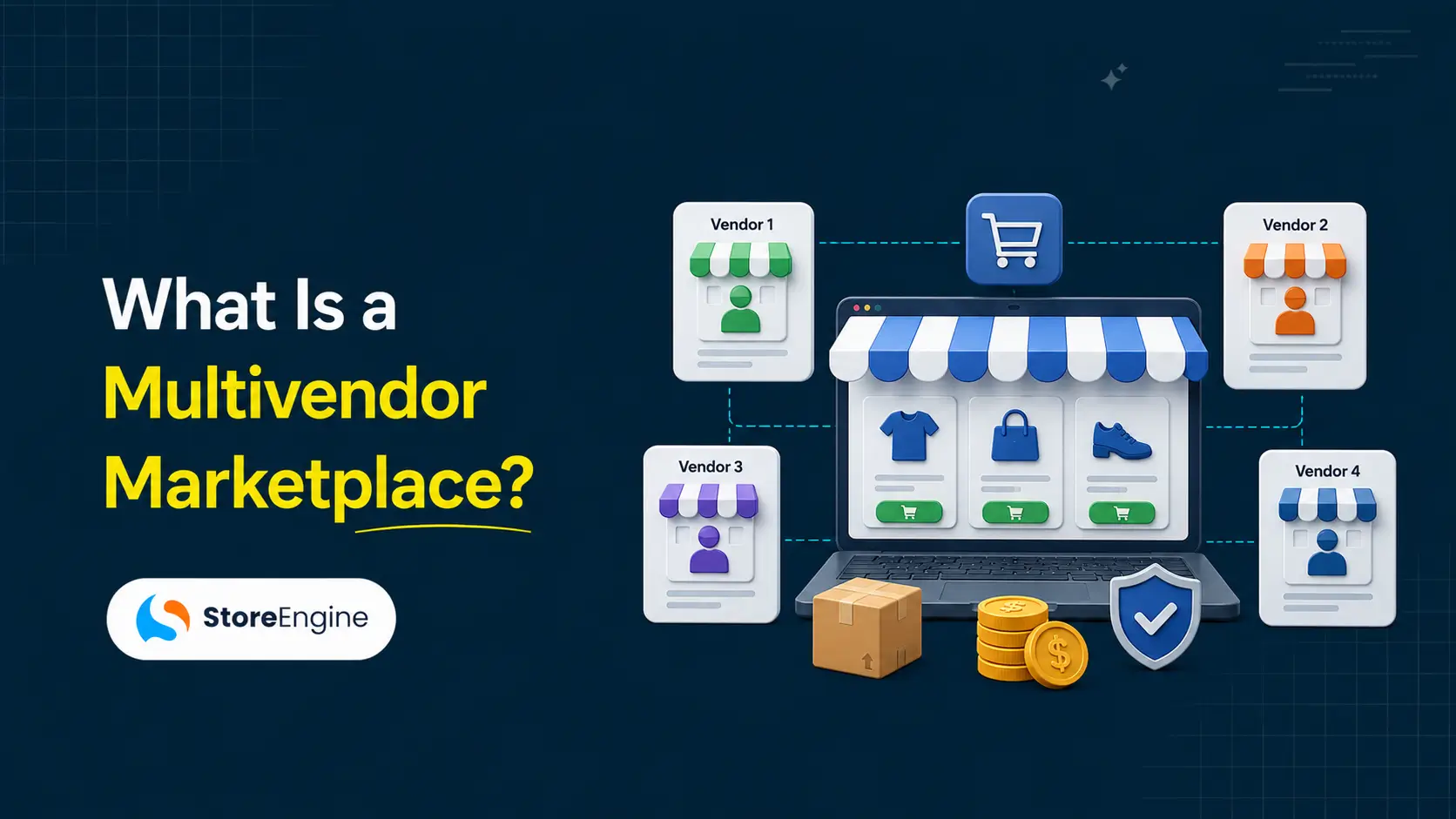

Most people who want to build a multivendor marketplace spend three weeks reading articles and still can’t answer two basic questions. First: what happens to a vendor’s commission when an order gets refunded? Second: what actually stops one vendor from editing another vendor’s products? Every article explains that Amazon has multiple sellers. Almost none explain how the underlying mechanics work — and those mechanics are exactly what breaks when you try to build one.
A multivendor marketplace is an ecommerce website where multiple independent sellers list and sell their own products through a single shared storefront. You own the platform. Vendors own the products. Customers see one unified store. The platform earns a commission on every sale. That’s the model. Understanding why it works — and what holds it together technically — is what this article is actually about.
By the end, you’ll know whether the marketplace model fits your goal, how commission and vendor payouts are supposed to work (including the refund problem most builders discover too late), and what a WordPress build looks like without WooCommerce as a dependency.
Quick Answer: What Is a Multivendor Marketplace?
- A multivendor marketplace is a single ecommerce website where multiple independent vendors sell their own products. The platform owner earns a commission on each sale. Vendors manage their own products, prices, and fulfillment.
- Three core roles: Admin (owns the platform, approves vendors, processes payouts), Vendors (list products, fulfill orders, request withdrawal of earned commissions), Customers (browse all vendors’ products in one storefront, check out once).
- Revenue model: Commission per sale — a percentage or flat fee taken from each vendor’s transaction. Additional revenue from vendor subscription fees, listing fees, and featured placement.
- Real-world examples: Amazon, Etsy, eBay (products), Fiverr, Upwork (services), Airbnb, Turo (rentals), Envato Market (digital downloads).
- On WordPress: Plugins like StoreEngine’s Multi-Vendor addon handle vendor registration, commission calculation, and payout management without requiring WooCommerce — unlike Dokan or WCFM, which depend on WooCommerce as a base.
What Is a Multivendor Marketplace?
A multivendor marketplace is an ecommerce platform that connects multiple independent sellers with a shared customer base, all under one unified storefront. The marketplace owner provides the technology infrastructure and the customer relationship. Vendors provide the products, the inventory, and the fulfillment.
Think of it as a shopping mall rather than a store. The mall owns the building, enforces the rules, and collects rent from each shop. Individual shops operate independently — their own inventory, their own pricing, their own staff. Customers walk into one building and buy from many different sellers without even thinking about which “store” they’re in. That’s exactly how multivendor ecommerce works, except the building is a website.
The scale of this model is striking. The digital marketplace market has experienced remarkable growth, reaching $580.31 billion in 2024 and projected to surpass $1 trillion by 2030, representing a compound annual growth rate of 10.6%. That growth is driven by one fact: marketplaces now account for 62% of global retail e-commerce sales, totaling approximately $2.4 trillion in transaction value. The multivendor model isn’t a niche business structure — it’s the dominant form of ecommerce worldwide. BitBagBitBag
The reason it works is straightforward. A single-vendor store grows by sourcing more products. A multivendor marketplace grows by approving more vendors — and each vendor brings their own inventory, their own product listings, and often their own customer base. Growth is vendor-driven, not inventory-driven.

How a Multivendor Marketplace Works — Step by Step
The multivendor model is cleaner than it looks from the outside. Here’s the full cycle from vendor signup to payout, including the steps that most explanations skip.
1. Vendor applies to join.
A prospective seller submits an application through a signup form on the marketplace. They provide their store name, description, business type, and contact details. The application sits in a pending queue. The admin reviews it and either approves or rejects. Approved vendors gain access to their dashboard. Rejected applicants receive a notification.
2. Vendor creates product listings.
Approved vendors build their product catalog from a frontend dashboard — they never need access to the site’s admin panel. They add product titles, descriptions, images, prices, and inventory counts. New products go into a pending queue. The admin reviews and either publishes them or rejects them. Platforms can optionally enable auto-approval for trusted vendors.
3. Customer browses and purchases.
Customers browse the unified product catalog. They can search across all vendors simultaneously or filter by a specific vendor. They add products from multiple vendors to a single cart and check out once. The platform processes the full payment.
4. Order routes to the correct vendor.
When a customer places a multi-vendor order, the platform splits it by vendor and notifies each one of their line items. A vendor sees only their portion of the order — not line items belonging to other vendors. Each vendor updates shipping status and tracking independently on their items.
5. Commission is automatically calculated.
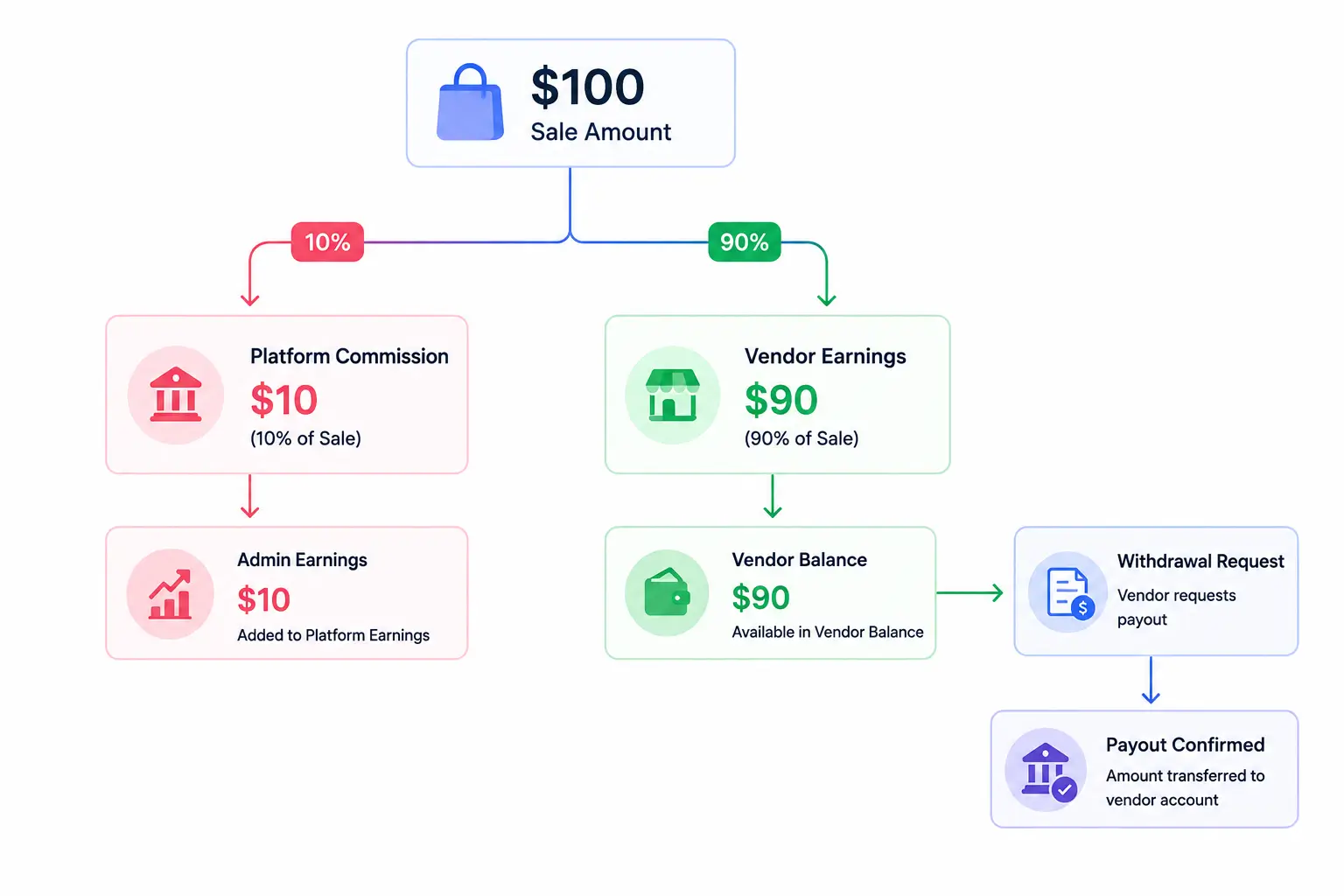
When the order payment is confirmed, the system calculates commission per vendor per line item. At 10% commission on a $100 item, the vendor earns $90 and the platform earns $10. This happens automatically — no manual calculation. When a refund occurs, the commission should automatically reverse. Most platforms handle this badly — more on that in the Commission section below.
6. Vendor requests a payout.
Vendors see their available balance in their dashboard: total earned commission minus any pending withdrawals. When the balance exceeds the minimum withdrawal threshold, they submit a payout request. The admin reviews the request, approves it, marks it paid. The vendor receives the funds via PayPal or bank transfer.
The Four Types of Multivendor Marketplaces
Not every multivendor marketplace sells the same thing. The type you build changes which features you need and how your commission model works.
Product marketplace
Vendors sell physical or digital products. Customers browse, buy, and receive shipments or file downloads from individual vendors. Amazon, Etsy, and eBay are the largest examples. This is the most common marketplace type and what most WordPress multivendor plugins are built to handle. Commission is typically 5–20% per sale.
Service marketplace
Vendors offer services — design, writing, consulting, development, photography. Fiverr charges a 20% commission on every transaction. Upwork charges a sliding commission based on lifetime billings with each client. Service marketplaces require different mechanics: no physical inventory, often a booking or project flow instead of a simple cart checkout.
Digital downloads marketplace
Vendors sell files — themes, templates, fonts, music, plugins, ebooks. Envato Market is the most well-known example. No physical fulfillment. The platform delivers the file automatically on purchase. License management matters here: the platform needs to track which buyer has rights to which file.
Rental or booking marketplace
Vendors list spaces, equipment, or time for rent. Airbnb and Turo are the reference examples. This requires availability calendars, date-based pricing, and deposit handling that most standard ecommerce platforms don’t support natively.
For most WordPress-based marketplace builders, the product marketplace is the right starting model. It’s what StoreEngine’s Multi-Vendor addon is built to handle — physical products, digital downloads, and vendor management in a single plugin.
Why the Marketplace Model Beats Owning Your Own Inventory
The common advice is to start an ecommerce store, find a product, and own the inventory. Most people who follow this discover the hard way why that’s a difficult model to scale.
Third-party sales through marketplaces are projected to become the largest and fastest-growing retail channel globally by 2027, accounting for 59% of all global e-commerce. That trajectory exists because the economics of the marketplace model are structurally different from single-vendor retail. github
Here’s the honest comparison:
| Factor | Single-Vendor Store | Multivendor Marketplace |
| Who sources products | You | Vendors bring their own |
| Who holds inventory risk | You | Vendors hold their own |
| Who writes product listings | You | Vendors write theirs |
| How you add more products | Buy/source more stock | Approve more vendors |
| Revenue model | Product margin | Commission per vendor sale |
| Operational complexity | Lower | Higher — vendor management required |
| Scaling ceiling | Inventory/capital limited | Vendor count limited (no inventory cap) |
The marketplace model shifts inventory risk entirely to vendors. It scales by approving vendors, not by purchasing more stock. The trade-off is operational complexity — vendor management, quality control, payout processing, and dispute resolution are now your responsibility.
The mistake I see most often: people underestimate how much time vendor management actually takes in the early months. Before you have automated systems in place, manually approving products, reviewing withdrawal requests, and handling vendor disputes can consume more time than running a regular store. Plan for that overhead before you commit to the model.
How Money Actually Flows — Commission, Refunds, and the Part Everyone Gets Wrong
Commission is the marketplace’s primary revenue. It sounds simple: take a percentage of each sale. In practice, three things make it more complex than that — and two of them are rarely mentioned in marketplace guides.
Commission calculation
Commission is calculated per line item per vendor. If a single customer order contains products from three vendors, commission is calculated separately for each vendor. Your global commission rate (say, 10%) applies as the default. You can override it per vendor — giving Vendor A a negotiated 7% rate while keeping 15% from newer vendors. Commission type can be percentage-based or flat fee.
The refund reversal problem — what most platforms miss
Here’s the scenario nobody writes about. A customer places a $500 order. Commission is calculated at 10% — $50 to you, $450 to the vendor’s balance. Two weeks later, the customer requests a refund. Most marketplace setups require you to manually subtract $50 from the vendor’s balance. At any real volume, this becomes a painful administrative task — and if you forget, the vendor has been overpaid.
The right implementation writes a negative commission row when a refund is processed. The sum of all commission rows (positive original + negative refund) equals the accurate net balance at all times. No manual adjustment. No risk of overpaying vendors on refunded orders.
In StoreEngine’s commission system, refund reversal is automatic. When an order is refunded, a negative commission row is inserted immediately. The vendor’s balance reflects the accurate net amount — including the refund deduction — without any admin action.
Withdrawal state machine
When a vendor requests a payout, it doesn’t immediately become a payment. It flows through a state machine:
pending → approved → paid (terminal — cannot be reversed)
pending → rejected → can request again
pending → cancelled → can request again
The paid status is intentionally permanent. Once you mark a payout as paid, you cannot change it back. This protects the audit trail — you can always prove that a payout was processed, and the record can’t be accidentally deleted or modified. Admin notes and vendor notes are attached to each request for reference.
Vendor Isolation — How One Vendor Can’t Touch Another’s Products
This is the question every marketplace builder eventually asks, and almost no article answers it directly: what stops Vendor A from logging in and editing Vendor B’s products?
In a poorly built marketplace system, the answer is “nothing” — or just a UI that hides products the vendor didn’t create. But hiding something in the interface doesn’t protect it. A vendor who finds the right URL or REST API endpoint can still access or modify another vendor’s product data if the permission check happens only at the UI layer.
In a properly built system, every vendor action is checked at the permission layer, not just the UI layer. When Vendor A tries to edit a product belonging to Vendor B, the server checks ownership before processing the request. If the product isn’t owned by the requesting vendor, the server returns a 403 error — forbidden. The edit never happens, regardless of how the vendor found the URL.
In StoreEngine’s Multi-Vendor system, vendor isolation is enforced at the capability layer:
- Vendors can only view, edit, and delete products they own. Attempting to edit another vendor’s product returns a 403 error.
- Vendors cannot access wp-admin. The WordPress admin panel is completely blocked for vendor accounts — they’re automatically redirected to the frontend dashboard.
- The WordPress admin bar is hidden for vendor accounts.
- The vendor dashboard shows only the vendor’s own orders, inventory, returns, and financial data.
- Commission data is stored per-vendor in the database, not accessible cross-vendor.
This matters more than people realize in the early days. When your marketplace has 10 vendors, you can monitor everything manually. When you have 200, you need the security boundary enforced automatically — not by trusting that vendors will only use the features you intend them to use.
Single Vendor vs. Multivendor Marketplace: An Honest Comparison
Most people come to this decision thinking a multivendor marketplace is “better” because it scales without inventory. That’s true. But it’s not the whole picture.
|
Single-Vendor Store |
Multivendor Marketplace |
|
|
Inventory responsibility |
You buy and hold everything |
Vendors hold their own inventory |
|
Product quality control |
You control every listing |
You moderate vendors’ listings |
|
Revenue model |
Full product margin |
Commission (lower per-sale revenue) |
|
Scaling mechanism |
Add more products/capital |
Approve more vendors |
|
Time to first sale |
Faster — you control everything |
Slower — need vendors first |
|
Operational complexity |
Lower |
Higher — vendor support, disputes, payouts |
|
Best for |
One niche, deep expertise, high margin |
Diverse catalog, low capital, scale via vendors |
The marketplace model scales better at volume but requires more infrastructure to run well. A single-vendor store is operationally simpler but capital-intensive. Neither is universally superior — it depends on whether you want to be a merchant or a platform operator.
What You Need to Build a Multivendor Marketplace on WordPress
Here’s where most guides give you the wrong stack. The default advice is: install WooCommerce → add Dokan or WCFM on top → configure everything to work together. That’s three plugin stacks from at least two different development teams, all requiring synchronized updates to avoid conflicts.
The mistake I see most often with this approach: a WooCommerce update breaks Dokan, or a Dokan update breaks the WCFM integration, and you spend a day debugging something that has nothing to do with your actual marketplace. At any real scale, this plugin dependency chain creates ongoing maintenance overhead.
Here’s what you actually need for a WordPress multivendor marketplace:
1. WordPress hosting that handles real traffic
Shared hosting breaks under marketplace load. Managed WordPress hosting (SiteGround Business, Kinsta, or WP Engine) gives you the PHP memory, CDN, and database optimization your marketplace needs. Budget $30–$80/month at launch.
2. A plugin that handles the full marketplace stack without WooCommerce
The WooCommerce + Dokan combination requires WooCommerce as a mandatory base. Dokan costs $149–$499/year depending on plan. WCFM has similar pricing. Both require WooCommerce core to function, adding a third plugin to maintain.
StoreEngine is a standalone WordPress ecommerce plugin that doesn’t require WooCommerce. The Multi-Vendor addon adds vendor registration, product approval workflow, per-vendor commission (percent or flat, global or per-vendor override), automatic refund reversal, withdrawal management with state machine, public vendor store pages, shop filter by vendor, vendor badges, and 9 webhook events for automation. One plugin, one support channel, one update cycle.
|
Feature |
WooCommerce + Dokan |
StoreEngine Multi-Vendor |
|
WooCommerce required? |
Yes |
No |
|
Annual plugin cost |
$149–$499/year (Dokan) + WooCommerce costs |
Included in StoreEngine Pro |
|
Vendor frontend dashboard |
Yes |
Yes |
|
Commission auto-reversal on refund |
Depends on plan |
Yes, built-in |
|
Per-vendor commission override |
Yes (paid plans) |
Yes |
|
Vendor webhook events |
Limited |
9 native events |
|
Plugin stacks to maintain |
3 (WooCommerce + Dokan + theme) |
1 (StoreEngine) |
3. A payment gateway
Stripe for card payments and subscription billing. PayPal as an alternative. Both are supported natively by StoreEngine. Stripe is recommended for marketplaces — it handles the full payment lifecycle cleanly, including failed payment retries.
4. A vendor acquisition plan before launch
Don’t build the marketplace first and then try to recruit vendors. The most common early marketplace failure is launching with zero or two vendors and wondering why no customers convert. Recruit 5–10 vendors before go-live. Seed the catalog. Give customers something to actually browse on day one.
To see the full step-by-step build walkthrough, read How to Build a Multivendor Marketplace on WordPress. For the complete commission and vendor management setup, see How Multivendor Commission and Vendor Management Works.
Decision Framework: Which Setup Is Right for You?
- If you want to build a marketplace with diverse vendors and zero inventory investment → the multivendor model is the right structure. Plan for vendor management overhead from day one. Don’t launch without at least 5 active vendors in your catalog.
- If you’re already on WordPress and want to add vendor functionality without installing WooCommerce → use StoreEngine’s Multi-Vendor addon. One plugin handles vendor registration, commission, payouts, store pages, and order routing. No WooCommerce dependency.
- If you want to compare multivendor platform costs before committing → read Best Multivendor Ecommerce Platforms Compared for the honest cost breakdown across Shopify apps, WooCommerce plugins, and standalone solutions.
- If you’re planning to launch a course or digital download marketplace → the StoreEngine + Academy LMS integration lets vendors sell courses through your marketplace. Membership status gates course access automatically.
Frequently Asked Questions
What is a multivendor marketplace?
A multivendor marketplace is a single ecommerce website where multiple independent sellers list and sell their own products under one shared storefront. The platform owner earns a commission on each vendor’s sales. Vendors manage their own product listings, pricing, inventory, and order fulfillment. Customers browse all vendors’ products in one place and check out once. Amazon, Etsy, and eBay are the most widely known examples.
How does a multivendor marketplace work?
Vendors register and get approved by the platform admin. They submit products through a frontend dashboard, which go live after admin review. When a customer purchases, the order routes to the relevant vendor for fulfillment. Commission is automatically deducted from the vendor’s sale and added to their balance. Vendors request payouts once their balance reaches the minimum threshold. The admin approves and processes each payout request.
What are some examples of multivendor marketplaces?
Product marketplaces: Amazon, Etsy, eBay, Walmart Marketplace. Service marketplaces: Fiverr, Upwork, Freelancer. Rental marketplaces: Airbnb, Turo, VRBO. Digital download marketplaces: Envato Market, Creative Market, Gumroad. All of these use the same core model: one platform, multiple independent sellers, commission-based revenue.
How do multivendor marketplaces make money?
The primary model is commission — a percentage or flat fee from each vendor transaction. A 10% commission on a $100 sale earns the marketplace $10. Additional revenue streams include vendor subscription fees (monthly or annual listing access), per-product listing fees, and featured placement charges. Most new marketplaces start commission-only and add subscription fees once they have enough vendor volume to justify the charge.
What is the difference between a single vendor and multivendor marketplace?
In a single-vendor store, one business owns all products, manages all inventory, and handles all fulfillment. Revenue is the full product margin. In a multivendor marketplace, independent vendors own their products and handle their own fulfillment. The platform earns commission on each vendor’s sale. The marketplace scales by approving more vendors; the single-vendor store scales by sourcing more inventory.
Can I build a multivendor marketplace on WordPress without WooCommerce?
Yes. StoreEngine is a standalone WordPress ecommerce and marketplace plugin that doesn’t require WooCommerce. The Multi-Vendor addon handles vendor registration, product approval, per-vendor commission calculation with automatic refund reversal, withdrawal management, vendor store pages, and order routing — without WooCommerce as a base dependency. Dokan and WCFM, by contrast, require WooCommerce to function.
What is vendor commission and how is it calculated?
Vendor commission is the percentage or flat fee the marketplace earns from each vendor’s sale. A 10% commission on a $100 sale means the vendor earns $90 and the marketplace earns $10. Commission is calculated per line item, per vendor, automatically when an order is paid. When a refund occurs, commission should reverse automatically — a negative row offsets the original commission so the vendor’s net balance is always accurate. Platforms that don’t auto-reverse commissions on refunds require manual balance adjustments, which creates errors at any real transaction volume.
How do vendor payouts work in a marketplace?
Vendors see their available balance in the dashboard — total earned commission minus pending or approved withdrawal amounts. When the balance reaches the minimum withdrawal threshold (which the platform admin configures), the vendor can submit a payout request with their preferred payment method (PayPal or bank transfer). The request flows through a state machine: pending → approved → paid. The paid status is terminal — it cannot be reversed — which protects the financial audit trail. Admin notes and vendor notes are supported per request for reference.