


You set up a promotion. You picked the discount, configured the code, maybe sent an email. Then you checked the redemption report a week later and found that most customers never used it — not because they didn’t want the deal, but because they never found it, typed the code wrong, or left your site to hunt for something better and never came back. That scenario is not a marketing problem. It’s a coupon architecture problem.
StoreEngine’s Advanced Coupons is a Pro-only extension to the core eCommerce advanced coupon system that closes the three gaps behind that failure: no native BOGO or auto-apply discount types, no mechanism to surface available deals proactively in cart and checkout, and no architecture for private or VIP targeting that prevents public code leakage. It adds new discount types, a Suggestion Engine that evaluates available promotions against every cart in real time, and a customer account dashboard panel that shows relevant deals even when customers aren’t actively shopping. Each piece addresses a specific failure point, not a general “more features” upgrade.
By the end of this article, you will understand exactly how each component works — mechanically, not conceptually — and whether it fits the way your store runs promotions.
Quick Answer: What Is an eCommerce Advanced Coupon System?
- What it is: An advanced coupon system extends core discount types (percentage, flat) with BOGO and auto-apply, then adds a promotion UX layer — cart nudges, spend-progress tracking, and a customer account panel — that surfaces deals proactively instead of waiting for customers to remember a code.
- Core mechanism: A SuggestionEngine evaluates all promoted coupons against the current cart subtotal on every load, shows “almost eligible” or “eligible” states with a one-click apply link, and caps nudges at two so the cart doesn’t become an ad panel.
- Who it’s for: Store owners who run promotions that customers don’t redeem, want BOGO deals without custom development, or need to target specific customers without issuing public codes that get shared.
- The main benefit: Customers discover and apply deals automatically — without hunting for codes — which directly addresses the cart abandonment that coupon friction causes.
- How to get started: Activate StoreEngine Pro to enable the Advanced Coupons gate, which activates BOGO and auto-apply types alongside the full discoverability layer.
What Standard eCommerce Coupons Can’t Do (And the Revenue It Costs You)
The coupon field at checkout is one of the most psychologically damaging UI elements in eCommerce — when it’s handled wrong. Research from the Nielsen Norman Group found that when a coupon field is visible but no deal is readily available, many shoppers leave the checkout page to search for one and never return. The field signals that a discount exists. If customers can’t find it, they feel they’re paying more than they should. That feeling kills conversions.
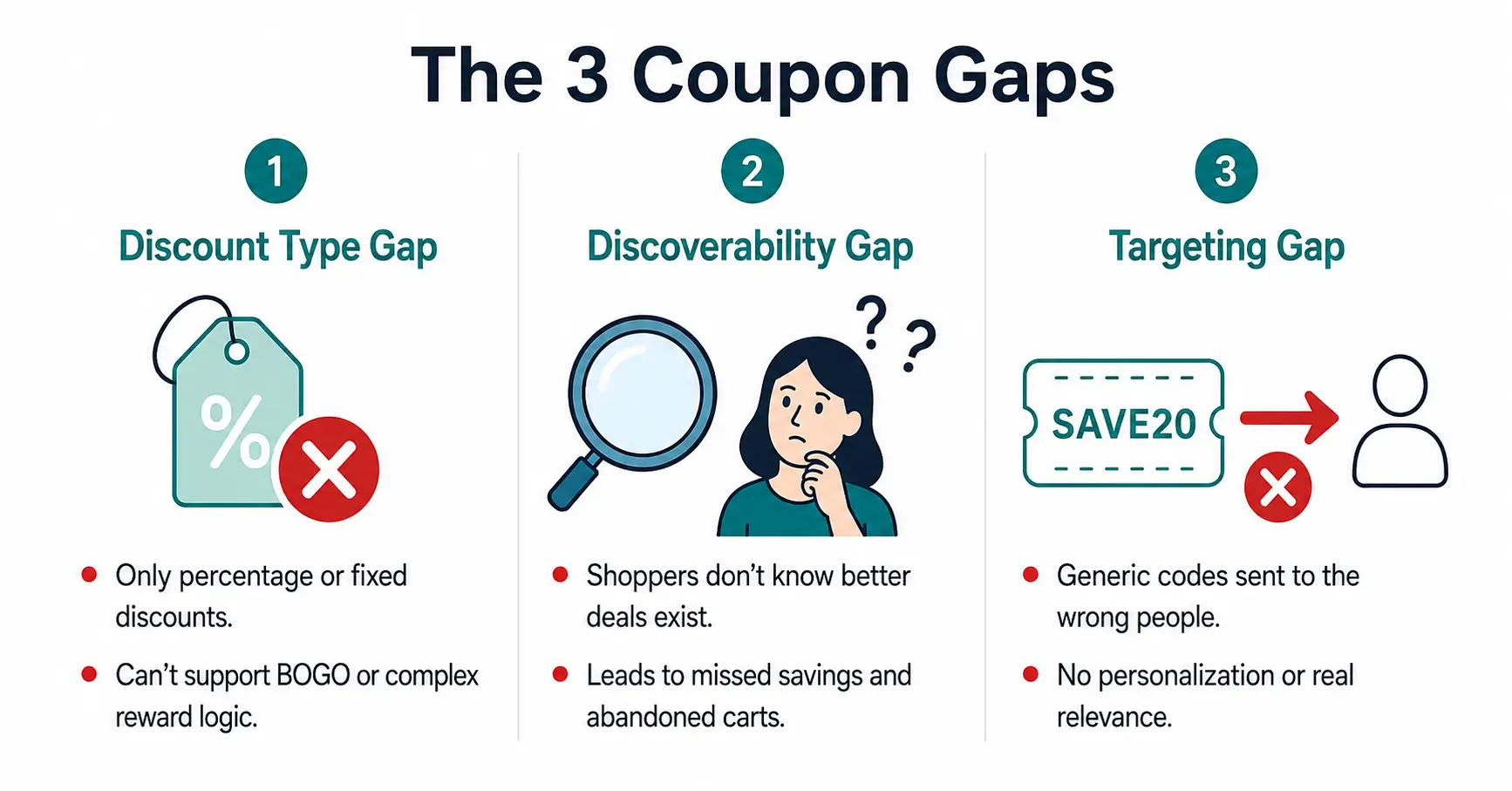
The honest assessment of most core coupon systems — including StoreEngine’s free tier — is that they solve exactly half the problem. They let merchants create codes and set rules. They don’t help customers find those codes, apply them without friction, or discover deals they’re close to qualifying for. The three gaps this creates are consistent across platforms:
The Discount Type Gap. Core systems cover percentage off, flat amount, and free shipping. Buy One Get One — one of the highest-converting promotional formats in retail — is either absent or requires custom development. There’s no partial BOGO, no configurable buy/get quantity, no cheapest-item targeting built in.
The Discoverability Gap. Once a merchant creates a coupon, the system does nothing to surface it. Customers must know the code exists, find it, type it correctly, and hope it works. According to data aggregated from over 50 studies by the Baymard Institute, the average cart abandonment rate sits at 70.22% — and a meaningful portion of that friction is specifically coupon-related. SimplyCodes, tracking 78 million promo code interactions, found that 87.6% of attempts resulted in downvotes, and the majority of failures came not from bad codes but from merchant-side checkout rules the customer had no way to know about in advance.
The Targeting Gap. Email-restricted or VIP coupons exist in most systems, but the code itself is still a code — it can be shared, screenshotted, posted to coupon aggregator sites. There’s no architecture for a truly private offer visible only to its intended recipient.
What this means in practice: a merchant running a well-designed BOGO campaign for repeat customers is likely spending time and budget on a promotion that most eligible customers will never find, and a few ineligible customers will try to abuse. That’s not a strategy problem. It’s a feature gap.
BOGO in StoreEngine — How the Engine Actually Works
BOGO is StoreEngine’s Buy One Get One discount type, activated exclusively by the Advanced Coupons Pro gate. When a merchant enables the Pro tier, a flag (storeengine/advanced_coupon/enabled) flips to true. In the free core, the BOGO type appears in the coupon editor UI — but it applies zero discount. It’s visible but inactive. Pro turns it on.
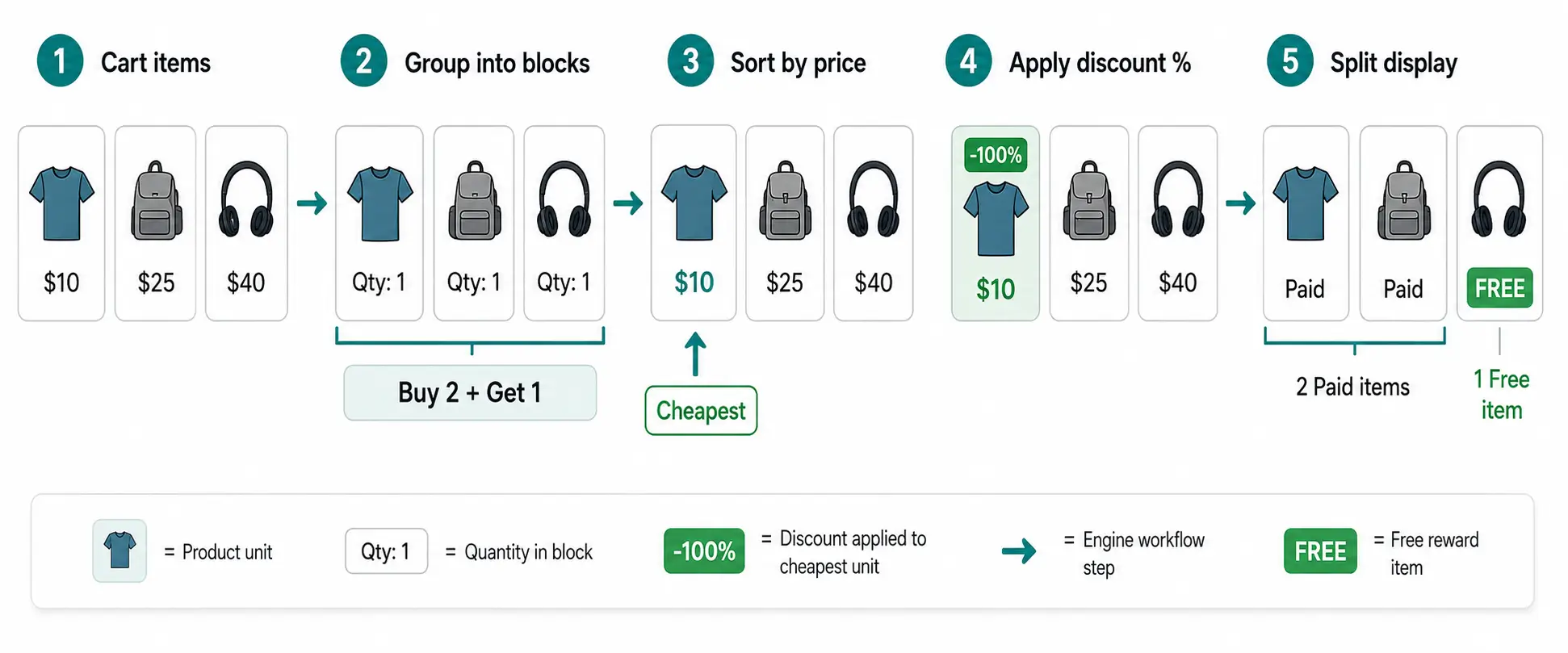
Here is what happens mechanically when a BOGO coupon fires on a cart:
- The engine identifies all eligible cart items based on the products or categories you configured.
- It groups them into blocks of (buy_qty + get_qty). Set Buy 2, Get 1, and each block is 3 units.
- It calculates reward units: floor(total_qty / group_size) × get_qty. Seven eligible items at Buy 2 Get 1 qualifies for 2 free units.
- It sorts all eligible items by price, ascending — cheapest first.
- It applies your configured discount percentage (1% to 100%) to the cheapest qualifying reward units.
- The discount is clamped so it never exceeds the item’s remaining discountable amount — which prevents negative pricing edge cases on partially discounted items.
The cheapest-first targeting is intentional and protects your margin. A cart with items at $10, $25, and $40 qualifying for one free unit gives the customer the $10 item free — not the $40 one. This mirrors how major retail BOGO programs are structured. The math is consistent because it’s the right math for merchant margin protection.
Why BOGO converts better than an equivalent flat discount comes down to psychology. Behavioral economists describe a “zero price effect” — the moment something is labeled free, it triggers a disproportionate emotional response relative to its actual monetary value. A $10 item marked free outperforms a $10 discount on the cart total even though they’re numerically identical. That’s the conversion advantage BOGO carries over an equivalent percentage discount.
BOGO Transparency — The “FREE” Line Item Customers Actually See
What happens after the discount fires matters as much as the discount itself. Most BOGO implementations apply the discount silently to the cart total. The customer sees a lower number at the bottom but has no visibility into which item was discounted or whether the deal applied correctly. That ambiguity creates post-purchase doubt — and support tickets.
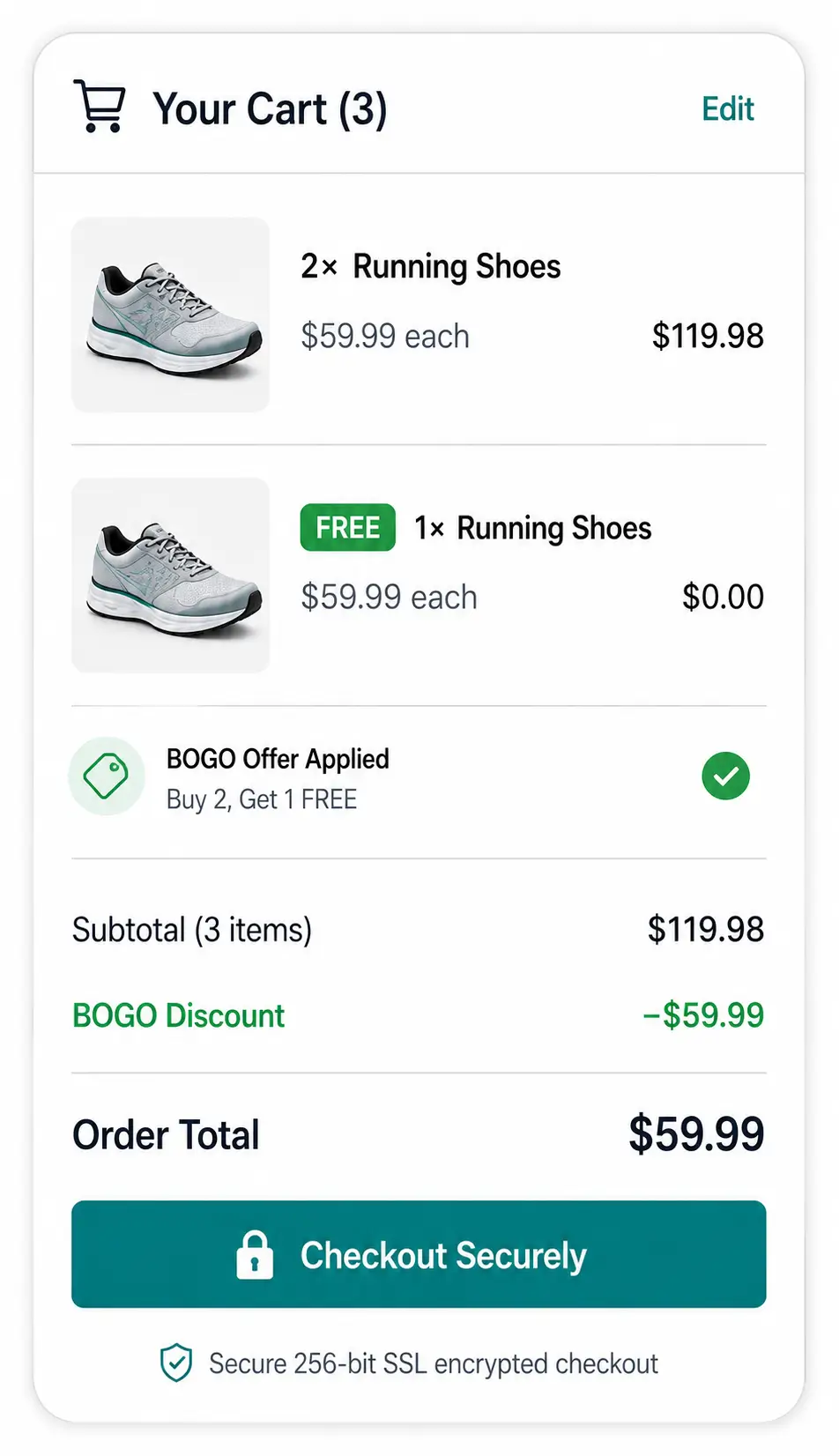
StoreEngine handles this through BOGO line-item transparency. When rewarded units exist in the cart, the engine splits the relevant line into two separate display rows:
- Paid row: The full-price units at their normal price. Example: “2× Running Shoes — $59.99 each”
- Reward row: The discounted or free units, explicitly labeled. Example: “1× Running Shoes (FREE) — $0.00”
In classic PHP templates, the reward row carries a “FREE” badge. Both rows appear in the REST cart/checkout snapshot and in the standard PHP render — so the split displays correctly regardless of whether the store uses block-based or classic checkout.
The practical value is trust. A customer who sees “FREE” next to the specific item doesn’t need to do mental math or wonder whether the system worked. The alternative — a silent $29.99 discount buried in the order summary — is technically correct but experientially opaque. In practice, opaque discounts generate more support tickets and more post-checkout confusion than transparent ones. Transparency is not a cosmetic improvement; it’s a support cost reduction.
Auto-Apply Coupons — No Code, No Hunt, No Abandonment
Auto-apply coupons activate automatically when the cart meets configured conditions. The customer never sees a coupon code field, never types a character string, never leaves to search a coupon aggregator site.
The friction anatomy of manual code entry has three distinct failure points. First, the customer doesn’t know the code exists. Second, they know it exists but mistype it. Third, they see the coupon field, leave to find the right code, get distracted, and don’t come back. One widely cited estimate puts up to 50% of abandoned carts as linked to users leaving the site specifically to hunt for coupon codes. Auto-applied discounts cut all three failure points at once — the discount appears in the cart the moment the cart qualifies, with no customer action required.
In StoreEngine, the auto-apply type works alongside email restriction. A returning customer who qualifies by email sees the discount applied automatically when they add the right products. A customer who doesn’t qualify sees nothing — no code, no prompt, no indication that a deal exists for someone else.
The before/after comparison is straightforward:
|
Manual code entry |
Auto-apply |
|
Customer must know code exists |
Discount appears automatically |
|
Mistyped codes fail with generic errors |
No entry, no error possible |
|
Customer leaves to search for the code |
Customer stays in the checkout flow |
|
Code shared publicly, applied by wrong audience |
Email restriction scopes eligibility precisely |
|
Attribution unclear if customers find the code independently |
Conversion attributed cleanly to the campaign |
The part most workflows get wrong is treating auto-apply as a simple convenience feature rather than a targeting tool. Combined with email restriction, it becomes a precision instrument — a welcome-back offer for lapsed customers, a loyalty reward for a specific segment, a first-purchase discount for a new subscriber list — that reaches exactly who it’s supposed to, and nobody else.
The Discoverability Layer — Spend-Progress Bar, Cart Nudges, and the “Almost Eligible” State
This is the component of StoreEngine’s Advanced Coupons system that has no equivalent in standard coupon tools, and it’s the piece that directly addresses the discoverability gap at the cart level.
CouponPromoteField is a per-coupon setting — a “Promote in cart” toggle plus an optional description field. When a merchant enables this toggle on a coupon, that coupon enters the pool the SuggestionEngine evaluates on every cart load. When the toggle is off, the coupon is invisible to the suggestion system entirely — it will never appear in a nudge, a spend-progress bar, or the account dashboard, regardless of how eligible the customer might be. The toggle controls visibility at the architecture level, not at the display level.
The SuggestionEngine is StoreEngine’s real-time coupon evaluation system that runs on every cart and checkout page load. Its evaluation logic:
- Collect all promoted coupons — those with the toggle enabled.
- Evaluate each against the current cart subtotal.
- Minimum spend not met → assign “almost” state: “Spend $12 more to unlock 20% off SUMMER20” with the exact gap amount shown.
- Eligible → assign “eligible” state: one-click apply link that adds the coupon without requiring code entry.
- Sort by smallest gap first — the easiest deal to qualify for appears at the top.
- Cap output at 2 simultaneous nudges in cart and checkout.
Each nudge displays the discount headline, expiry date, and any product restrictions — enough context for a customer to decide in one glance whether it’s worth acting on.
The spend-progress bar is the visual layer on this logic. It works on the same principle as free shipping progress bars, which have become standard on high-converting stores because they directly increase average order value. NNG research found that on sites where potential savings were highlighted in the cart, users actively considered adding more products to qualify. The “almost” state is not a passive notification — it’s an active AOV prompt. A customer $8 from a 20% discount threshold has a specific, actionable reason to add one more item. Without the progress bar, that moment doesn’t exist and the cart session ends at whatever value it reached organically.
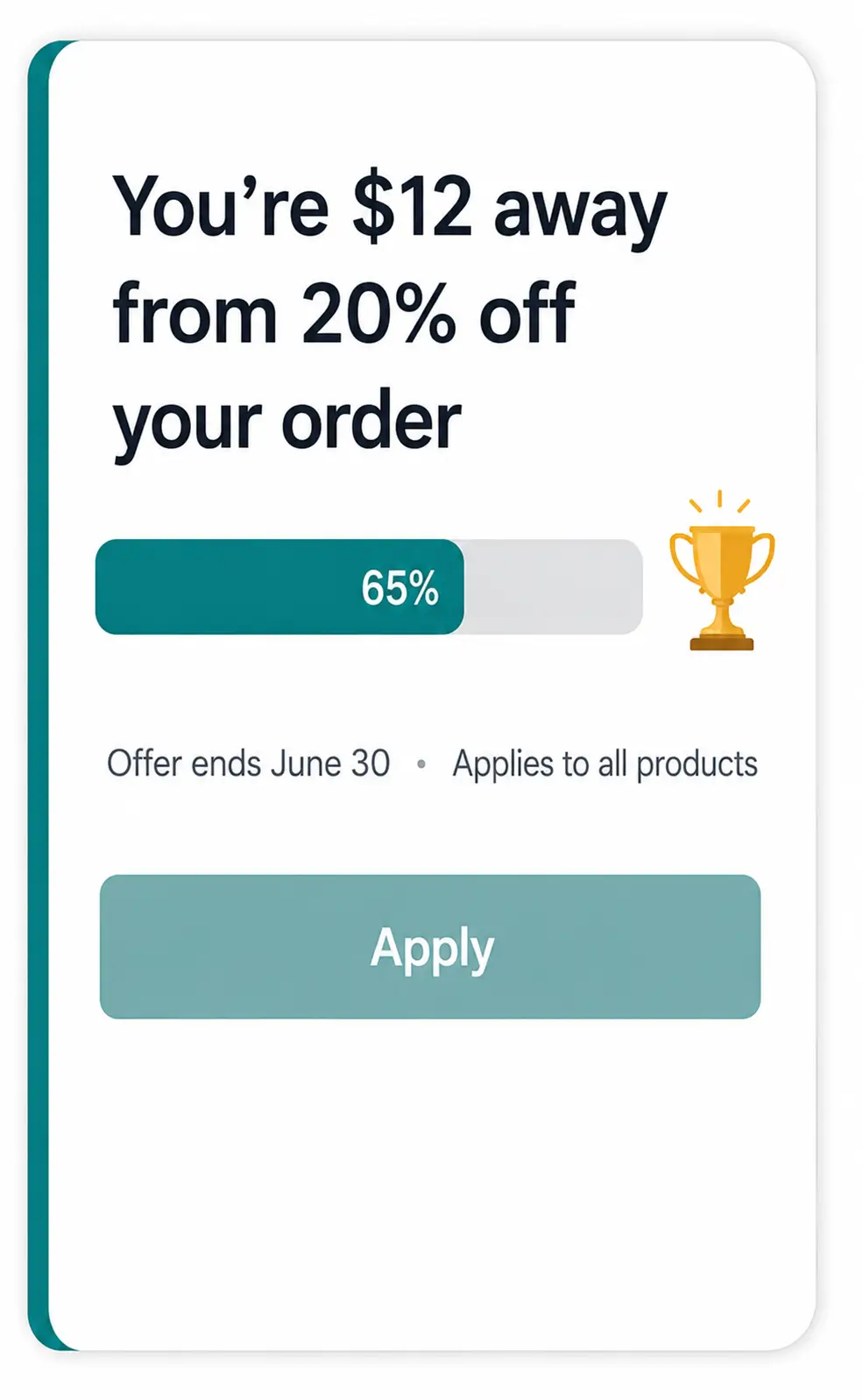
What this actually solves is the silent promotion problem — the scenario where a merchant has an active campaign, a customer is in the cart, and the two never connect because the system has no bridge between them. The SuggestionEngine is that bridge.
Promoted vs. Private — Why Not Every Coupon Should Be Visible
The standard mental model for VIP or targeted coupons is: create a code, email it to the right people, hope it doesn’t get shared. That model breaks because a code is always copyable. Once it exists as a string of characters, it travels.
StoreEngine’s architecture separates promotion visibility from discount eligibility at the coupon level, not the cart level. Two targeting mechanisms control this:
Email restriction limits which customers can apply a coupon — the discount fires only for customers whose email address matches the configured list. If the coupon also has the Promote toggle enabled, the SuggestionEngine can still show the nudge to non-qualifying customers (they’d see it but couldn’t redeem it). The restriction blocks redemption; it doesn’t block visibility by itself. Email restriction is the right tool for scoping who can use a deal.
User ID restriction is more precise. A coupon targeted to a specific user ID is visible only to that logged-in customer — in their account dashboard and in their cart nudges. No one else sees it. No shareable code exists in the traditional sense. The deal surfaces exclusively for that person. This is the right tool for high-value individual offers: a loyalty credit for a long-term customer, a win-back offer for a specific lapsed account.
The Promote toggle is the master visibility control. A coupon without this toggle enabled will never appear in any nudge, progress bar, or dashboard panel — regardless of email eligibility or user ID assignment. This is how private codes stay private: not through obscurity, but through architecture. The private code simply never enters the Sugge StionEngine’s evaluation pool.
Three scenarios that clarify how these controls interact:
- Site-wide seasonal deal: Toggle ON. No restrictions. SuggestionEngine surfaces it to every cart visitor. One-click apply when eligible.
- Email segment offer: Toggle OFF. Email restriction configured. Code sent by email. Won’t appear in cart nudges to anyone. Eligible recipients apply it manually or via auto-apply if that type is also set.
- Individual VIP reward: Toggle ON (scoped to this user ID). User ID restriction set. The customer sees their exclusive deal in the account dashboard and cart nudge. No one else sees it. No shareable code exists.
Customer Dashboard Coupons Panel — Discounts Where Customers Actually Look
Cart nudges work when customers are actively shopping. The account dashboard works when they aren’t.
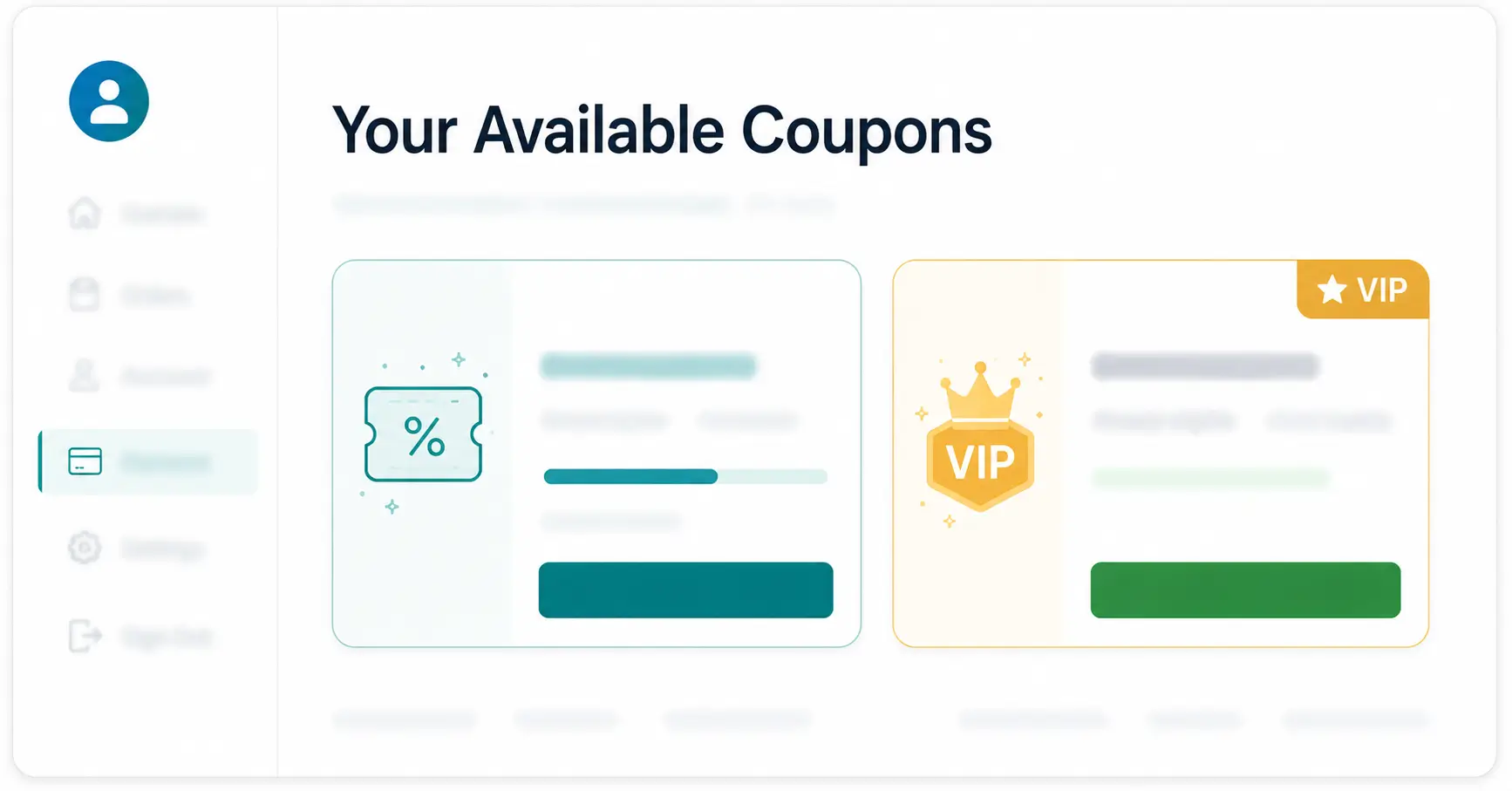
DashboardCoupons is a dedicated panel in the customer account area that shows available coupons using the same SuggestionEngine evaluation logic that runs in cart and checkout. It shows two categories of deals:
- Globally promoted coupons — any coupon with the Promote toggle on, evaluated with “almost” or “eligible” status and matching gap messaging.
- Customer-targeted coupons — coupons restricted to that specific user ID, visible only to them, surfaced as exclusive offers.
The messaging consistency is deliberate. A coupon that reads “Spend $12 more to unlock 20% off” in the cart shows the same message in the dashboard. There’s no disconnect between what a customer sees at checkout and what they see in their account — which matters because inconsistent messaging between those two surfaces generates the specific type of confusion that creates support tickets.
In practice, this matters most when a customer’s purchase cadence doesn’t align with your active promotion window. Someone who bought three weeks ago and isn’t actively browsing can discover an available deal when they log in to check an order status — and that discovery can pull them back into a purchase they weren’t planning. The dashboard panel is a re-engagement touchpoint that costs nothing extra to activate once the rest of the Advanced Coupons system is in place.
The Old Way vs. Advanced Coupons
The old way of running a BOGO or VIP deal usually means choosing between three incomplete options: a manual coupon code, a dedicated BOGO plugin that only handles the math, or building the discoverability and targeting logic yourself.
|
Generic BOGO-only plugin |
Manual coupon code |
Generic BOGO-only plugin |
Advanced Coupons |
|
Discoverability |
None — customer must already know the code |
None — handles discount math only |
Cart and checkout nudges, plus a dashboard panel |
|
BOGO margin safety |
N/A |
Varies by plugin; some discount the wrong unit |
Always cheapest-unit-first, clamped at zero |
|
Private/VIP targeting |
Manual tracking, easy to leak once shared |
Rare or limited |
Restricted by email or user ID, never surfaces publicly |
|
Best for |
A single, public, one-time promotion |
Stores that only need correct discount math |
Stores that need math, visibility, and targeting together |
Most of the existing tooling in this space — the kind reviewed in roundups comparing ten different BOGO plugins side by side — competes almost entirely on the middle column: whose discount math is more flexible, whose conditions engine handles more edge cases. That’s a real and useful thing to get right. It’s also only half the problem, and it’s the half most of that tooling leaves for the merchant to solve alone, usually with an email newsletter and hope.
Decision Framework — Is Advanced Coupons Right for Your Store?
- If you want BOGO deals without writing custom code → the BOGO engine covers configurable buy qty, get qty, and discount percentage with cheapest-item targeting built in. No development required.
- If you run promotions regularly but see low redemption → the SuggestionEngine’s “almost/eligible” nudges and spend-progress bar put active deals in front of customers at the exact cart moment they can act on them.
- If you need to reward specific customers without public code leakage → user ID restriction plus the account dashboard panel creates a private, personalized offer channel — no shareable code, no leakage risk, no manual verification required.
- If your store only uses basic percentage or flat discounts and customers find codes without friction → the Advanced Coupons system is real capability solving real problems, but core coupons may be sufficient; the feature earns its value against specific promotional failure points.
Implementing auto-apply coupons is a great start, but pairing them with long-term dynamic pricing strategies will ensure sustained profit growth for your store.
|
Store situation |
Fit |
|
Want BOGO without custom development |
✅ Strong fit |
|
Promotions exist but customers don’t redeem |
✅ Strong fit |
|
Need VIP targeting without code leakage |
✅ Strong fit |
|
Want per-customer personalized deals via account dashboard |
✅ Strong fit |
|
Only use simple % discounts; customers find codes fine |
⚠️ Core coupons may suffice |
|
Need bulk code generation, gift cards, or store credits |
🔄 Evaluate additional StoreEngine features |
FAQ
What is an eCommerce advanced coupon system?
An advanced coupon system extends the standard percentage and flat-amount discount types with BOGO, auto-apply, and targeted coupon types, then adds a promotion UX layer — cart nudges, spend-progress bars, and an account dashboard panel — that actively surfaces available deals instead of waiting for customers to find codes on their own. The core distinction from a basic coupon system is the presence of a real-time discoverability mechanism, not just a discount calculation engine.
How does StoreEngine’s BOGO coupon engine work?
The engine groups all eligible cart items into blocks of (buy_qty + get_qty) based on your configured values. It calculates reward units using floor(total_qty / group_size) × get_qty, sorts eligible items by price ascending, and applies your configured discount percentage to the cheapest qualifying units. The discount is clamped so it never exceeds the item’s remaining discountable amount, preventing negative pricing edge cases on partially-discounted inventory.
Does the BOGO discount always target the cheapest items?
Yes. StoreEngine’s BOGO engine sorts eligible items by price ascending and applies the discount to the cheapest qualifying units. This protects merchant margin by ensuring the free or discounted unit is always the lowest-value item in the eligible set — not the highest-margin product in the cart.
Do auto-apply coupons require customers to enter a code?
No. Auto-apply coupons fire automatically when the cart meets the configured conditions. Customers see the discount reflected in their cart total without entering anything. This removes all three primary friction points of manual code entry: not knowing the code exists, mistyping it, and leaving the site to search for it.
What is the “Promote in cart” toggle, and why does it control more than just display?
The Promote toggle is a per-coupon setting that determines whether a coupon enters the SuggestionEngine’s evaluation pool. A coupon with the toggle off is completely invisible to the suggestion system — it will never appear in cart nudges, the spend-progress bar, or the account dashboard, regardless of how eligible the customer might be. This is what makes private and targeted coupons actually private: the architecture excludes them from public surfacing at the coupon level, not through restrictions alone.
Can I target a coupon to a single customer without issuing a public code?
Yes. User ID restriction assigns a coupon to a specific customer account. The deal appears in that customer’s account dashboard panel and their cart nudges only — no one else sees it, and no shareable code exists. Combine user ID restriction with the Promote toggle scoped to that user for a completely private, personalized offer that behaves like a code for the recipient but is invisible to everyone else.
Is Advanced Coupons available in the free version of StoreEngine or only in Pro?
The BOGO and auto-apply coupon types are visible in the coupon editor UI in the free version of StoreEngine, but they apply no discount without Pro. The full Advanced Coupons system — BOGO engine, auto-apply, SuggestionEngine, spend-progress bar, cart and checkout nudges, customer dashboard panel, BOGO line-item transparency, email restriction, and user ID targeting — is activated only when the storeengine/advanced_coupon/enabled gate is turned on via StoreEngine Pro.