


Most store owners discover they have a restocking problem the wrong way — a customer tries to buy, the product shows out of stock, and the owner realizes they forgot to email the supplier three days ago. The reorder didn’t happen because there was no trigger. There was no trigger because there was no system. Just a mental note and a spreadsheet that nobody updated.
Managing suppliers and purchase orders properly is not about sending cleaner emails to your vendors. It is about building a procurement loop that closes itself — one where a product hitting a low-stock threshold automatically generates a purchase order, routes it to the right supplier, and updates your inventory the moment stock is received. Most tutorials on this topic stop at “create a PO document.” That is about halfway through the actual workflow.
By the end of this article, you will understand exactly how a complete supplier and purchase order workflow operates — from setting stock thresholds and mapping products to suppliers, through to the moment received inventory updates your counts and refreshes your cost prices automatically.
Quick Answer: What Is Suppliers & Purchase Orders Management?
Suppliers and purchase orders management is the system that controls how a store identifies low-stock products, contacts the right supplier, creates a formal purchase order, tracks incoming shipments, and updates inventory when goods arrive.
- A purchase order (PO) is a formal document a buyer sends to a supplier specifying what products are needed, at what price, in what quantity, and by what date — it becomes legally binding once the supplier accepts it.
- Supplier profiles store each vendor’s contact details, the products they supply, their cost prices, minimum order quantities, and their priority ranking when a product has multiple sources.
- Product-to-supplier mapping links each SKU to one or more suppliers, so the system knows exactly who to contact — and in what order — when a reorder fires.
- Auto-reorder rules set a stock threshold per product; when inventory drops below that threshold, the system generates a PO draft without anyone needing to notice or intervene.
- PO receipt is the step most tutorials skip: when goods arrive and are confirmed against the PO, inventory levels update at the correct location, and cost prices refresh — closing the loop completely.
Automating supplier workflows is essential when scaling product inventory. This becomes even more critical if you operate a multi vendor marketplace on WordPress, where tracking vendor purchase orders and stock levels requires seamless synchronization.
What Is a Purchase Order? (And Why Stores That Skip Them Reorder Too Late)
A purchase order is a formal, legally binding document that a buyer sends to a supplier before any goods change hands. It specifies the exact products requested, the agreed quantity, the unit cost, the delivery date, and the payment terms. Once the supplier accepts it, both parties are contractually committed to those terms.
That last part matters more than most people realize. Without a PO, a restock is just an email. It has no agreed price, no confirmed quantity, no delivery commitment. When the wrong quantity arrives or the price differs from what you expected, you have no document to point to. The PO is the paper trail that prevents “we thought you meant 50 units” conversations.
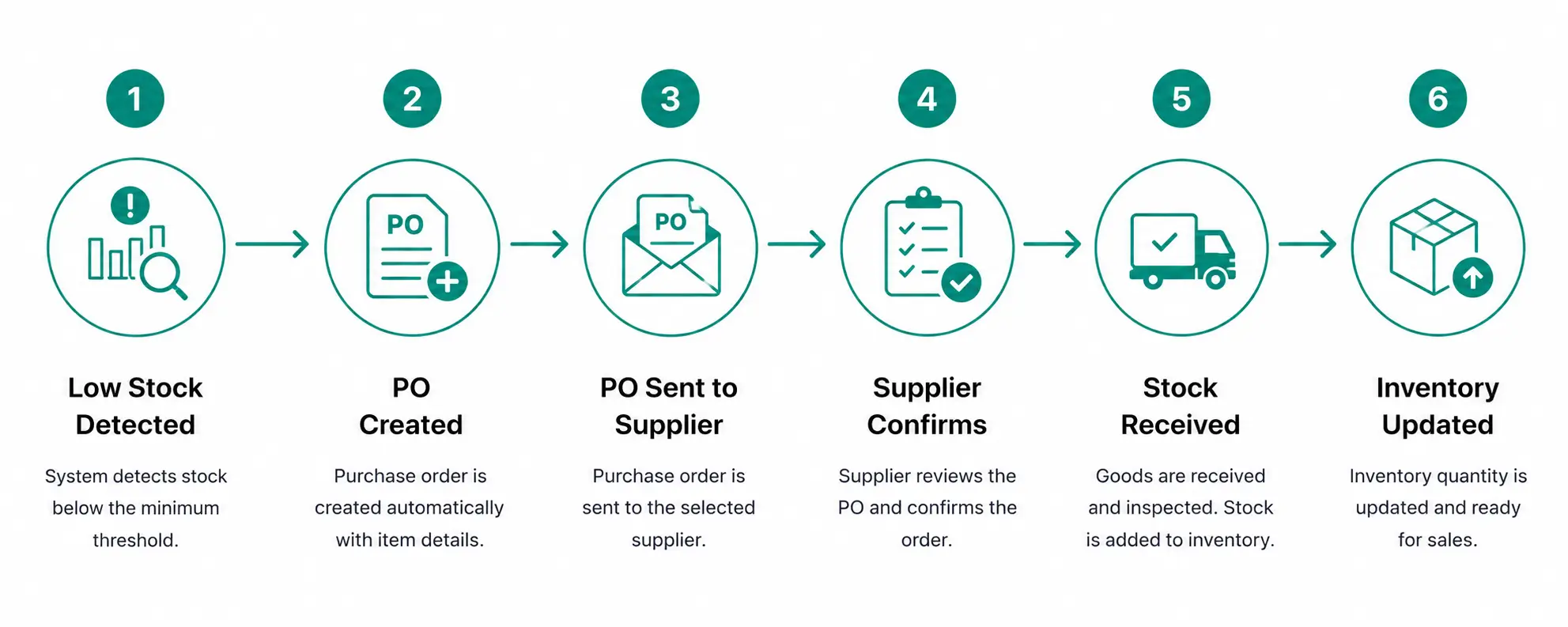
The mistake I see most often is treating a purchase order as a formality — something you generate after you have already arranged the reorder by phone or email. That is backwards. The PO should come first. It is the arrangement. Everything else — the supplier’s confirmation, the shipment, the invoice, the payment — flows from it.
How a purchase order compares to the alternatives:
|
Informal Email |
Purchase Order |
Invoice |
|
|
Created by |
Buyer |
Buyer |
Supplier |
|
Timing |
Before delivery |
Before delivery |
After delivery |
|
Legally binding |
No |
Yes (when accepted) |
Yes |
|
Purpose |
Request goods |
Authorize purchase |
Request payment |
|
Inventory impact |
None |
Creates incoming record |
None |
Store owners who rely on informal emails end up reordering too late because there is no threshold telling them when to act. They reorder from whoever they emailed last because there is no supplier priority on record. They cannot reconcile what arrived against what they ordered because there is no document. A PO system solves all three of those problems at once — and the sections below show you exactly how.
The 4 Types of Purchase Orders: Which One Matches Your Restocking Pattern?
Purchase order types are not interchangeable. Each one is designed for a different buying pattern, and using the wrong type creates paperwork friction that slows your procurement down.
Standard Purchase Order
A standard PO is a one-time document for a specific purchase. It lists the exact products, quantities, prices, and delivery date for that single transaction. Once the order is fulfilled and the supplier sends an invoice, the PO is closed. This is the right choice when you are placing a trial order with a new supplier, ordering a seasonal product you will not restock again, or buying something you will only need once.
Blanket Purchase Order
A blanket PO covers repeated purchases from the same supplier over a defined period — usually a quarter or a full year. You agree on the pricing and general terms upfront, then call off individual deliveries against that blanket agreement as needed. If you have three or four core suppliers you reorder from every six to eight weeks, a blanket PO locks in your pricing and removes the need to renegotiate terms every time.
Contract Purchase Order
A contract PO establishes the legal framework — payment terms, delivery conditions, quality standards — without specifying quantities or dates upfront. The actual delivery schedule is arranged separately when needed. This suits long-term supplier relationships where delivery timing varies based on production cycles or seasonal demand. A clothing retailer working with a fabric manufacturer on two collections per year, for example, would use a contract PO to fix quality standards and payment terms while leaving order volumes flexible.
Planned Purchase Order
A planned PO ties delivery dates to a sales forecast rather than an on-demand call-off. If historical data shows you need 500 units of a product every eight weeks, you schedule four quarterly deliveries in advance. This lets the supplier plan production around a predictable calendar — which typically means faster turnaround and more consistent quality than placing ad-hoc orders. Planned POs make the most sense once you have six to twelve months of sales velocity data to draw from.
For most independent ecommerce stores restocking physical products, standard and blanket POs cover the majority of scenarios. Understanding the full set matters because the wrong PO type for a given supplier relationship creates unnecessary back-and-forth every time a reorder fires — which is exactly the friction a well-set-up procurement system is supposed to eliminate.
Purchase Order vs. Invoice: The One-Sentence Difference That Prevents Payment Disputes
A purchase order is created by the buyer before goods are delivered; an invoice is created by the supplier after goods are delivered.
That single distinction prevents more payment disputes than any other piece of procurement discipline. When a PO and an invoice are compared side by side — quantities, unit prices, totals — any discrepancy surfaces immediately. Without a PO to match against, accounts payable is essentially trusting that the supplier’s invoice reflects what was originally agreed. Sometimes it does. Sometimes it does not.
The process is called three-way matching: comparing the PO (what you ordered), the goods receipt (what arrived), and the invoice (what the supplier is charging). As the MRPeasy procurement guide explains, this matching step is what catches receiving errors and billing discrepancies before payment is released.
|
Field |
Purchase Order |
Invoice |
|
Who creates it |
Buyer |
Supplier |
|
When it’s created |
Before delivery |
After delivery |
|
Purpose |
Authorize the purchase |
Request payment |
|
Legally binding |
Yes, when supplier accepts |
Yes |
|
Triggers |
Procurement process |
Accounts payable process |
|
Contains |
What you want, at what price, by when |
What was delivered, total owed, payment due date |
A common confusion is that the PO and invoice cover the same transaction — they do, but from opposite sides and at different moments. The PO commits the buyer to purchase; the invoice commits the buyer to pay. Missing either one creates a gap in the financial record. That gap is what makes audits difficult and payment disputes unresolvable.
What Actually Breaks Without a PO System: 5 Stockout and Overspend Scenarios
Store owners often assume the cost of skipping formal PO management is some paperwork inefficiency. In practice, the costs land in the financials before anyone diagnoses the root cause — and they repeat until the underlying system problem is fixed.
1. Wrong reorder timing. Without a stock threshold that fires automatically, reordering depends on someone noticing the count is low. Sellercloud’s analysis of common ecommerce purchasing problems identifies ordering timing as one of the most frequent and expensive purchasing errors: order too early, and you tie up working capital in excess inventory; order too late and backorders pile up, marketplace rankings drop, and customers find alternatives.
2. Wrong supplier priority. When a product has two or three potential suppliers and no priority is on record, the reorder goes to whoever the person remembers first. That might not be the fastest supplier, the cheapest one, or the one currently in stock. A supplier mapping system with priority ranking removes that variable entirely — the right vendor is contacted without a judgment call.
3. No cost price record. If you do not capture cost price at the moment a PO is received, your margin reports drift. A supplier raises prices 8% in March. By June, your cost-of-goods data still shows February prices. Profit appears higher than it is, and pricing decisions get made on stale numbers.
4. Duplicate orders. This happens more often than owners admit. Two people in the business notice low stock independently and both email the supplier. The supplier fulfills two orders. You receive twice the inventory needed and have twice the working capital tied up until it sells. A PO system with a single source of truth eliminates this completely — one open PO per product prevents a second one from firing.
5. Shipment arrives, stock does not update. Manual inventory updates after receiving a shipment are error-prone and consistently delayed. The product is physically in the warehouse but showing as out of stock on the storefront. Sales are lost. The owner eventually notices the count is wrong. This is not a data entry problem — it is a system design problem, and it is solved at the PO receipt stage.
Each of these five failures has the same root cause: the procurement process is disconnected from the inventory system. The sections that follow show what a connected workflow actually looks like.
How a Purchase Order Workflow Works End-to-End: From Low-Stock Alert to Inventory Update
Most articles describe a PO as a document you create and send. That is one step in a seven-step process. The full loop — what practitioners sometimes call centralized procurement management — is what turns a paper exercise into an automated restocking system.
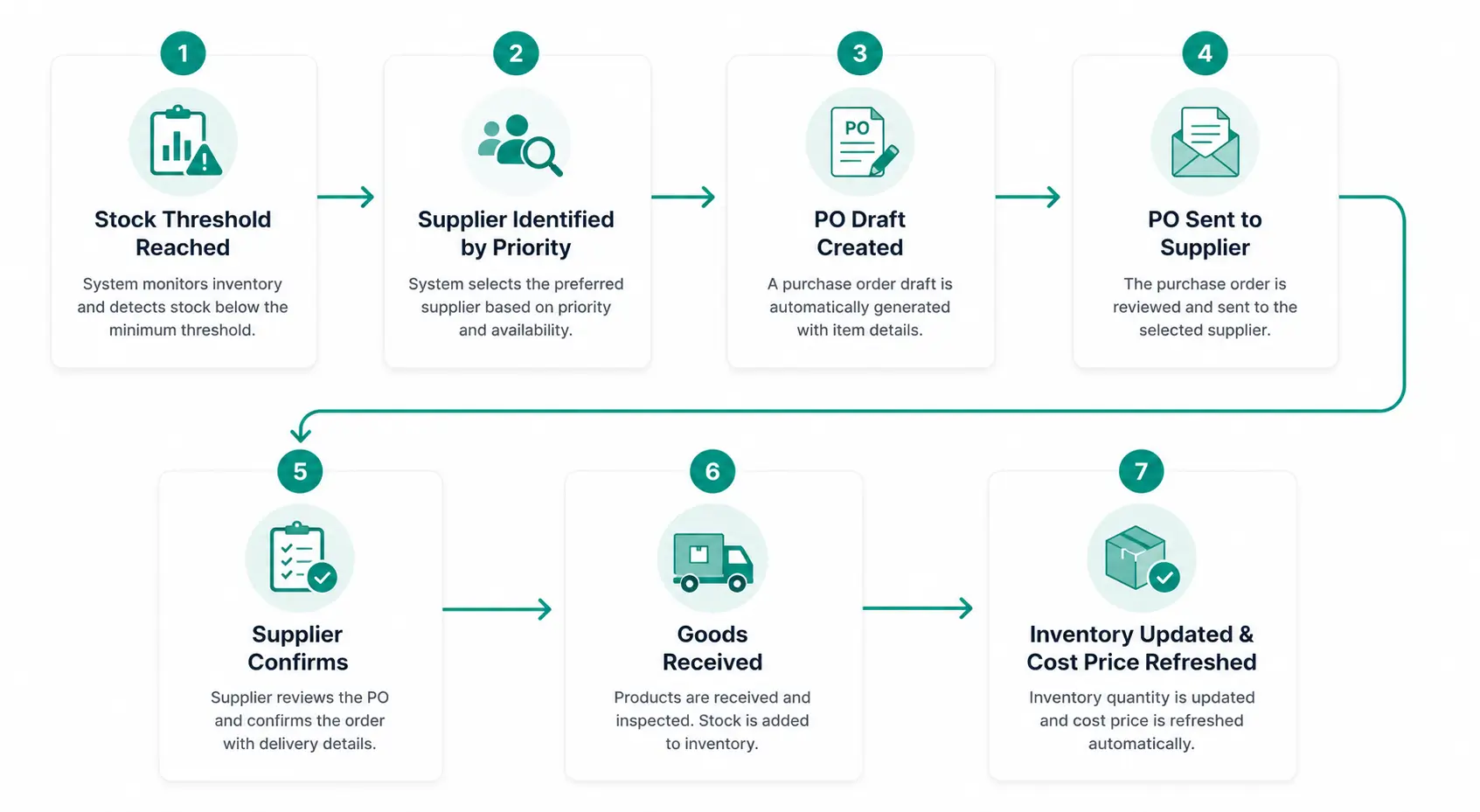
Step 1: Stock threshold trigger. A product’s inventory drops to or below its configured reorder point. This fires the procurement process — either automatically generating a PO draft or alerting the store manager to create one manually, depending on configuration.
Step 2: System identifies the assigned supplier and priority. Because each SKU is linked to one or more suppliers with a priority ranking, the system knows which supplier to contact first. If Supplier A is priority 1, the PO routes to them. If they are unavailable or at capacity, Supplier B at priority 2 picks it up.
Step 3: PO draft is created. The system populates the PO with the product details, the reorder quantity, the supplier’s cost price on record, and the delivery terms. Some systems generate the draft automatically; others create it for the manager to review and approve before sending.
Step 4: PO is sent to the supplier. The supplier receives the formal purchase order — typically by email as a PDF — with all agreed terms stated. Once they accept, both parties are committed.
Step 5: Supplier confirms. The supplier acknowledges the PO, confirms they can fulfill the quantity by the requested date, and begins preparing the shipment.
Step 6: Goods arrive and are received against the PO. When the shipment lands, it is received against the open PO. This step includes checking the physical quantity against what was ordered. Any discrepancy is flagged here, before the invoice is approved.
Step 7: Inventory updates at the right location; cost price refreshes. Confirmed received quantities are added to inventory at the correct location — not a global pool, but the specific warehouse or store where the goods landed. The cost price on record updates to reflect the PO terms, keeping margin reports accurate from that moment forward.
StoreEngine’s Suppliers & Purchase Orders feature — part of the Inventory Pro addon — handles all seven steps as a connected workflow inside WordPress. When a PO is received, inventory levels update automatically at the destination location, and cost prices refresh without manual entry. One practitioner using Ordoro’s integrated PO automation reported cutting manual supplier email exchanges by approximately 80% and reducing stockouts during a holiday sale period by approximately 90% — which tracks with what happens when the workflow is closed end-to-end rather than handled in pieces.
In practice, the teams that get this right treat the PO receipt step as seriously as the PO creation step. Creating the PO is the intention. Receiving against it is the confirmation. Both matter equally.
Supplier Profiles: What to Store and Why Contact Details Aren’t Enough
A supplier profile is a centralized record of everything your procurement system needs to know about a vendor — not just how to contact them, but which products they supply, at what cost, in what minimum quantity, and with what priority relative to your other sources.
Most store owners start with a spreadsheet. Name, email, phone number. That is a contact list, not a supplier profile. The difference becomes clear when stock runs low on a product you source from three vendors at different prices, minimum order quantities, and lead times. A contact list cannot tell the system which vendor to contact first. A supplier profile can.
Supplier profiles also serve a supplier communication function that informal systems cannot replicate. When a PO is generated, the system pulls the supplier’s contact details automatically and attaches the PO. When the supplier responds, that response is tied to the PO record. The entire communication thread stays attached to the procurement event — not buried in someone’s email inbox.
What a complete supplier record should include:
|
Field |
Why It Matters |
Basic Contact List Has It? |
|
Contact name and email |
Primary communication |
Yes |
|
Phone / direct line |
Urgent order situations |
Sometimes |
|
Assigned products |
Drives auto-PO routing |
No |
|
Cost price per product |
Feeds margin reports |
No |
|
Minimum order quantity |
Prevents undersized POs |
No |
|
Priority ranking |
Determines which supplier gets the auto-PO first |
No |
|
Lead time (days) |
Informs reorder timing |
No |
|
Payment terms |
Accounts payable planning |
No |
|
Notes / special conditions |
Seasonal constraints, packaging specs |
No |
Over time, supplier profiles also enable informal performance monitoring: which suppliers consistently hit their lead time commitments, which ones regularly ship short quantities, which ones have raised prices without notice. That history lives in the PO record — if the system ties POs to supplier profiles correctly.
StoreEngine’s supplier profile system stores contact details alongside assigned products, cost prices, and priority rankings in a single record. When an auto-reorder rule fires, the system already knows which supplier to contact, what price to reference, and what quantities make sense — because all of that is in the profile rather than in someone’s memory.
The moment a supplier changes their price, update the profile. From that point forward, every PO generated and every goods receipt processed pulls the new cost price. Margin data stays current without anyone manually correcting a spreadsheet.
Product-to-Supplier Mapping: How to Assign Multiple Suppliers to One SKU
Product-to-supplier mapping is the mechanic that tells your procurement system which vendor to contact when a specific product needs to be reordered — and in what order if you have more than one option.
This matters most when a product has two or three potential sources. Say your best-selling physical product can be sourced from Supplier A (your preferred vendor, slightly more expensive but faster) and Supplier B (slower lead time, cheaper per unit). Without a priority mapping on that SKU, whoever does the reorder makes a judgment call every time. With it, the system always contacts Supplier A first and only falls to Supplier B if configured to do so.

A practical mapping example:
|
Supplier |
Priority |
Cost Price (unit) |
MOQ |
Lead Time |
|
Supplier A |
1 |
$12.00 |
50 units |
5 days |
|
Supplier B |
2 |
$10.50 |
100 units |
12 days |
With this mapping in place, an auto-reorder rule firing at 20 units remaining defaults to Supplier A. If you need the cheaper option for a larger planned order, you can override manually. But the default is set — no decision required at the moment of low stock, when cognitive load is highest.
StoreEngine’s Inventory Pro addon supports multiple supplier assignments per product with priority ordering. When a stock threshold is breached, the system knows exactly which supplier record to pull from, what cost price to put on the PO, and what minimum quantity to reference — all without anyone manually cross-checking a spreadsheet.
The common advice here is to use your primary supplier for everything and sort out alternatives when they fail. That approach works until the moment your primary supplier cannot fulfill an urgent order and you have no backup in the system. Priority mapping is not about complexity — it is about resilience.
Auto-Reorder Rules: Setting Stock Thresholds That Trigger POs Without Manual Checks
An auto-reorder rule is a product-level setting that defines the stock quantity at which a purchase order should be generated — and the quantity that PO should request.
The two key values are the reorder point and the reorder quantity. The reorder point is the inventory level that fires the trigger. The reorder quantity is how much to order. A product with a reorder point of 20 units and a reorder quantity of 150 units will automatically draft a PO for 150 units the moment on-hand stock drops to 20.
How to set these values correctly:
The reorder point should account for lead time. If your supplier takes 7 days to deliver and you sell 8 units per day, you need at least 56 units of coverage while the order is in transit. Set the reorder point at 60–70 units to include a safety buffer. Setting it at 20 means you run out before the stock arrives.
The reorder quantity should reflect your real purchasing economics — the supplier’s minimum order quantity, volume discount thresholds, and how much physical storage you have. There is no universal formula. The right quantity keeps you from reordering again within a week while not burying working capital in inventory that sits for months.
StoreEngine’s auto-reorder rules are configurable per product. The threshold triggers the PO draft; the assigned supplier is pulled from the product-to-supplier mapping. If you have set up the supplier profile and the product mapping correctly, auto-reorder does exactly what the name implies — you stop checking a spreadsheet every morning because the system checks it for you.
I have seen this fail when reorder points are set once at initial setup and never revisited as sales velocity changes. A product that moved 5 units per week now moves 30. The reorder point set at 10 units means the PO fires when there are only 3 days of stock left, not 7. Review reorder thresholds whenever sales patterns shift significantly — at minimum, once per quarter.
Receiving Stock Against a PO: How Inventory Levels and Cost Prices Update Automatically
Receiving stock against a purchase order is the final step in the procurement loop — and the step most incomplete systems leave to manual work.
When goods arrive, the receiving process does two things: it confirms that what was delivered matches what was ordered, and it updates the system accordingly. In a properly integrated PO system, that update happens automatically. The received quantity is added to inventory at the specific location where the goods landed. The cost price recorded on the PO — the actual price paid per unit — updates the cost data for those products in your system.
That second part, the cost price update, is the one most store owners underestimate. StoreEngine’s Cost & Profit Tracking feature snapshots cost price at the moment of each PO receipt, so margin reporting stays accurate even when supplier prices change between orders. Without that automatic snapshot, you manually update cost prices every time a supplier changes their rate — and the reporting lags until someone catches the discrepancy.
What happens during a proper PO receipt:
- Goods arrive at your warehouse or store location
- Physical quantities are verified against the open PO
- Discrepancies are flagged before the invoice is approved for payment
- Received quantities are added to inventory at the correct location
- Cost price on record updates from the PO data
- The PO status moves to received/closed
- The supplier’s invoice can now be matched against the confirmed receipt
StoreEngine’s multi-location inventory means that when a PO is received, stock routes to the destination location rather than a single global count. A warehouse in Manchester receives its 150 units; the London retail location receives its 50 units. Each location’s count updates independently, at the correct time, based on which PO covered which delivery.
The practical effect is that the loop closes completely. Low stock triggered a PO. The PO was sent and confirmed. Stock arrived and was received. Inventory updated. Cost prices refreshed. No manual entry. No lag between physical receipt and system count.
What to Look for in a Supplier & Purchase Order Tool for Your WordPress Store
Not every PO tool closes the full loop. Some systems — like dedicated procurement platforms built for enterprise teams — create PO documents but operate as separate tools from your store, requiring manual sync back into your inventory. Others, like basic WordPress supplier plugins, handle contact management and low-stock email alerts but do not create or track POs. A third category handles PO creation and inventory updates but does not refresh cost prices on receipt, leaving margin reports to drift.
Most frameworks get this backwards — they evaluate tools by how good the PO document looks or how easy it is to email a supplier. Those are table-stakes features. The criteria that actually matter are about data flow: what happens to your inventory, your cost data, and your supplier records at each step in the workflow.
Six criteria for evaluating a supplier and purchase order tool:
|
Criterion |
Why It Matters |
What to Check |
|
Supplier profiles linked to products |
Enables auto-routing and priority logic |
Can you assign multiple suppliers per SKU with priority ranking? |
|
PO creation inside your inventory system |
Eliminates sync lag between tools |
Does PO creation live in the same platform as your stock counts? |
|
Auto-reorder thresholds per SKU |
Removes manual monitoring |
Can you set a different reorder point and quantity per product? |
|
Inventory auto-update on PO receipt |
Closes the loop without manual entry |
Does receiving a PO automatically update stock at the right location? |
|
Multi-location routing on receipt |
Accurate location-level inventory |
Can you specify which location receives which PO? |
|
Cost price sync with margin reporting |
Accurate profit data over time |
Does receiving a PO update the cost price used in profit calculations? |
StoreEngine’s Suppliers & Purchase Orders feature satisfies all six criteria within a single WordPress plugin, without requiring a separate ERP or procurement tool. For WordPress-based stores selling physical products alongside digital products, memberships, or subscriptions, having procurement built into the same system as the storefront removes an entire category of integration complexity.
For stores at an early stage with one supplier per product and no auto-reorder needs yet, a simpler setup is fine. The criteria above matter most as order volume grows and the mental overhead of manual restocking becomes the limiting factor.
Decision Framework: Which Approach Is Right for You?
- If you have fewer than 50 SKUs and one primary supplier per product, start with basic supplier profiles and manual PO creation. Build the habit of generating a PO for every restock before the email goes out. Add auto-reorder rules once you have a feel for the right reorder points per product.
- If you source the same products from multiple suppliers, set up product-to-supplier mapping with priority ranking before anything else. The first time your primary supplier cannot fulfill an urgent order is not the moment to decide who the backup is.
- If your store sells both physical and digital products on WordPress and you are managing inventory manually, an integrated plugin like StoreEngine’s Inventory Pro add-on is the faster path than combining a standalone PO tool with a separate inventory plugin. The cost price and multi-location data flows without additional configuration.
- If stockouts have happened in the past three months, the root cause is almost always a missing reorder point — not a missing reminder. Set auto-reorder thresholds on your top 20 highest-velocity products first. That covers the Pareto majority of your restocking risk before you finish building out the full system.
For stores built on WordPress, StoreEngine’s Suppliers & Purchase Orders feature — part of the Inventory Pro addon — connects supplier profiles, product mapping, auto-reorder rules, and PO receipt into a single workflow. Stock drops, PO fires, goods arrive, inventory updates. The loop closes without spreadsheets.
Related reading: Inventory Management · Multi-Location Inventory · Cost & Profit Tracking · Returns & RMA
FAQ
What is a purchase order in accounting?
A purchase order is a pre-approval document in accounting — it creates a spending commitment before goods are received and before any invoice is processed. In accounting terms, a PO does not trigger a journal entry when it is issued; the accounting entry happens when goods are received or when the invoice is matched and approved for payment. POs exist in the accounting record as open commitments that finance teams use to track pending liabilities and budget against future spend.
What is the difference between a purchase order and an invoice?
A purchase order is created by the buyer before delivery to authorize a purchase; an invoice is created by the supplier after delivery to request payment. The PO defines what was agreed — product, quantity, price, delivery terms. The invoice confirms what was delivered and states the amount owed. In a properly run procurement process, invoices are matched against POs and goods receipts before payment is released — without a PO to match against, billing discrepancies are harder to catch and payment disputes are harder to resolve.
What are the types of purchase orders with examples?
There are four main types. A standard PO covers a one-time, specific purchase — for example, ordering 100 units of a product from a supplier you are trialing. A blanket PO covers recurring purchases from the same supplier over a period — for example, agreeing to buy up to 2,000 units over 12 months at a fixed price. A contract PO establishes the legal framework without specifying quantities — useful for long-term supplier relationships with variable delivery schedules. A planned PO ties deliveries to a forecast — for example, scheduling four deliveries of 500 units spaced eight weeks apart based on historical sales velocity.
What is a standard purchase order?
A standard purchase order is a one-time purchasing document sent to a supplier for a specific, defined transaction. It includes the exact products, quantities, agreed unit prices, delivery date, and payment terms for that single order. Once the supplier fulfills the order and sends an invoice, the PO is closed. Standard POs are the best fit for trial orders with new suppliers, one-off seasonal purchases, or any product you do not expect to restock on a regular schedule.
What is a blanket purchase order?
A blanket purchase order is an agreement with a supplier to purchase goods repeatedly over a set period, with the total volume, pricing, and terms agreed upfront. Instead of renegotiating on each order, you call off individual deliveries against the existing blanket agreement as needed. Blanket POs reduce administrative overhead for regular suppliers and lock in pricing for the agreement period — making them practical for any product you restock every four to eight weeks from the same vendor.
What is a contract purchase order?
A contract purchase order establishes the legal framework for a supplier relationship — payment terms, quality standards, delivery conditions, dispute resolution — without specifying quantities or delivery dates upfront. The actual order details are arranged separately as needed. Contract POs suit long-term supplier relationships where the volume or timing varies based on demand or production cycles.
How does a purchase order help with inventory management?
A purchase order creates visibility into incoming stock before it physically arrives. Once a PO is confirmed, the system records that quantity as “on order” — which means demand planning can account for it while the shipment is in transit. When goods arrive and are received against the PO, inventory updates automatically, removing the need for manual entry. This keeps stock counts accurate in real time and prevents the common scenario where a product shows as out of stock on the storefront while a shipment is already in the warehouse.
What should a supplier profile include?
A complete supplier profile should include the supplier’s contact name, email, and direct phone number; the specific products they supply with each product’s cost price; the minimum order quantity they require; their average lead time in days; their priority ranking relative to other suppliers for the same product; and any payment terms or special conditions. Contact details alone are not enough — the product assignments, cost prices, and priority ranking are what allow a procurement system to route auto-reorders correctly without human intervention at the moment of low stock.
What is an auto-reorder rule?
An auto-reorder rule is a per-product setting that defines the stock threshold at which a purchase order is automatically generated, and the quantity that order should request. When on-hand inventory drops to the reorder point, the system creates a PO draft using the assigned supplier and cost price from the product’s supplier profile. Auto-reorder rules remove the need for daily manual stock checks and ensure that restocking begins early enough for the incoming shipment to arrive before the product runs out.
Do I need a purchase order template?
A purchase order template standardizes the format and fields that every PO your business issues will use — product description, quantity, unit price, delivery date, payment terms, and PO number. If you are creating POs manually, a template reduces errors and ensures you capture the same information every time. If you are using an integrated PO system, the template is built in — the system generates a consistent PO document automatically when a reorder fires, pulling product and supplier data from the records already in the system. For ecommerce stores handling regular restocking from multiple suppliers, an automated system replaces the manual template entirely.