


You launch an affiliate program the way most store owners do. A spreadsheet with affiliate names, a column for their coupon code, and a promise to check sales at the end of the month. Then two affiliates share the same customer, both claim the sale, and you have no way to prove who actually drove it. Or an affiliate quietly uses their own code to buy their own order at a discount, and you pay a commission on a sale that cost you money. The manual method doesn’t just get tedious — it breaks in ways that cost you.
An affiliate plugin for wordpress fixes this by tracking every referral automatically, attributing each sale to the right partner, and calculating commissions without you touching a spreadsheet. StoreEngine’s Affiliate addon does all of this inside your store — for free, with no WooCommerce required and no monthly SaaS fee before you’ve earned a single affiliate dollar. It sets a tracking cookie when someone clicks a referral link, credits the commission when that person buys, and blocks the self-referral trick that manual programs can’t catch.
By the end of this guide, you’ll understand exactly how store-native affiliate tracking works, where it beats both the spreadsheet method and the pay-first standalone tools, and whether it fits the kind of store you’re running.
Quick Answer: What Is an Affiliate Plugin for WordPress?
- An affiliate plugin for WordPress lets you run your own affiliate program — recruit partners, give each a unique referral link, track the sales they drive, and pay them a commission. It turns word-of-mouth into a measurable sales channel.
- The core mechanism: the plugin sets a browser cookie when a visitor clicks an affiliate’s referral link, then credits that affiliate a commission when the visitor completes a purchase within the tracking window.
- Who it’s for: any WordPress store owner who wants partners, customers, or influencers promoting their products on commission — instead of paying for ads upfront.
- The main benefit with StoreEngine: it’s free, runs natively inside your store without WooCommerce, calculates commissions automatically, and blocks affiliates from earning on their own purchases.
- How to get started: activate the Affiliate addon in StoreEngine, drop the registration form on a page with a shortcode or block, set your commission rate, and approve your first affiliates.
What an Affiliate Plugin for WordPress Actually Does
An affiliate plugin for WordPress is a tool that lets you build and run your own affiliate program directly on your website — handling affiliate signups, referral link tracking, commission calculation, and payouts from inside your WordPress dashboard. Instead of paying an external network a cut, you own the entire program and its data.
Why store owners run affiliate programs
The reason this matters right now: affiliate marketing is one of the highest-ROI channels a store can run. US affiliate marketing spending is projected to reach nearly $12 billion in 2025 and around $16 billion by 2028, and Shopify reports affiliate campaigns deliver an average return of 12:1 versus roughly 3.3:1 for Google Ads. The appeal is structural — you only pay a commission after a sale happens, so there’s no upfront ad spend at risk.
Why you can’t run one by hand
The catch is that you can’t run a real program manually. You need something that watches every referral link, remembers which affiliate sent which visitor, and credits the right commission automatically. That’s the whole job of an affiliate marketing plugin for WordPress, and it’s what separates a program that scales from a spreadsheet that collapses at ten affiliates.
The Two Types of Affiliate Plugin (Don’t Buy the Wrong One)
Before you install anything, understand this: “affiliate plugin” describes two completely different tools, and buying the wrong type is the most common mistake in this category.
Type 1: Affiliate program managers (for store owners)
An affiliate program manager is for vendors — store owners who sell products and want other people to promote them for a commission. This is the tool you use when you have something to sell and want an army of partners driving traffic to it. It handles affiliate registration, referral tracking, commission rules, and payouts. StoreEngine’s Affiliate addon is this type.
Type 2: Affiliate link managers (for content publishers)
An affiliate link manager is for affiliates — bloggers and publishers who promote other companies’ products (often Amazon’s) and need to cloak, organize, and track their outbound links. These tools display product boxes, shorten long affiliate URLs, and build comparison tables for Amazon Associates. If you searched for an “amazon affiliate wordpress plugin,” this is the type you actually want — and StoreEngine is not it.
The rest of this guide is about Type 1: running your own affiliate program on your own store. If that’s what you need, keep reading. The mistake I see most often is a store owner installing a link-cloaking tool and wondering why it won’t track their affiliates’ sales — it was never built to.
Why Most Affiliate Plugins Make You Pay Before You Earn a Cent
Here’s the pattern nobody in the “best affiliate plugin” roundups says out loud: almost every affiliate program manager for WordPress is paid-only, and most start at $149 a year or more. You pay for the full year before you’ve recruited a single affiliate or earned a single referred sale.
The problem with the pay-first model
That pricing model made sense when affiliate management was a separate specialty product. But if you already run a WordPress store, paying a second annual subscription just to add a referral program is a real barrier — especially when you don’t yet know whether affiliates will drive enough sales to justify it.
The free, store-native alternative
StoreEngine’s Affiliate addon is a free wordpress affiliate plugin built into the StoreEngine ecommerce plugin. There’s no separate license, no monthly fee, and no WooCommerce dependency underneath it. What this actually solves is the chicken-and-egg problem of affiliate programs: you can launch a complete program, recruit affiliates, and start tracking real referral sales before spending anything — then decide how far to scale it based on results, not on a subscription you committed to on day one.
The free tier isn’t a stripped demo, either. It includes automatic referral tracking, percentage or flat commissions, per-affiliate rates, self-referral fraud blocking, commission auto-reversal on refunds, and a frontend payout system. Those are the pieces you need to run a genuine program, and I’ll walk through each one. You can see the full feature set on the StoreEngine features page.
How a Store-Native Affiliate Program Works
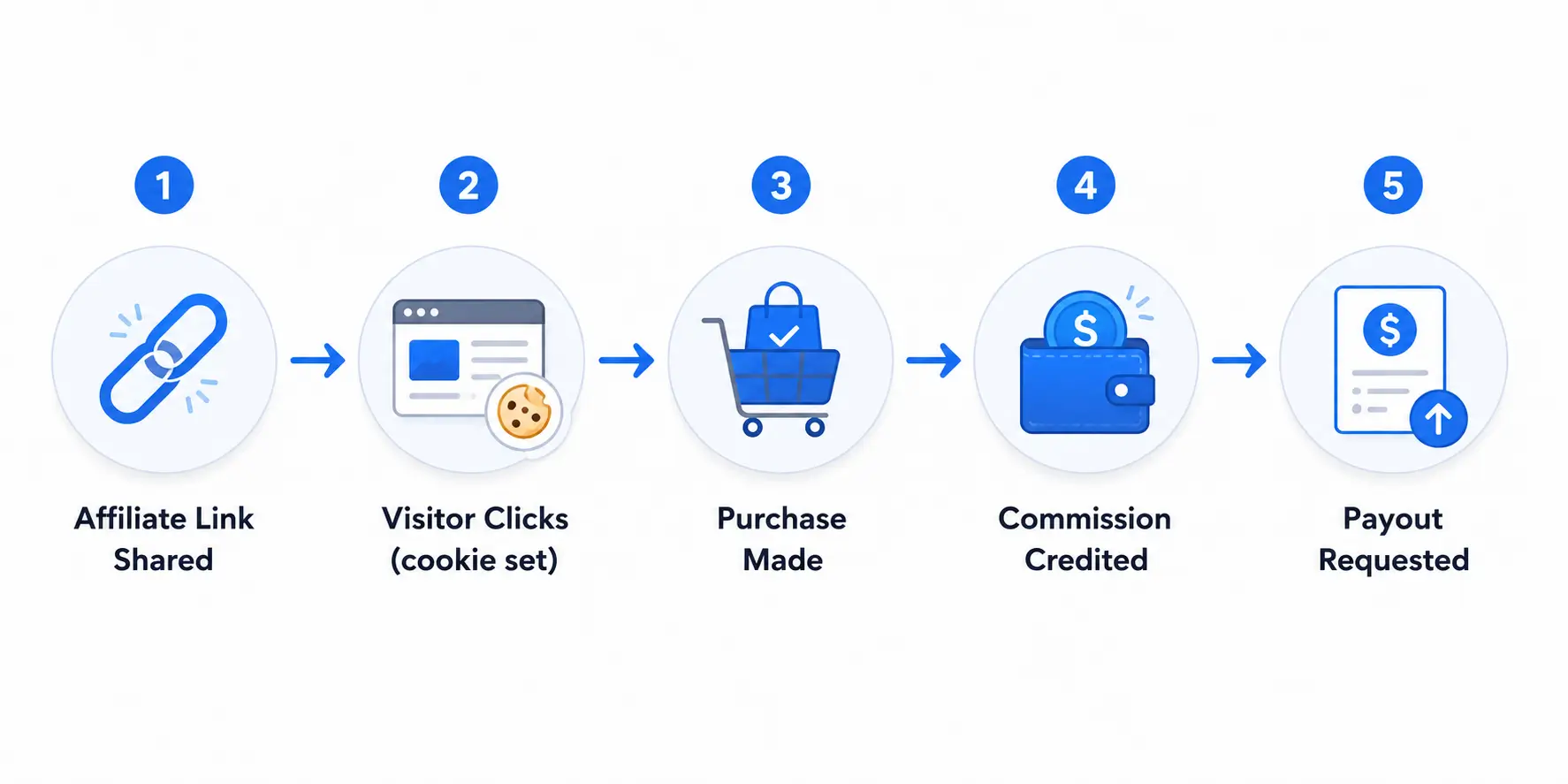
A store-native affiliate program works by connecting five steps into one automatic loop: an affiliate signs up, gets a unique link, shares it, earns a commission when someone buys through it, and withdraws their earnings. Because it all runs inside StoreEngine, every step is tracked against your actual store orders — not guessed at from a spreadsheet.
Here’s the full flow.
Step 1: The affiliate registers
You add the registration form to any page using the [storeengine_affiliate_application] shortcode — or the matching Gutenberg block if you prefer the editor. The form collects the applicant’s name, email, website or promotional URL, the promotional methods they plan to use, and a payout email, plus agreement to your program terms. Submitting it creates a WordPress user with a dedicated affiliate role and a pending status, so nobody starts earning until you approve them.
Step 2: They get a unique referral link
Once approved, each affiliate gets a referral link in the format yourstore.com/?ref=CODE. The code is generated automatically, but affiliates aren’t stuck with a random string — the plugin supports custom vanity slugs, so a partner can use ?ref=sarah instead of ?ref=x7f2a9, as long as it’s at least three characters and not already taken. The link works on any page of your store — a product, a blog post, your homepage, or the shop — not just one fixed landing page.
Step 3: A click sets the tracking cookie
When someone clicks that link, the plugin drops a cookie in their browser and records the click — logging the visitor’s IP, incrementing the affiliate’s click count, and updating their stats. That cookie is what remembers the referral later. The part most manual programs get wrong is exactly this: a coupon code only works if the customer remembers to type it, while a cookie tracks the referral silently whether the buyer remembers anything or not.
Step 4: A purchase credits the commission
If that visitor buys something before the cookie expires, StoreEngine reads the affiliate cookie at checkout and creates a commission record tied to the order. The commission is calculated on product revenue — the order total minus tax and shipping — so you’re not paying affiliates a percentage of the shipping cost. It starts as pending, and the system guards against duplicates, so a single order can never generate two commissions even if the payment is retried.
Step 5: The commission approves and the affiliate withdraws
When the order is paid, the commission automatically flips from pending to approved and the amount lands in the affiliate’s balance (this auto-approval is on by default, and you can switch it off to review each one manually). Once an affiliate’s balance clears your minimum withdrawal amount, they request a payout from their dashboard, and you process it. The whole cycle — click to cash — runs without you opening a spreadsheet once.
How Referral Tracking Actually Works
Referral tracking in StoreEngine works through a browser cookie tied to each affiliate’s unique code. When a visitor lands on your site through a ?ref= link, the plugin validates the code, confirms the affiliate is active, and stores a cookie that links that visitor’s session to that affiliate. That stored link is what lets a purchase days later still trace back to the right partner.
Links that work on every page, not just the shop
A referral link points wherever you want it to. The affiliate can link to a specific product they love, a blog post they wrote about it, or your homepage. Earlier affiliate setups often only credited a click if the visitor landed on one specific page — which meant links to anything else silently failed to track. StoreEngine credits the referral on any landing page, so an affiliate’s blog review link tracks exactly the same as a direct product link.
Click tracking and affiliate stats
Every referral click is recorded with a timestamp and the visitor’s IP, and the affiliate’s total click count updates in real time. This gives both you and the affiliate a clear picture of how many people a link is actually sending — not just how many converted. In practice, this matters most when an affiliate is driving lots of clicks but few sales, because it tells you the traffic is there and the problem is the offer or the landing page, not the promotion.
The tracking window you control
The cookie lasts for a duration you set — 30 days by default. If a visitor clicks an affiliate link today and buys three weeks later, the affiliate still gets credited, because the cookie is still active. You can lengthen or shorten this window in the affiliate settings depending on how long your typical buying cycle runs.
Last-Click vs First-Click: Which Affiliate Gets Paid?
When two different affiliates refer the same buyer, the attribution model decides who earns the commission — and StoreEngine lets you choose which model your program uses. This is the exact situation that breaks manual programs, because a spreadsheet has no way to know which referral came first or last.
Last-click attribution (the default)
With last-click, the most recent affiliate link the visitor clicked wins the commission. If a customer clicks Affiliate A’s link on Monday and Affiliate B’s link on Wednesday, then buys on Thursday, Affiliate B gets paid. This is the standard model across most of the industry because it credits the partner who was closest to the actual purchase decision.
First-click attribution
With first-click, the first affiliate to refer the visitor keeps the credit, even if another affiliate’s link is clicked later. In the same scenario, Affiliate A would earn the commission because they introduced the customer first. This model rewards the affiliate who did the discovery work rather than the one who caught the buyer at the finish line.
Neither model is universally correct — it depends on whether you want to reward first contact or final push. What matters is that StoreEngine makes it an explicit setting instead of leaving it to chance, so every affiliate is playing by the same clearly-defined rule.
Setting Commission Rates: Percentage, Flat, or Per-Affiliate
StoreEngine lets you set commissions as a percentage of the sale or a flat amount per order, globally or per individual affiliate. The default is a 10% percentage rate applied to every affiliate, which is a reasonable starting point — but the real flexibility is in the overrides.
Global rate vs per-affiliate override
Your global rate applies to every affiliate automatically. But each affiliate record stores its own commission type and rate, and when those are set, they take precedence over the global default. This means you can run most of your program at a standard 10% while giving a high-performing partner a negotiated 15%, or setting a flat $20-per-sale deal with a specific influencer — without changing anything for everyone else.
For context on where to set your baseline: brands typically allocate between 5% and 30% of a product’s revenue to affiliate commissions, with the right number depending on your margins. Digital products and high-margin goods can support the higher end; thin-margin physical products sit lower.
What the commission is calculated on
By default, the commission is calculated on product revenue only — the order total minus tax and shipping. This is the fair way to do it, because paying a percentage of tax and shipping means paying affiliates on money that was never your margin. For stores that want to widen the base (for example, to include shipping in the commissionable amount), there’s a developer filter to adjust it, but the sensible default is product revenue.
|
Commission setup |
How it works |
Best for |
|
Global percentage |
One rate (e.g. 10%) applied to all affiliates on product revenue |
Most stores starting out |
|
Global flat |
Fixed amount per sale (e.g. $15) regardless of order size |
Consistent-price products |
|
Per-affiliate override |
A specific affiliate’s own rate overrides the global default |
Negotiated deals with top partners |
|
Per-affiliate flat |
A fixed per-sale amount for one affiliate |
Influencer or sponsorship arrangements |
The Self-Referral Problem (and How to Block It)
Self-referral is when an affiliate uses their own referral link to buy their own order and pocket the commission — effectively giving themselves a discount you’re funding. StoreEngine blocks this automatically, and it’s one of the clearest examples of why a real plugin beats a manual program.
Here’s the scenario a spreadsheet can’t stop. An affiliate signs up, gets their link, and instead of promoting it, they just click it themselves and place an order. On a manual coupon-code program, that order looks identical to a legitimate referral — the code was used, so a commission is “owed.” You end up paying someone a commission for buying from you.
How the block works
StoreEngine matches the buyer against the referring affiliate in two ways: by WordPress user ID (if the affiliate is logged in when they buy) and by billing email (if they check out as a guest using their own email address). If either matches, no commission is created — the affiliate simply doesn’t earn on their own purchase. It’s off-limits by default, though there’s a setting to allow it in the rare case a store genuinely wants to (some stores treat it as an employee-discount mechanism).
What this actually solves is the single most common way affiliate programs get quietly drained. Catching it by hand means auditing every affiliate’s personal orders against their referral code — which nobody does consistently. Doing it automatically at checkout means it’s simply never a problem.
What Happens to a Commission When an Order Is Refunded
When an order is refunded, cancelled, or fails, StoreEngine automatically reverses the affiliate commission tied to it — clawing the amount back out of the affiliate’s balance. This runs regardless of your auto-approval setting, because a refunded sale should never leave an earned commission sitting in someone’s account.
Think about what happens without this. An affiliate refers a $300 order, earns a $30 commission that lands in their balance, and two weeks later the customer returns everything for a full refund. On a manual program, that $30 is already recorded as owed — and unless you catch the refund and subtract it by hand, you’ll pay a commission on a sale that no longer exists.
How the reversal behaves
If the commission is still in the affiliate’s balance (approved but not yet paid out), StoreEngine removes it cleanly — the balance drops by the commission amount and the commission is marked rejected. If the commission was already paid out before the refund happened, the plugin flags it as rejected for your records but doesn’t try to claw back money that’s already left your account, since that has to be handled with the affiliate directly. Either way, your commission ledger stays accurate to the sales that actually stuck.
Setting Up Your Affiliate Program (Step by Step)
Setting up a StoreEngine affiliate program takes four steps: activate the addon, publish the registration form, configure your commission and tracking settings, and set up payouts. None of it requires code.
Step 1: Activate the Affiliate addon
In your StoreEngine settings, turn on the Affiliate addon. This creates the affiliate role, the database tables that store affiliates, referrals, and commissions, and the affiliate dashboard endpoint your partners will use.
Step 2: Publish the registration form
Create a page called something like “Become an Affiliate” and add the [storeengine_affiliate_application] shortcode or the Affiliate Registration block. Customize the form title and button text if you want. This is the page you’ll send prospective affiliates to.
Step 3: Set commission and tracking rules
In the affiliate settings, set your commission type (percentage or flat) and rate, choose your attribution model (last-click or first-click), and set the cookie tracking window. Decide whether commissions auto-approve when orders are paid or whether you want to approve each one manually — auto-approval is fine for most stores and saves you the ongoing work.
Step 4: Configure payouts
Set your minimum withdrawal amount (the default is $10) and enable the payout methods you’ll support — PayPal, bank transfer, or e-check. Affiliates can only request a withdrawal once their balance clears the minimum, which keeps you from processing tiny payouts that cost more in transfer fees than they’re worth.
Once these four steps are done, approve your first affiliate and the program is live. New signups will appear in your affiliates list, commissions will track against real orders automatically, and payout requests will queue up for you to process.
Manual Affiliate Tracking vs StoreEngine
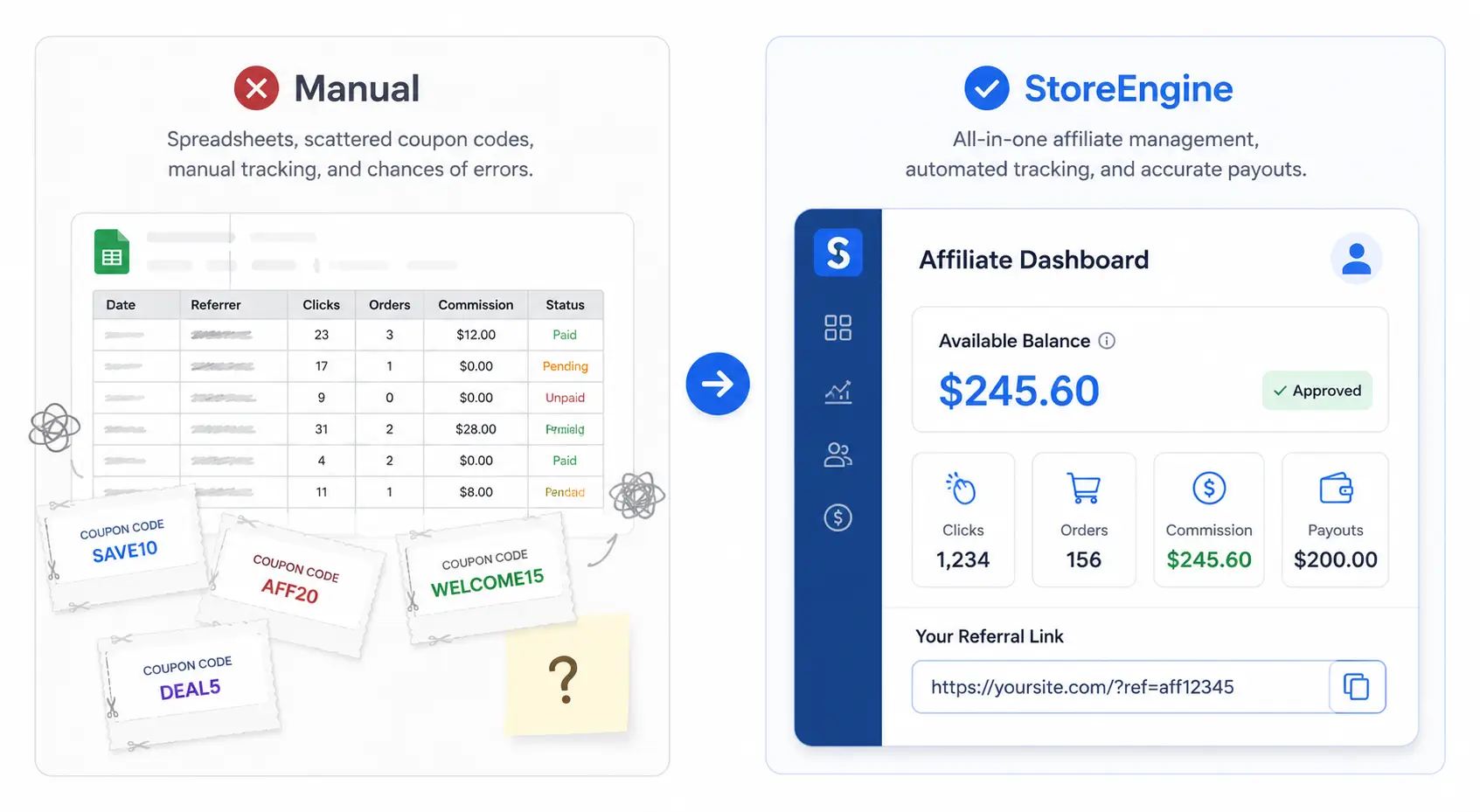
The clearest way to see what a store-native affiliate plugin does is to line it up against the spreadsheet-and-coupon method most stores start with. The difference isn’t just convenience — it’s whether the program can be trusted at all.
|
What you’re doing |
Manual (spreadsheet + coupon codes) |
StoreEngine Affiliate addon |
|
Tracking who referred a sale |
Customer must remember to type a code |
Automatic cookie tracks every referral |
|
Two affiliates, same customer |
No way to know who to credit |
Attribution model decides (last or first click) |
|
Affiliate buying through own link |
Looks like a real sale, you pay |
Blocked by user ID and email match |
|
Refunded order |
You must subtract the commission by hand |
Commission auto-reverses from balance |
|
Different rate per affiliate |
Separate coupon codes, manual math |
Per-affiliate override, calculated automatically |
|
Commission on tax/shipping |
Hard to exclude, usually overpays |
Excluded by default (product revenue only) |
|
Affiliate seeing their earnings |
You email them a total |
Live dashboard with balance and payout request |
|
Cost to start |
Free but unreliable |
Free and automatic |
The honest takeaway: the manual method isn’t cheaper, it’s just untracked. Every row above is a place where a spreadsheet either costs you money or gives you numbers you can’t actually trust.
Is StoreEngine’s Affiliate Plugin Right for You?
- If you already run a WordPress store and want to add a referral program without a second annual subscription → StoreEngine’s free Affiliate addon gives you full tracking, commissions, and payouts inside the store you already have.
- If you’re worried about affiliates gaming the system → the automatic self-referral block and commission auto-reversal on refunds close the two most common leaks without any manual auditing on your part.
- If you sell products and also run a membership or course → StoreEngine handles ecommerce, memberships, and affiliates in one plugin, so your affiliates can earn on membership signups and product sales through the same program.
- If you’re a blogger promoting Amazon products and need to cloak outbound links → this isn’t your tool. You want a link-management plugin built for affiliates, not a program manager built for store owners.
Frequently Asked Questions
What is an affiliate plugin for WordPress?
An affiliate plugin for WordPress lets you run your own affiliate program on your site — recruiting partners, giving each one a unique referral link, tracking the sales they drive, and paying them commissions. It automates the tracking and attribution that would be impossible to manage accurately by hand. StoreEngine’s Affiliate addon does this natively inside your store, tracking referrals through a browser cookie and calculating commissions on real orders.
Is there a free affiliate plugin for WordPress?
Yes. StoreEngine’s Affiliate addon is a genuinely free affiliate plugin for WordPress with no monthly fee and no separate license. It includes automatic referral tracking, percentage or flat commissions, per-affiliate rates, self-referral blocking, commission reversal on refunds, and a frontend payout system — the full set of features needed to run a real program, not a limited demo.
Do I need WooCommerce to run an affiliate program?
No. StoreEngine is a standalone WordPress ecommerce plugin, and its Affiliate addon runs inside it without WooCommerce. You install one plugin, activate the Affiliate addon, and you have both your store and your affiliate program in a single system — no WooCommerce base layer and no third-party affiliate service to connect.
How does affiliate referral tracking work?
When a visitor clicks an affiliate’s referral link (formatted as yourstore.com/?ref=CODE), the plugin sets a cookie in their browser that links their session to that affiliate. If the visitor buys something before the cookie expires — 30 days by default — StoreEngine reads the cookie at checkout and credits the commission to that affiliate. The link works on any page of your store, so affiliates can promote specific products, blog posts, or your homepage.
Can affiliates earn commission on their own purchases?
No, not by default. StoreEngine blocks self-referrals by matching the buyer against the referring affiliate — both by WordPress user ID for logged-in purchases and by billing email for guest checkout. If either matches, no commission is created, so an affiliate can’t use their own link to give themselves a commission-funded discount. There’s a setting to allow it in the rare case a store wants to, but it’s off by default.
What happens to the commission if a customer gets a refund?
StoreEngine automatically reverses the commission when an order is refunded, cancelled, or fails. If the commission is still in the affiliate’s balance, the amount is removed and the commission is marked rejected. If it was already paid out, it’s flagged for your records but not clawed back automatically, since money that’s already been sent has to be settled with the affiliate directly. This keeps your commission totals accurate to sales that actually completed.
How do I pay my affiliates?
Affiliates request a payout from their frontend dashboard once their balance clears the minimum withdrawal amount you set (the default is $10). You enable the payout methods you want to support — PayPal, bank transfer, or e-check — and process requests as they come in. The minimum threshold prevents tiny payout requests that would cost more in transfer fees than the commission is worth.
Can I set different commission rates for different affiliates?
Yes. While your global rate applies to every affiliate by default, each affiliate record can store its own commission type and rate that overrides the global setting. This lets you run most of your program at a standard rate while giving top performers a higher percentage or setting a custom flat-fee deal with a specific influencer — all calculated automatically, with no separate coupon codes or manual math.