











The StoreEngine Archive Header Filter shortcode lets you display a powerful product filter at the top of your shop and archive pages. It helps users quickly sort and filter products for a smoother shopping experience.
Shortcode
[storeengine_archive_header_filter]This will instantly show the archive header filter with all available filtering options.
What This Filter Does
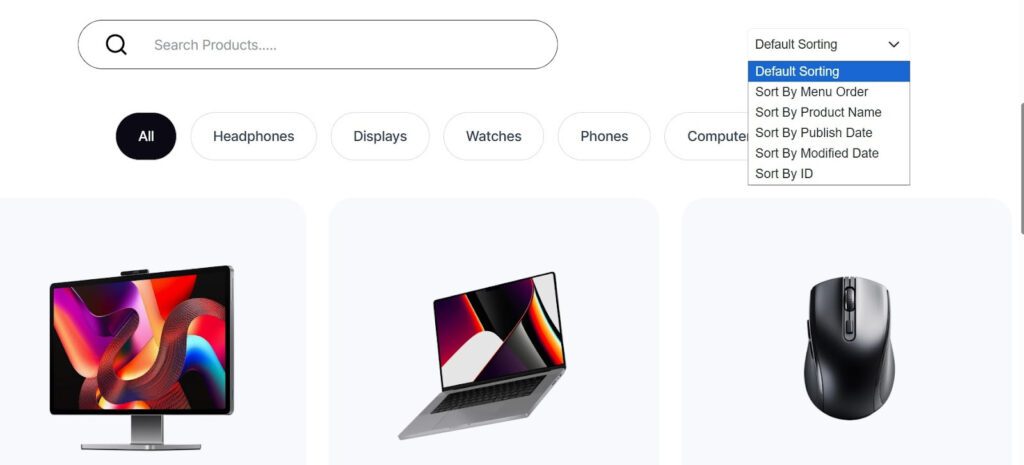
The StoreEngine Archive Header Filter helps customers quickly find the right products using smart filtering and sorting options.
Filter Options
Customers can filter products by:
- Menu Order
- Product Name
- Publish Date
- Modified Date
- Product ID
These sorting controls give users more flexibility and help them browse products in the way they prefer, improving usability and conversions.
Usage Example
You can use the StoreEngine Archive Header Filter shortcode on any shop, category, or custom product listing page.
Main Shop Page
Add the shortcode at the very top of your Shop page to allow users to filter and sort products before browsing.
Product Category Pages
Use it on category or archive templates so customers can quickly narrow down products.
Landing & Campaign Pages
Place it above featured product sections on sales or promotional pages to improve product discovery.
How to Use in Gutenberg Editor
You can easily add the StoreEngine Archive Header Filter to any page using the Gutenberg editor.
- Open any Shop, Category, or Product Listing page where you want to show the filter.
- Click the ➕ (Add Block) button.
- Search for and insert the Shortcode block.
- Paste the following shortcode into the block:
[storeengine_archive_header_filter]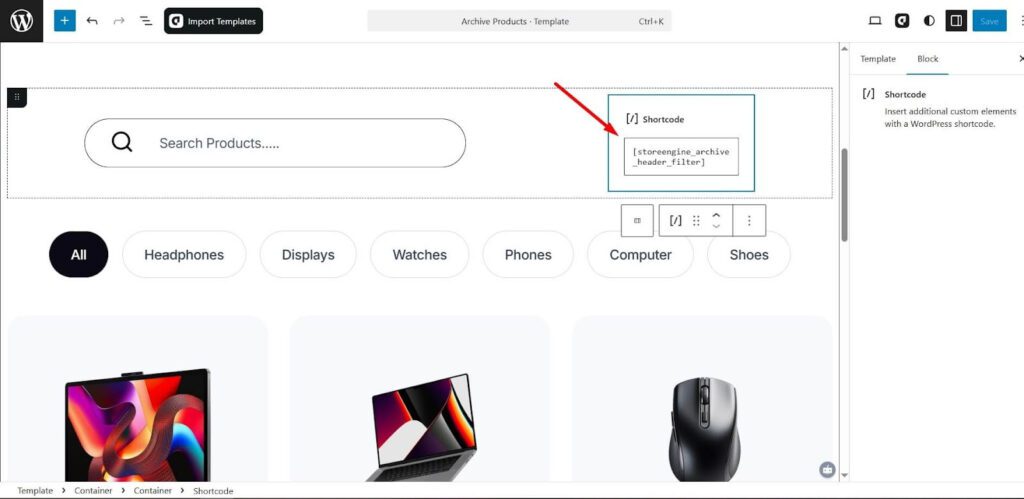
Click Update or Publish to save your changes.
Once saved, the archive header filter will appear on the front end of your page.
Using with aBlocks
You can also add this using the aBlocks → StoreEngine Archive Header Filter block. Just insert the block into your page—no shortcode needed.