









Today we will learn how you can activate and use StoreEngine add-ons. The add-ons feature enhances the functionality of your eCommerce stores with minimal effort.
Usage of StoreEngine Add-ons Feature
First of all, the StoreEngine plugin must be installed and activated on your WordPress website. If you haven’t done so already, follow these steps:
1. Access your WordPress dashboard, go to Plugins > Add New.
2. Type StoreEngine into the search box.
3. When the plugin appears, click Install and then Activate the plugin.
Accessing the StoreEngine Add-ons Page
Once the plugin is installed and activated, you can access the add-ons feature. Simply:
1. Go to StoreEngine > Add-ons from the WordPress dashboard.

2. On this page, you will see all the available add-ons that you can enable to expand the functionality of your store.
Enabling or Disabling StoreEngine Add-ons
From the Add-ons section, you can easily enable or disable the required add-ons. This streamlines the process and eliminates the need to install separate plugins for additional features. You can manage your add-ons directly from this section at any time.
- Click the toggle button next to the desired add-on to activate an add-on.
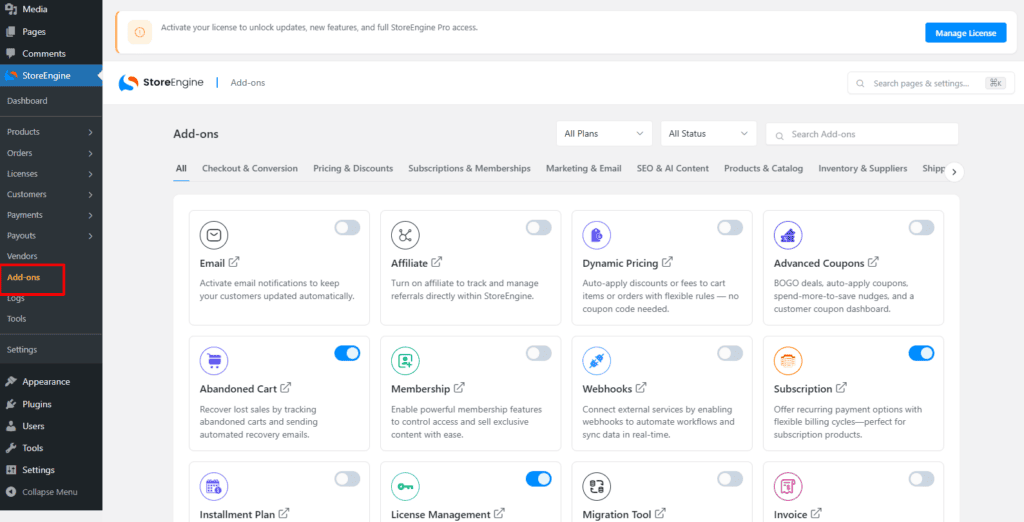
- To deactivate an add-on, click the toggle button when it’s no longer needed.
Active and Inactive Add-ons:
- The activated add-ons will appear under the Active tab, which indicates they are currently in use.

- The inactive or deactivated add-ons will be listed under the Deactivate tab, allowing you to reactivate them whenever necessary.

By using the StoreEngine add-ons feature, you can efficiently manage and enhance your store’s functionality with minimal effort.