










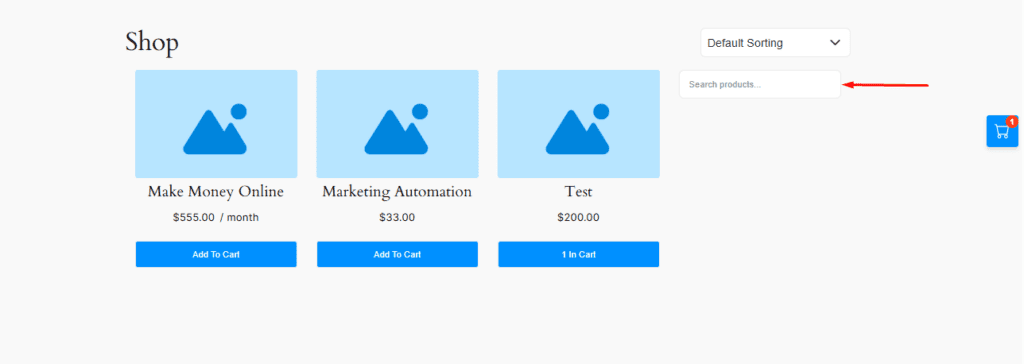
The StoreEngine Product Sidebar works as a search bar on the shop page, allowing users to type any product name and instantly find matching products. This sidebar helps users quickly locate desired items without scrolling through the entire shop, making the shopping process faster, smoother, and more user-friendly. By improving product discovery and navigation, the Product Sidebar enhances the overall shopping experience on the StoreEngine shop page.
Shortcode
[storeengine_products_sidebar]This shortcode instantly displays the product sidebar for the current purchase.
What this shortcode does
The storeengine_products_sidebar shortcode displays the product search sidebar on the frontend, allowing users to quickly search and find products by name on the shop page.
Usage Example
On the StoreEngine shop page, you’ll find a “Search Product” option. This feature is part of the StoreEngine Product Sidebar, which allows users to quickly search for and find any product available in the shop.
How to Add the StoreEngine Product Sidebar Shortcode (Gutenberg)
You can easily add the StoreEngine Product Sidebar shortcode to any page using the Gutenberg editor:
- Open the Store Shop page or any page where you want to display the product sidebar.
- Click the “+” (Add Block) icon.
- Search for and insert the Shortcode block.
- Paste the
[storeengine_products_sidebar]shortcode into the block. - Click Save or Publish.
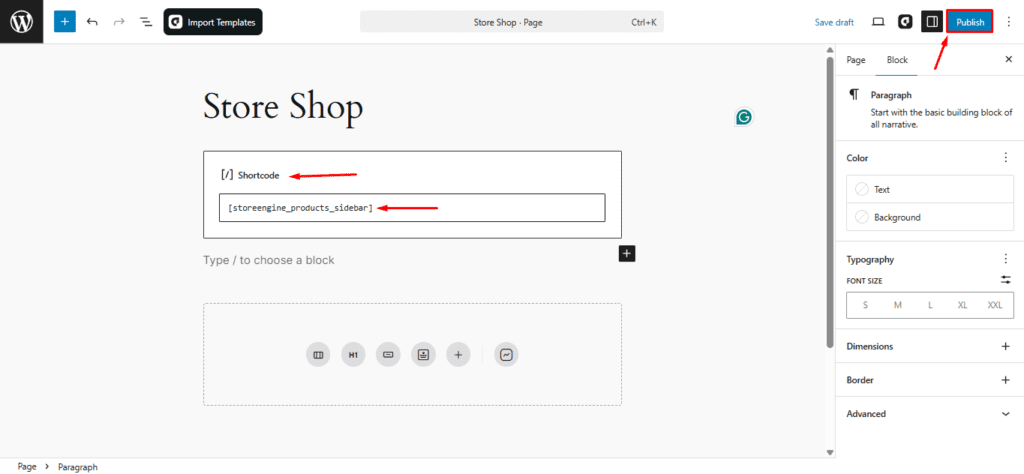
After completing the above steps, click the Save or Publish button in the top-right corner of the editor. Once published, congratulations! Your Product Sidebar page has been successfully created.
Using with aBlocks
You can also add this feature using the aBlocks → StoreEngine Product Sidebar.
No shortcode is required—simply insert the block into your page, and it’ll display the Order Summary information automatically.