











The StoreEngine Order Details shortcode lets you display comprehensive order information on your website. It provides customers with a clear view of their order status, items purchased, and transaction details for better transparency and user experience.
Shortcode
[storeengine_order_details]This will instantly show the order details with all relevant information about the customer’s purchase.
What This Feature Does
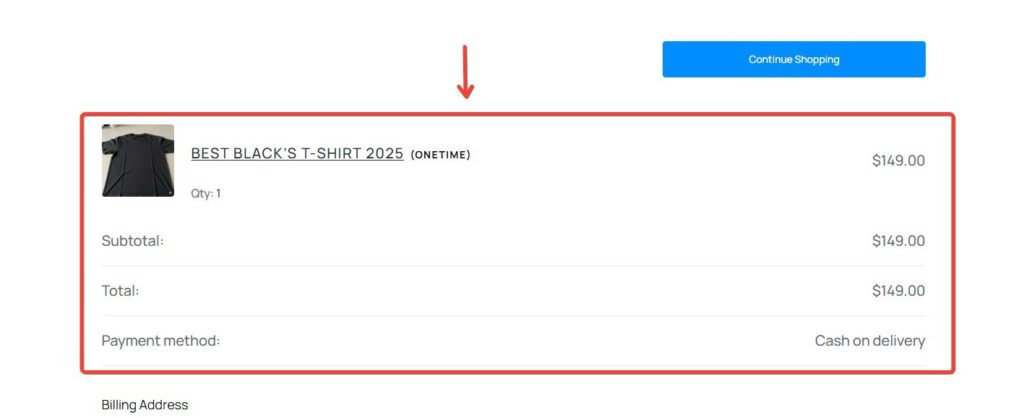
The StoreEngine Order Details helps customers view complete information about their orders in an organized and easy-to-read format.
Display Options
The order details can show:
- Order Number – Unique identifier for the order
- Order Date – When the order was placed
- Order Status – Current status (Processing, Completed, Pending, etc.)
- Order Total – Total amount paid
- Payment Method – How the customer paid
These details give customers full visibility into their purchase, improving trust and reducing support queries.
Usage Example
You can use the StoreEngine Order Details shortcode on various pages to display order information.
Thank You Page
Add the shortcode to your Order Confirmation/Thank You page so customers can review their order immediately after purchase.
Usage Example
My Account Page
Use it on the My Account section so customers can view their order history and details anytime.
Custom Order Tracking Page
Place it on a dedicated order tracking page where customers can check their order status and shipment information.
How to Use in Gutenberg Editor
You can easily add the StoreEngine Order Details to any page using the Gutenberg editor.
- Open any page where you want to show order details (Thank You page)
- Click the ➕ (Add Block) button
- Search for and insert the Shortcode block
- Paste the following shortcode into the block:
[storeengine_order_details]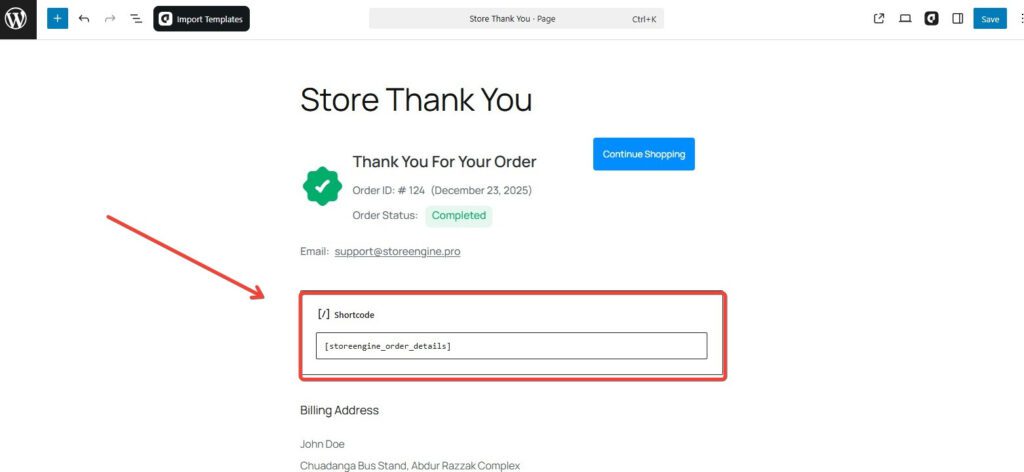
- Click Update or Publish to save your changes
Once saved, the order details will appear on the front end of your page.
Using with aBlocks
You can also add this using the aBlocks → StoreEngine Order Details block. Just insert the block into your page—no shortcode needed.