











The StoreEngine Cart Sub Total Table is an essential feature that displays the cart subtotal clearly before checkout. It helps customers understand the total cost of their selected products in advance, creating a transparent and trustworthy shopping experience.
Shortcode
[storeengine_cart_sub_total_table]Using this shortcode will instantly display the Cart Sub Total Table with all available subtotal information.
What Does This Table Do?
The Cart Sub Total Table shows the calculated subtotal of products in the cart before taxes and shipping costs are applied. It provides customers with a clear order summary prior to checkout.
Table Information
With this table, customers can view:
- Total price of all products in the cart
- Product quantities and price calculations
- Applied discounts (if available)
- A complete order summary before checkout
This information helps customers make confident purchasing decisions and reduces cart abandonment.
Usage Examples
You can use the StoreEngine Cart Sub Total Table in different areas of your site to improve clarity and enhance the checkout experience for your customers.
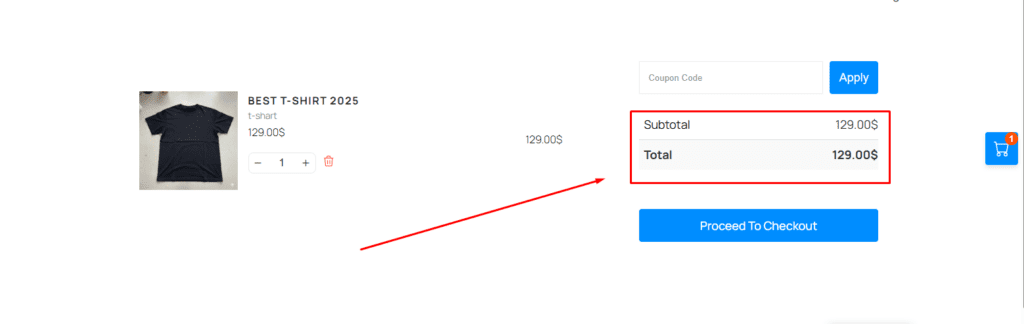
Checkout Page
Place the Cart Sub Total Table on the checkout page so customers can review their subtotal before completing payment.
Cart Page
Using it on the cart page allows customers to instantly see how product changes affect the total price.
Custom & Landing Pages
You can also display the cart subtotal on custom or promotional pages where an order summary is needed.
How to Use in Gutenberg Editor
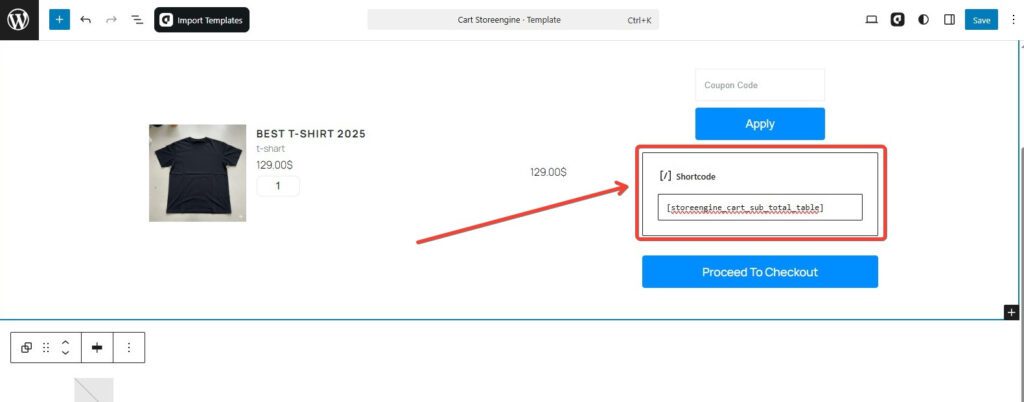
- Open any Cart, Checkout, or custom page
- Click the ➕ (Add Block) button
- Insert the Shortcode block
- Paste the following shortcode:
[storeengine_cart_sub_total_table]- Click Update or Publish
Once saved, the Cart Sub Total Table will appear on the front end of your page.
Using with aBlocks
You can also add this feature using theaBlocks → StoreEngine Cart Sub Total Table block.
No shortcode is required—just insert the block into your page.