


What it does: Adds two more ways to take payment in your store — Paystack (card, bank transfer, USSD and mobile-money, popular across Africa) and Square (card payments, with the card details never touching your server). Both come from a separate companion plugin, StoreEngine Payments.
This is a companion plugin, not a built-in add-on. Install and activate StoreEngine Payments alongside StoreEngine.
Before you start
- StoreEngine must be installed and active. If it isn’t, you’ll see a red notice: “StoreEngine Payments requires StoreEngine to be installed and active.”
- Requires WordPress 6.5+ and PHP 7.4+.
Turn a gateway on (two steps)
Each gateway is off until you switch it on, then configured separately:
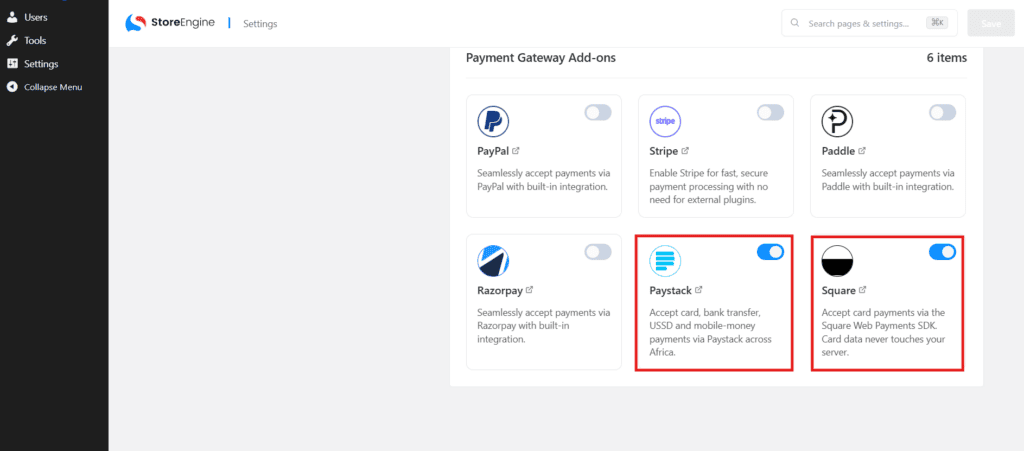
- Go to StoreEngine → Add-ons → Payments and toggle Paystack and/or Square On.
- Go to StoreEngine → Settings → Payments — the gateway now appears there. Open it, fill in your keys, and enable it.
Paystack
Accept card, bank transfer, USSD and mobile-money payments across Nigeria, Ghana, South Africa, Kenya, Côte d’Ivoire and Egypt.
Supported currencies: NGN, GHS, ZAR, USD, KES, XOF, EGP. (Your store currency must be one of these.)
Settings
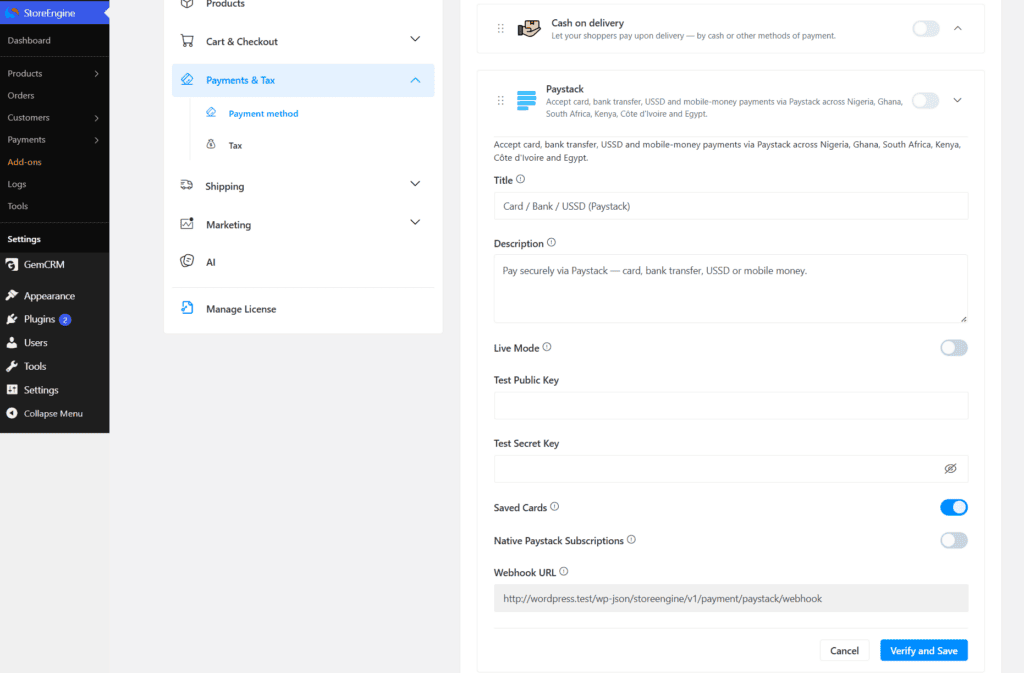
- Title — what customers see at checkout (default: “Card / Bank / USSD (Paystack)”).
- Description — the line shown under the title.
- Live Mode — turn on to take real payments with your live keys; leave off to test with test keys.
- Live Public Key / Live Secret Key — shown when Live Mode is on.
- Test Public Key / Test Secret Key — shown when Live Mode is off.
- Saved Cards (on by default) — let logged-in customers reuse a saved card.
- Native Paystack Subscriptions (off by default) — see below.
- Webhook URL (read-only) — copy this into your Paystack Dashboard → Settings → API Keys & Webhooks.
Subscriptions & recurring payments
Paystack works with StoreEngine subscriptions, installment plans and memberships. There are two renewal modes:
- Native Paystack Subscriptions ON — new subscriptions are created as real Paystack Plans & Subscriptions. Paystack bills them and your customers appear as subscribers in the Paystack dashboard; renewals are recorded from Paystack webhooks. Any schedule Paystack can’t express (e.g. every 2 months) automatically falls back to StoreEngine-managed renewals. This only affects new subscriptions.
- Native Paystack Subscriptions OFF — StoreEngine charges the saved card itself on each renewal.
Refunds are supported in both modes.
Square
Accept card payments via the Square Web Payments SDK — card data never touches your server.
Settings
- Title — shown at checkout (default: “Credit / Debit Card (Square)”).
- Description — the line under the title.
- Live Mode (off by default) — on = Square production; off = Sandbox (testing).
- Production credentials (shown when Live Mode is on):
- Application ID — from Square Developer Dashboard → Applications → Credentials
- Access Token — your production access token
- Location ID
- Sandbox credentials (shown when Live Mode is off):
- Sandbox Application ID
- Sandbox Access Token
- Sandbox Location ID
- Saved Cards (off by default) — “Allow logged-in customers to save cards via Square card-on-file.”
Square uses StoreEngine’s place-order flow (no webhook to configure). It supports refunds, and works with subscriptions/installments — StoreEngine schedules the billing and Square’s card-on-file handles each renewal charge.
Troubleshooting
- Gateway not showing in Settings → Payments — turn its card on first under Add-ons → Payments.
- “requires StoreEngine to be installed and active” notice — activate the StoreEngine plugin.
- Paystack rejects your settings on save — your store currency must be one of the supported currencies (NGN, GHS, ZAR, USD, KES, XOF, EGP).
- Paystack renewals are not recording — make sure the Webhook URL is added in your Paystack dashboard.