


What it does: Adds a VAT-number field to your checkout, checks if the number is real (against the EU’s VIES service, or HMRC for UK numbers), and automatically removes VAT for valid cross-border business buyers (the B2B “reverse charge” rule). This is a Free add-on.
Important: This add-on does not set your tax rates — it only removes VAT for exempt buyers. Your actual VAT rates, and whether prices include tax, are set in StoreEngine’s core Tax settings. Set those up first.
Turn it on
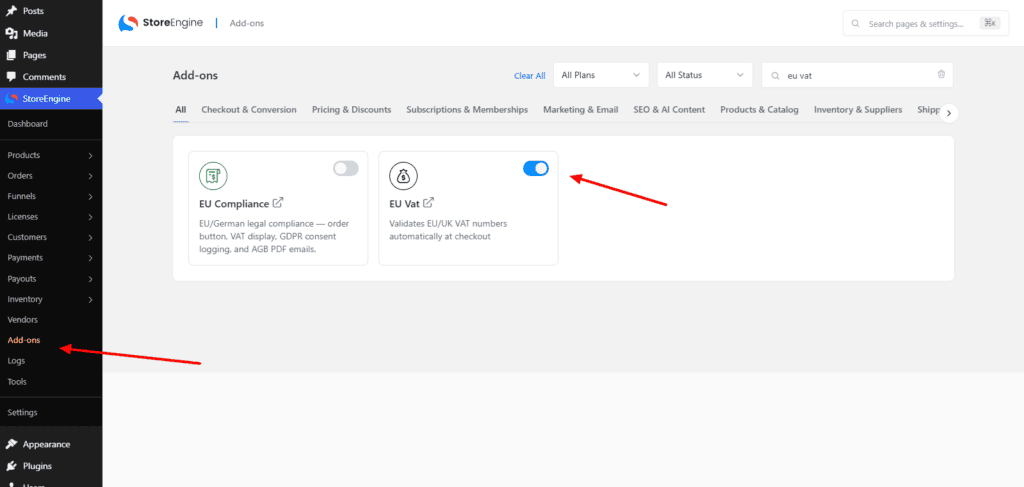
- Make sure tax is enabled and your VAT rates are configured in StoreEngine’s core Tax settings.
- Go to StoreEngine → Add-ons and turn on EU VAT.
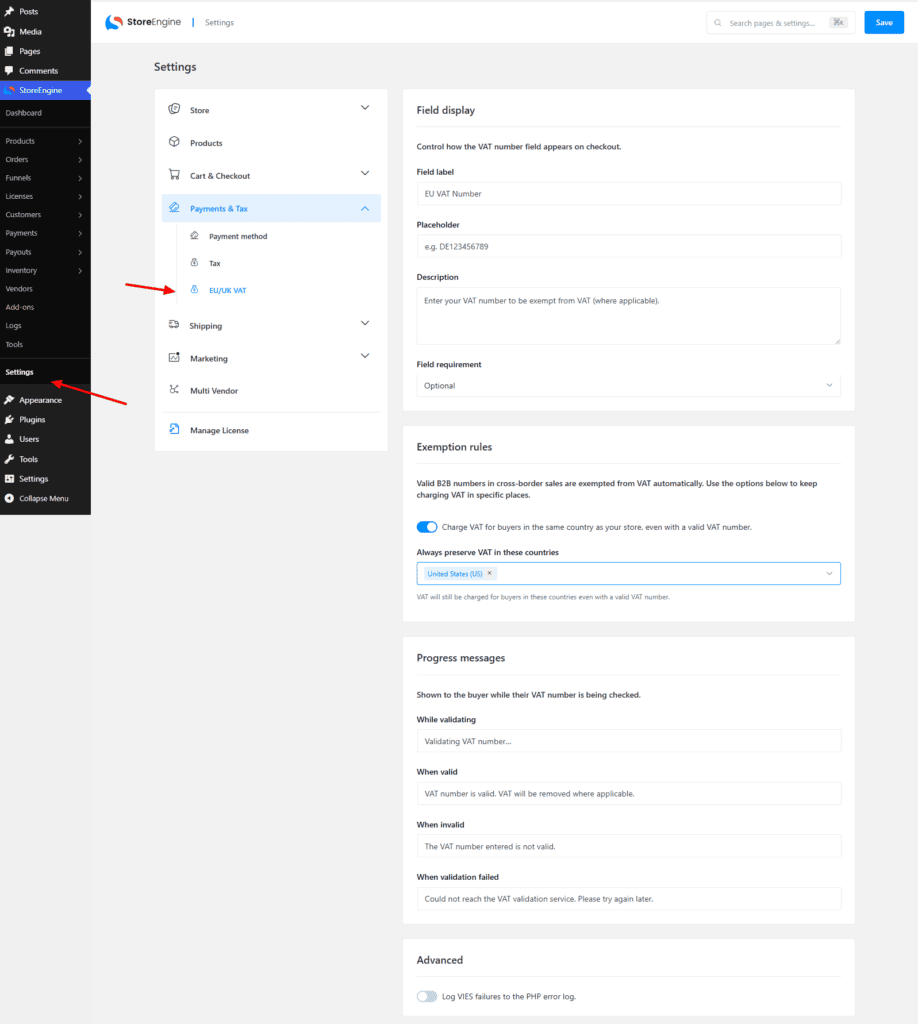
- Configure it in StoreEngine → Settings (there’s a dedicated EU VAT tab there).
Your server needs internet access so it can reach the VIES/HMRC validation services
How it works for your shopper
- At checkout, the shopper sees a VAT number field (default label “EU VAT Number”, e.g. DE123456789).
- As they type, StoreEngine validates it live and shows a message:
- “Validating VAT number…”
- “VAT number is valid. VAT will be removed where applicable.”
- “The VAT number entered is not valid.”
- If the number is valid and the buyer qualifies for exemption, VAT is removed from their order.
On the order, staff see the VAT Number and a (VAT exempt) badge. Customers can also save their VAT number in My Account → billing address so it’s remembered.
Settings you can change
Open the EU VAT tab in StoreEngine Settings:
- Field label — rename the checkout field (default “EU VAT Number”).
- Description — helper text shown under the field.
- Field requirement — choose one:
- Optional (default)
- Required (always)
- Required only if company name is filled
- Progress messages — customize the four messages shown to the buyer: While validating, When valid, When invalid, When validation failed.
Controlling when VAT is still charged
By EU rules you usually still charge VAT to buyers in your own country. Two options handle this:
- Charge VAT for buyers in the same country as your store (on by default) — keep charging VAT to local buyers even if they enter a valid VAT number.
- Always preserve VAT in these countries — pick any countries where VAT should always be charged, regardless of a valid number.
So a buyer is made VAT-exempt only when their number is valid, they’re in a different country from your store, and that country isn’t on your “always charge” list.
Which numbers are checked
- EU VAT numbers → checked against the EU VIES database.
- UK (GB) numbers → checked against HMRC.
- Special cases are handled automatically (Greece uses EL, Northern Ireland uses XI).
There’s also a debug logging option if you ever need to record validation failures for support.
Troubleshooting
- Validation says “Could not reach the service” — this is a temporary outage of VIES/HMRC; ask the buyer to try again shortly. Check your server can make outbound HTTPS requests.
- VAT isn’t being removed — confirm the buyer’s country differs from your store country, their number is valid, and their country isn’t in your “always preserve” list.
- I can’t find the old “EU VAT” menu — settings now live in the main StoreEngine → Settings → EU VAT tab, not a separate menu.
Also available: If you need German/EU checkout compliance (custom order-button text, net-total + VAT breakdown, legal-document emails, consent checkboxes), that’s a separate EU Compliance add-on — not this one.